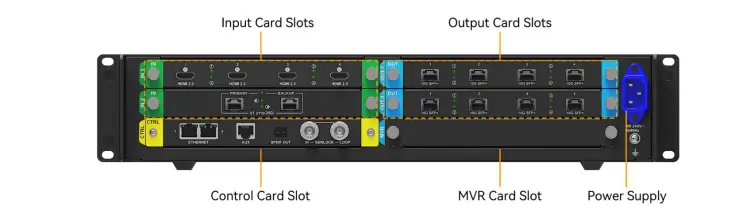
The NovaStar MX2000 Pro is a modular 2U controller for large COEX LED systems, with a maximum documented load of 35.38 million pixels. Ea are two input-card slots and two output-card slots. NovaStar offers multiple card types to choose from; the statement in the previous version of this article that it can hold ten input cards was incorrect. Card choice, receiving-card family, output bandwidth, bit depth, and frame rate determine the capacity you can actually deploy.
This guide is for an AV integrator designing a large fixed display or a camera-critical production wall. It separates the chassis headline from a buildable 1G or 5G system, explains which claims depend on optional hardware, and gives a commissioning and quotation checklist. Technical values come from NovaStar’s MX2000 Pro Specifications V1.5.1, dated April 30, 2026, unless a different document is named.
Specify the wall’s physical pixel map, source count and formats, receiving cards, operating frame rate, and backup path before asking for a price. A bare-chassis quote cannot establish the final input count, output bandwidth, or installed cost.
1. NovaStar MX2000 Pro: what the chassis actually provides
The NovaStar MX2000 Pro is an all-in-one LED display controller in NovaStar’s COEX range. Its modular chassis accepts two input cards and two output cards, selected for the proposed signal and LED network. The maximum 35.38-million-pixel figure is a device ceiling under applicable conditions; it is not the guaranteed load of every card combination. A screen can hit a port, card, frame-rate, or receiving-card limit first.
| Articol | NovaStar specification | Implicarea în proiect |
|---|---|---|
| sloturi de carduri | Two input and two output | Choose from available card types; do not confuse options with slots. |
| Sarcină maximă LED | 35.38 milioane pixeli | Check the selected output cards, receiving cards, bit depth, and frame rate. |
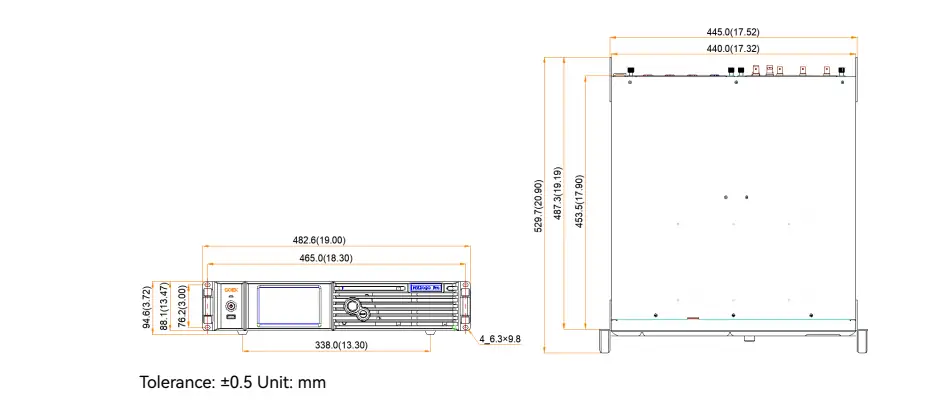
| Şasiu | 2U; 482.6 × 94.6 × 529.7 mm including feet | Allow room for fiber, power, ventilation, and card service. |
| Adâncimea de introducere | 8-, 10-, or 12-bit, subject to format and card | Match the source and the LED processing chain. |
| Maximum stated power | 260 W for a fully configured unit | Actual draw varies with installed cards; do not use 260 W as an average. |
| Mediu de lucru | −5 to 45 °C; 0–80% RH, non-condensing; IP20 | Install in a protected equipment location, including for outdoor walls. |
The NovaStar MX2000 Pro maximum frame-rate capability reaches 480 Hz only with a compatible screen hardware configuration. It does not mean every 8K input, output card, receiving card, driver IC, and cabinet will operate at 480 Hz. Similarly, NovaStar’s minimum controller processing latency can reach below 1 ms, but the complete camera-to-LED path has more stages. Confirm the actual configuration in a production test.
2. Choose cards as a complete signal chain
01. Input slots are different from input choices
The NovaStar MX2000 Pro has two physical input-card slots. The specifications list several card options: four-port HDMI 2.0, DP 1.2 or 12G-SDI cards for 4K-class inputs; HDMI 2.1 and DP 1.4 options for higher-resolution sources; and ST 2110 cards for video over IP. One card can contain multiple connectors. Ask the supplier to list the exact installed card model and the number of usable connectors at the required resolution, frame rate, color sampling, and bit depth.
A source labeled “8K” can require a specific 8K-capable card in the NovaStar MX2000 Pro. For example, the documented single-port DP 1.4 (8K@60Hz) card has a different limit from the two-port DP 1.4 option. Do not assume that every DP 1.4 or HDMI 2.1 configuration offers the same 8K timing. Before ordering, test the switcher or media server’s actual output format with the chosen card.
02. Select 1G, 5G fiber, or the documented Base-T option
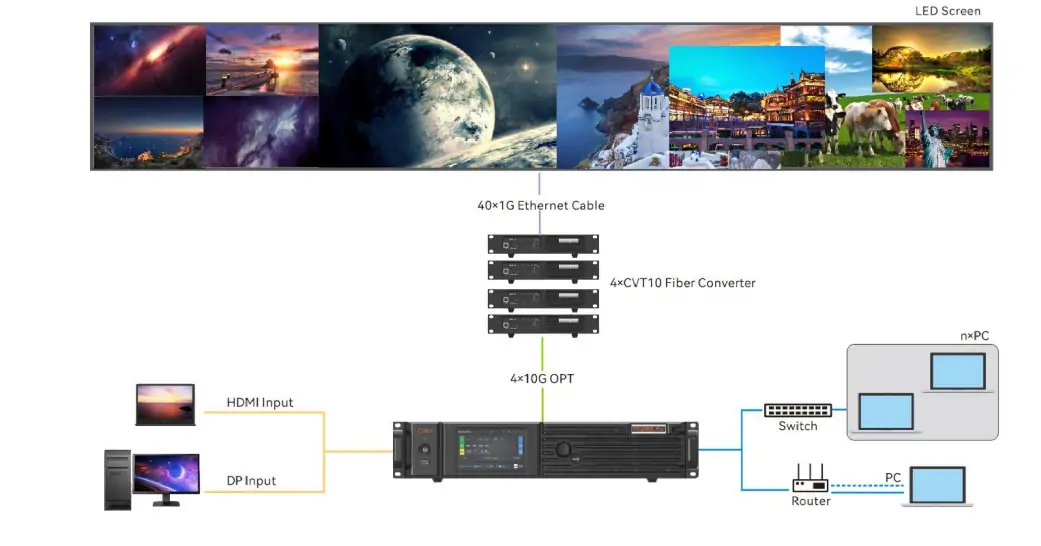
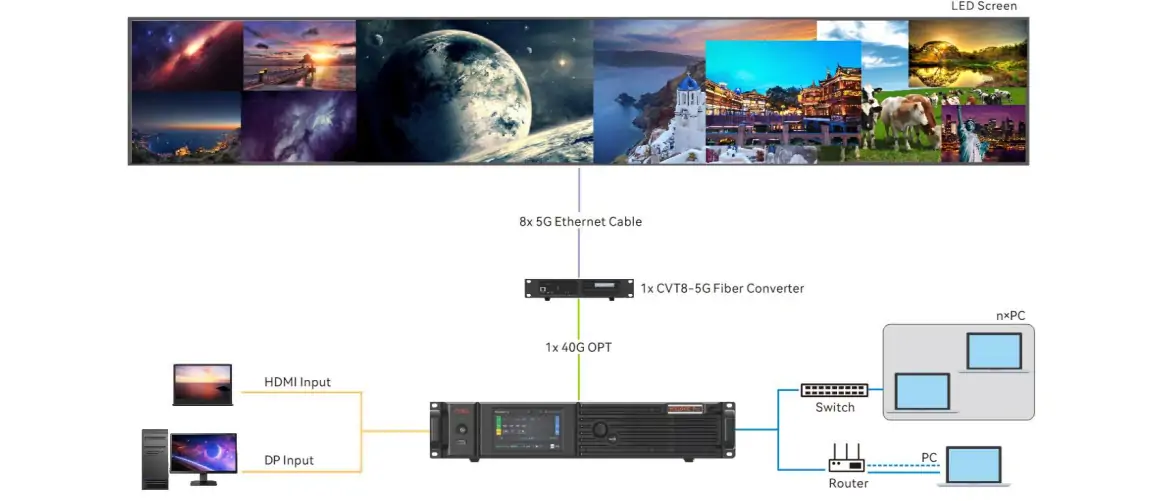
The 4 × 10G fiber output card supports a 1G receiving-card solution through an appropriate converter such as the CVT10. The 1 × 40G fiber card supports a 5G solution with compatible receiving cards and conversion hardware. The V1.5.1 specification also adds an 8 × 5G Base-T output-card option. Confirm which options are available for the proposed firmware, receiving cards, cabling, and local supply before including them in a quote.
Do not treat a 10G or 40G optical connector as a direct substitute for a 1G or 5G cabinet Ethernet port. The converter, optical modules, fiber type, receiving-card family, and link redundancy belong in the system drawing. EagerLED'S CVT10 overview și CVT8-5G guide provide context for the two architectures.
3. Calculate capacity at your actual bit depth and frame rate
The NovaStar MX2000 Pro maximum is a useful starting number, but an integrator needs a per-port calculation. NovaStar’s V1.5.1 tables show that a 1G Ethernet port in the stated 60 Hz configuration supports up to 659,722 pixels at 8-bit, 494,792 at 10-bit, or 329,861 at 12-bit. In the documented 5G configuration, the corresponding values are 2,951,200, 2,291,312, and 1,475,600 pixels. These values depend on the receiving-card families named in the specification.
| Soluţie | 8-bit | 10-bit | 12-bit |
|---|---|---|---|
| 1G with compatible A10s Pro/A8s Pro family cards | 659,722 pixeli | 494,792 pixeli | 329,861 pixeli |
| 5G with compatible XA50 Pro/CA50E cards | 2,951,200 pixeli | 2,291,312 pixeli | 1,475,600 pixeli |
The table is for the stated 60 Hz conditions, not an all-purpose NovaStar MX2000 Pro capacity promise. At higher frame rates the per-port pixel load falls. NovaStar also notes a width condition for achieving the listed maximum; narrow load areas can reduce usable capacity. Map each cabinet rectangle, total the ports on each output card, and check the card’s own ceiling as well as the chassis limit.
For an illustrative 12-million-pixel 5G wall at 60 Hz and 10-bit, dividing 12 million by the listed 2,291,312 pixels per 5G port suggests at least six ports before topology, spare capacity, and card limits are considered. This is only a planning estimate. A real design must use the exact cabinet map, compatible receiving cards, output-card configuration, and backup plan.
Blank areas in some irregular screen layouts may not count toward active load under NovaStar’s documented no-rectangle-restriction conditions. That does not authorize ignoring cabinet coordinates or the output-card limits. Have the supplier demonstrate the exact layout and save the mapped configuration.
4. Check image features with the complete hardware stack
The NovaStar MX2000 Pro supports HDR10 and HLG, 3D LUT color management, 14-channel color correction, and up to eight 4K layers across the documented output-card configuration. The value of these features depends on the source format, LED hardware, calibration workflow, and whether each feature is enabled in the delivered build. Ask to see the finished system displaying the actual content, not a chassis menu alone.
For camera-critical xR or broadcast work, test shutter settings, genlock or synchronization, target frame rate, LED driver behavior, and recorded footage together. The stated 480 Hz ceiling depends on the screen hardware and settings. A high output frame rate is not automatically a high input frame rate or a guarantee against scan lines. NovaStar describes frame-rate adaptation and shutter-fit features, but their compatibility is conditional on receiving cards, driver ICs, firmware, and configuration files.
Color depth also changes bandwidth and therefore pixel capacity. If a NovaStar MX2000 Pro quotation cites 35.38 million pixels but the brief requires 12-bit processing, a high frame rate, and multiple synchronized outputs, ask for the card-level calculation. An 8K input does not by itself prove an 8K-native LED wall, just as a 4K source does not change the physical pixels in the display.
5. Design, commission, and hand over the system
01. Build a card schedule before purchase
List each video source with connector, resolution, frame rate, sampling, and bit depth. Assign it to a specific input card and slot. Then list the LED wall’s cabinet resolution, count, receiving-card model, and output ports. Include the optical modules, converter, fiber, spare card policy, and whether the site requires a separate backup controller.
02. Map the screen and preserve the first working state
Set up the output cards in the vendor’s supported control software, load cabinet-compatible configuration files, and map cabinets to the physical data chains. Use a test pattern to verify port order and each display area before adding layers. Save a restorable configuration immediately after the base picture works. This gives the crew a known-good point when later changes cause an unexpected black area.
03. Prove the show scene and failure paths
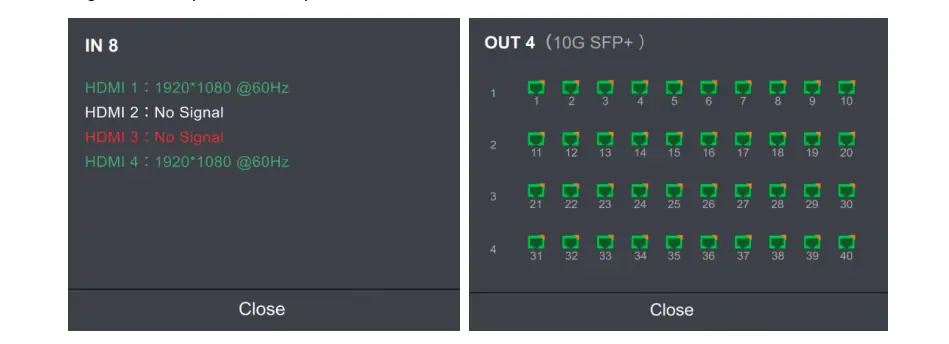
Load the proposed source windows and switch between them while displaying real graphics and video. Check the intended HDR or SDR workflow, low-brightness detail, color matching between cabinets, and camera footage when relevant. If backup is specified, disconnect the primary source, card path, or network route in a controlled test and document what actually recovers. A configured backup option is only useful if the installed system switches as required.
04. Prepare a serviceable handover
Give the NovaStar MX2000 Pro operator the firmware and software versions, card models and serials, receiving-card files, source-format list, cabinet map, presets, recovery steps, and a contact path for support. If the system will tour, add a rack and cable inventory for each move. The next technician should be able to restore the picture without guessing which card or configuration file was last used.
6. Compare a complete MX2000 Pro quote with alternatives
NovaStar does not give a universal public transaction price for every NovaStar MX2000 Pro configuration. The chassis, two selected input cards, output cards, conversion hardware, receiving cards, optical modules, spare parts, and service terms can differ substantially. Ask for a line-item quote and the exact card list; “one MX2000 Pro” is not enough detail to compare suppliers.
| Linie de citat | Specifica | Motiv |
|---|---|---|
| Carduri de intrare | Models, connector counts, source formats, and spare policy | Two slots can hold very different builds. |
| Carduri de ieșire | 1G/5G architecture, card models, ports, and backup | Bandwidth and per-port load change with the build. |
| Transport | Converters, fiber type and length, optical modules, and test plan | Fiber parts and routes are not interchangeable. |
| Ziua Operației | Licenses if applicable, training, firmware baseline, and support | Handover cost is part of a working system. |
Comparați MX40 Pro, MX6000 Pro, VX2000 Pro when the wall’s pixel count, card count, and processing features point to a smaller or larger system. A less expensive chassis can become a poor fit if it needs extra equipment to meet the input or output brief.
Include operating costs and practical service access in the comparison. A card-based system may need labeled spare cards, compatible optics, rack cooling, and a technician who can restore the saved project. If an output-card failure would interrupt a live event, price the tested backup arrangement rather than treating a spare card on a shelf as instant recovery. Ask who supplies firmware support and who is responsible for on-site diagnosis after delivery. These questions often explain why two proposals with the same controller model have different totals.
7. Use the current document revision and a controlled update plan
The older article linked copies of NovaStar’s MX2000 Pro V1.5.0 manual și Specificația V1.5.0 găzduit pe EagerLED. NovaStar’s current download page lists V1.5.1 documents and firmware. The V1.5.1 specification adds an 8 × 5G Base-T output card and an HDMI 2.0 + 12G-SDI MVR output card, and updates other hardware details. Check the latest official documents against the exact supplied cards before relying on an older diagram or limit.
For a firmware upgrade, keep the existing working project and card inventory, read the release notes, verify compatibility, and schedule enough time to retest sources, mapping, color, and backup. Do not interrupt power during an update. The EagerLED control software page can help locate relevant tools, but the installed hardware and NovaStar’s current instructions determine the supported version.
8. Test the delivered configuration before handover
The NovaStar MX2000 Pro should be accepted as a complete signal chain, not as an unconfigured chassis. Make a test sheet with the ordered card models, receiving-card family, cabinet map, source formats, bit depth, frame rate, and backup design. Compare this sheet with the invoice and the installed rack. If an optional card was replaced during procurement, repeat the capacity calculation before signing off.
For input acceptance, feed every source that the customer will use through its assigned connector. Check detected resolution, sampling, frame rate, and image stability while switching sources. A player that works at 1080p does not prove the desired 8K timing. Record any forced format or EDID setting. Keep a screenshot of the source status so a later software update can be compared against the accepted state.
For LED output, use a numbered cabinet pattern to confirm the physical map, then test representative white, gray, primary-color, and motion content. The NovaStar MX2000 Pro load plan should be checked at the intended bit depth and frame rate, with the actual cabinets connected. An irregular canvas or narrow loading region can change usable capacity. Compare the software map with a diagram of every fiber and Ethernet path.
Where the wall will be filmed, run a camera test at the planned shutter angle and operating brightness. Save sample clips and the camera, driver, receiving-card, and controller settings used. This is the evidence for a project-specific result. The maximum 480 Hz capability and low controller latency do not replace a recorded camera test.
Finally, simulate each failure the backup design claims to handle: loss of a source, a primary output path, and a controller if redundant devices were purchased. Test in a safe window, note the visible interruption, and restore normal routing. Export the accepted configuration and put the file, card list, firmware versions, and recovery instructions in the handover package. A buyer should be able to repeat the acceptance test after a card replacement.
9. NovaStar MX2000 Pro FAQs
01. Care este încărcarea maximă de pixeli a MX2000 Pro?
The NovaStar MX2000 Pro documented chassis ceiling is 35.38 million pixels. The usable load may be lower for the chosen output card, receiving cards, bit depth, frame rate, and cabinet map.
02. Acceptă rezoluție 8K?
Yes, with a suitable 8K-capable input card and source format. The delivered LED wall’s own resolution depends on its physical pixel map and output design; “8K input” is not an automatic 8K wall.
03. Ce fel de semnale de intrare acceptă?
The NovaStar MX2000 Pro can accept HDMI 2.0, HDMI 2.1, DP 1.2, DP 1.4, 12G-SDI, or ST 2110 with the relevant installed cards. There are two input-card slots, so request the exact card list and connector-format limits.
04. Este MX2000 Pro potrivit pentru producție virtuală?
It can be used in an xR or virtual-production system when the selected receiving cards, driver ICs, synchronization, camera settings, and firmware meet the production requirements. Verify performance with the actual camera and content.
05. Novastar MX2000 Pro acceptă ieșire prin fibră optică?
Yes. Documented output-card options include 4 × 10G fiber and 1 × 40G fiber. Specify the matching converter, optical modules, receiving cards, fiber, and backup route.
06. How much power does the MX2000 Pro use?
NovaStar specifies a 260 W maximum for a fully configured NovaStar MX2000 Pro. Actual power consumption varies with the installed cards and use; it is not an average-use figure.
07. Where can I download the MX2000 Pro manual and software?
Use NovaStar’s current MX2000 Pro download page for the matching manual, specification, firmware, and release notes. EagerLED also hosts older V1.5.0 PDF copies; check the revision before following them.
08. How much does the Novastar MX2000 Pro cost?
There is no single meaningful price without the chassis, input and output card models, conversion parts, spares, support, and delivery scope. Request an itemized quote for the actual system.
10. Request a buildable MX2000 Pro system proposal
Trimiteți EagerLED your screen pixel map, cabinet and receiving-card models, source list, bit depth, frame rate, camera requirements, site distance, and backup goal. We can use that brief to compare a NovaStar MX2000 Pro configuration with practical alternatives and prepare a line-item proposal. Discuss your LED system with EagerLED.