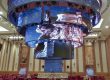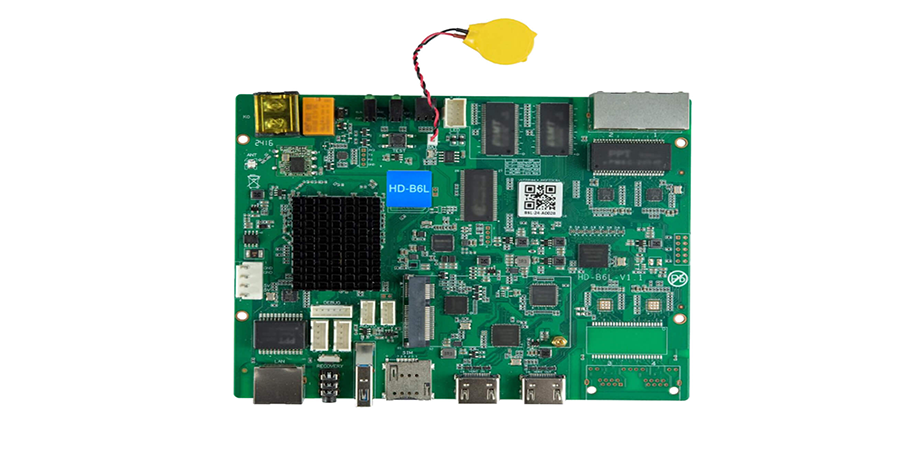
The Huidu B6L is a multimedia LED control card built for indoor poster-type LED displays. It combines Android 11 with FPGA co-processing on a single board. It supports 1.3 million pixels across dual Gigabit Ethernet outputs and runs in both standalone playback and HDMI 1.4b synchronous modes.
This guide covers architecture, specs, setup, how it stacks up against the B6 and B8L, troubleshooting, and a buyer checklist.
Table of Contents
1.What Is Huidu B6L?
2.Why Huidu B6L Gets Used in LED Poster Projects
3.Technical Specifications and Architecture
4.How to Configure Huidu B6L: Step-by-Step Setup
5.Huidu B6L vs B6 vs B8L: Which Controller Fits Your Project?
6.Who Should Choose Huidu B6L?
7.Common Huidu B6L Issues and Troubleshooting
8.FAQ
9.Conclusion
1.What Is Huidu B6L?
1.1 Product Definition
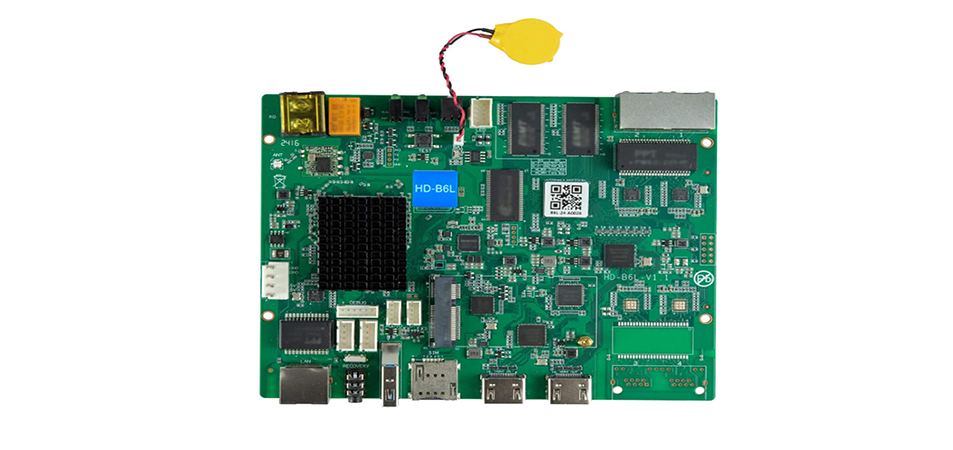
The Huidu B6L is a multimedia LED control card developed for indoor poster-type LED displays. Unlike a traditional sending card that depends entirely on an external video source, this one integrates an Android 11 operating system with FPGA-based signal processing on a single board. The upshot: the controller can store, manage, and play content on its own. No external PC needed.
In the Huidu HD series, the B6L sits between the standard HD-B6 dual-mode player and the HD-B8L poster screen control system. You will often see it listed as HD-B6L in product documentation and supplier catalogs. The “L” stands for local playback — it comes with onboard multimedia storage.
1.2 Where It Fits in an LED Display System
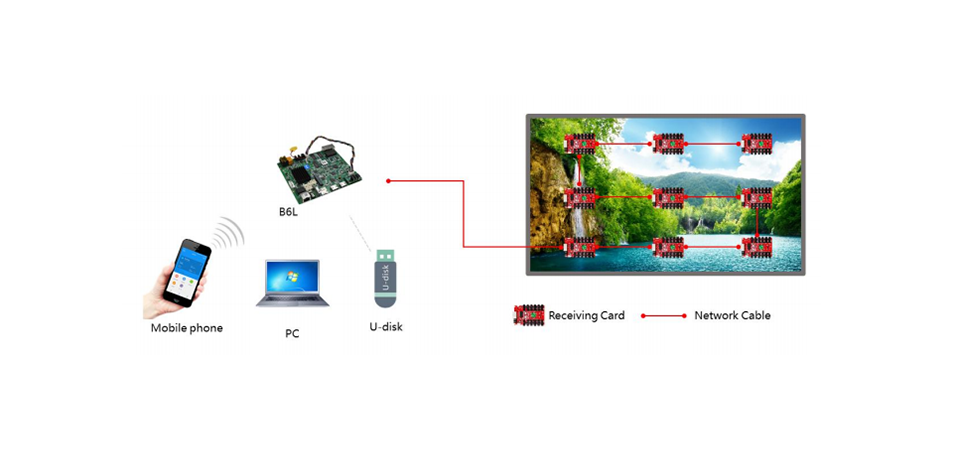
Inside an LED poster cabinet, the control card is the central node between your content and the LED modules. The signal chain is simple: media files sit on the controller’s internal storage (or come in via HDMI), the Android system handles scheduling, and the FPGA processes the image and pushes pixel data out through two Gigabit Ethernet ports to the receiving cards that drive the LED modules.
This puts the Huidu B6L in its own category. It is a self-contained multimedia player with FPGA co-processing, closer to an embedded playback computer than a signal distribution card. Not a simple sending card.
1.3 Asynchronous vs Synchronous: Dual-Mode Operation
Dual-mode capability is one of the things that makes the Huidu B6L useful. In asynchronous mode, it plays content stored locally on its internal storage. You upload media files and set playback schedules through the Android interface, and the B6L runs on its own with no continuous signal input. This is how most retail and exhibition LED posters operate day to day.
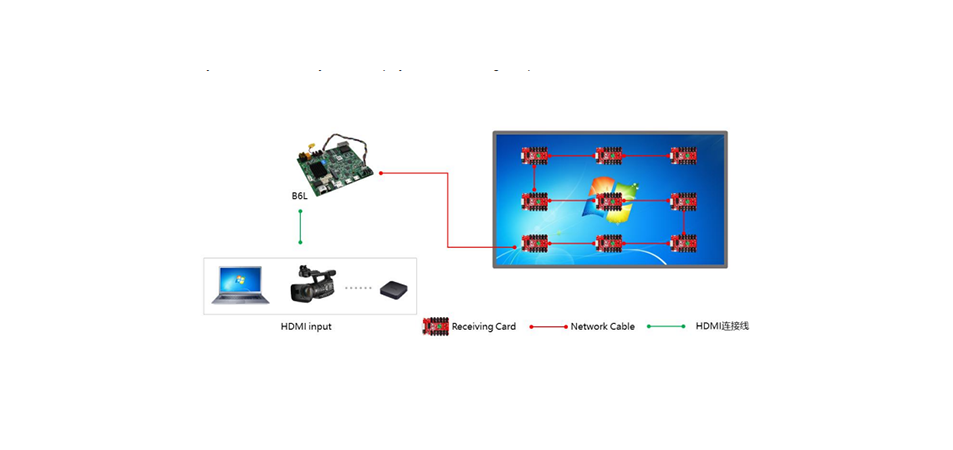
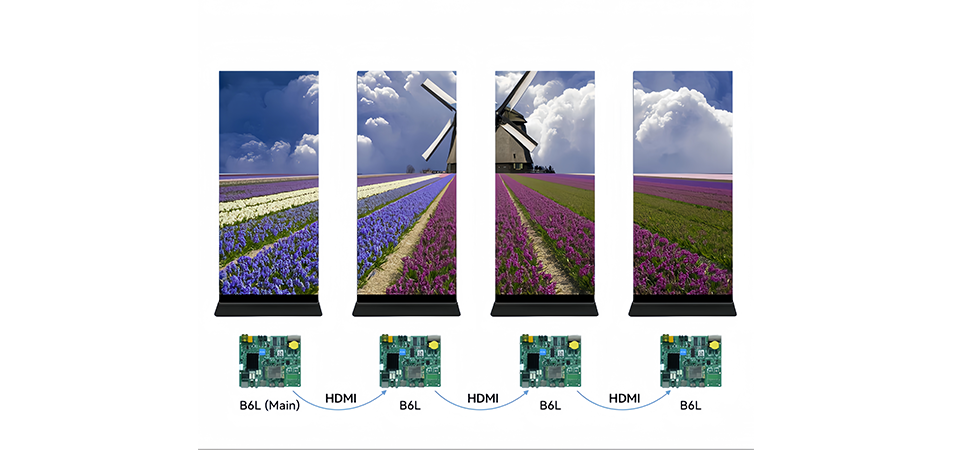
In synchronous mode, the controller takes an HDMI 1.4b input signal and maps it to the configured LED resolution in real time. So a retail poster can run scheduled ads most of the time, then switch to a live HDMI feed during a product launch or event. Both modes live in one controller, so the wiring stays clean. No extra switcher or converter needed.
2.Why Huidu B6L Gets Used in LED Poster Projects
2.1 Android + FPGA Dual Architecture
The Huidu B6L splits content management and image processing across two hardware layers. Android 11 owns media storage, playback scheduling, and the user-facing controls. The FPGA owns image processing (color correction, scaling, pixel packaging) and pushes finished frames to the Ethernet outputs.
This split matters. When Android runs a content update or schedule change, the FPGA pipeline keeps going uninterrupted. No frame drops during media uploads. No visible glitch when switching between scheduled items. In a retail setting where every minute of downtime costs money, that separation between the content brain and the display engine actually means something.
2.2 Built-in Storage and Local Media Playback
The HD-B6L has onboard multimedia storage for local content, which means you do not need an external media player, a dedicated PC, or a continuous network stream. For a retail chain deploying LED posters across multiple locations, fewer boxes per installation means lower upfront cost and less maintenance over time. Content gets pre-loaded during install and updated periodically via USB, Wi-Fi, or Ethernet, depending on how the cabinet is set up.
Medium-sized LED displays work well in commercial and event spaces where viewers are typically 3–15 meters away.
2.3 1.3 Million Pixel Loading Capacity
The maximum loading capacity of a single Huidu B6L is 1.3 million pixels. That budget covers most standard indoor poster configurations at common pixel pitches, from compact retail displays to taller exhibition totems. The controller also supports maximum dimensions of 16,384 pixels wide and 8,192 pixels high, which gives you room to design custom aspect ratios for creative installs.
2.4 Dual Gigabit Network Outputs
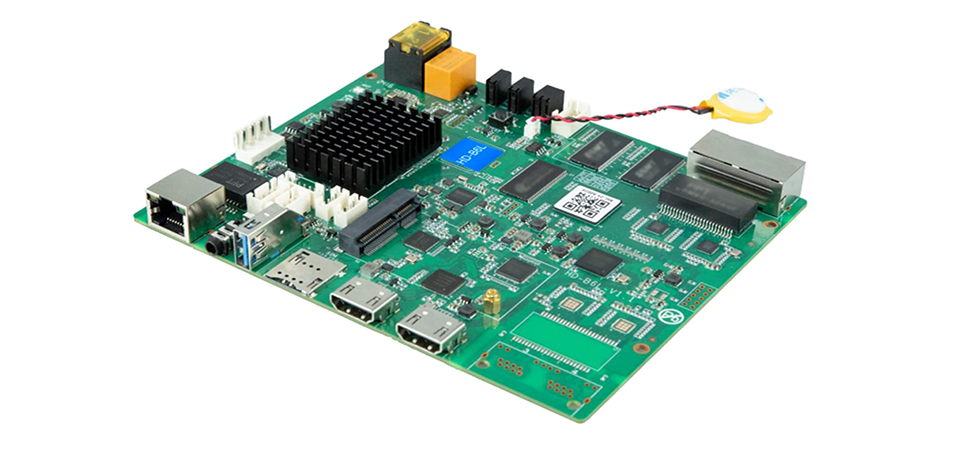
Two Gigabit Ethernet ports connect the Huidu B6L to the receiving cards downstream. In a poster cabinet, this dual port design lets you split the load. Each port carries roughly half the total pixel data. Get the balance right and you avoid saturating a single port, which is one of the most common causes of frame drops in tall vertical layouts.
2.5 Indoor Only
The Huidu B6L is not waterproof. It is designed for indoor installation, period. I actually like when a product is this clear about its limits. If the display lives in a climate controlled retail space, exhibition hall, or corporate lobby, the B6L works. If you are building an outdoor billboard or a semi-outdoor storefront display, you need a different class of controller entirely. The operating temperature range is -40°C to 70°C, which handles enclosed poster cabinets in sun-exposed windows where internal temps can climb.
3.Technical Specifications and Architecture
3.1 System Architecture Overview
The Huidu B6L LED Poster Control Card uses a three-layer architecture:
- Input Layer
Receives content from two sources:
- Built-in storagefor asynchronous playback
- HDMI 1.4b inputfor synchronous display
- Processing Layer
Combines:
- Android 11 systemfor content management, scheduling, and user interaction
- FPGA processorfor image scaling, color processing, and pixel data packaging
- Output Layer
Sends processed image data to LED receiving cards through two Gigabit Ethernet ports.
Because Android handles content management separately from FPGA image processing, updating playlists or schedules does not interrupt the displayed content. This ensures smooth playback during operation.
3.2 Signal and Loading Capacity
|
Parameter |
Specification |
| Maximum Loading Capacity |
1.3 million pixels |
|
Maximum Width |
16,384 pixels |
| Maximum Height |
8,192 pixels |
|
Output Ports |
2 × Gigabit Ethernet (RJ45) |
| Single-Port Capacity |
~650,000 pixels per port |
The pixel capacity is the main limitation when designing an LED poster display with the Huidu B6L.
If the total pixel count exceeds 1.3 million pixels, the system may experience configuration issues, incomplete images, or data transmission problems.
Note that the width and height limits are independent. Even when the total pixel count is within range, neither dimension can exceed the maximum supported resolution.
3.3 Input and Media Capabilities
|
Parameter |
Specification |
| Video Input |
HDMI 1.4b × 1 |
|
Max Input Resolution |
1920×1200@60Hz |
| Operating System |
Android 11 |
|
Media Playback |
Built-in storage with local playback |
| Content Control |
Android-based management system |
The HDMI 1.4b input supports common sources such as laptops, media players, and presentation devices.
Through the Android management system, users can:
- Upload images and videos
- Create playback schedules
- Manage screen content remotely
The Huidu B6L supports common image and video formats through the Android media framework, making it suitable for most LED poster applications.
3.4 Environmental and Physical Specifications
|
Parameter |
Specification |
|
Operating Temperature |
-40°C to 70°C |
|
Storage Temperature |
-40°C to 80°C (non-condensing) |
|
Waterproof Rating |
Not waterproof (indoor use only) |
| Control Type |
Multimedia LED control card |
The Huidu B6L offers a wide operating temperature range, but it is designed for indoor LED poster displays only.
Since the controller is not waterproof, avoid:
- Direct rain exposure
- High humidity environments
- Areas with condensation risks
For installation near entrances or semi-outdoor locations, ensure the controller is installed inside a protected cabinet with proper ventilation.
4.How to Configure Huidu B6L: Step-by-Step Setup
4.1 Step 1: Hardware Connection
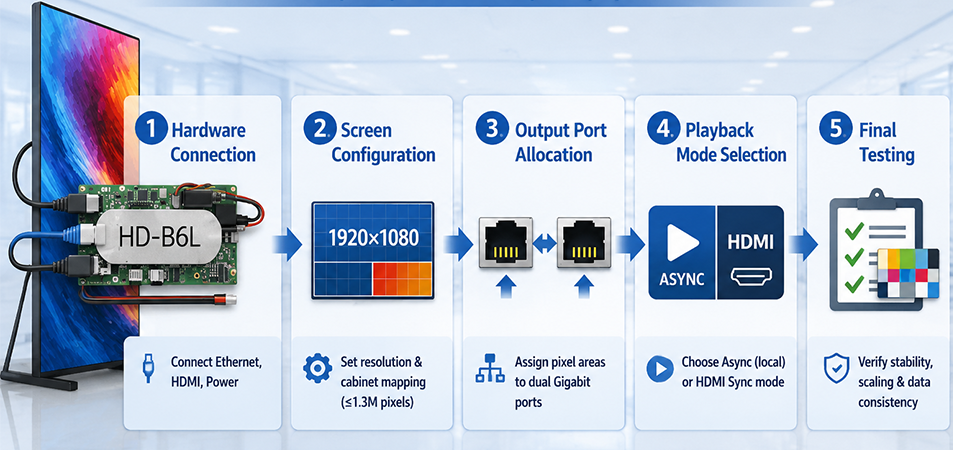
Before setup, power off all devices. Connect the two Gigabit Ethernet output ports on the Huidu B6L to the receiving cards inside the LED cabinet using Cat5e or Cat6 cables.
Then:
- Connect the power supply according to the cabinet design
- Connect the HDMI 1.4b inputif synchronous display is required
The Huidu B6L works as the bridge between the content source and LED modules. Every receiving card must have a valid Ethernet connection back to one of the controller’s output ports. A disconnected receiving card will cause the corresponding LED area to remain blank.
4.2 Step 2: Screen Parameter Configuration
After hardware connection, configure the LED screen parameters through the Huidu software interface.
The main settings include:
- Screen resolution(width × height in pixels)
- Cabinet layout and arrangement
- Receiving card mapping
- Pixel width and height settings
The total resolution must stay within the 1.3 million pixel loading capacity of the Huidu B6L.
Receiving card mapping is one of the most important steps. Incorrect settings may cause:
- Black areas
- Repeated images
- Misaligned columns
Always verify the card mapping before assigning output ports.
4.3 Step 3: Output Port Allocation
The Huidu B6L LED controller provides two Gigabit Ethernet outputs. The pixel area needs to be distributed between Port 1 and Port 2 during configuration.
Each port supports approximately 650,000 pixels, so keeping the load balanced helps ensure stable transmission.
For example, a vertical LED poster cabinet measuring 512×2048 pixels contains about 1.05 million pixels, which is within the B6L’s total capacity. However, assigning all pixels to one Ethernet port may exceed bandwidth limits and cause image instability.
4.4 Step 4: Select Playback Mode
The Huidu B6L supports two main working modes:
Asynchronous Playback Mode
Best for most LED poster displays.
Content is stored locally on the controller, allowing users to:
- Upload videos and images
- Create playlists
- Schedule playback times
- Run content automatically
HDMI Synchronous Mode
Used when real-time external content is needed.
The controller receives HDMI signals from a PC, media player, or other source and displays them on the configured LED screen. Switching modes may briefly restart the display output.
4.5 Step 5: Testing and Verification
Before delivery, perform a complete system test:
- Play content at the target resolution for at least 15 minutes
- Check HDMI input performance if used
- Confirm image scaling and alignment
- Verify all receiving cards communicate correctly
- Check Ethernet ports for errors
- Confirm the installation environment is dry and dust-protected
Since the Huidu B6L is designed for indoor LED poster applications, avoid installation in areas exposed to rain, excessive humidity, or condensation. Proper ventilation and enclosure protection help ensure long-term stability.
5.Huidu B6L vs B6 vs B8L: Which Controller Fits Your Project?
5.1 Comparison Table
|
Feature |
HD-B6 | Huidu B6L |
HD-B8L |
|
Product Position |
Standard dual-mode LED controller | LED poster screen controller |
Advanced poster display control system |
|
System Architecture |
Dual-mode playback | Android 11 + FPGA processing |
Android-based control platform |
|
Max Loading Capacity |
1.3 million pixels | 1.3 million pixels |
1.3 million pixels |
|
Cascading Capability |
Up to 2.3M pixels via HDMI splicing | Designed for poster-level applications |
Up to 5.24M pixels (14 units max.) |
|
HDMI Input |
1 × HDMI | 1 × HDMI 1.4b |
2 × HDMI 1.4 |
|
HDMI Output / Loop |
HDMI OUT | Not supported | HDMI LOOP |
|
Storage |
8GB Flash | Internal multimedia storage |
4GB RAM + 64GB storage |
|
Expansion Interfaces |
Basic interfaces | Standard poster screen interfaces |
RS232 / RS485 / TTL / Relay / USB 3.0 |
| Best Application | Standard LED displays | Indoor LED poster displays |
Large-scale LED poster systems |
5.2 When Huidu B6L Is the Right Choice
The Huidu B6L LED controller card is designed for indoor LED poster screens that require simple content management and reliable multimedia playback.
With a loading capacity of 1.3 million pixels, it supports common LED poster display sizes while combining Android-based content management with FPGA image processing. Users can upload videos, schedule playlists, and manage playback directly through the controller without additional media equipment.
For retail stores, shopping malls, exhibitions, hotels, and other indoor advertising applications where content is mainly promotional videos, images, or scheduled playlists, the B6L offers the right balance between functionality and simplicity.
5.3 When to Choose HD-B6 or Upgrade to HD-B8L
Choose the HD-B6 if you need a basic LED display controller with standard playback functions. It provides the same 1.3 million pixel loading capacity but does not include the Android-based management system of the B6L. This makes it a simpler and more cost-effective option for projects where content is managed externally.
Choose the HD-B8L when your project requires larger LED poster screen systems, multiple-unit cascading, or advanced control integration. It supports up to 5.24 million pixels across 14 units, includes more storage capacity, dual HDMI inputs, and industrial interfaces such as RS232, RS485, TTL, and relay control.
For large LED poster walls, interactive displays, or automation-based installations, the B8L provides the additional scalability and connectivity that the B6L is not designed to handle.
5.4 Quick Recommendation
- Choose Huidu B6L:Indoor LED poster screens, advertising displays, scheduled multimedia playback.
- Choose HD-B6:Simple LED displays requiring basic playback at lower cost.
- Choose HD-B8L:Large LED poster systems, multi-screen splicing, and advanced integrations.
6.Who Should Choose Huidu B6L?
6.1 Ideal Applications for Huidu B6L
The Huidu B6L LED control card is designed for indoor LED poster displays, making it a strong choice for retail stores, shopping malls, exhibition booths, and corporate lobbies.
It also works well for digital signage totems, mirror LED displays, and small creative LED installations where flexible content management is more important than extremely high pixel capacity.
The ideal B6L project is a display that mainly runs scheduled advertisements, promotional videos, or branded content, while still requiring occasional HDMI input for live presentations or event playback.
6.2 Huidu B6L Buyer Checklist
Choose the Huidu B6L if:
- Your project uses an indoor LED poster screen, digital signage display, or LED totem
- The total loading capacity is within 3 million pixels per controller
- You need built-in multimedia playback and content scheduling
- Most content consists of advertisements, branding videos, or loop playback
- You occasionally need HDMI input for real-time content
- You do not require industrial control interfaces such as RS232, RS485, or relay connections
Consider another controller if:
- You are building a large LED video wall with multiple cascaded units
- The project requires cascading more than 10 LED poster screens
- You need integration with industrial automation systems
- External sensors, relays, or control devices must connect directly to the controller
- The display will be installed outdoors or in environments without proper protection
6.3 Final Recommendation
For indoor LED poster displays and commercial digital signage, the Huidu B6L offers a good balance of playback capability, flexibility, and cost.
However, for large-scale LED installations, industrial automation projects, or outdoor applications, a higher-capacity LED controller such as the Huidu B8L or other professional control systems would be a better fit.
7.Common Huidu B6L Issues and Troubleshooting
7.1 LED Poster Display Misalignment After Configuration
Symptoms: Black areas, repeated images, incorrect columns, or shifted content after setup.
Cause: The receiving card mapping or Ethernet port allocation is incorrect. The assigned pixel areas do not match the actual cabinet wiring order.
Solution:Open the screen configuration software and check that each receiving card matches its physical cabinet position. Verify the pixel mapping, balance the load between the two Gigabit Ethernet ports, and upload the configuration again.
7.2 No Signal from HDMI Input
Symptoms: The screen shows a blank image or “No Signal” when switching to HDMI synchronous mode.
Common causes:
- HDMI cable does not support HDMI 1.4b bandwidth
- Input source resolution exceeds the configured LED screen resolution
- Screen parameters are incorrectly set
Solution:
Use a certified High-Speed HDMI cable and set the source output to 1920×1200@60Hz or lower. Also confirm that the LED screen resolution and scaling settings match the HDMI input signal.
7.3 Video Stuttering or Frame Drops During Playback
Symptoms: Video playback freezes, tears, or drops frames in asynchronous mode.
Cause: One Ethernet output port is overloaded, especially on tall vertical LED poster layouts where most pixel data is assigned to a single port.
Solution:Redistribute the pixel load between both Gigabit Ethernet outputs. For example, a 512×2048 pixel cabinet should be split across two ports instead of sending the entire load through one output.
7.4 New Content Not Updating in Asynchronous Mode
Symptoms: Uploaded videos or images do not appear in the playback playlist.
Possible causes:
- Media upload was incomplete
- New files were not added to the active playlist
- Playback schedule has not been updated
Solution:
Upload the content again through the Android management system and confirm the transfer is complete. Then check the playlist and schedule settings to ensure the new content is active.
7.5 Huidu B6L Overheating Inside an Enclosed Cabinet
Symptoms: Controller instability, unexpected reboots, or performance issues after long operation.
Cause: Poor ventilation inside a sealed cabinet can cause heat buildup, even though the controller supports a wide operating temperature range.
Solution:Provide sufficient airflow by adding ventilation openings or a cooling fan. During testing, measure the internal cabinet temperature under normal operating conditions and keep enough thermal margin below the maximum rated temperature.
7.6 Quick Troubleshooting Checklist
|
Problem |
Possible Cause |
Solution |
|
Black areas or wrong image position |
Incorrect receiving card mapping |
Check cabinet mapping and reload configuration |
|
HDMI shows no signal |
Wrong resolution or cable issue |
Use HDMI 1.4b cable and check input settings |
|
Video lag or tearing |
Ethernet port overload |
Redistribute pixel load between outputs |
| Content not updating | Playlist or schedule issue |
Re-upload files and update playback settings |
| Controller rebooting | Poor ventilation |
Improve cabinet cooling |
8.FAQ
8.1 Can Huidu B6L Be Used Outdoors?
No. The Huidu B6L is designed for indoor LED displays only and does not have waterproof protection.
For outdoor or semi-outdoor LED poster screens, choose a controller with proper environmental protection and install it inside a suitable waterproof enclosure. Exposure to moisture or condensation can damage the controller and may affect warranty coverage.
8.2 What Is the Maximum Resolution Supported by Huidu B6L?
The Huidu B6L supports a maximum loading capacity of 1.3 million pixels per controller.
Its maximum output dimensions are:
- Maximum width:16,384 pixels
- Maximum height:8,192 pixels
These limits work independently. Even if the total pixel count stays below 1.3 million, the display cannot exceed either the maximum width or height limit.
8.3 Does Huidu B6L Support Wi-Fi Content Updates?
The Huidu B6L runs on Android 11, which supports Wi-Fi connectivity. However, actual wireless content updates depend on the cabinet design and whether a compatible Wi-Fi module is installed.
In most LED poster applications, users manage content through Ethernet connections or external Wi-Fi solutions for remote updates.
8.4 How Many Receiving Cards Can Huidu B6L Control?
There is no fixed receiving card limit. The actual number depends on the total pixel loading, receiving card capacity, and cabinet configuration.
The main limitation is the controller’s 1.3 million pixel capacity, which is distributed through its two Gigabit Ethernet output ports.
8.5 Can Huidu B6L Be Used for an LED Video Wall?
The Huidu B6L can support small LED splicing projects, but it is mainly designed for LED poster displays and commercial digital signage.
For larger video walls requiring extensive cascading, multiple signal inputs, or industrial control interfaces, a higher-end controller such as the Huidu B8L is more suitable. The B6L is optimized for simpler installations within its pixel capacity range.
8.6 Is Huidu B6L Compatible with NovaStar Receiving Cards?
The recommended pairing is Huidu receiving cards from the HD series, as they are designed and tested for compatibility with B6L controllers.
Third-party receiving cards may work in some cases, but compatibility should always be confirmed with the manufacturer before purchase. Matching Ethernet protocols alone does not guarantee stable communication, synchronization, or reliable image output.
8.7 Can Huidu B6L Play Videos Without a Computer?
Yes. The Huidu B6L supports asynchronous playback, allowing users to upload videos and images directly to the controller’s internal storage.
Once configured, the LED poster can play scheduled content independently without a continuous connection to a PC, making it suitable for advertising displays, retail signage, and promotional screens.
9.Conclusion
The Huidu B6L is a practical choice for most indoor LED poster projects. It offers Android 11 content management, FPGA-based processing, 1.3 million pixel loading capacity, and HDMI input for occasional live content.
It is not designed for large video walls or complex industrial control systems, but for retail displays, digital signage, and indoor LED posters, it provides the right balance of performance, flexibility, and cost.
Before choosing the controller, check your screen resolution, cabinet layout, and application requirements to ensure the B6L fits your project.