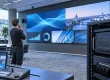
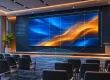
Indoor LED screens are direct-view displays assembled from LED modules and cabinets. They create a continuous image without the panel bezels of an LCD wall and can be built to fit a lobby, meeting room, retail surface, or event stage. For buyers, the useful question is not simply whether an indoor LED display looks bright. It is whether its pixel pitch, dimensions, brightness, processing, mounting, and service plan match the room and the content.
This guide explains the benefits and limits of indoor LED screens, the difference between fixed and rental systems, and a practical specification process. Use the tables to compare applications, calculate native resolution, and prepare a vendor brief. Figures are planning examples; confirm final values against the selected product and site survey.
Quick answer for buyers: Start with the nearest viewing distance and smallest text, then calculate the wall’s native pixels from its physical size and pixel pitch. Ask for a cabinet drawing, power and service plan, and an itemized installed quote before choosing a model. For a fixed wall, confirm front-service access; for a touring screen, confirm rental-rated rigging and transport hardware.
1. What Is an Indoor LED Screen?
An indoor LED screen is a modular display whose red, green, and blue light-emitting elements form the image directly. A controller receives a video or data feed, maps it to the screen’s native pixel grid, and sends instructions to receiving cards and modules. Indoor LED displays are designed for controlled spaces rather than rain or direct outdoor sun; the correct brightness still depends on windows and lighting at the installation site.
“Indoor LED screen,” “indoor LED display,” and “indoor LED video wall” commonly describe the same direct-view category. A fixed indoor LED display remains installed in one location and usually prioritizes slim cabinets and accessible service. A rental screen uses cabinets and hardware designed for repeated assembly, transport, and rigging. A retail poster display is a narrower packaged format. These differences affect structure, spare parts, maintenance access, and total cost.
Pixel pitch is the center-to-center distance between neighboring pixels in millimeters. Smaller pitch gives more pixels in a given area, but it is not automatically the best purchase: content, viewing distance, wall size, and budget determine the useful resolution. EagerLED’s separate pixel pitch guide explores this variable in more detail.

2. Benefits and Limits of Indoor LED Screens
01. A continuous canvas and flexible size
Because cabinets join into one image, indoor LED screens can fill large surfaces without the visible seams of tiled LCD panels. Designers can specify a wide presentation wall, a portrait column, or a curved feature if the chosen cabinet supports the geometry. The cabinet grid still imposes increments: ask the supplier for the actual finished width and height rather than assuming any arbitrary size is possible.
02. Visibility and room control
Indoor LED displays remain visible under typical commercial lighting and can be dimmed for a comfortable viewing experience. A bright showroom setting is not an operating target for a dark conference room. Specify brightness adjustment and assess daylight, reflections, and viewing angle at the site. Direct-view LED also avoids a projector’s throw path and shadows, although a projector or LCD may be better value for a small room.
03. Serviceability and lifecycle
A failed module, power supply, or receiving card can often be replaced individually. Front-service indoor LED screens suit walls where technicians cannot reach the back. Maintenance is not automatic or free: access space, matching spare modules, calibration data, and trained support must be planned. Power demand varies by product, brightness, content, and operating hours; compare stated maximum and typical consumption under a defined test condition rather than assuming that every LED wall uses less energy than every LCD wall.
04. Where the technology is less suitable
Indoor LED screens may be poor value when viewers sit very close to a small screen, need fine spreadsheet text, or have a limited budget. Large displays require a mounting structure, electrical distribution, processor configuration, and a commissioning period. If an indoor LED display will face a sunlit window or a camera, test the proposed unit in comparable conditions before ordering. For a permanent wall, the benefit is strongest when the canvas size, shape, and service model solve a real problem.

3. Where Indoor LED Screens Work Best
Applications determine specifications. A reception wall seen from five meters does not need the same pitch or content treatment as an executive meeting room viewed from two meters. A stage screen photographed by cameras has additional refresh and processing requirements. The table below is a starting brief, not a universal product prescription.
| Setting | Typical content | Priority to verify | Practical note |
|---|---|---|---|
| Corporate meeting room | Slides, video calls, dashboards | Text legibility at the nearest seat | Test the smallest type size on the intended screen. |
| Retail and showroom | Campaign video, products, wayfinding | Ambient light, sightlines, easy content updates | Place key messages where dwell time supports reading. |
| Lobby and hospitality | Brand stories, welcome messages | Finish, quiet operation, front service | Check the display in both daytime and evening lighting. |
| Event and exhibition | Live feeds, sponsor graphics, stage visuals | Rigging, transport, camera compatibility | Consider a rental-grade cabinet for repeated setup. |
| Control and education | Maps, data, shared presentation | Reliability, native pixels, redundancy | Confirm source switching and backup behavior. |
For permanent projects, compare the front-service EA640F2 indoor LED display as one concrete example. For touring or repeated event builds, evaluate the rental LED display range. These product categories should be compared against the room brief, not chosen by a generic claim that one technology is always superior.
4. How to Specify an Indoor LED Display
01. Start with distance, content, and size
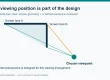
Record the nearest and farthest intended viewers, then define the content that must remain readable. Pixel pitch is a distance between pixels, not a promise of visual quality. As an early planning rule, a pitch in millimeters near the closest viewing distance in meters can suggest a candidate; inspect real content before final selection. Finer pitches usually raise pixel count and cost. A P1.5 screen may be appropriate for close detailed work, while P3 or P4 can be sensible for large-format visuals seen from farther away.
Calculate approximate native width in pixels as screen width in millimeters divided by pitch in millimeters; use the same formula for height. For example, a 4,800 mm by 2,700 mm wall at 2.5 mm pitch is about 1,920 by 1,080 native pixels. Cabinet dimensions may change the final physical size, so request a cabinet layout drawing and final pixel map. Feeding a 4K source to a lower-resolution wall does not create 4K native detail.
| Pitch | First viewing-distance check | Often considered for | Trade-off |
|---|---|---|---|
| P1.2–P1.5 | About 1.2–1.5 m or more | Close seating, fine text, premium interiors | Higher pixel density and project cost. |
| P1.8–P2.5 | About 1.8–2.5 m or more | Meeting rooms, retail, reception walls | Balance detail against wall area and budget. |
| P3–P4 | About 3–4 m or more | Large lobbies, venues, stage backdrops | Small text looks coarse at short range. |
These are evaluation ranges, not visual-acuity guarantees. The appropriate pitch changes with typography, eyesight, camera framing, and whether viewers see still images or moving video. Ask for a sample or reference installation at the actual viewing distance.
02. Brightness, refresh, and color
Specify usable brightness and dimming for the room. An indoor LED display in a windowless studio can operate at a different level from one beside a glass storefront. Ask for measured brightness, uniformity, grayscale performance at lower brightness, and calibration method. Refresh rate and camera scan behavior matter for broadcast or livestreams, but the processor, scan design, frame rate, shutter, and exposure also influence the picture. A high refresh figure alone cannot guarantee clean on-camera results; run a camera test with the intended settings.
03. Cabinets, service, and control
Confirm cabinet depth, weight, module access, allowable curvature, aspect ratio, and the mounting surface. Verify that the processor supports the final pixel count, input formats, scaling, and source switching. For critical installations, discuss power and signal redundancy. Request a service diagram showing the replacement path for modules, power supplies, and receiving cards. If the wall is flush-mounted, front access may be a requirement rather than a convenience.

5. Design the Project Before Requesting a Quote
A comparable quote needs more than the phrase “indoor LED screen.” Send each supplier the same room drawing, intended dimensions, viewing distances, content examples, operating schedule, installation photos, and electrical information. Ask each supplier to state assumptions and exclusions. This helps expose differences in cabinet count, processor capacity, rigging, commissioning, freight, and support.
| Item | Information to provide | Evidence to request |
|---|---|---|
| Viewing and content | Nearest seat, farthest viewer, smallest text, camera use | Pitch recommendation and sample test |
| Physical wall | Width, height, substrate, access, obstruction and finish | Cabinet layout, loads, service clearance |
| Image system | Inputs, aspect ratio, source switching, playback schedule | Native pixel map and processor configuration |
| Environment | Ambient light, HVAC, daily operating hours | Brightness range, typical and maximum power |
| Operations | Owner of content, uptime target, local technicians | Spare-parts list, warranty, response plan |
| Acceptance | Uniformity, visible defects, camera tests, training | Written commissioning and handover criteria |
Ask for the full installed cost, not just the price per square meter. A low panel quote may exclude structural steel, electrical work, controller licenses, spare modules, labor, and tax. Evaluate operating cost using actual hours, brightness settings, measured consumption, and maintenance visits. Request a bill of materials that distinguishes screen hardware from installation and service.
To avoid a mismatch, review an installation drawing before purchase. For instance, EagerLED’s EA640H1 front-service LED wall illustrates how a slim cabinet and front access can serve a permanent wall. The specific model is only suitable if its pitch, loading, resolution, and operating conditions match the project.

6. A Real Indoor LED Wall Example
The EagerLED EA640H1 specification page provides a concrete reference for a permanent, front-service installation. Its 640 × 480 mm cabinet is 48 mm deep and weighs 6.7 kg. Available pitches run from P1.25 to P2.5; the published refresh rate is at least 3,840 Hz. Brightness varies by pitch from 600 to 800 cd/m². These values describe the EA640H1 series, not every indoor LED screen. Ask EagerLED to confirm the selected configuration and project drawing before procurement.
A four-cabinet-wide by three-cabinet-high array makes a 2,560 × 1,440 mm wall. At P2, that is 1,280 × 720 native pixels. This illustrates why a 16:9 physical wall is not automatically a 4K wall. The published average power figure for this model is 100 W/m² and the maximum is 300 W/m²; size electrical infrastructure from the maximum and verify actual operating consumption during commissioning. The series is rated IP31 for indoor use.
For a quote, share your room dimensions, nearest viewer, content, installation photos, and delivery location. Ask EagerLED for an itemized indoor LED display proposal that lists cabinets, controller, mounting, spares, shipping, commissioning, and support.
7. Installation, Commissioning, and Maintenance
01. Survey the site and structure
Before ordering, confirm wall dimensions, the supporting structure, cable routes, power distribution, ventilation, and safe technician access. A qualified installer or engineer should check loading and rigging. Do not assume gypsum board, decorative cladding, or a suspended ceiling can carry an indoor LED screen. Align the cabinet grid with finished architectural dimensions, including edge trim and access panels.
02. Commission the complete signal path
After cabinets are aligned, verify data mapping, processor settings, and source resolution. Test uniformity, color, brightness adjustment, grayscale, dead pixels, and seam alignment. Play the real presentation files at native aspect ratio. If the indoor LED display will be filmed, test moiré and scan artifacts with the actual cameras and shutter settings. Record a baseline configuration so later service work can restore the approved image.
03. Plan routine care and spares
Use the manufacturer’s cleaning method, isolate power when required, and avoid pressing exposed LED surfaces. Check ventilation paths and intake areas. Keep labeled spare modules from a compatible batch, plus the recommended receiving cards and power supplies. Train staff to identify a content-source failure versus a screen hardware fault. A documented contact and response process matters more to uptime than a nominal lifetime claim.
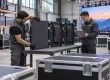
For fixed installations, define who can remove front-service modules without damaging neighboring cabinets. For rental indoor LED screens, inspect locks, connectors, edge protection, and cases after every event. Maintenance records help identify recurring faults and preserve calibration consistency.

8. Make Indoor LED Screens Effective After Installation
01. Design at the native canvas size
Create master files to match the approved pixel map or an intentional scaling workflow. Build layouts around the content people actually need to read, then test them from the nearest and farthest viewing positions. If a screen is used for a presentation, avoid placing tiny text across a very wide wall simply because the source laptop is 4K. For wayfinding, use short messages and strong hierarchy. For retail, give the viewer enough dwell time to process one offer before the next appears.
02. Manage brightness and motion
Schedule brightness settings for the room’s lighting cycle and review the wall at evening levels. Excessive brightness can reduce comfort and make phone or video footage harder to capture. Motion should support the message rather than compete with it. Keep critical text on screen long enough to read; do not place essential instructions only in a fast animation. Test brand colors and skin tones after calibration, especially when multiple content sources are used.
03. Assign an operating owner
An indoor LED display needs a content owner, an approval workflow, a playback calendar, and a fallback screen. Decide who monitors the player and network, who updates content, and who contacts service if a module fails. If cloud-based management is used, protect access and keep a local recovery path where continuity matters. For a live event, rehearse source switching and keep backup media available.
Measure success against the display’s purpose. A lobby wall may be judged by information clarity and guest feedback; a retail campaign by sales or engagement against a reasonable baseline. Those outcomes depend on placement and message quality as well as display hardware. Indoor LED screens work best when content design and operations are part of the original specification.

9. Frequently Asked Questions About Indoor LED Screens
01. What is the main benefit of a fixed indoor LED display?
A fixed indoor LED display creates a continuous, scalable image tailored to a permanent room. Its strongest benefits are architectural fit, visibility under room lighting, and replaceable modules. It is most valuable when the required wall size or shape is difficult to achieve with a single LCD panel or projector.
02. How do I choose pixel pitch for indoor LED screens?
Start with the closest important viewer and the smallest text or detail they must see. Use the pitch-to-distance ranges above to shortlist products, then test real content at actual scale. Check final cabinet dimensions and native resolution before purchase. A smaller pitch increases pixel density but may not add useful detail at long viewing distances.
03. Are indoor LED displays suitable for video calls and filming?
They can be, but camera results depend on refresh behavior, scan design, processor configuration, pitch, and camera settings. Test the proposed indoor LED screen with the intended cameras, shutter, and framing. For meeting rooms, also check that participants can read shared documents from their seats.
04. How bright should an indoor LED screen be?
There is no one setting for every room. Specify a usable adjustment range and evaluate the display in the space’s brightest and darkest normal lighting. Ask the vendor to demonstrate color and grayscale at the lower brightness levels that people will actually use.
05. What does an indoor LED display quote need to include?
Request the cabinets and modules, processor, mounting structure, power and signal distribution, cabling, installation, commissioning, spare parts, warranty, training, and support. Compare the final installed system and its service plan, not only the panel price.
06. Can an indoor LED screen be maintained from the front?
Some models permit front removal of modules and sometimes power and receiving components. Confirm every component’s access path on the proposed product drawing. Front service is particularly useful for a flush wall with no rear corridor.
07. What affects indoor LED screen price?
Pixel pitch, total wall area, cabinet type, processor capacity, mounting, power distribution, shipping, spare modules, installation, and support all affect the installed price. Compare itemized quotes for the same wall dimensions, native resolution, and service requirements. A price per square meter alone does not describe the finished system.
10. Conclusion: Choose Indoor LED Screens Around the Room
The right indoor LED screen is defined by the audience, content, space, and support plan. Establish viewing distance and native resolution first; then verify brightness, camera performance, access, mounting, power, and operating responsibilities. This process shows when a fixed indoor LED display delivers value and when a simpler display is sufficient.
For a project-specific recommendation, send the room dimensions, nearest viewing distance, content examples, and installation photos. A supplier can then provide a cabinet layout, pixel map, service approach, and complete quote that can be checked before purchase. Explore EagerLED’s indoor LED screen range to compare available formats.
Prepared by EagerLED. Updated September 29, 2026. Product specifications above refer to the linked EA640H1 series and should be reconfirmed for the final configuration.