A sphere LED display is a direct-view video screen built around a three-dimensional framework. It can show motion graphics to people approaching from multiple directions, which makes it useful for museums, trade shows, retail atriums and public venues. Buying one requires more than choosing a diameter. The viewing distance, pixel pitch, visible surface, content mapping, support structure and service access must work as one system.
This guide explains how to specify a sphere LED display, compare constructions, estimate resolution, request a meaningful quotation and test the finished installation. It also distinguishes an LED sphere from a projection globe or a dome. Use the tables as planning tools; final specifications should be confirmed with drawings, samples and site measurements.
Quick buying answer: Choose a sphere LED display by the nearest viewing distance, the content that must remain legible, the visible LED area, and the installation method. For a museum or interactive exhibit, confirm the exact pixel map, visitor controls, accessibility, service access, and who maintains the software. Compare complete quotations that include mapping, structure, power, installation, training, and spares.
1. What Is a Sphere LED Display?
A sphere LED display, also called an LED sphere screen, spherical LED display or LED globe, uses light-emitting pixels on a curved outer surface. Unlike a flat LED wall, its geometry lets visitors walk around the object and see content from many azimuth angles. A full sphere may still have an attachment point, service hatch or unlit area at the top or bottom; ask the vendor for a map of the active display surface rather than assuming every square centimeter carries pixels.
An LED sphere emits its own light. A projection globe uses projectors aimed at a passive sphere, while a dome is normally viewed from inside or below a partial spherical surface. Each approach has a different brightness, ambient-light, maintenance and content workflow. For a bright atrium or 360-degree public circulation route, a sphere LED display can be the right choice; for a dark gallery with existing projection content, compare both technologies before committing.
The display is usually custom engineered. Diameter, module geometry and mounting details affect how closely the surface follows a true sphere and whether graphics remain continuous across seams. Request a dimensioned elevation, plan view and illuminated-area drawing as early as the concept stage.
2. How Does a Sphere LED Display Work?
01. Modules, frame and signal path
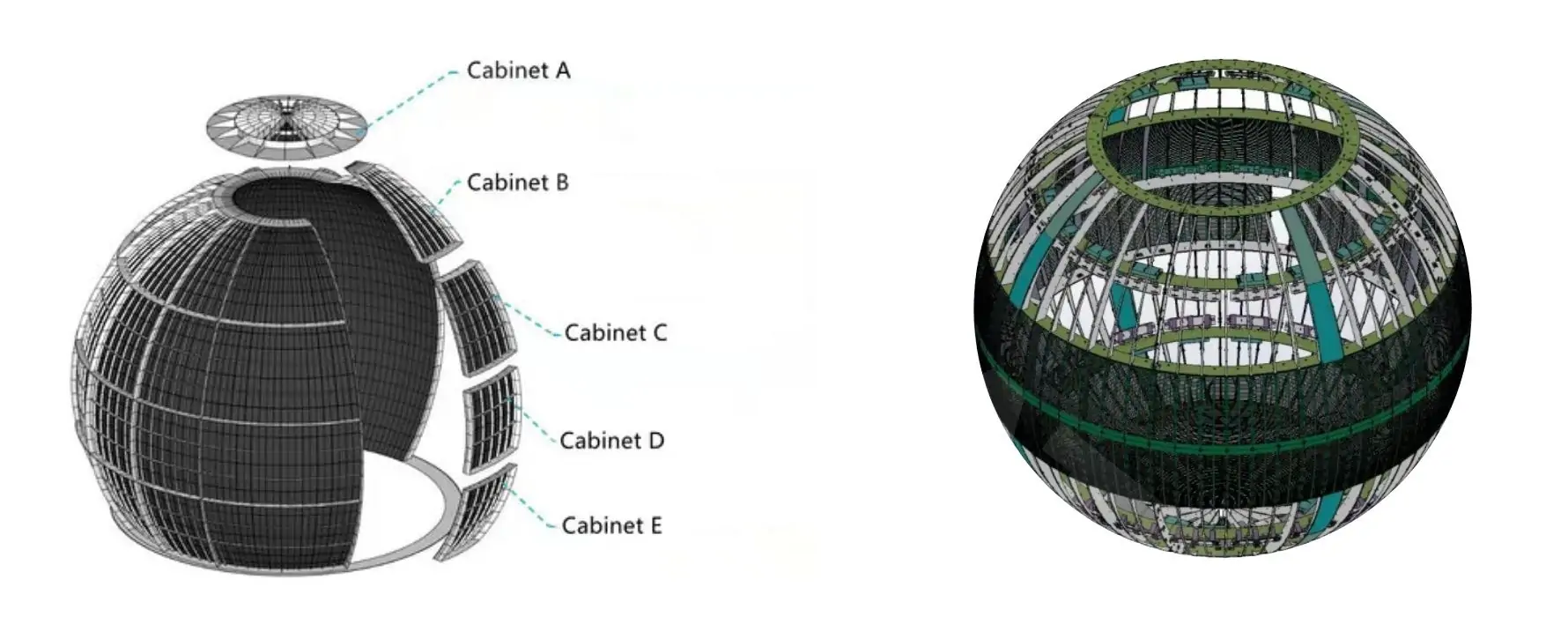
LED pixels are mounted on curved, flexible or faceted modules fixed to a shaped frame. A receiving system distributes pixel data, power supplies feed the modules, and a controller or media server converts source content into the screen’s native pixel map. The physical sphere is therefore only one part of the system. The bill of materials should identify the controller, sending and receiving cards, cabling, spare modules and access panels.
The frame must transfer weight to a rated support without deforming module joints. For a suspended sphere LED display, the structural engineer should verify the ceiling or truss, suspension points, safety cables, vibration and the combined weight of screen, rigging and power equipment. A freestanding sphere needs a stable base and visitor-clearance plan.
02. Spherical mapping and image quality
A rectangular video does not automatically look right on a sphere. Mapping software assigns source pixels to the curved surface, usually with an equirectangular, latitude-longitude, cube-map or custom UV workflow. Text placed near a pole can compress; a logo crossing a seam can distort. Ask for the pixel map, template, safe zones and a test animation before producing the final media.
A sphere LED display presents three-dimensional-looking imagery by wrapping animated content around a physical object. That is different from true volumetric or stereoscopic 3D. Claiming a hologram or glasses-free depth effect requires a specific demonstrated system. Visitors also see only the hemisphere facing them at any instant, even if the content wraps around the entire object.
3. Sphere LED Display Types and Best Uses
Choose construction by the required sightline, service method and viewing distance. A transparent version preserves some background visibility but has lower pixel fill and different contrast than a solid surface. An interactive sphere LED display adds a touch interface, external touchscreen, camera or sensor layer; interactivity is a separate system requirement, not an automatic property of LEDs.
| Format | Best fit | Main trade-off | Ask the supplier |
|---|---|---|---|
| Solid LED sphere | Bright lobbies, brand features, public circulation | Needs custom frame, mapping and service access | What percentage of the sphere is active and how are modules replaced? |
| Faceted LED sphere | Large diameters and modular fabrication | Flat facets can become visible at close range | What is the maximum visible gap and facet size? |
| Transparent LED sphere | Exhibits where sightlines through the object matter | Transparency reduces solid-image appearance | What are the measured transparency and contrast in the actual venue? |
| Interactive sphere | Museums, science centers and visitor activations | Requires sensors, software and ongoing content support | What input method and response time will be demonstrated? |
| Projection globe or dome | Controlled-light education and immersive rooms | Brightness and projector alignment depend on the environment | Has total cost of ownership been compared with LED? |
Some products use triangular tiles to approximate a spherical shell; others use flexible modules or multi-sided panels. The labels alone do not establish quality. Examine the prototype from the closest intended visitor position and from the side. Look for abrupt facet changes, dark seams, exposed fasteners and the amount of active area around poles.
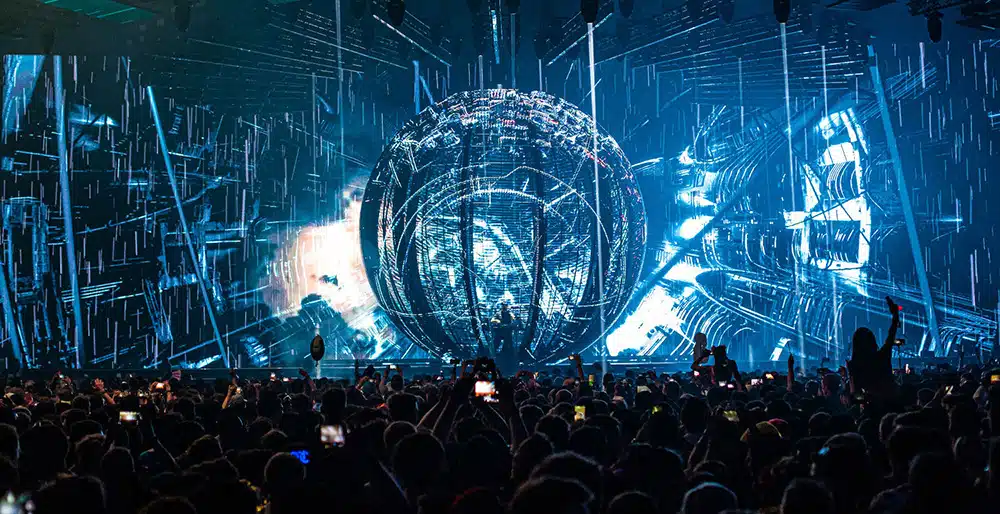
A transparent LED sphere can be effective when a window display or exhibition sightline must remain open. Check the background behind it during both day and night conditions; perceived contrast changes with ambient light.
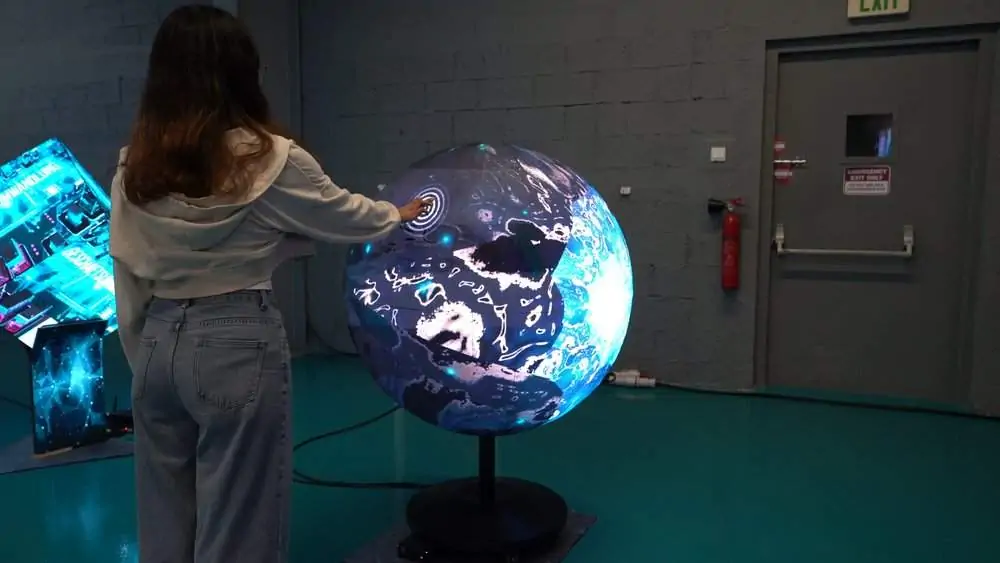
For an interactive sphere LED display in a museum, specify what the visitor actually does: touch the surface, use a nearby tablet, or trigger motion sensors. Define accessibility, reset behavior, content language and staff controls in the brief.
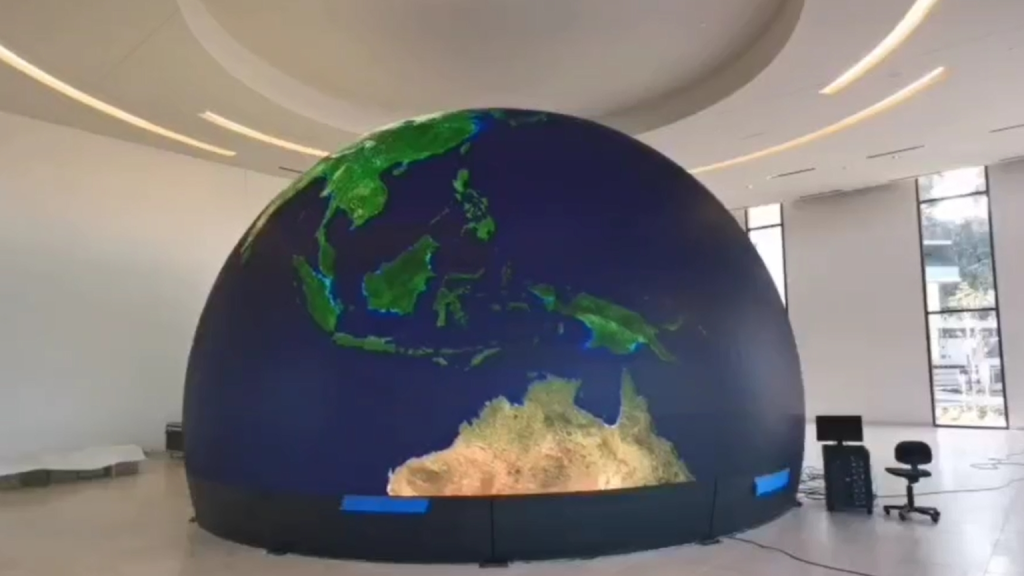
A hemisphere is useful where the audience sees the object from one side, but it is not a complete 360-degree sphere LED display. Confirm the edge treatment and mounting method.
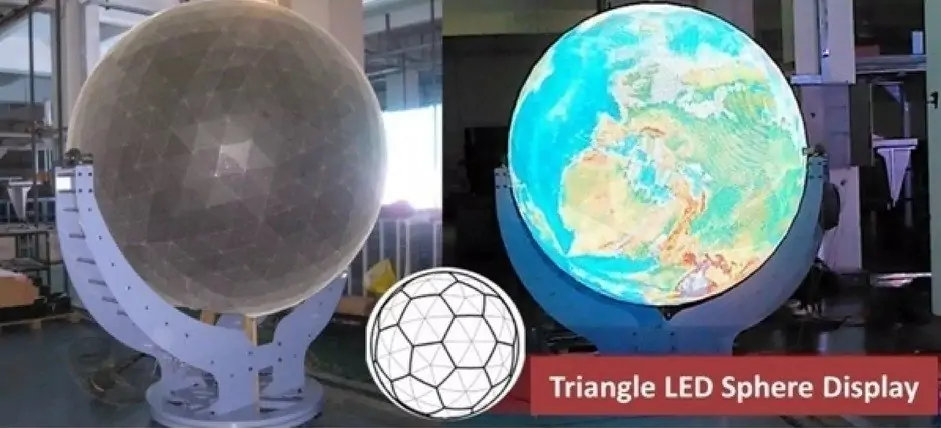
Triangular modules can reduce some geometric discontinuities, yet the finished effect still depends on pitch, seams and content mapping. Ask to see the exact module layout.
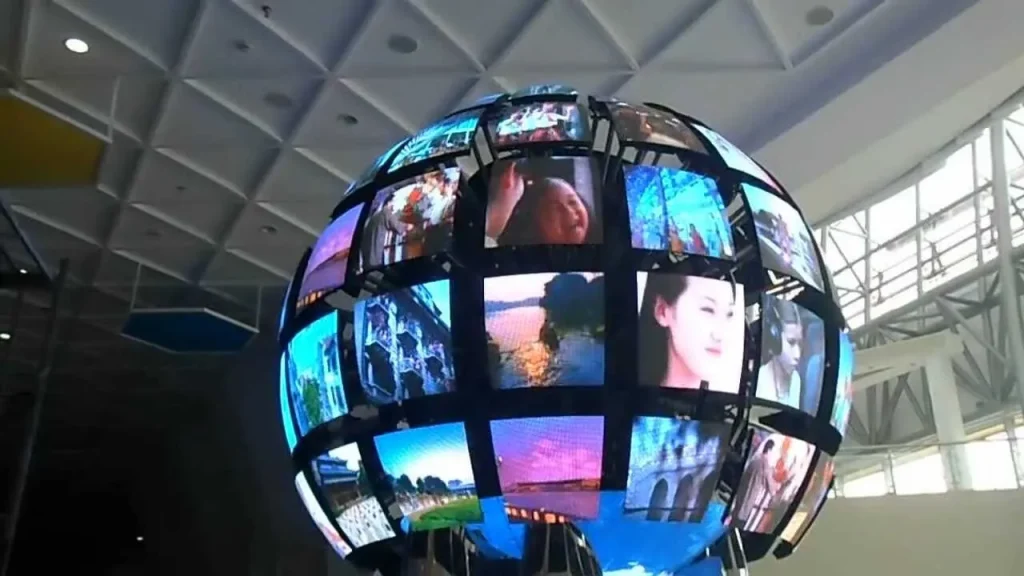
Multi-panel constructions can simplify fabrication. Request a close-up of a working joint and a service demonstration rather than relying on a rendering.
4. Sphere LED Display Specifications That Matter
01. Diameter, active area and pixel pitch
Start with the nearest and farthest viewer positions, the desired content and the maximum physical diameter. Pixel pitch is the center-to-center distance between adjacent pixels, measured in millimeters. A smaller pitch generally produces finer detail at close range but increases pixel count, controller capacity and cost. The simple sphere surface-area formula is A = π × D², where D is diameter in meters. This is an upper-bound geometric planning area; openings and non-display sections reduce the actual LED area.
As a rough planning check, pixel count is approximately active area divided by pitch squared after converting both to the same units. Real counts differ because modules, seams and polar geometry do not form a perfect square grid. Ask the manufacturer for the exact native pixel map, not just a P-number.
| Diameter | Full geometric area | At P2.5, theoretical pixels | At P4, theoretical pixels | Planning implication |
|---|---|---|---|---|
| 1 m | 3.14 m² | ~503,000 | ~196,000 | Close viewing may justify finer pitch. |
| 2 m | 12.57 m² | ~2.01 million | ~785,000 | Controller capacity and media workflow become significant. |
| 3 m | 28.27 m² | ~4.52 million | ~1.77 million | Structure, service and heat planning grow quickly. |
These figures assume full coverage and an ideal square pixel grid. A quote should state actual active area, exact pixel count, native canvas dimensions and any dark zones. For a museum where visitors stand close, test text and fine graphics at the planned distance. For a high atrium, a coarser pitch may deliver similar perceived quality without unnecessary pixels. The LED pixel pitch guide explains the flat-screen relationship between pitch and viewing distance; apply it to a sphere with the added curvature and seam checks.
02. Brightness, refresh, color and environment
Specify brightness in nits for the actual ambient light, plus a dimming range for evening operation. An indoor gallery should not be forced to run at outdoor brightness. An outdoor sphere LED display needs a site-specific daylight study, ingress protection at the assembled system level, drainage, corrosion planning and access for safe service. An IP rating for an individual module does not prove the entire installed assembly is weatherproof.
Ask for measured refresh rate under the proposed scan and camera conditions, grayscale performance at low brightness, color calibration procedure, viewing-angle limits and expected power draw at typical content. For filmed events, test with the real camera shutter and frame-rate settings. For public installation, request flame, electrical and structural documentation required by the local authority. Avoid treating a catalog maximum brightness or power figure as the everyday operating value.
5. Sphere LED Display Price: What a Quote Must Include
There is no reliable single price per square meter for every sphere LED display. A small indoor standard-diameter model and a large custom outdoor build have different module tooling, structure, electronics, freight and installation requirements. A published unit price may omit the engineering and media work that determines whether the installation succeeds. Compare complete project scope rather than a headline screen-only number.
| Cost line | Information to request | Common omission to catch |
|---|---|---|
| LED hardware | Diameter, active area, pitch, pixel count, module count, spares | Quote based on geometric area rather than lit area |
| Control and content | Processor, mapping license, player, templates, commissioning | Custom animation or interactive software excluded |
| Structure and rigging | Frame drawings, weight, suspension or base, safety hardware | Site engineering and lift equipment excluded |
| Power and network | Average/maximum load, distribution, cabling and redundancy | Venue-side electrical works excluded |
| Delivery and installation | Packaging, freight terms, customs, labor and training | Taxes, transport or on-site crew excluded |
| Support | Warranty coverage, response time, spare stock and software updates | Return shipping or travel excluded |
Send the same brief to each shortlisted supplier: intended venue, photos and drawings, diameter limit, closest viewer distance, target go-live date, indoor or outdoor conditions, mounting preference, content format and service constraints. Ask each supplier to identify assumptions and exclusions. If a price is unusually low, check whether the controller, mapping software, rigging, spare modules and local approvals are included.
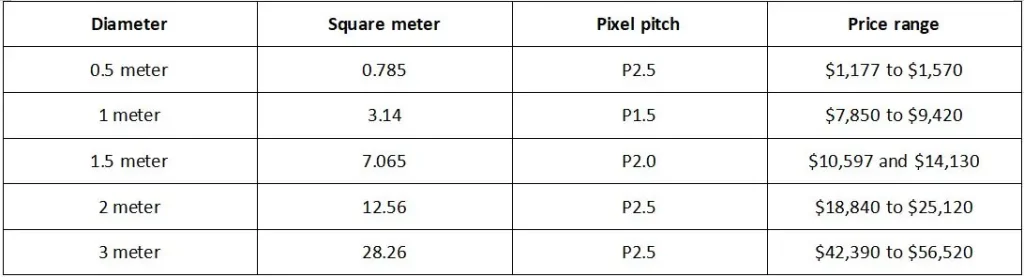
Use any size-and-price illustration as a conversation starter only. Current pricing must come from a dated, itemized proposal for the exact project.
6. How to Choose the Best Sphere LED Display
01. Match the sphere to the visitor journey
Write a one-page use case before selecting hardware. Describe who approaches the sphere LED display, where they stand, whether they can circle it, how long they view it and what information they should retain. A branded moving pattern tolerates lower detail than a scientific globe with labels. In a museum, legible labeling, accessible controls and reliable daily startup can matter more than the highest catalog resolution.
For an outdoor plaza, identify weather exposure, viewing distance, night brightness limits and maintenance access. For an exhibition, identify transport case dimensions, assembly time, recurring labor and the number of times the sphere will be rebuilt. A sphere intended for repeated rentals should be judged by handling durability and connector design as well as display quality.
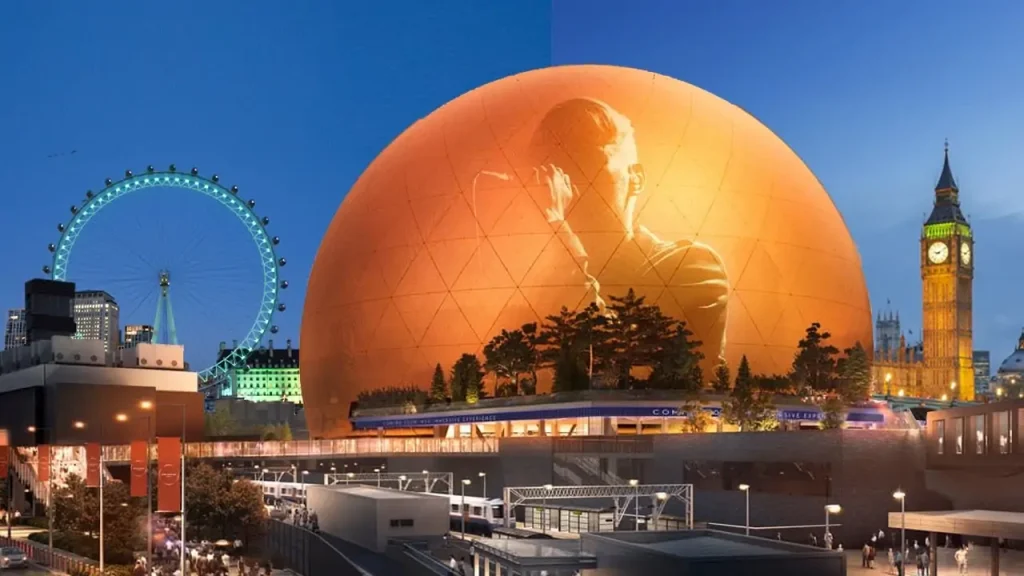
02. An indoor product example
For an indoor museum, exhibition hall or retail atrium, EagerLED’s EAiBall spherical LED display is one concrete configuration to evaluate. The published range offers P1.8 or P2.5 pixel pitch, diameters of 1, 1.5, 2, 2.5 and 3 m, front-service modules, and hanging, floor-standing or embedded installation. Its stated brightness is 500–700 cd/m², with refresh rate up to 3,840 Hz. These are product specifications, not proof that every size and pitch will suit every venue; request the exact active-area drawing, weight, native pixel map, and sample test for your selected configuration.
For an outdoor project, do not substitute this indoor model for a weather-engineered system. Request a separate design that addresses the complete assembly, support loads, drainage and local approvals.
03. Ask for evidence, not just a specification sheet
Request a working sample or factory acceptance video showing the exact pitch and construction. Include a slow solid-color sweep, low-gray ramp, white field, high-motion clip and your own mapped artwork. Inspect seam visibility, color consistency, polar distortion, flicker on camera, thermal behavior and startup time. Ask the supplier to remove and reinstall one module on camera.
Confirm the native content template, compatible media formats, control interfaces, training, warranty terms and spare-parts availability in writing. For custom projects, obtain engineering drawings and a signed acceptance test plan before fabrication. A practical supplier should explain limitations clearly, including dead zones, minimum viewing distance and how repairs affect the image.
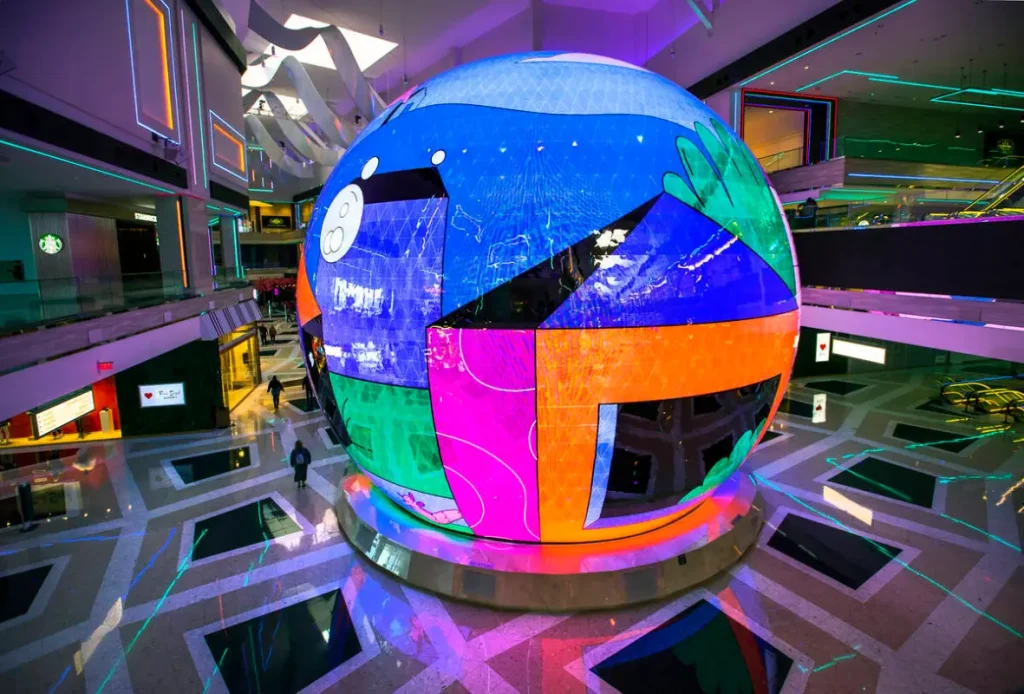
7. Content and Interactivity for a Sphere LED Display
Successful sphere content is designed for a curved, continuously viewed surface. Put critical logos and text in latitude bands visible from typical eye height. Keep fine type away from poles and leave margin around module seams. Loop length should fit dwell time: a quick retail encounter needs an immediately readable opening, while a museum demonstration can support a longer narrative. Test the creative on the exact pixel map before delivery.
For a museum exhibit, write a testable interaction brief: define whether visitors use a touch surface, companion screen or motion sensor; the languages and accessible controls required; the idle loop; simultaneous-use behavior; and what happens during a network outage. Ask the integrator to demonstrate each action on the actual sphere before acceptance. The LED hardware displays the result; the sensor, software and content workflow create the interaction.
Specify who owns the interactive software after launch, including content updates, backups, fault recovery, and support. An external integrator may supply this layer; identify that responsibility in the quotation rather than assuming it is included with the LED hardware.
For comparison, EagerLED’s EA-Flex flexible LED modules can follow curved structures, but a complete sphere LED display still needs a suitable radius, frame, controller and mapping plan. Its flexible LED display guide covers module bending and service questions in more detail. These resources help establish whether a custom curved build is feasible; they do not replace a sphere-specific engineering drawing.
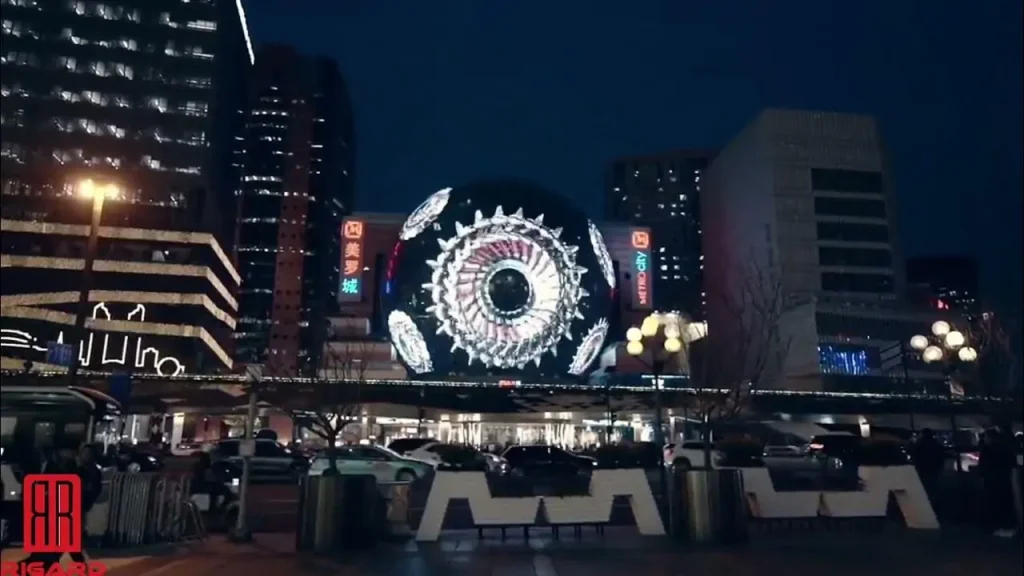
8. Sphere LED Display Installation and Maintenance
01. Installation sequence
First verify the venue dimensions, route into the building, structural load capacity, power and network points. Approve shop drawings showing the complete sphere LED display, mounting positions, module access and cable paths. During assembly, label every module and cable against the pixel map. Keep service openings reachable after the surrounding fit-out is complete. Then commission the controller, map content, calibrate color and brightness, and run a full-system burn-in under normal ventilation.
For a suspended screen, have the responsible engineer sign off on the rigging and any secondary safety retention. Keep visitors outside the lift zone during installation. An outdoor sphere also needs site-specific weather sealing, drainage and grounding checks. The installing contractor should provide as-built drawings, operating instructions and a spare-parts inventory.
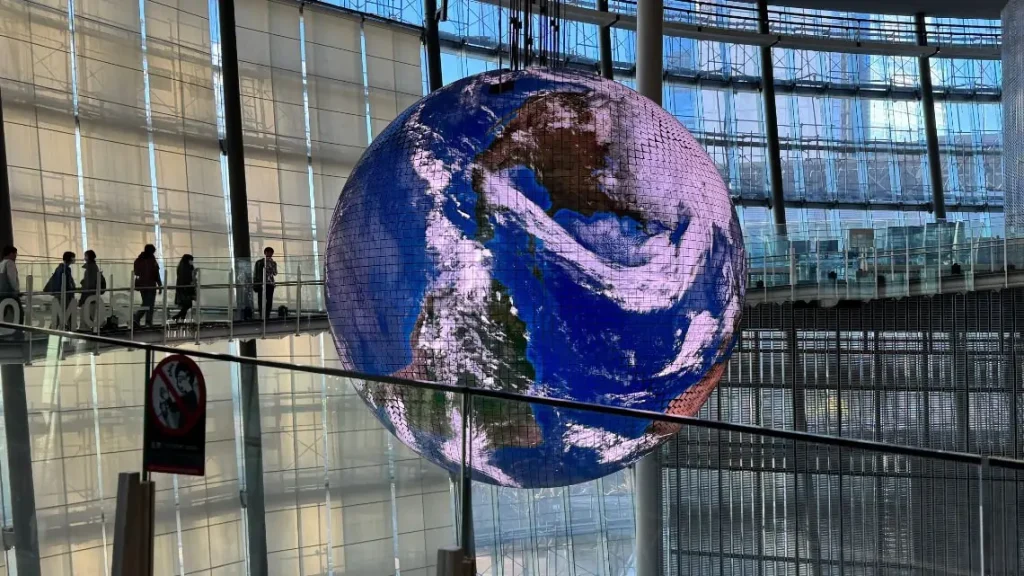
02. Maintenance plan
Schedule visual checks for damaged pixels, loose fasteners, blocked vents, water ingress and cable strain. Clean only by the manufacturer’s approved method; abrasive solvents, high-pressure water or direct spray can damage LED packages and seals. Record a baseline photo and calibration settings at handover so gradual color drift can be identified. Replace failed modules with matched spares and recalibrate the affected area when required.
Assign ownership for content backups, controller firmware, mapping files and emergency restart instructions. If the sphere LED display is the center of an exhibition, keep a fallback still or loop and an escalation contact so an outage does not leave a blank feature. Ask how quickly a technician can reach the service point without dismantling surrounding finishes.
9. Sphere LED Display Acceptance Checklist
Use a written factory and on-site acceptance test. This turns broad claims such as “seamless” or “high resolution” into observable outcomes. The limits below should be agreed in the purchase contract for the actual venue and content, not copied from another installation.
| Test | How to check | Record at handover |
|---|---|---|
| Geometry and coverage | Walk the planned viewing route; inspect poles, openings and joints | Approved active-area drawing and photos |
| Pixels and seams | Display solid colors, grid and moving edge patterns | Defect count, seam observations and repair plan |
| Content mapping | Run supplied logo, text and globe assets from multiple angles | Final pixel map, template and playback files |
| Brightness and color | Test in actual day and night lighting | Operating presets and calibration report |
| Power and thermal | Run representative content for an agreed period | Measured load, temperatures and alarms |
| Service and controls | Swap a module; restart player; simulate signal loss | Training record, spares and support contacts |
Once defects are resolved, archive the test media, firmware versions and approved settings. That record makes future maintenance and supplier discussions much easier.
Installation images are visual references. Confirm project-specific hardware and site conditions with the supplier.
10. Sphere LED Display FAQs
01. What is the difference between a sphere LED display and a projection globe?
A sphere LED display is self-emissive: LEDs on the outer surface create the image. A projection globe uses one or more projectors and a passive spherical surface. LED generally handles ambient light differently, while projection may suit dark educational spaces. Compare full equipment, content and maintenance costs.
02. Which pixel pitch should I choose for a sphere LED display?
Choose pitch from the nearest real viewing distance and the smallest content detail that must remain readable. Test a sample at that distance. Ask for the exact native pixel count and active-area drawing, because a sphere’s seams and poles complicate simple pitch calculations.
03. Can a sphere LED display be used outdoors?
Yes, if the complete design is engineered for weather, wind, temperature, power safety and service access. Verify ingress protection at joints and connectors, not only at the module. Obtain local structural and electrical approval before installation.
04. How much does a sphere LED display cost?
Price depends on diameter, pitch, construction, controller, mapping, rigging, freight, installation and support. Request a dated, itemized quote for the exact site. A screen-only price per square meter is insufficient for budgeting a complete project.
05. Is an interactive sphere LED display touch sensitive?
Only when the specified solution includes an appropriate touch or sensor system. Many interactive installations use an external touchscreen, camera or motion sensor instead of direct touch on the LED surface. Define the interaction and accessibility requirements before ordering.
06. How do I maintain a sphere LED display?
Keep matched spare modules, document the pixel map, inspect ventilation and joints, use approved cleaning methods and retain controller backups. The supplier should demonstrate the replacement procedure and provide a realistic service response plan.
11. Conclusion: Specify the Sphere LED Display as a System
The best sphere LED display is the one that fits the audience, venue and content brief. Compare active area, pixel pitch, mapping, structure, power, service access and total project scope together. A convincing demonstration at the real viewing distance is more useful than a long list of untested specifications.
For a custom sphere LED display, send suppliers the site drawing, diameter limit, viewing distances, application, mounting plan and sample content. Ask for an itemized proposal and an acceptance plan. For a standard indoor starting point, review the EAiBall product range. If you are considering a flexible-module build, review the EA-Flex product details and contact EagerLED with those project requirements so the engineering team can assess a suitable solution.