Last reviewed: August 21, 2026. This guide separates published FIFA and IEC guidance from model-specific EagerLED examples. Product values are planning references; the final stadium LED display specification must be validated for the venue, local regulations, structural loads, broadcast workflow, and operating environment.
To choose an outdoor stadium LED screen, start with the screen’s job, not its maximum brightness or lowest pixel pitch. First decide whether the display will serve as a main video board, scoreboard, perimeter advertising board, or ribbon board. Then match nine factors to that location: pixel pitch, brightness, refresh rate, ingress protection, impact safety, viewing angle, maintenance access, control infrastructure, and lifecycle cost.
For a broadcast venue, do not approve a screen from a specification sheet alone. Test representative cabinets in the actual light, verify them with the production cameras, and have the mounting structure reviewed for the site’s loads and access requirements.
Quick answer: A suitable stadium screen is the lowest-cost system that remains readable from the intended seats, looks clean on the venue’s cameras, survives the environment and impact risk, and can be maintained without disrupting events.
Stadium LED Screen Selection Checklist
| Decision | Planning question | Approval evidence |
|---|---|---|
| Screen role | Main video board, scoreboard, perimeter board, ribbon board, or concourse display? | Content list, dimensions, seating plan, and system diagram |
| Pixel pitch | Can the nearest priority viewer read real content without paying for invisible extra resolution? | Full-size content demonstration at actual viewing distances |
| Brightness and contrast | Will content remain readable in direct sun and comfortable at night? | Day/night presets, low-brightness grayscale test, and sensor override test |
| Camera performance | Will broadcast and slow-motion cameras show flicker, banding, moire, or color shift? | Recorded test with the final controller, scan configuration, and camera settings |
| Weather protection | Are the rated cabinet faces suitable for dust, water, heat, corrosion, and condensation? | Model-specific IP and environmental test reports |
| Impact safety | Could players, balls, staff, or spectators contact the display? | Soft protection, covered edges, stable support, and site-specific impact review |
| Viewing coverage | Does every priority seating zone receive acceptable brightness, color, and sightlines? | Viewing-envelope study using the stadium seating plan |
| Service and resilience | Can critical parts be reached safely, and what happens after a power, data, or controller failure? | Maintenance method, spare-parts plan, failover test, and operator procedure |
| Lifecycle cost | What will the complete system cost to install, operate, maintain, and support? | Itemized bid, power tests, warranty terms, response times, and acceptance criteria |
Procurement rule: do not approve an outdoor stadium LED screen from a data sheet alone. The winning bid should pass venue-specific viewing, camera, safety, environmental, power, service-access, and failover tests.
Table of Contents
- Quick selection checklist
- Define the screen’s job
- Choose the stadium screen type
- Match pixel pitch to viewing distance
- Set brightness and contrast for the location
- Specify refresh rate for cameras and live action
- Check weather, heat and impact protection
- Confirm viewing angle and screen placement
- Plan mounting, maintenance and control systems
- Compare lifecycle cost and supplier evidence
- Common selection mistakes
- Frequently asked questions
1. Define the Screen’s Job
FIFA’s stadium guidance says larger stadiums should provide giant video screens to communicate team line-ups, show match highlights, display advertising, and make announcements. Those functions place different demands on the hardware and control system. A scoreboard showing large numbers is not specified in the same way as a main board showing close-up video, and neither is the same as a pitch-side board exposed to ball and player impact.
Before requesting a quotation, document:
- The screen location and primary content.
- The nearest, typical, and farthest viewing distances.
- Whether the screen will appear in live broadcast or slow-motion footage.
- Daylight, floodlight, rain, dust, temperature, and salt-air exposure.
- Mounting limits, wind load, maintenance access, power, and data routes.
- Required uptime, redundancy, warranty, spare parts, and service response.
Without this brief, suppliers may quote technically different systems that cannot be compared fairly.
2. Choose the Stadium Screen Type
| Screen type | Primary use | Main specification priorities |
|---|---|---|
| Main video board | Live video, replay, scores, fan content | Resolution at actual viewing distance, brightness, camera performance, redundancy |
| Scoreboard | Score, time, statistics | Legibility, control-system integration, reliability |
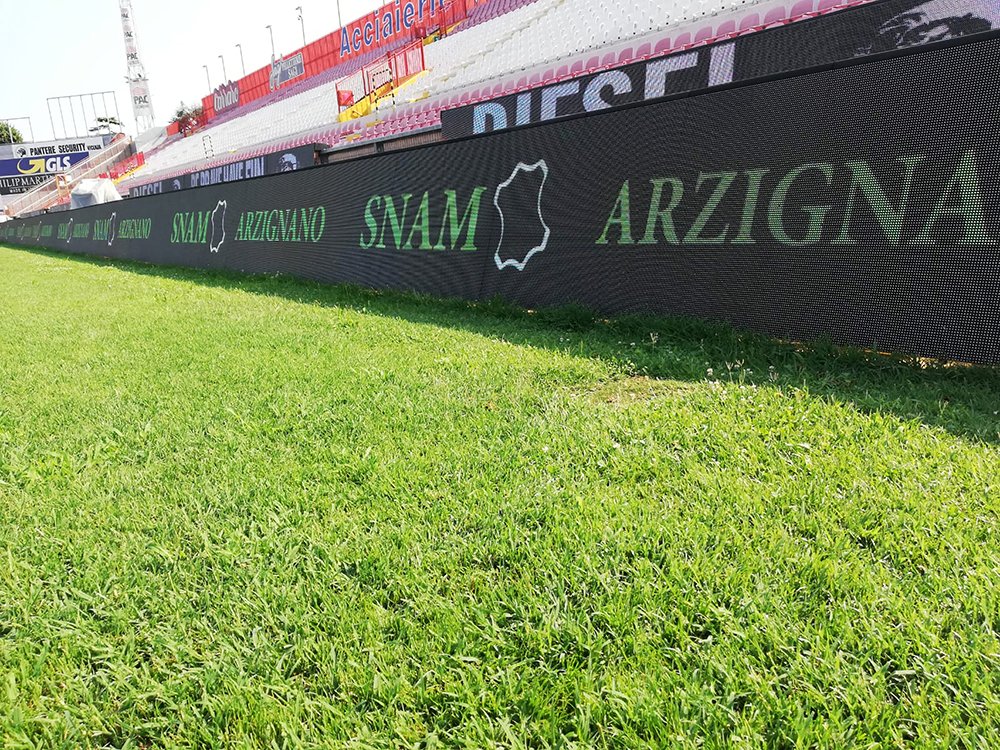
| Perimeter LED board | Sponsor content beside the field | Impact-safe front, stable support, weather protection, camera performance |
| Ribbon or fascia board | Long-format advertising and crowd graphics | Wide viewing coverage, content mapping, consistent color |
| Concourse or entrance display | Wayfinding, announcements, concessions | Closer-view pixel pitch, indoor brightness, service access |
A venue may need several screen types connected to one content and emergency-message workflow. Define which systems must continue operating if a signal path, controller, or power circuit fails.
3. Match Pixel Pitch to Viewing Distance
Pixel pitch is the center-to-center distance between adjacent pixels, measured in millimeters. A smaller pitch places more pixels in the same area and can improve close-range detail, but it also increases LED count, data load, power design complexity, and cost.
Use this as a planning matrix, not a final engineering specification:
| Typical application | Practical starting range | Verify before approval |
|---|---|---|
| Indoor arena or close concourse viewing | P2.5-P5 | Nearest seat, text size, content resolution |
| Main outdoor video board | P6-P10 | Board dimensions, farthest seat, camera framing |
| Pitch-side perimeter or ribbon board | P6-P10 | Camera distance, board height, sponsor artwork |
| Very long-distance auxiliary display | P10 or wider | Character height and real content test |
Do not use a one-line rule such as minimum viewing distance equals pixel pitch as the only decision method. The result also depends on screen size, content design, visual acuity, sightlines, and whether viewers need to read text or watch full-screen video. Ask each shortlisted supplier to demonstrate the proposed pitch with the venue’s real scoreboard and advertising content.
4. Set Brightness and Contrast for the Location
Outdoor displays need enough luminance to remain readable in daylight, while indoor screens and night-time operation need controlled output to avoid glare and crushed detail. Peak brightness alone does not guarantee a good image. Contrast, black level, louver design, color calibration, grayscale performance, and automatic dimming all matter.
As an example of first-party product data, EagerLED lists its EA960SP4 perimeter stadium display at 6,000 cd/m2. Treat that figure as a model specification, not a universal requirement. The correct project value should be confirmed against the screen orientation, local sunlight, roof shading, floodlights, night-time limits, and camera exposure.
Request these tests:
- Full-white and typical-content power measurements.
- Day and night luminance presets.
- Low-brightness grayscale and color consistency.
- Viewing under floodlights and direct sun where applicable.
- Automatic brightness sensor behavior and manual override.
5. Specify Refresh Rate for Cameras and Live Action
Refresh rate describes how often the LED display redraws the image. Insufficient camera performance can produce scan lines, flicker, banding, color shift, or artifacts that are not obvious to a spectator but become visible in broadcast footage.
EagerLED lists a 3,840 Hz refresh rate for the EA960SP4. For a venue that will be televised, use that kind of camera-oriented specification as a procurement starting point, then validate the complete system with the actual production workflow. A high number on a controller data sheet is not enough.
The acceptance test should cover:
- Broadcast frame rates and shutter settings used by the production team.
- Slow-motion and high-speed cameras where applicable.
- Bright and dark content at day and night luminance presets.
- Genlock, frame synchronization, processing delay, and signal failover.
- Moire risk at normal camera positions and focal lengths.
Record the approved controller, receiving card, firmware, scan configuration, and calibration file so later maintenance does not change the validated result.
6. Check Weather, Heat and Impact Protection
The International Electrotechnical Commission explains that IEC 60529 classifies how enclosures resist dust and liquid ingress. In an IP code, each digit has a specific meaning; for example, IP65 indicates a dust-tight enclosure and protection against water jets. Always confirm which face of the cabinet carries the rating and request the relevant test documentation.
Outdoor stadium projects should also evaluate:
- Operating and storage temperature ranges.
- Drainage, condensation control, ventilation, and heat dissipation.
- UV, corrosion, salt mist, and wind-driven rain exposure.
- Flame performance and local electrical/fire requirements.
- Cabinet sealing after repeated module replacement.
- Surge protection, grounding, lightning protection, and emergency isolation.
Pitch-side perimeter boards add a human-safety requirement. FIFA’s pitch-area guidance notes that the active LED board is commonly around 0.9 m high, but the final layout must follow the governing competition, venue, and safety requirements. Require soft front protection, covered edges, a stable support structure, and an impact assessment appropriate to players and balls. These features should be demonstrated, not accepted from a marketing image.
7. Confirm Viewing Angle and Screen Placement
A stadium audience is distributed across different tiers and lateral angles. Specify the required horizontal and vertical viewing envelope from a seating plan, then test image brightness and color at the edge of that envelope.
Check that the proposed position does not:
- Obstruct spectator sightlines, accessibility routes, cameras, or emergency exits.
- Create glare for players, officials, nearby residents, or road users.
- Conflict with scoreboards, advertising inventory, roof structures, or field lighting.
- Place critical content outside the comfortable viewing direction of major seating zones.
A wide-angle LED module cannot correct a poorly positioned screen. Placement, elevation, tilt, content safe zones, and the physical LED viewing characteristics must be evaluated together.
8. Plan Mounting, Maintenance and Control Systems
The display is one part of a larger system. Before choosing front service or rear service, document how a technician will reach every module, power supply, receiver card, fan, and cable after installation. Include safe working space, lifting access, spare cabinet handling, and the maximum permitted repair time during an event.
FIFA’s information-technology guidance says larger stadiums hosting live broadcasts should consider 99.999% backbone network resilience so that a single failure affects only an isolated part of the venue. Apply that principle to the LED display signal path: document redundancy, failure domains, failover time, and the operator response.
The technical design should also cover:
- Structural engineering and site-specific loads.
- Power distribution, consumption limits, grounding, and monitoring.
- Fiber/data routes, processors, senders, receivers, and signal redundancy.
- Integration with score data, live video, advertising, CMS, and emergency messages.
- Spare parts, calibration management, remote diagnostics, and maintenance logs.
For critical screens, define what happens after a controller, receiving card, fiber link, or power circuit fails. Redundancy has value only when the failover behavior is tested and operators know how to use it.
9. Compare Lifecycle Cost and Supplier Evidence
Compare bids on total lifecycle cost, not cabinet price alone. Ask suppliers to separate the costs of LED cabinets, structure, processors, cabling, power distribution, installation, commissioning, calibration, spares, training, warranty service, and expected maintenance.
Use this supplier evidence checklist:
- A model-specific data sheet and bill of materials.
- Test reports for claimed ingress, safety, EMC, and electrical performance.
- Camera test using the final control configuration.
- Full-white and typical-content power figures with test conditions.
- Original stadium case studies with project date, location, screen area, pitch, and photos.
- Written warranty scope, exclusions, response times, and spare-part availability.
- A factory acceptance test and site acceptance test with pass/fail criteria.
EagerLED’s stadium display and EA960SP4 product pages provide model and configuration examples. Before purchase, request a comparable stadium reference with the project date, location, screen area, pixel pitch, installation challenge, acceptance method, and current operating status. If those details cannot be verified, do not treat a generic project photo as evidence.
Common Stadium LED Display Selection Mistakes
Buying the smallest pixel pitch by default
A finer pitch may add cost without adding visible value at the actual seat distance. Test real content from the nearest and farthest priority seats.
Choosing peak brightness without dimming performance
A screen that looks powerful at noon can look harsh at night. Evaluate contrast and grayscale at every operating preset.
Treating refresh rate as a single-number guarantee
Camera results depend on the complete processing, scan, firmware, brightness, and camera configuration. Require a recorded test.
Ignoring maintenance access
A low cabinet price can be offset by difficult access, long outages, and expensive labor. Review the repair path before approving the mounting design.
Accepting generic certifications
Confirm that certificates and test reports apply to the exact cabinet, module, power supply, and configuration being quoted.
Frequently Asked Questions
What pixel pitch is suitable for a stadium LED display?
The right pixel pitch depends on the nearest viewing distance, screen dimensions, content, and camera use. P6-P10 is a practical starting range for many large outdoor boards, while closer indoor viewing may justify P2.5-P5. Confirm the choice with full-size content at the venue’s real viewing distances.
How bright should an outdoor stadium LED screen be?
There is no single correct brightness for every stadium. Orientation, direct sunlight, roof shading, local rules, night operation, contrast, and camera exposure all affect the requirement. Specify automatic and manual dimming, then test both daylight and night presets.
Is 3,840 Hz necessary for a stadium screen?
It is a common camera-oriented target and is listed for EagerLED’s EA960SP4, but the final decision should come from a camera acceptance test. Refresh rate alone does not guarantee flicker-free broadcast footage.
What IP rating should an outdoor stadium display have?
IP65 is commonly specified for exposed outdoor LED enclosures. Under IEC 60529, it denotes dust-tight construction and protection against water jets. Confirm the rating for the relevant cabinet faces and review the model-specific test report and site conditions.
What should a stadium LED display quotation include?
It should include cabinets, modules, processors, structure, power distribution, data cabling, installation, commissioning, calibration, spare parts, training, warranty, service response, and acceptance testing. Compare lifecycle scope, not only price per square meter.
Plan the Specification Before Requesting a Quote
Send EagerLED the venue drawings, screen location, dimensions, viewing distances, content types, broadcast requirements, environmental conditions, maintenance constraints, and control-system requirements. A useful proposal should explain why each specification fits the project and define how it will be tested before handover.
Request a Stadium LED Display Specification and Quote
Explore EagerLED: Review our stadium LED display solutions, stadium LED screen solution, stadium LED display cases, or contact our project team.