Choosing the right LED video processor is essential for achieving stable image quality and reliable LED screen performance. The NovaPro HD, developed by NovaStar, is an all-in-one LED video processor that combines video scaling, seamless switching, and LED control functions in a single 2U rack-mounted device.
With support for multiple input sources, 4 Gigabit Ethernet outputs, 4 optical fiber outputs, 2.35 million pixel loading capacity, GenLock synchronization, and DMX512 control, the NovaPro HD is designed for professional applications such as rental LED screens, live events, broadcast productions, corporate AV systems, and commercial LED video walls.
In this NovaPro HD review, we will cover its key features, complete specifications, setup process, real-world applications, and comparison with other NovaStar processors, including the VX1000 and NovaPro UHD series, to help you decide whether it is the right solution for your LED display project.
Table of Contents
1.What Is NovaPro HD?
1.1 Overview of NovaPro HD
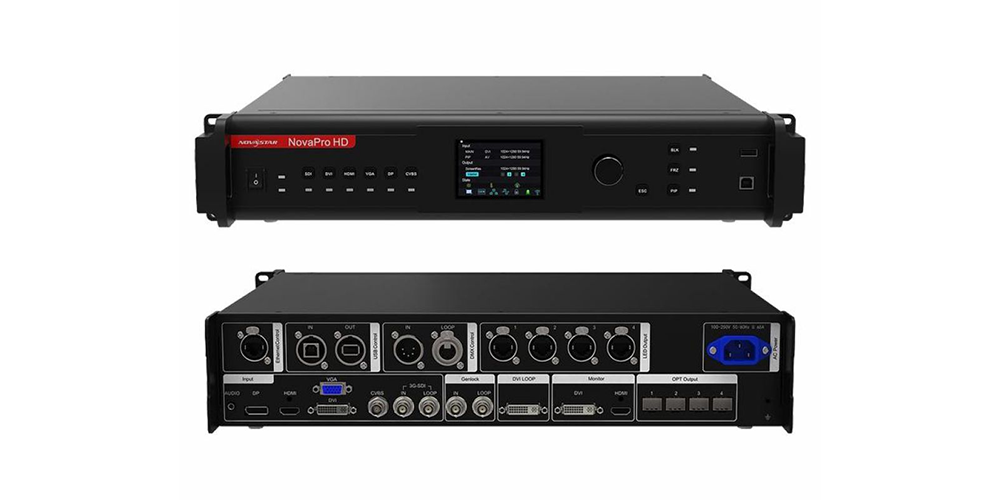
The NovaPro HD is a professional all-in-one LED display controller and video processor developed by NovaStar, the dominant force in LED control systems. Unlike traditional setups that require a separate scaler, switcher, and sending card, it integrates all three functions into a single chassis — input routing, image processing, scaling, and LED screen output management happen inside one device.
1.2 What Does NovaPro HD Do?
At its core, the processor handles four tasks:
- Receives video signals:from up to six sources simultaneously — cameras, media servers, laptops, or legacy composite feeds.
- Processes and scales images:in real time, applying de-interlacing, motion-adaptive processing, color correction, and cropping before the signal reaches the LED panels.
- Manages LED screen output:through four Gigabit Ethernet ports and four optical fiber ports, mapping processed video to physical cabinets with customizable resolutions up to 3840 × 1920 pixels.
- Improves image quality:with per-input adjustments for contrast, brightness, hue, saturation, and RGB gain — no external color corrector needed.
1.3 Who Should Use NovaPro HD?
The NovaPro HD is built for professionals who need reliable video-to-LED processing without a rack full of separate components:
(1)Rental LED screen companies — all-in-one form factor for fast deployment and teardown
(2)Event production teams— concerts, festivals, and live broadcasts where signal stability is critical
(3)AV integrators — fixed installations for corporate lobbies, houses of worship, and conference centers
(4)Commercial LED display installers— digital signage and advertising walls requiring day-in, day-out reliability
2.NovaPro HD Specifications
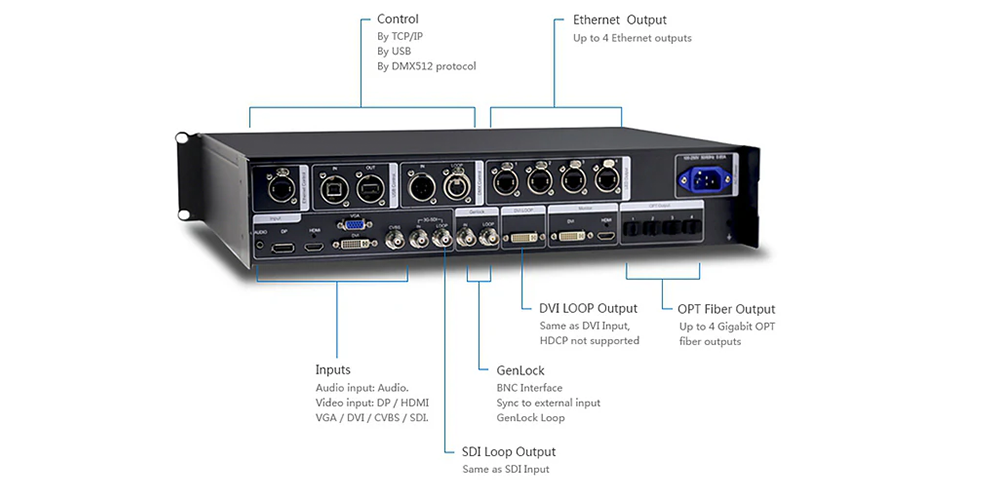
Before choosing an LED video processor, it’s important to understand its hardware capabilities. The table below summarizes the key NovaPro HD specifications, including video inputs, output capacity, control interfaces, and physical dimensions.
| Category | Specification |
| Brand | NovaStar |
| Model | NovaPro HD |
| Device Type | All-in-one LED video processor and controller |
| Video Inputs | 1× DisplayPort, 1× HDMI 1.3, 1× DVI, 1× VGA, 1× CVBS, 1× 3G-SDI |
| Maximum Input Resolution | Up to 1080p @ 60Hz (digital inputs) |
| Pixel Clock | 165 MHz |
| Ethernet Outputs | 4× RJ45 Gigabit Ethernet (Port 1 supports audio via multifunction card) |
| Fiber Outputs | 4× Optical fiber outputs for long-distance transmission |
| Monitoring Outputs | 2× DVI, 1× HDMI |
| Loop Outputs | 1× DVI Loop, 1× SDI Loop |
| Maximum Loading Capacity | 2.35 million pixels |
| Maximum Width | 3,840 pixels |
| Maximum Height | 1,920 pixels |
| Output Bandwidth | 4 Gbit/s |
| Control Interfaces | USB Type-B, LAN (RJ45), Web Browser, Touch Track Knob |
| Control Software | NovaLCT (Windows), Web-based Configuration |
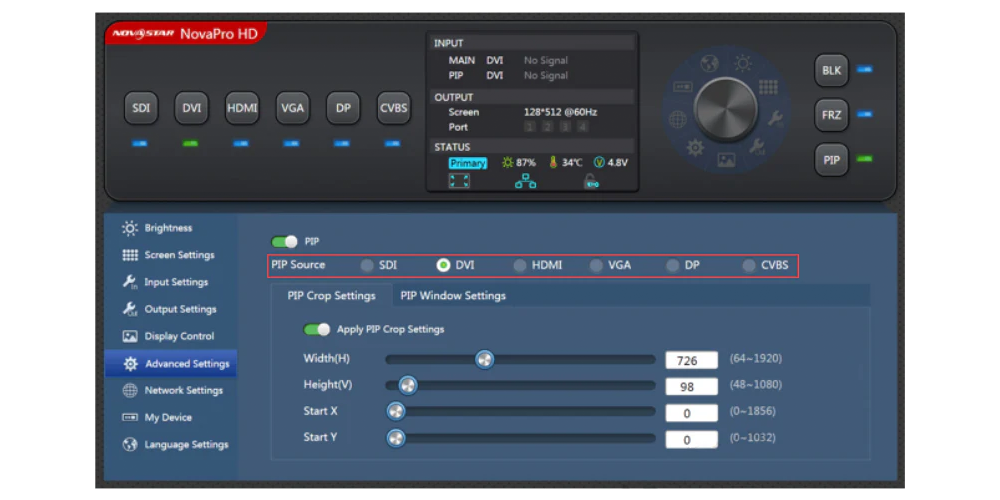
| Video Processing Features | Picture-in-Picture (PiP), Seamless Switching, EDID Management, De-interlacing, Motion-Adaptive Processing, Crop Settings |
| Synchronization | GenLock Input & Loop |
| Lighting Control | DMX512 (16 Channels) |
| Audio Input | 3.5 mm Stereo |
| Power Supply | AC 85–265V, 50/60Hz |
| Maximum Power Consumption | 30 W |
| Dimensions (Rack Mount) | 483 × 389 × 88.2 mm (19 × 15.3 × 3.5 in) |
| Dimensions (Without Rack Ears) | 443 × 321.5 × 88.2 mm |
| Weight | Approximately 6 kg (13.2 lb) |
| Enclosure | 2U Rack-Mount Aluminum Chassis |
| Operating Temperature | -20°C to 60°C (-4°F to 140°F) |
| Certifications | CE, RoHS, FCC, UL, EAC |
3.NovaPro HD Key Features Review
3.1 High-Quality Video Processing
One of the biggest strengths of the NovaPro HD is its image processing capability. It supports motion-adaptive de-interlacing for interlaced video sources, such as 1080i SDI camera feeds, helping produce smoother and cleaner images with fewer visual artifacts.
The processor also offers flexible image scaling, allowing content to be displayed at its native resolution or scaled to fit the entire LED screen. In addition, each input can be adjusted independently for brightness, contrast, hue, saturation, and RGB gain, making it easier to achieve consistent image quality across different video sources.
These features make the NovaPro HD well suited for live events, conference rooms, broadcast environments, and commercial LED display installations.
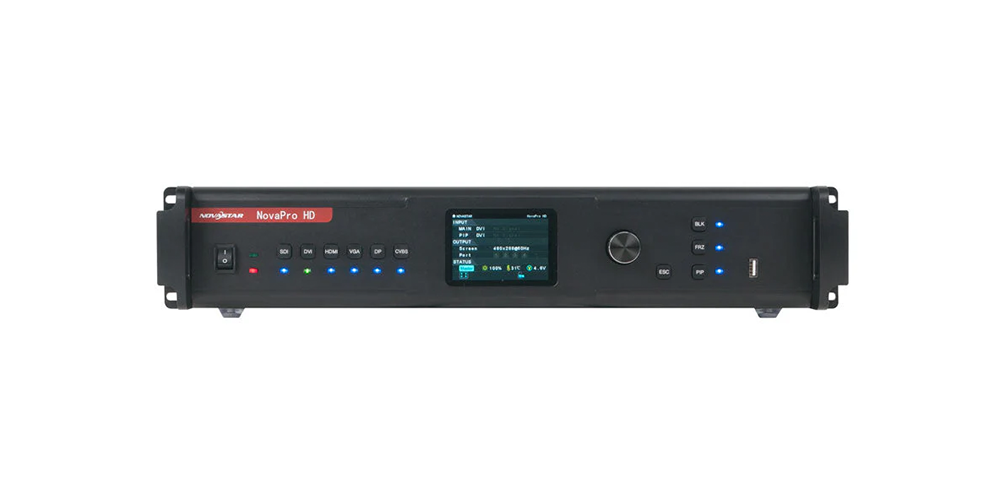
3.2 Multiple Video Input Options
The NovaPro HD supports a wide range of input interfaces, making it compatible with both modern and legacy video equipment.
| Input | Typical Application |
| DisplayPort (DP) | High-resolution PC and workstation outputs |
| HDMI 1.3 | Laptops, media players, presentation systems |
| DVI | Desktop computers and backup signal sources |
| VGA | Older computers and legacy devices |
| CVBS | Analog cameras and legacy AV equipment |
| 3G-SDI | Broadcast cameras, switchers, and production systems |
3.3 Powerful LED Screen Loading Capacity
The NovaPro HD supports a maximum loading capacity of 2.35 million pixels, making it suitable for most small and medium-sized LED display projects.
With a maximum resolution of 3,840 × 1,920 pixels, the processor can drive a variety of screen layouts, including standard 16:9 displays, ultra-wide LED banners, and portrait-oriented video walls.
Its four Gigabit Ethernet ports distribute data efficiently across the display, while NovaLCT software allows precise cabinet mapping and screen configuration. For larger installations, multiple processors can be cascaded to expand the overall loading capacity.
3.4 Easy Setup and Control with NovaLCT
The NovaPro HD is configured using NovaLCT, NovaStar’s professional LED display management software.
Key functions include:
- Mapping receiving cards to LED cabinets
- Configuring cabinet size, pixel pitch, and scan mode
- Adjusting brightness and color calibration
- Updating firmware for processors and receiving cards
- Saving and recalling screen configuration presets
The processor also features a built-in Touch Track knob for quick operation without a computer. Users can switch input sources, adjust brightness, and recall presets directly from the front panel. In addition, the integrated web interface allows remote configuration through a standard web browser, making on-site adjustments more convenient.
3.5 Designed for Professional LED Applications
The NovaPro HD applications cover a wide range of professional LED display projects, from rental LED screens and stage productions to corporate AV systems and commercial LED video walls. Its flexible video inputs, reliable signal processing, and easy system integration make it suitable for both temporary events and permanent installations.
The processor supports an operating temperature range of -20°C to 60°C, making it suitable for both indoor installations and outdoor events.
Additional professional features include:
- GenLock synchronizationfor broadcast and live production
- DMX512 controlfor integration with lighting systems
- Stable operation for rental LED screens and permanent installations
- Reliable performance during conferences, concerts, exhibitions, and sports events
These capabilities make the NovaPro HD a practical choice for professional LED display systems that require dependable image processing and flexible signal management.
4.NovaPro HD Setup Guide: How to Configure NovaPro HD
Setting up the NovaPro HD is straightforward if you follow the correct sequence. The guide below covers the basic configuration process for a typical LED display system using NovaLCT.
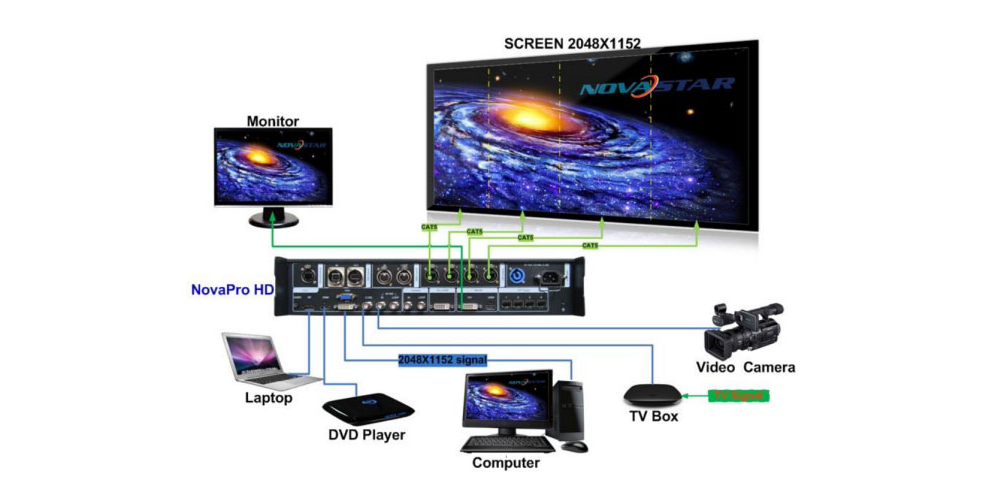
Step 1: Connect Your Video Sources
Connect your video devices to the appropriate input ports on the rear panel.
| Input | Typical Source |
| HDMI | Laptop, media player, presentation system |
| 3G-SDI | Broadcast camera or video switcher |
| DisplayPort (DP) | Workstation or backup media server |
| DVI / VGA | Desktop computer or legacy device |
The NovaPro HD automatically detects active input signals. If a source is not recognized, verify the cable connection and check the EDID settings in NovaLCT to ensure the output resolution matches the source device.
Step 2: Connect the LED Display
After connecting the video sources, connect the processor to the LED display.
- Connect Cat6 Ethernet cablesfrom the RJ45 output ports to the LED receiving cards.
- For long-distance transmission, connect optical fiber cablesto the fiber output ports.
- Power on the NovaPro HD first, then turn on the LED display cabinets.
If your project requires redundancy, you can connect a backup processor using the DVI Loop or SDI Loop outputs.
Step 3: Configure the Input and Output Resolution
Open NovaLCT and configure the video resolution.
- Verify that the detected input resolution matches the source device.
- Set the output resolution to match the native resolution of the LED display.
- Enable Point-to-Point Displaywhenever possible for the sharpest image quality.
- Configure Picture-in-Picture (PiP)if multiple video sources need to be displayed simultaneously.
Step 4: Configure LED Screen Parameters
In the Screen Configuration section of NovaLCT, complete the following settings:
- Enter the LED cabinet resolution.
- Select the correct pixel pitch(such as 5, P2.6, or P3.91).
- Configure the appropriate scan modebased on the receiving card.
- Set the desired refresh rate(3840 Hz is recommended for camera-facing applications).
- Map each Ethernet output to the correct cabinet layout.
Before saving the configuration, run several test patterns (white, RGB colors, and grayscale) to verify that all cabinets display correctly.
Step 5: Save the Configuration and Perform Final Testing
Once the setup is complete:
- Save the configuration to the processor.
- Create a backup configuration file on your computer.
- Run built-in test patterns to check color consistency and panel uniformity.
- Switch between different input sources to confirm stable signal transmission.
- If the LED wall will be used for broadcasting, verify GenLock synchronization.
- Test DMX512 controlif the processor is integrated with a lighting system.
After testing, lock the front panel to prevent accidental changes during operation. The NovaPro HD automatically stores the latest configuration, allowing the system to recover quickly after a power restart.
5.NovaPro HD vs. VX1000: Which NovaStar Video Processor Should You Choose?
The table below highlights the key differences between the two models.
| Feature | NovaPro HD | VX1000 |
| Device Type | All-in-one LED Video Processor & Controller | All-in-one LED Controller |
| Video Inputs | DisplayPort, HDMI 1.3, DVI, VGA, CVBS, 3G-SDI | HDMI 1.3, DVI, 3G-SDI |
| Maximum Input Resolution | 1080p @ 60 Hz | 1920 × 1200 @ 60 Hz |
| Maximum Loading Capacity | 2.35 Million Pixels | 2.60 Million Pixels |
| Ethernet Outputs | 4 × Gigabit Ethernet | 4 × Gigabit Ethernet |
| Optical Fiber Outputs | 4 Built-in Fiber Ports | Requires External Fiber Converter |
| GenLock Support | ✔ Yes | ✘ No |
| DMX512 Control | ✔ Yes | ✘ No |
| Front Panel Control | Touch Track Knob + Buttons | Buttons |
| Web-Based Control | ✔ Supported | Limited |
| Rack Size | 2U | 1U |
| Recommended Applications | Broadcast, Rental LED Screens, Live Events | Fixed LED Displays, Commercial Signage, Budget Projects |
6.FAQ
6.1 What is NovaPro HD used for?
The NovaPro HD is an all-in-one LED video processor designed to receive, process, scale, and output video signals to LED display systems.
It can connect with various sources, including cameras, computers, and media players, then deliver processed images to LED screen cabinets.
6.2 Does NovaPro HD support 4K?
No. The NovaPro HD does not support native 4K input.
All digital inputs are limited to a maximum resolution of 1080p @ 60Hz. For projects requiring 4K video processing, users should consider the NovaPro UHD series, which supports resolutions up to 4096 × 2160 @ 60Hz.
6.3 How many LED cabinets can NovaPro HD control?
The NovaPro HD supports a maximum loading capacity of 2.35 million pixels through its 4 Gigabit Ethernet outputs and 4 optical fiber outputs.
6.4 What software is used to configure NovaPro HD?
The main configuration software for the NovaPro HD is NovaLCT (NovaStar LED Configuration Tool).
6.5 Is NovaPro HD suitable for rental LED screens?
Yes. The NovaPro HD is well suited for rental LED screen applications thanks to its integrated processing design and professional event features.
6.6 Where can I download the NovaPro HD user manual?
You can download the latest NovaPro HD resources using the links below:
To ensure proper compatibility, always download the files that match your NovaPro HD model and current firmware version.
7.Conclusion
The NovaPro HD is a reliable all-in-one NovaStar video processor designed for professional LED display applications. With support for 1080p processing, multiple input sources, GenLock, DMX512, and optical fiber transmission, it is well suited for rental LED screens, stage events, corporate displays, and commercial LED video walls.
While it is not designed for 4K workflows, its stable performance and flexible features make it a practical choice for projects within its 2.35-million-pixel capacity. Before purchasing, consider your screen size, resolution requirements, and application needs to ensure the NovaPro HD is the right fit for your LED display system.