The smallest pixel pitch is often the most expensive wrong answer. A finer pitch can produce a sharper image at close range, but it also increases the number of LED packages, receiving cards, power components, and potential service points in the same display area. If your audience is far enough away, that extra density may be invisible.
The right choice is the pitch that satisfies the closest viewer, the required canvas resolution, the content, the installation environment, and the budget at the same time. This buyer’s guide gives you the formulas, reference ranges, and supplier questions needed to specify it with confidence.
Key takeaways
- Choose the coarsest pitch that still meets the closest-viewing and native-resolution requirements.
- Use viewing distance as a baseline, then verify text, camera performance, and real content.
- Pitch and physical screen size together determine the native pixel canvas.
- Compare complete systems, including processing, power, structure, spares, and service.
- Validate the final choice with a sample from actual audience and camera positions.
Table of Contents
- 1. What Is Pixel Pitch on an LED Display?
- 2. Why Pixel Pitch Matters to Buyers
- 3. Pixel Pitch vs. Pixel Density vs. Resolution
- 4. Pixel Pitch and Viewing Distance
- 5. Indoor vs. Outdoor LED Display Pixel Pitch
- 6. How to Choose Pixel Pitch Step by Step
- 7. Recommended Pixel Pitch by Application
- 8. Pixel Pitch FAQs
- 9. Final Buying Checklist
1. What Is Pixel Pitch on an LED Display?
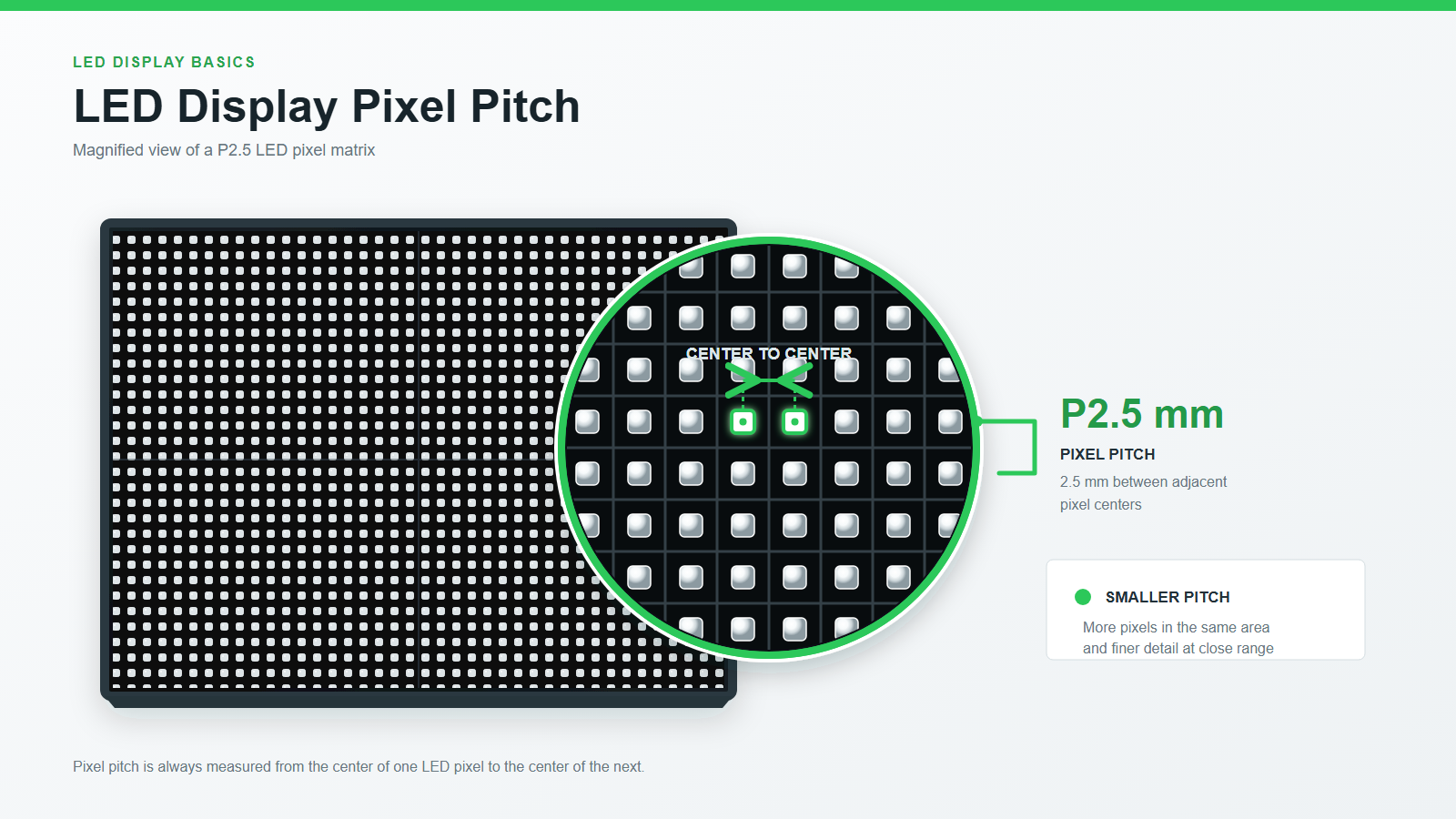
Pixel pitch is the center-to-center distance between two adjacent pixels on an LED display. It is measured in millimeters. A P2.5 display has 2.5 mm between neighboring pixel centers; a P10 display has 10 mm.
The number describes physical spacing, not the overall resolution of the completed screen. Pitch tells you how tightly pixels are packed. Screen dimensions determine how many of those pixels fit across the final canvas.
1.1 How Pixel Pitch Is Measured
On a standard direct-view LED module, measure from the center of one RGB pixel package to the center of the next package horizontally or vertically. Do not measure the empty gap between packages. Most conventional modules use a square grid, so horizontal and vertical pitch are equal.
1.2 What the P-Number Means
The letter P is followed by the nominal spacing in millimeters:
- P0.9-P1.5: very fine pitch for close viewing, high-detail content, and premium indoor installations
- P1.8-P2.5: common for meeting rooms, control rooms, retail, studios, and corporate environments
- P2.6-P4: common for stages, rental displays, exhibition spaces, and medium viewing distances
- P5-P10: common for large venues, facades, and outdoor advertising
- P16 and above: used where viewers are typically far from the screen
These are planning ranges, not universal rules. Product construction, contrast, processing, brightness, content, and ambient light can make two displays with the same nominal pitch look very different.
1.3 The Buyer’s First Principle
Smaller is not automatically better. Smaller pitch increases pixel density and improves close-range detail, but it normally raises the display cost per square meter. Choose the coarsest pitch that still meets the closest-viewing and resolution requirements. That is usually where image quality and project economics are best balanced.
2. Why Pixel Pitch Matters to Buyers
Pitch affects what the audience sees, how large the display must be, and how much hardware the project requires. It should be decided early, before a supplier locks the cabinet layout, signal design, power distribution, structure, or budget.
2.1 Image Detail at Close Range
At the same physical screen size, a smaller pitch fits more pixels into the image. Fine text has cleaner edges, diagonal lines appear smoother, and detailed charts remain readable at shorter distances.
But viewers do not resolve unlimited detail. Once they are far enough away that adjacent pixels visually blend together, moving from P4 to P2 may deliver little visible improvement while multiplying the pixel count by four.
2.2 Minimum Viewing Distance
Pitch is a useful first estimate for minimum viewing distance. A widely used planning rule is:
Minimum viewing distance in meters is approximately equal to pixel pitch in millimeters.
Under that rule, P2.5 starts around 2.5 m and P8 around 8 m. Treat this as an initial screening tool, not an acceptance standard. A viewer reading small spreadsheet text may need a finer pitch than someone watching full-screen video from the same seat.
2.3 Screen Resolution and Content Canvas
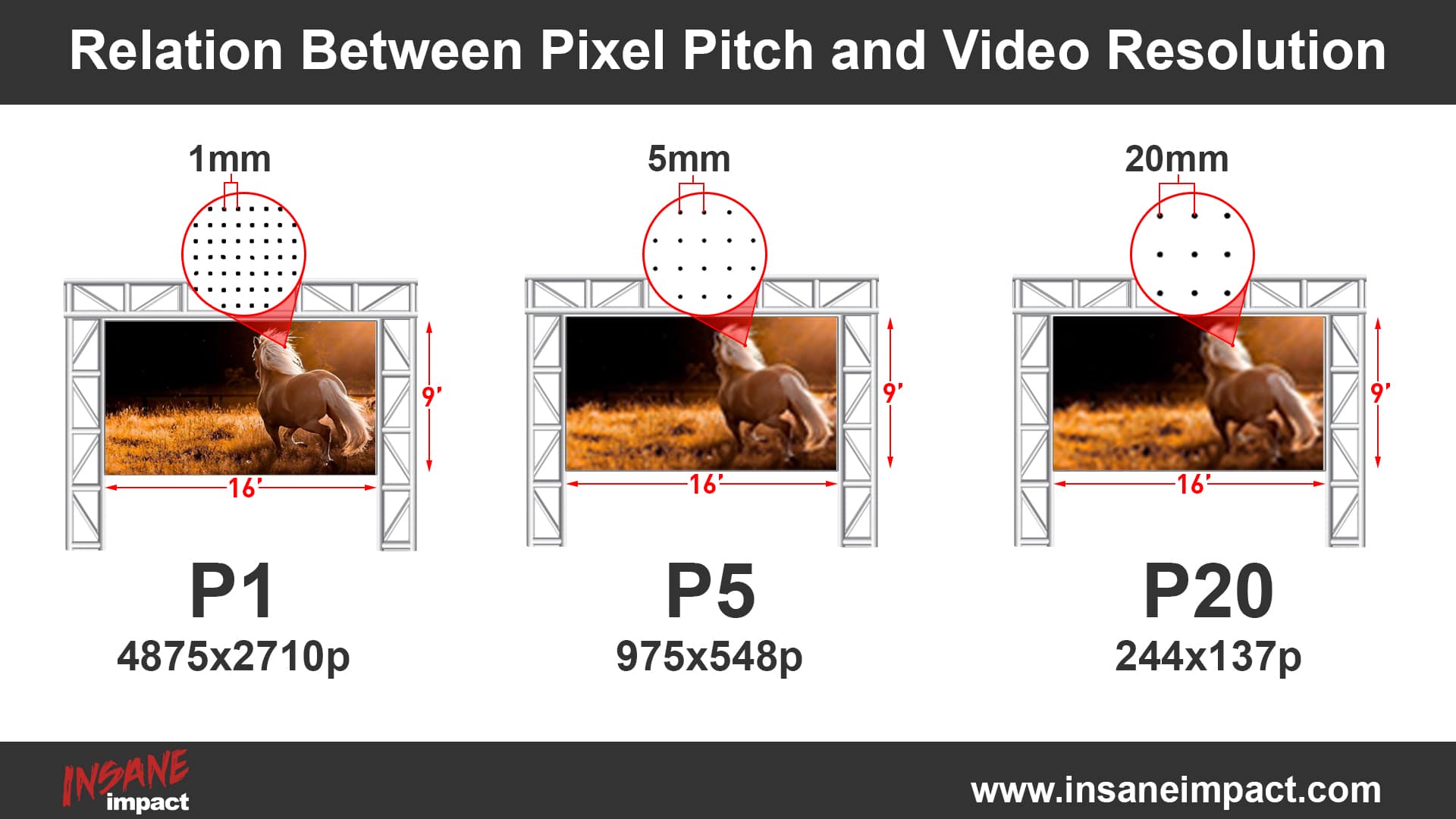
Pitch and screen dimensions together determine the native resolution. If a media wall must display a 1920 x 1080 source without scaling or cropping, the proposed cabinet array must provide at least that many physical pixels.
A buyer who specifies only “4K content” without stating the available wall size may receive an impractical design. At P2.5, a native 3840-pixel-wide canvas is 9.6 m wide. At P1.2, it is 4.608 m wide. The same source resolution can therefore imply very different structures and budgets.
2.4 Cost, Power, Heat, and Service Scope
For the same display area, halving pitch approximately quadruples pixel density. That does not mean every project cost will exactly quadruple, but it explains why fine-pitch products require more LED packages and more densely integrated electronics.
When comparing quotations, evaluate the whole system rather than the panel price alone:
- LED cabinets or modules and spare parts
- Video processing and signal redundancy
- Power distribution and electrical capacity
- Mounting structure and front/rear service access
- Calibration, commissioning, and on-site support
- Expected power consumption at typical content brightness
- Warranty terms and long-term module availability
2.5 Camera Performance
For broadcast studios, virtual production, houses of worship, and conference stages, pitch is only one part of camera performance. Refresh rate, scan mode, grayscale at low brightness, shutter compatibility, moire behavior, and processing latency also matter. Ask for an on-camera test using the actual camera, shutter angle, frame rate, and planned shooting distance.
3. Pixel Pitch vs. Pixel Density vs. Resolution
These three specifications are related, but they answer different buying questions.
3.1 Key Definitions
| Specification | Meaning | Unit | Buyer question |
|---|---|---|---|
| Pixel pitch | Distance between adjacent pixel centers | mm | How close can viewers stand? |
| Pixel density | Number of pixels in a unit area | pixels/m2 | How much detail fits per square meter? |
| Resolution | Total pixels across the completed display | width x height | Can the screen show the required content canvas? |
3.2 Formulas Buyers Can Use
For a square pixel grid:
Pixel density:
Pixel density (pixels/m2) = (1000 / pixel pitch in mm)^2
Completed screen resolution:
Horizontal pixels = screen width in mm / pixel pitch in mm
Vertical pixels = screen height in mm / pixel pitch in mm
Screen size required for a target resolution:
Screen width in mm = horizontal pixels x pixel pitch in mm
Screen height in mm = vertical pixels x pixel pitch in mm
Always reconcile the result with the supplier’s cabinet and module dimensions. A theoretical size may need to be adjusted to the nearest buildable cabinet array.
3.3 Pixel Density Examples
| Pixel pitch | Approx. pixels/m2 | Native 4K width | Native 4K height |
|---|---|---|---|
| P1.2 | 694,444 | 4.608 m | 2.592 m |
| P1.5 | 444,444 | 5.760 m | 3.240 m |
| P1.8 | 308,642 | 6.912 m | 3.888 m |
| P2.5 | 160,000 | 9.600 m | 5.400 m |
| P4 | 62,500 | 15.360 m | 8.640 m |
The table reveals a practical tradeoff: fine pitch can deliver a target resolution in a smaller physical space; coarse pitch needs a larger canvas. If the wall opening is fixed, calculate resolution from the available dimensions. If resolution is fixed, calculate the physical size from pitch.
3.4 A Note About Quoted Resolution
Ask whether the quoted resolution refers to the physical LED canvas, the video processor output, or the incoming source. A processor may accept 4K input even when the wall contains fewer than 3840 x 2160 physical pixels. That is valid, but the image will be scaled to the native canvas.
4. Pixel Pitch and Viewing Distance
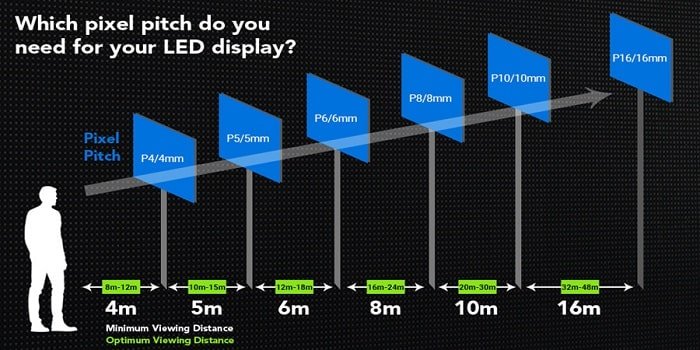
The closest regular viewer should drive pitch selection. Designing for the average or farthest viewer can leave front-row viewers looking at visible pixel structure.
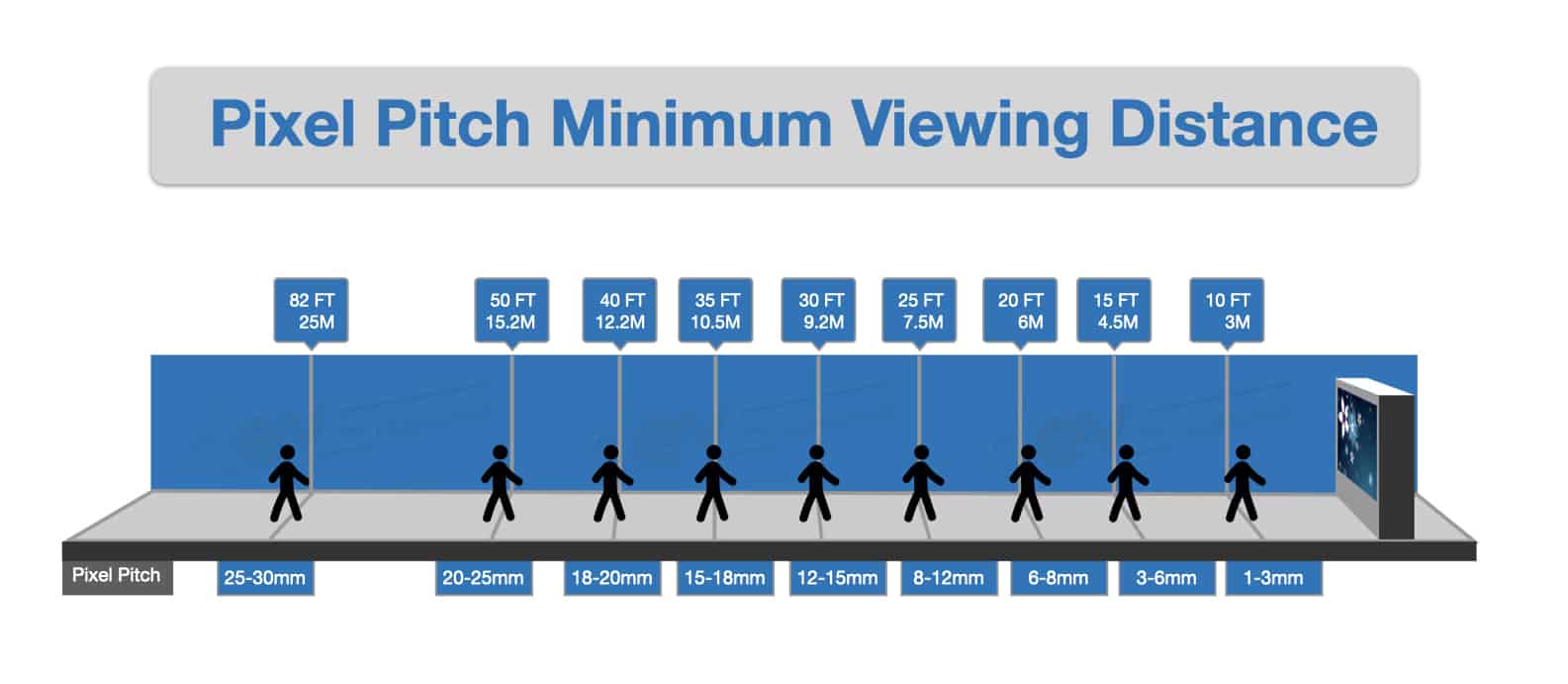
4.1 Use the One-Millimeter-to-One-Meter Rule as a Baseline
Start with:
Pixel pitch in mm <= closest viewing distance in m
For a closest viewer at 3 m, begin by comparing P3 and finer options. Then adjust for content, contrast, ambient light, and budget. Small text or camera close-ups may justify P2.5 or P1.8. Large video imagery may make P3 entirely adequate.
4.2 Practical Viewing Distance Chart
| Typical pitch | Starting minimum distance | Common comfortable range | Typical use |
|---|---|---|---|
| P0.9-P1.2 | 1 m | 1-3 m | Executive rooms, studios, control rooms |
| P1.5-P1.9 | 1.5-2 m | 2-5 m | Meeting rooms, command centers, premium retail |
| P2-P2.5 | 2-2.5 m | 2.5-8 m | Lobbies, retail, exhibitions, indoor signage |
| P2.6-P3.9 | 3-4 m | 4-12 m | Rental, stages, auditoriums, trade shows |
| P4-P6 | 5-6 m | 6-20 m | Arenas, large stages, facades, outdoor signs |
| P8-P10 | 8-10 m | 10-40 m | Billboards, stadiums, roadside displays |
| P16+ | 16-20 m | 20 m+ | Long-range roadside and very large outdoor displays |
These ranges overlap because visual performance does not come from pitch alone. Request a sample viewing test from the intended distance with representative content whenever the purchase is high value or the application is visually critical.
4.3 Test With the Hardest Content
Do not approve a display using only vivid demo reels. Test the content most likely to expose a mismatch:
- The smallest text users must read
- Thin chart lines and data labels
- Faces at their expected on-screen size
- Dark gradients and low-brightness scenes
- Fast motion and camera pans
- Brand colors that must be reproduced accurately
4.4 Consider the Entire Audience Zone
Map the closest seat, typical seat, farthest seat, off-axis positions, and standing traffic paths. For formal display-planning guidance, consult AVIXA standards resources. A retail display may have people walking within 1 m even when the main aisle is 4 m away. A stage wall may look good to the audience but produce moire for a camera positioned much closer.
5. Indoor vs. Outdoor LED Display Pixel Pitch
Indoor and outdoor projects often use different pitch ranges because viewing distance, brightness, weather protection, content, and service conditions differ.
5.1 Indoor Displays
Indoor viewers are usually closer and more likely to read fine text. P0.9-P2.5 is common for control rooms, boardrooms, studios, corporate lobbies, and premium retail, while P2.6-P4 can be suitable for larger indoor venues and events.
Indoor buyers should also compare:
- Low-brightness grayscale and color uniformity
- Contrast under room lighting
- Fan noise and heat management
- Front service access in shallow wall cavities
- Surface robustness in public or touch-adjacent locations
5.2 Outdoor Displays
Outdoor LED screens are commonly viewed from farther away, so P5-P10 or larger can be economical without sacrificing perceived clarity. Outdoor selection must also address brightness in direct sun, ingress protection, operating temperature, wind loading, corrosion resistance, drainage, and safe service access.
A finer outdoor pitch is not a substitute for adequate brightness or contrast. Conversely, extreme brightness does not correct a pitch that is too coarse for nearby pedestrians.
5.3 Rental and Staging
Rental panels usually balance image quality with fast assembly, weight, durability, and inventory flexibility. P2.6, P2.9, P3.9, and similar ranges are common because they can cover many indoor and outdoor event distances. Check cabinet locking accuracy and flatness: visible seams or misalignment can undermine the benefit of a fine pitch.
5.4 Side-by-Side Planning Summary
| Factor | Indoor priority | Outdoor priority | Rental/event priority |
|---|---|---|---|
| Typical viewing | Close to medium | Medium to long | Medium, sometimes camera-close |
| Common pitch range | P0.9-P4 | P5-P10+ | P2.6-P4.8 |
| Other critical specs | Contrast, low-gray performance, noise | Brightness, IP rating, thermal/weather design | Weight, rigging, speed, durability |
| Acceptance test | Text, charts, low brightness | Sunlight visibility, thermal operation | Seams, camera test, repeated assembly |
6. How to Choose Pixel Pitch Step by Step
A reliable selection process starts with the use case, not a product catalog.
6.1 Step 1: Record the Closest Viewing Distance
Measure the shortest realistic eye-to-screen distance, including walkways, operators, presenters, camera positions, and front-row seats. Use that distance to establish the coarsest pitch worth considering.
6.2 Step 2: Confirm the Available Screen Dimensions
Record the maximum active image width and height, not just the wall opening. Allow for structure, trim, ventilation, access, and required clearances. Ask the supplier to show the exact cabinet array and final active dimensions.
6.3 Step 3: Define the Required Native Resolution
Decide whether the display must reproduce a particular canvas, such as Full HD, UHD/4K, or an ultra-wide custom layout. If pixel-for-pixel presentation is not required, state the minimum acceptable native canvas and let the processor scale the source.
For a fixed width, calculate the maximum pitch that meets the horizontal resolution:
Maximum pitch = active screen width in mm / required horizontal pixels
Repeat the calculation vertically. Use the smaller of the two results, then adjust to a pitch and cabinet geometry the supplier can actually build.
6.4 Step 4: Match the Content
Detailed dashboards, subtitles, spreadsheets, wayfinding text, product pricing, and camera close-ups favor finer pitch. Large logos, bold advertising creative, sports footage, and distant stage visuals can work well at coarser pitch.
Ask the content team for real files before final approval. A specification based on unknown future content often becomes unnecessarily expensive or visibly inadequate.
6.5 Step 5: Account for the Environment and Cameras
Document ambient light, direct sun exposure, viewing angles, operating hours, temperature, humidity, dust, noise limits, camera use, and service access. Pitch should be selected alongside brightness, contrast, refresh rate, scan architecture, LED package type, and protection level.
6.6 Step 6: Compare Total Cost, Not Pitch Alone
Request at least two technically acceptable alternatives, such as P1.8 and P2.5 or P6 and P8. Compare their final resolution, active dimensions, power assumptions, structural load, spare-parts package, processor, warranty, and maintenance method on the same basis.
6.7 Step 7: Validate With a Sample or Mock-Up
View a sample from the closest, typical, and camera positions. Use real content at planned brightness. Confirm text readability, seams, moire, low-gray behavior, color, off-axis performance, and image scaling.
6.8 Worked Example: A 6-Meter-Wide Meeting Room Wall
Assume a 16:9 LED wall is 6 m wide, the closest viewer is 3 m away, and the content includes presentations, video calls, and detailed charts.
- Viewing-distance baseline: P3 or finer
- P3 native canvas: 6000 / 3 = 2000 pixels wide; about 2000 x 1125
- P2.5 native canvas: 6000 / 2.5 = 2400 pixels wide; about 2400 x 1350
- Decision: P3 can cover Full HD-class content and may be economical. P2.5 offers more margin for small text and camera framing. P1.5 would add density, but its visual benefit should be proven from the actual 3 m position before paying the premium.
This example shows why the answer is rarely “buy the finest pitch available.” Both viewing distance and useful canvas resolution must justify the step up.
7. Recommended Pixel Pitch by Application
Use the following ranges to create a shortlist, then confirm them with calculations and a sample test.
7.1 Application Reference Table
| Application | Common starting range | Main decision driver |
|---|---|---|
| Broadcast studio / virtual set | P0.9-P2.6 | Camera distance, moire, refresh and scan behavior |
| Control room / command center | P0.9-P1.8 | Operator distance, small text, continuous use |
| Boardroom / meeting room | P1.2-P2.5 | Closest seat, presentations, video calls |
| Retail / showroom | P1.5-P4 | Walk-up distance, text size, ambient light |
| Corporate lobby | P1.8-P4 | Traffic path, content type, architectural size |
| Exhibition / rental event | P2.6-P4.8 | Audience and camera distance, setup speed |
| House of worship / auditorium | P2.6-P6 | Front row, camera use, stage dimensions |
| Indoor arena / scoreboard | P4-P10 | Seat distances, screen size, content layout |
| Outdoor facade / billboard | P6-P10+ | Nearest road/pedestrian distance, brightness |
| Highway sign | P10-P20+ | Speed, legibility distance, character size |
7.2 When to Choose a Finer Pitch
Move to a finer option when at least one measurable requirement supports it:
- The closest viewer can see pixel structure at the proposed pitch
- Required text fails the readability test
- The available physical size cannot deliver the required native canvas
- Camera testing shows unacceptable moire or detail loss
- A design-critical application requires smoother close-range imagery
7.3 When a Coarser Pitch Is the Smarter Buy
Choose the coarser option when both candidates pass the viewing and content tests, but the coarser one reduces cost, power, weight, or complexity. Spend the saved budget on a better processor, redundancy, structural quality, calibration, spares, or service coverage if those items reduce more project risk.
8. Pixel Pitch FAQs
8.1 Is a Smaller Pixel Pitch Always Better?
No. A smaller pitch increases density and close-range detail, but it can add cost and system complexity. If viewers cannot perceive the extra pixels at the planned distance, the finer pitch produces little practical value.
8.2 How Do I Calculate Pixel Pitch From Viewing Distance?
Use the closest viewing distance in meters as an approximate upper limit for pitch in millimeters. A 4 m closest distance suggests starting at P4 or finer. Then verify the choice against content resolution, text size, environment, and a sample test.
8.3 What Pixel Pitch Is Best for an Indoor LED Display?
Many indoor projects fall between P1.2 and P4. Boardrooms, control rooms, and studios usually need the finer end; lobbies, stages, and large indoor venues can often use P2.5-P4. The correct answer depends on the nearest viewer and required content canvas.
8.4 What Pixel Pitch Is Best for an Outdoor Billboard?
P6-P10 is a common planning range for outdoor advertising, while longer-range screens may use P16 or larger. Pedestrian-facing displays may need a finer pitch. Brightness, weather protection, structure, and serviceability are as important as pitch outdoors.
8.5 What Is the Difference Between P2 and P2.5?
P2 spaces pixel centers 2 mm apart; P2.5 spaces them 2.5 mm apart. P2 has 250,000 pixels/m2, while P2.5 has 160,000 pixels/m2. At the same screen size, P2 therefore provides 56.25% more pixels, but the buyer should confirm that the viewing distance and content benefit from them.
8.6 What Pixel Pitch Is Needed for a 4K LED Wall?
There is no single 4K pitch. A native 4K wall needs 3840 x 2160 physical pixels, so its size depends on pitch. P1.2 produces a 4.608 x 2.592 m 4K canvas; P2.5 produces a 9.6 x 5.4 m canvas. Start with the available space and viewing distance, then calculate whether native 4K is practical.
8.7 Can Two Displays With the Same Pixel Pitch Look Different?
Yes. LED package quality, contrast, black-level treatment, calibration, grayscale, brightness, refresh rate, processing, cabinet flatness, and viewing angle all affect the result. Compare full specifications and view representative samples rather than buying from pitch alone.
9. Final Buying Checklist
Before approving an LED display proposal, confirm that the supplier has documented:
- The closest, typical, and farthest viewing distances
- The final active width, height, aspect ratio, and cabinet array
- The exact physical pixel resolution, not only accepted input resolution
- The pixel-pitch calculation and at least one alternative option
- Representative content tested from real viewing positions
- Indoor/outdoor conditions, brightness, and protection requirements
- Camera test results where recording or broadcasting is planned
- Maximum and typical power assumptions
- Service access, calibration method, spare modules, and spare LEDs
- Processing, backup signal paths, and power redundancy where required
- Warranty scope, response times, and future module availability
- A drawing showing structure, clearances, cable paths, and maintenance access
The best pixel pitch is the one that passes every project constraint without buying invisible resolution. Begin with the closest viewer, confirm the native canvas with the screen dimensions, test real content, and compare complete system proposals. That process gives buyers a defendable specification instead of a guess based on the smallest P-number in a catalog.
Explore EagerLED’s commercial LED display solutions, or contact EagerLED with your screen dimensions, closest viewing distance, content resolution, installation environment, and budget range to request a pixel-pitch comparison with two technically suitable options.