

Quick answer: Choose an LED poster screen by checking real content at the intended viewing distance, brightness under site lighting, cabinet protection, playback reliability, and access for repairs. Then compare suppliers using a written component list, acceptance tests, spare-parts plan, and warranty responsibilities. A convincing demonstration and a complete quotation are more useful than an unsupported promise of “high quality.”
This guide explains how to verify an LED poster screen before ordering for a shop, hotel, exhibition, or outdoor promotion. It focuses on quality and supplier selection: the questions to ask, the evidence to request, and the differences that can make two similar quotations unequal. For a broader overview of formats and applications, read our poster LED display buying guide.
1. What Is an LED Poster Screen?
An LED poster screen is a portrait-format digital sign made from direct-view LED modules. A controller sends image data to the modules, whose red, green, and blue emitters form the visible picture. Many units combine the display, player, cabinet, and wheeled stand into one movable system. Other configurations support approved wall mounts, suspension hardware, or connections between compatible cabinets.
The terms LED poster display, poster LED screen, and LED banner display often describe the same product category. However, “digital poster” can also mean an LCD sign with an LED backlight. Ask whether the quoted product uses direct-view LED modules or an LCD panel; the distinction affects native resolution, repair methods, and how multiple screens join together.
A good LED poster screen makes your message readable in its actual location and can be maintained throughout its working life. Small text at close range may favor a finer pitch or an appropriate commercial LCD. Large promotional artwork and expandable installations may favor direct-view LED. Neither technology automatically guarantees better value in every setting.

2. Features That Matter in an LED Poster Screen
01. Pixel pitch, native resolution, and readable content
Pixel pitch is the distance between adjacent pixel centers, measured in millimeters. A smaller pitch places more pixels within the same active display area. Native resolution is the physical pixel count across the width and height; it is different from the resolution of an uploaded video or an accepted input signal.
For an LED poster screen, divide the active width and height in millimeters by the exact pitch to calculate nominal resolution. For example, a 640 × 1920 mm active area at P2.5 gives 256 × 768 pixels. Sending a 4K file to this screen does not turn it into a 4K display. Always confirm the assembled pixel matrix because nominal pitch labels can be rounded.
| Exact pitch | Calculated native resolution | What to test | Buying implication |
|---|---|---|---|
| P1.25 | 512 × 1536 pixels | Fine lettering and close inspection | More pixels; justify the added cost with real content |
| P2.0 | 320 × 960 pixels | Product labels and medium-sized text | Compare readability against adjacent pitch options |
| P2.5 | 256 × 768 pixels | Promotional headlines and portrait videos | Check small text carefully before accepting |
| P4.0 | 160 × 480 pixels | Large graphics viewed farther away | Fine detail is limited at this active size |
These are arithmetic examples, not a list of available EagerLED configurations. There is no single viewing-distance rule that guarantees invisible pixels for every viewer. Text size, eyesight, contrast, and viewing angle all matter. Use pitch and viewing-distance guidance only to shortlist products, then approve your own artwork on a sample at the actual viewing positions.
02. Brightness, grayscale, and camera behavior
Brightness is measured in nits, equivalent to candela per square meter. Request brightness after calibration and ask how far the LED poster screen can dim while retaining usable shadow detail. A very bright demonstration in a showroom does not establish readability behind reflective glass or comfort in a dim hotel lobby.
Refresh rate, video frame rate, and grayscale are separate characteristics. A quoted 3840 Hz refresh rate describes display driving behavior; it does not mean the poster plays 3840 distinct video frames each second. Film the proposed unit at your intended camera settings. Screen timing and camera shutter parameters interact, so a refresh-rate number alone should not be treated as a filming guarantee.
03. Movement, installation, and multi-screen splicing
For a portable LED poster screen, request the weight with its stand, the base footprint, packed dimensions, and the recommended handling method. Test wheel locks, cable routing, and access through doors. If joining units, inspect cabinet alignment and color consistency across the seam. Confirm that the controller can address the total pixel count and that the exact model supports the proposed mounting arrangement.

3. Clarify Usage Scenarios and Requirements
01. Define the installation environment
Before asking for an LED poster screen price, send suppliers photographs and dimensions of the site. Record the closest viewing position, daily operating hours, available power, nearby windows, ventilation space, and route from delivery point to installation position. Explain whether the screen will stay in one place or travel frequently.
| Application | Main requirement | Evidence to request | Common oversight |
|---|---|---|---|
| Indoor retail or lobby | Readable text and comfortable brightness | Content demonstration at normal lighting and dimmed settings | Choosing pitch from video footage alone |
| Behind a shop window | Visibility through glass and thermal suitability | Site assessment at the brightest time of day | Ignoring reflections and heat trapped behind glazing |
| Exhibitions and roadshows | Repeatable setup and protected transport | Packed weight, case details, assembly demonstration | Buying wheels without suitable transport protection |
| Outdoor promotion | Suitable enclosure, stability, and operating limits | Model-specific protection documentation and installation plan | Assuming a protected LED surface makes the whole system outdoor-rated |
| Multi-location deployment | Reliable scheduling and remote management | Demonstration of permissions, offline playback, and recovery | Omitting software subscriptions and connectivity costs |
An indoor LED poster screen positioned behind glass is still exposed to a demanding thermal and optical environment. An outdoor LED poster screen needs a suitable complete enclosure, connections, and installation method. Ask separately about protection at the front, rear, connectors, and service openings. A model label should never replace an assessment of the finished installation.
02. Specify playback and content management
List the content the LED poster screen must show: portrait videos, price lists, event schedules, QR codes, or a live input. Request supported file formats, player capacity, scheduling functions, and native canvas dimensions. Test the smallest text and a real QR code from the expected scanning position instead of relying only on colorful promotional footage.
For standalone playback, verify that approved content continues when the internet connection fails. For live or joined-screen playback, confirm input compatibility, mapping, synchronization, and recovery after a power interruption. Ask who owns the cloud account, how users are removed, and whether licenses or mobile data are charged separately. Have a staff member complete an actual upload during the demonstration.
03. Plan power, heat, and access
Request maximum input power for installation planning and measured consumption with representative content for running-cost estimates. Keep watts per square meter separate from watts for a complete unit. For illustration, a unit averaging 0.25 kW for 12 hours daily uses 3 kWh per day; multiply by operating days and your electricity tariff. This is a worked example, not a product rating.
Include ventilation clearance and the space needed to remove modules, power supplies, and control hardware. Ask whether fan noise suits a quiet reception area. Qualified installation personnel should verify the electrical supply and mounting arrangement against the model documentation and site conditions before the LED poster screen enters service.
4. Verify LED Poster Screen Product Quality and Reliability
01. Make the specification verifiable
A high-quality LED poster screen should have a traceable specification. Request the module model, LED package, driver IC, power supply, receiving card, media player, cabinet construction, and calibration method. Component names alone do not prove performance, but a documented bill of materials helps prevent unexplained substitutions between a demonstration unit and the delivered order. See EagerLED’s quality-control process for the factory checks behind these questions.
Ask how replacement modules are matched to the original batch and how calibration data are retained. On a sample, show full white, red, green, blue, neutral gray, and dark gradients. Look for dead pixels, bright dots, color patches, inconsistent module edges, and poor detail at low brightness. Inspect straight lines across cabinet joins using simple test artwork.
02. Agree acceptance tests before ordering
Write down what constitutes acceptance of the LED poster screen before paying for production. Specify test content, brightness setting, viewing distance, operating duration, and how defects will be recorded and corrected. The following checklist provides discussion points; numerical pass limits should be agreed for the actual project rather than invented after delivery.
| Check | Practical test | Record to keep |
|---|---|---|
| Pixel and module quality | Solid colors, white, gray, and dark gradients | Defect map, photographs, agreed remedy |
| Readable content | Actual headlines, small text, and QR code at site distance | Approved artwork, distance, brightness setting |
| Camera compatibility | Record at required frame rate and shutter settings | Original video clips and controller settings |
| Sustained operation | Run the agreed playlist for the agreed test duration | Test duration, ambient conditions, fault log |
| Playback recovery | Restart and disconnect the network under supervision | Startup behavior and offline playback result |
| Service access | Demonstrate replacement access with power isolated | Tools, access space, procedure, spare-part identifiers |
| Joined cabinets | Move a grid and image across the complete canvas | Mapping file, seam alignment, color settings |
For a larger purchase, identify the sampled units and record their serial numbers. Request dated inspection records tied to the production batch, not a generic factory video. If remote acceptance is necessary, ask for a continuous demonstration that shows the unit identification, test patterns, normal content, and operating settings. Repeat essential checks when the shipment arrives.
03. Examine protection and repairability
Surface protection such as optional GOB encapsulation may help protect an LED poster screen module from handling damage. It does not establish the weather resistance of the entire cabinet. Ask about the cleaning method, surface finish, repair procedure, and availability of matching spare modules. Compare any coating under angled light because reflections can affect the viewing experience.
Request applicable model-specific compliance documents and check that the product identifiers match the quotation. Separate these documents from image-quality tests and warranty promises: each answers a different question. Also clarify operating temperature, humidity limits, storage instructions, and maintenance intervals. A claimed LED lifetime should not be read as a guarantee that every component will operate without repair for that period.


5. Choosing an LED Poster Screen Supplier and Service Support
01. Compare evidence and responsibilities
When choosing an LED poster screen supplier, evaluate who will specify, configure, deliver, and support the system. Request examples of comparable installations and ask how service is handled in your country. A factory-direct offer and a local integrator offer may include different levels of commissioning, installation, and replacement support, so compare their responsibilities explicitly.
Useful LED poster screen supplier advantages include consistent production records, compatible spares, accessible configuration files, and a support team that can explain fault isolation. Ask a practical question such as how they would diagnose one dark module while the rest of the screen works. A clear process is more informative than an unqualified promise of immediate support. Use our 12 factory checks for LED screen suppliers to examine production and support claims in more detail.
02. Compare complete quotations
There is no meaningful universal LED poster screen price without a defined configuration and delivery scope. Pitch, active area, protection, controller functions, cabinet mechanics, accessories, and support all affect the offer. Send the same requirement sheet to each supplier and require optional items to be priced separately.
| Cost or obligation | Ask the supplier to state | Why it matters |
|---|---|---|
| Display configuration | Pitch, active size, resolution, module and controller models | Prevents comparison of different specifications |
| Installation package | Stand, locks, cables, mounts, and commissioning scope | Shows what is needed before first use |
| Delivery | Packing, freight scope, delivery term, and destination | Separates equipment cost from arrival costs |
| Software and connectivity | License duration, cloud fees, accounts, network requirements | Reveals recurring operating costs |
| Service and spares | Parts included, warranty exclusions, labor, shipping responsibility | Makes repair obligations comparable |
| Acceptance and handover | Tests, defect remedies, manuals, training, configuration backups | Defines a usable delivery rather than a box shipment |
Compare total ownership cost over your planned operating period: purchase, delivery, installation, software, energy, maintenance, and expected replacement work. For occasional events, obtain a rental quotation for the same display area and service scope. Frequent use may justify ownership, but storage, transport, and staff time still need to be included.
03. Put service terms and handover in writing
For each LED poster screen, agree the warranty start date, covered parts, response channel, troubleshooting process, and who pays return freight or on-site labor. A response-time promise is different from a repair-completion promise. Request the process for an unavailable part and ask how long compatible modules and controller replacements are expected to remain obtainable.
The handover package should include wiring information, player instructions, access credentials transferred securely, receiving-card configuration, calibration backups where applicable, and a labeled spare-parts inventory. Ask for training on changing playlists and basic checks. Review EagerLED’s published service and warranty information, then confirm the terms for your order in the agreed quotation.
6. LED Poster Screen Options from EagerLED
The following two foldable models connect the checklist to published EagerLED product descriptions. Choose the outdoor or indoor version according to the installation environment, then confirm the current configuration, accessories, and service requirements. You can also compare the wider LED poster display range.
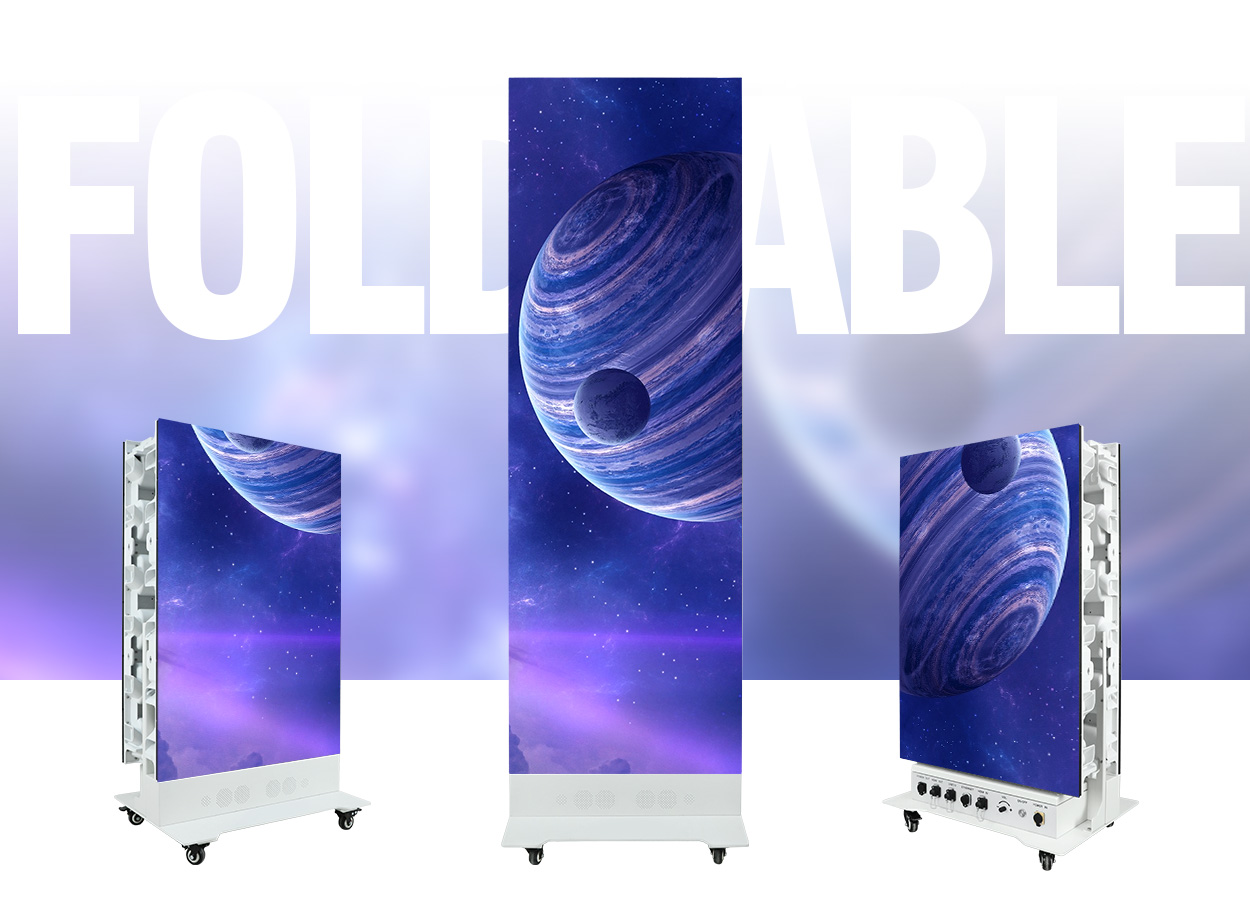
01. EA1920OP2 Outdoor Foldable Poster LED Screen
The EA1920OP2 Outdoor Foldable Poster LED Screen is a 640 × 1920 mm display designed for outdoor promotions and events. Its published specifications include a double-sided foldable cabinet, front and rear IP65 protection, rear service access, and four transport wheels. EagerLED lists P1.86, P2, and P2.5 options, 5,000 cd/m² brightness, and a refresh rate of at least 3840 Hz.
For this LED poster screen, inspect the folding mechanism, confirm the transport and stability arrangements, and leave sufficient rear access for maintenance. Ask how power and signal connections are protected at your site. If combining units, demonstrate the quick-lock connections and content mapping before accepting the complete installation.
02. EA1920iP5 640×1920 Indoor Foldable Poster LED Screen
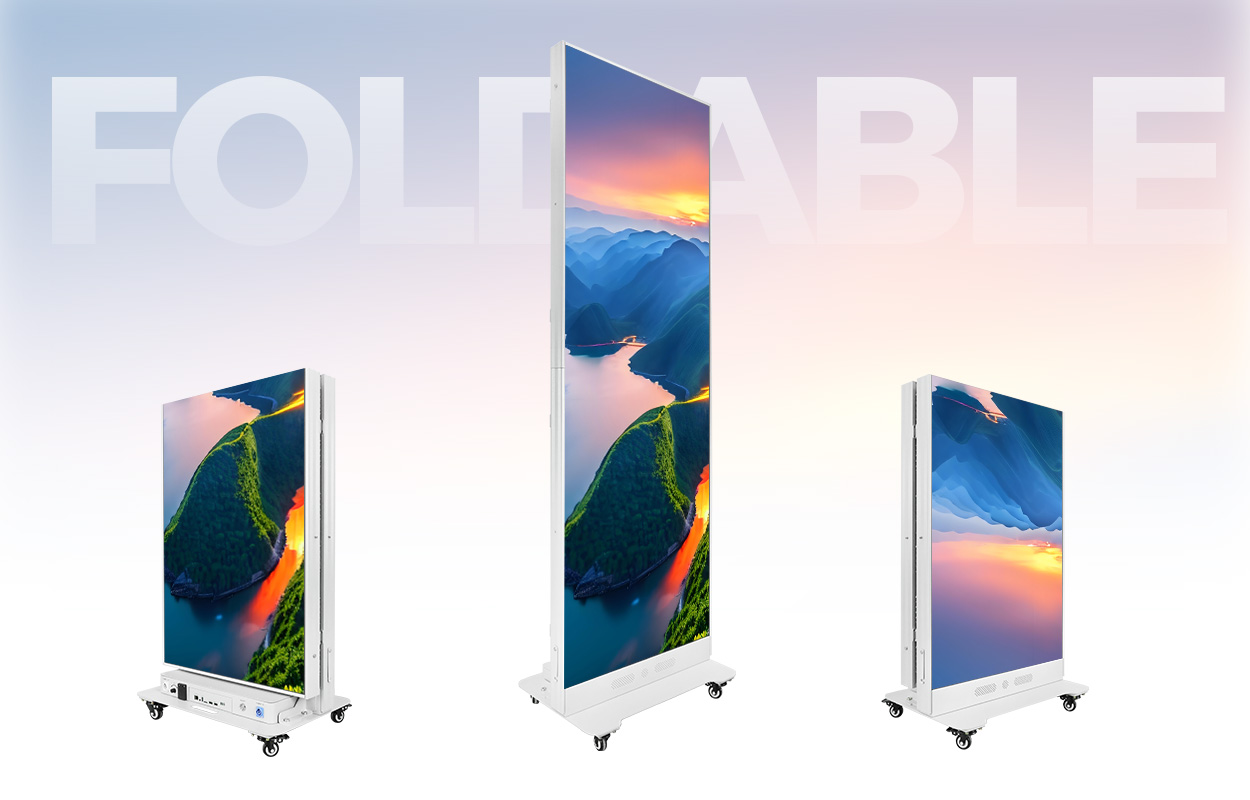
The EA1920iP5 640×1920 Indoor Foldable Poster LED Screen is designed for retail stores, showrooms, hotels, exhibitions, and other indoor venues. Its dual-sided folding design, four casters, and front-service access support transport and routine module maintenance. The product page also describes cloud content control, multi-screen splicing, and GOB or COB module options; confirm the exact module configuration in your quotation.
For this indoor LED poster screen, test your smallest text and QR codes at the intended viewing distance. Demonstrate content updates and independent playback on each side, then check the folded dimensions against your storage space or flight case. Surface protection does not make this indoor model a substitute for an outdoor-rated display.
7. LED Poster Screen FAQ
01. How do I choose a reliable LED poster screen supplier?
Request a model-specific specification, a demonstration with your content, agreed acceptance criteria, and written service responsibilities. Compare spare-parts availability and the full delivered scope. A reliable LED poster screen supplier should explain configuration and repair procedures clearly and document any substitutions before shipment.
02. What pixel pitch is best for an LED poster screen?
The best pitch is the one that makes your content readable at the closest expected viewing position within budget. Compare samples using your smallest lettering and QR code. Native resolution, screen size, and contrast matter alongside pitch; a distance formula is only a starting point.
03. Can an indoor LED poster screen be used outdoors?
Only if the manufacturer specifically approves that exact system for the conditions and installation. A covered entrance can still expose electronics to moisture and temperature changes. A surface coating, high brightness, or wheeled base does not by itself make an indoor cabinet outdoor-rated.
04. Does 3840 Hz guarantee flicker-free camera footage?
No. Camera shutter settings, display driving behavior, brightness, and synchronization can affect the recorded result. Test the LED poster screen with the actual camera or representative equipment before accepting it for filming. Save both the footage and the settings used for comparison.
05. What should an LED poster screen quotation include?
It should identify the exact display and controller, accessories, software fees, packing and delivery scope, spares, warranty responsibilities, and commissioning requirements. Include active dimensions and native resolution. Ask for missing items in writing before comparing the total against another supplier’s price.
06. Can several LED poster screens form one video wall?
Compatible models can, provided the mechanical connections, cabinet alignment, controller capacity, and content mapping support the complete canvas. Request a demonstration of the exact arrangement. Independent playlists on adjacent units are different from one synchronized image spanning all the screens.
8. Conclusion: Approve the Evidence Before Ordering
Choose an LED poster screen by matching the display to the site and validating the supplier’s promises. Approve representative content, record the agreed configuration, compare complete quotations, and establish how faults will be resolved. Keep copies of the acceptance results and configuration files with the equipment records.
Before requesting a recommendation, prepare your installation location, active display size, closest viewing distance, lighting conditions, operating hours, content examples, and delivery destination. Contact EagerLED with these requirements to discuss a suitable LED poster screen and obtain a configuration-specific quotation.