

When people ask why one LED wall looks silky and another looks like it was built from Lego, the answer almost always circles back to LED display resolution. At its simplest, LED display resolution is the amount of detail your screen can show. Get it right and small text is crisp, gradients look smooth, and the pixel grid disappears. Get it wrong and viewers notice jaggies before they notice your message.
This guide sticks to the essentials you actually need: a plain-English definition of LED display resolution, why it matters, the common formats (HD to 8K), a practical calculation walk-through, and a clean way to choose the best LED display resolution for your space. By the end, you’ll know how to pair LED display resolution with pixel pitch, viewing distance, and processing, so your content looks like it was meant for your screen.
Table of Contents
1.What is LED Display Resolution?
2.Why is Resolution Important for LED Displays?
3.Common Types of LED Display Resolution
4.Differences Between SD, HD, Full HD, 4K, and 8K
5.How to Calculate LED Display Resolution
6.Factors Affecting LED Screen Resolution
7.How to Choose the Right LED Display Resolution
8.Applications of High-Resolution LED Displays
9.FAQs
10.Conclusion
1.What is LED Display Resolution?
1.1 Definition of LED Display Resolution
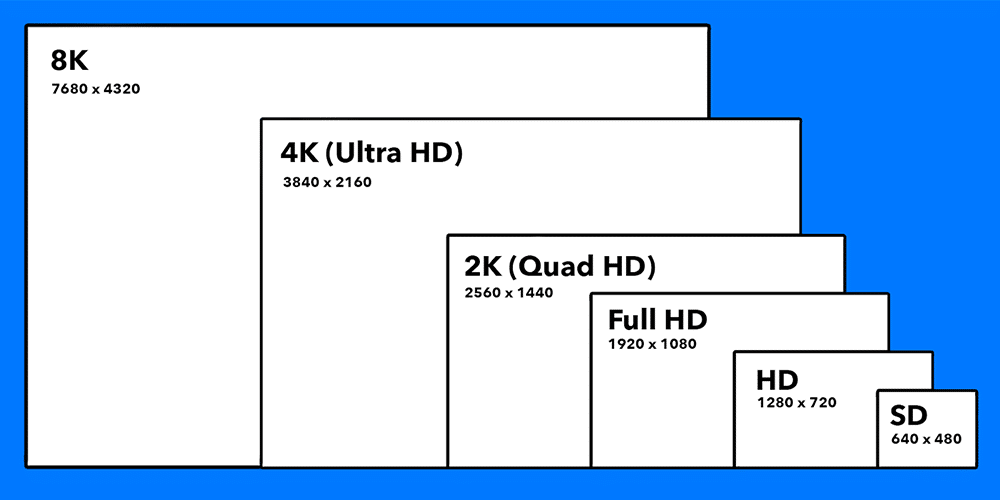
LED display resolution is the total number of pixels arranged horizontally and vertically on an LED wall. If a screen is 1920×1080, that means 1,920 pixels across and 1,080 pixels tall, roughly two million pixel dots drawing your picture. The higher the LED display resolution, the more individual “paint strokes” the system can use, which is why a logo looks cleaner at 1920×1080 than at 1280×720 on the same physical size.
1.2 Key Components of LED Display Resolution
Think of LED display resolution as the final canvas, and these four items as the building blocks:
- Pixels: tiny RGB light emitters that make up the image. More pixels generally mean higher LED display resolution and finer detail.
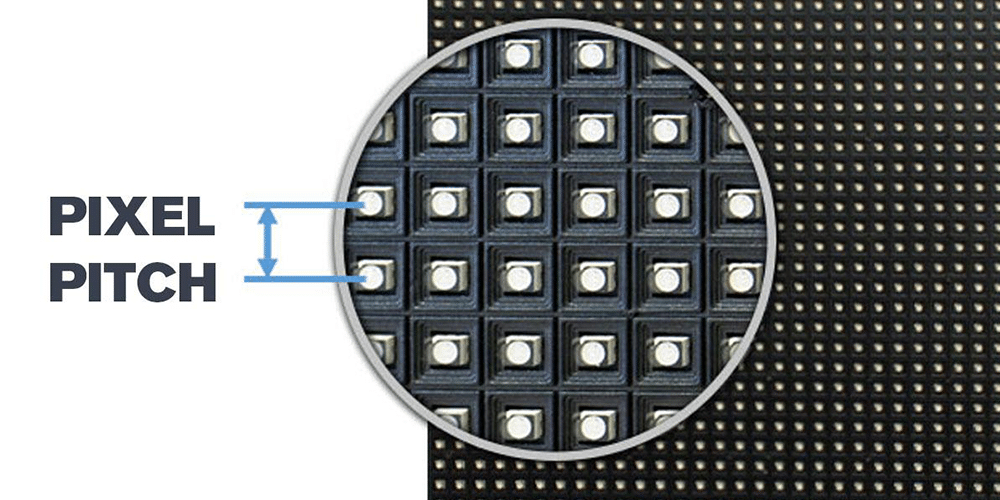
- Pixel pitch: the centre-to-centre spacing between pixels (in millimetres). Smaller pitch packs more pixels into each square metre, enabling higher LED display resolution in the same footprint.
- Pixel density (PPI): pixels per inch. PPI ties physical size to the LED display resolution you’ve achieved; higher PPI = tighter, cleaner visuals.
- Aspect ratio: the shape of the canvas (16:9, 4:3, 1:1, 9:16). Aspect ratio doesn’t increase LED display resolution by itself, but it dictates how content fits and how you’ll handle content mapping.
2.Why is Resolution Important for LED Displays?
A good LED display resolution is the difference between “that looks nice” and “wow.” It directly affects image quality, especially for things like thin fonts, UI elements, and gradients. In venues where trust matters, control rooms, monitoring centres, medical or design spaces, readability is non-negotiable, and the right LED display resolution keeps operators from squinting at critical details.
It also shapes experience. With the proper LED display resolution, viewers stop noticing pixels and start absorbing the story, whether that’s a product launch, an investor day, or digital art. Future-proofing counts too: as 4K and HDR mastering become commonplace, choosing an LED display resolution and processing chain that accepts those inputs protects your investment.
3.Common Types of LED Display Resolution
Not all canvases are created equal. Below is what the labels really mean in practice. Each format describes a pixel matrix; the physical size still depends on pixel pitch and cabinet layout.
HD (720p) – 1280×720. Entry level. On larger walls you’ll see the grid unless the pitch is very tight. Works for small info boards and budget installs.
Full HD (1080p) – 1920×1080. The workhorse. A 1080p LED display resolution is friendly for content teams, plays nicely with most laptops, and looks clean in retail, corporate, and stage settings.
2K / 1440p – 2560×1440 (and other 2K-class widths). Sharper than 1080p without the bandwidth demands of 4K. Good middle ground for wider canvases.
4K UHD – 3840×2160. Premium sharpness. A 4K LED display resolution excels at close viewing, fine text, and on-camera backdrops, provided your LED processor and media pipeline can feed it.
8K UHD – 7680×4320. Ultra-premium and niche. Stunning when you have the budget, the content, and a reason.
Custom resolutions. LED isn’t a TV; you can build a 3240×1620 wall if that’s what fits the space. A custom LED display resolution lets you keep aspect ratio and avoid wasted pixels.
4.Differences Between SD, HD, Full HD, 4K, and 8K
Legacy SD formats (720×480 / 720×576) look soft on modern LED, except on very small displays. HD at 1280×720 is a step up but still coarse on big canvases. Full HD (1920×1080) remains the most practical LED screen resolution for everyday use because it balances clarity and file size. When the viewing distance shrinks or when cameras are involved, 4K (3840×2160) gives you the headroom to keep edges clean and moiré under control. 8K serves flagship experiences that demand extreme fidelity.
The important nuance: two different walls can both claim a 4K LED display resolution while being physically very different in size. Pixel pitch decides how large that 4K canvas becomes in the real world.
5.How to Calculate LED Display Resolution
5.1 Screen Size & Pixel Pitch
Start with the physical target and the pitch. Say you need a wall roughly 5.0 m × 2.8 m. With a 2.6 mm pixel pitch, you can estimate pixel counts by dividing physical dimensions by pitch. That first-pass math gives you a ballpark LED display resolution, which you’ll refine once you choose the exact LED module and LED cabinet specs.
5.2 Step-by-Step Calculation Example
Let’s do a practical walk-through for a lobby wall.
(1)Pick module and cabinet specs
Suppose you select a module that’s 250 mm × 250 mm with a matrix of 96×96 pixels (designed for ~2.6 mm pitch). A cabinet houses 2×2 modules, so each cabinet is 192×192 pixels.
(2)Figure out how many cabinets fit
Width: 5,000 mm ÷ (2 × 250 mm) = 10 cabinets across.
Height: 2,800 mm ÷ (2 × 250 mm) = 5.6 → round to 6 cabinets high (or adjust width/height slightly to land cleanly on whole cabinets).
(3)Total pixel count (your LED display resolution)
Width = 192 px × 10 = 1,920 px.
Height = 192 px × 6 = 1,152 px.
Resulting LED display resolution ≈ 1920×1152. That’s close to 1080p, giving content teams an easy path (crop or letterbox minimal).
This is exactly how you shape a custom LED display resolution that still plays nicely with common content pipelines.
5.3 Why Calculation Matters
Perfect math prevents almost all headaches later. It ensures 1080p or 4K assets map correctly, protects text from soft scaling, and tells you whether the LED processor you’ve chosen can drive the total pixels. It also ties directly to viewing distance: if you undershoot pitch and end up with a low LED display resolution, the wall may look fine from the back but jagged at reception.
6.Factors Affecting LED Screen Resolution
6.1 Pixel pitch
Smaller pitch increases pixel density and enables a higher LED display resolution in a given area. It’s the single strongest lever you have.
6.2 Viewing distance
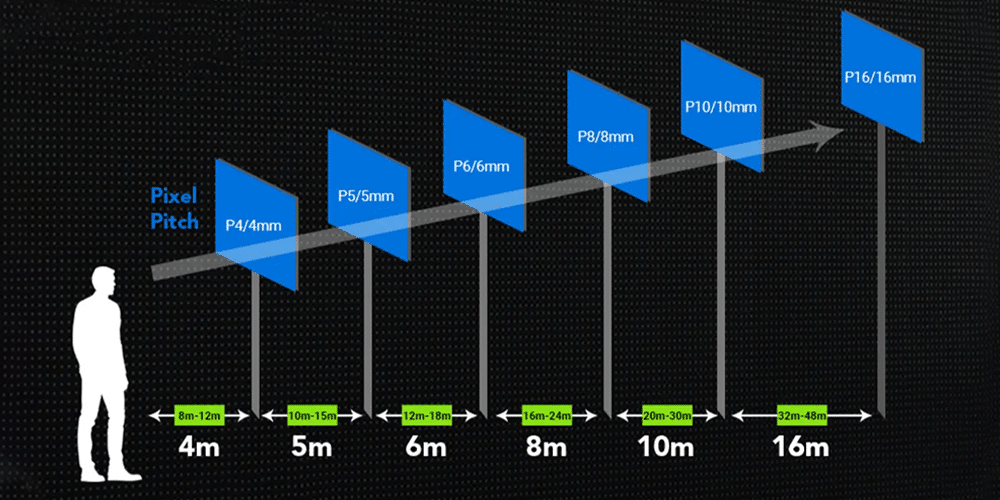
The closest viewer usually dictates the minimum practical LED display resolution. If people can walk within 2–3 metres, you’ll need a tight pitch to hide the grid. If the closest view is 25 metres, you can relax both pitch and LED display resolution without losing perceived quality.
6.3 Screen size
Doubling the size without increasing pixels halves the density; you’ll see it. Keep physical dimensions and LED display resolution in balance.
6.4 Content type
A fashion lookbook with gradients is forgiving; a control panel with thin lines is not. Match LED display resolution to the most demanding content you’ll show.
6.5 Brightness & contrast
High brightness helps outdoors, but contrast (and, when available, HDR mastering) often matters more for perceived detail. With good contrast, your chosen LED display resolution looks sharper.
6.6 Refresh rate and processing
A high refresh rate reduces flicker and moiré on camera, crucial for events. Your LED controller and LED processor must accept the sources you plan to play (1080p, 4K, HDR) and must be rated to drive the total pixel load of your LED display resolution.
6.7 Budget
Tight pitch, high LED display resolution, and premium processing cost more. Spend where viewers benefit, not just where spec sheets look impressive.
7.How to Choose the Right LED Display Resolution
Choosing well is mostly about sequence. Do this in order and you’ll almost never miss.
7.1 Clarify purpose
Advertising loop, premium lobby art, IMAG, dashboards? The purpose sets the “sharpness” bar and the LED display resolution you’ll need.
7.2 Map the audience
Note the nearest, typical, and farthest viewing distances. The closest distance is your guardrail for pixel pitch, and thus for LED display resolution.
7.3 Pick a target canvas
Decide if you want native 1080p, 4K, or a custom LED display resolution that aligns with your architecture and aspect ratio.
7.4 Match pitch and size
Select a pixel pitch that hits the chosen LED display resolution inside your physical footprint, then confirm cabinet counts and total pixels.
7.5 Validate processing
Check the LED processor for input formats (HDR, frame rates) and the LED controller for maximum pixels. Don’t forget cable bandwidth.
7.6 Reality-check with content
Drop a few real assets on a test section or simulator. If a 1080p wall with a tight pitch already looks immaculate, you might not need 4K today.
The best advice is simple: let the audience distance and the content drive LED display resolution. The moment you do that, the “what should we buy?” debate gets shorter and calmer.
8.Applications of High-Resolution LED Displays
8.1 Digital Signage & Advertising
A higher LED display resolution keeps small copy and QR codes crisp at real-world viewing distances. Pair it with sensible brightness/contrast so brand colors stay accurate, and map creatives to the native canvas to avoid soft scaling.
8.2 Concerts & Events
For camera-heavy shows, a camera-friendly LED display resolution plus high refresh reduces flicker and moiré. Build show files that tolerate small canvas changes across venues so you’re not rebuilding content at soundcheck.
8.3 Corporate & Conference Rooms
Most rooms look great with a tight-pitch 1080p LED display resolution; flagship boardrooms and divisible halls may justify 4K for extra desktop real estate. Keep 16:9, lock EDID for clean handshakes, and ensure the nearest seat can’t see the grid.
8.4 Retail & Showrooms
High LED display resolution preserves texture—fabric weave, wood grain, skin tone—so products look true to life. HDR and careful contrast help under spotlights; align templates to the wall’s native canvas for quick seasonal swaps.
8.5 Control Rooms & Monitoring Centres
Choose an LED display resolution that keeps dense dashboards, GIS layers, and timelines legible at operator distance. Processor capacity, redundancy, calibration, and seam alignment matter as much as raw pixel count.
8.6 Education & Training
Room depth sets the target: lecture halls are often perfect at tight-pitch 1080p, while labs and maker spaces benefit from 4K or higher pixel density. Standardize aspect ratio and EDID so laptops map pixel-for-pixel without fiddling.
8.7 Broadcasting & Virtual Studios
Virtual sets expose every flaw, so combine tight pitch, a suitable LED display resolution, and high refresh/genlock. Match the render engine’s output 1:1 to the canvas to minimize aliasing and keep tickers and lower thirds tack-sharp.
8.8 Museums, Art & Exhibitions
Here, LED display resolution serves the intent: sometimes the pixel grid is part of the aesthetic, sometimes it should disappear. Set brightness for dark galleries to maintain deep blacks, and keep a consistent native canvas across a series.
9.FAQs
9.1 What is the resolution of a big LED screen?
There isn’t a single answer. The LED display resolution depends on how many pixels you build into the wall, determined by pixel pitch, module/cabinet counts, and overall size. A “big” screen can be 1080p, 4K, or custom.
9.2 How do you calculate LED display resolution?
Use the module’s pixel matrix, multiply by modules per cabinet, then by cabinets across and high. If all you know is physical size and pitch, divide each dimension by pitch to estimate pixels, then refine. That gives you a solid LED display resolution before you order hardware.
9.3 What’s the difference between HD and LED display?
HD, Full HD, 4K, and 8K describe pixel counts (i.e., LED screen resolution). “LED display” is the technology used to show images. An LED wall can be built to any LED display resolution, including custom ones.
9.4 Is 4K LED better than Full HD?
Often, yes, but only if people stand close enough to notice. A well-designed 1080p LED display resolution with tight pitch can look indistinguishable from 4K at typical conference distances.
9.5 What resolution should I choose for outdoor advertising?
Most outdoor viewers are far away or in motion. You usually don’t need 4K LED display resolution. Prioritise appropriate pitch for distance, high brightness, contrast, weather-proofing, and a reliable processor chain.
10.Conclusion
Everything meaningful about image quality on an LED wall flows from one choice: LED display resolution. Pick it to match your audience and content, and you unlock clarity; pick it to impress a spec sheet, and you overpay for pixels no one sees. The path is straightforward, define purpose, measure the closest viewing distance, choose aspect ratio, set a target LED display resolution, match pixel pitch and size, and confirm your LED processor and LED controller can drive the load.
If you need a second set of eyes, share your room dimensions, viewing distances, and a content sample. We’ll help translate them into the right LED display resolution and the right pitch so your screen does what it’s supposed to do: make your message impossible to miss.
Have our engineers size the right LED display resolution, pixel pitch, and processor for your space, contact EagerLED for a free mockup and quote.