


To build an LED poster video wall, connect compatible poster displays through a supported video system, assign each display its own part of the image, and verify that playback stays synchronized. Physical alignment matters just as much: a correctly mapped picture will still look broken if neighboring display surfaces do not line up.
For AV integrators planning retail installations, exhibition booths, or presentation spaces, the main challenge is coordinating the display hardware, controller, content canvas, and site requirements. Several posters playing the same advertisement are easy to recognize as separate screens. Creating one continuous image requires a different configuration.
This guide focuses on that configuration process, using the EagerLED EA1920iP5 640 × 1920 Indoor Foldable Poster LED Screen as the product reference. It explains how to specify an LED poster video wall, plan its dimensions, select a connection method, commission the system, and assess whether foldable posters suit the project.
1. What Is an LED Poster Video Wall?
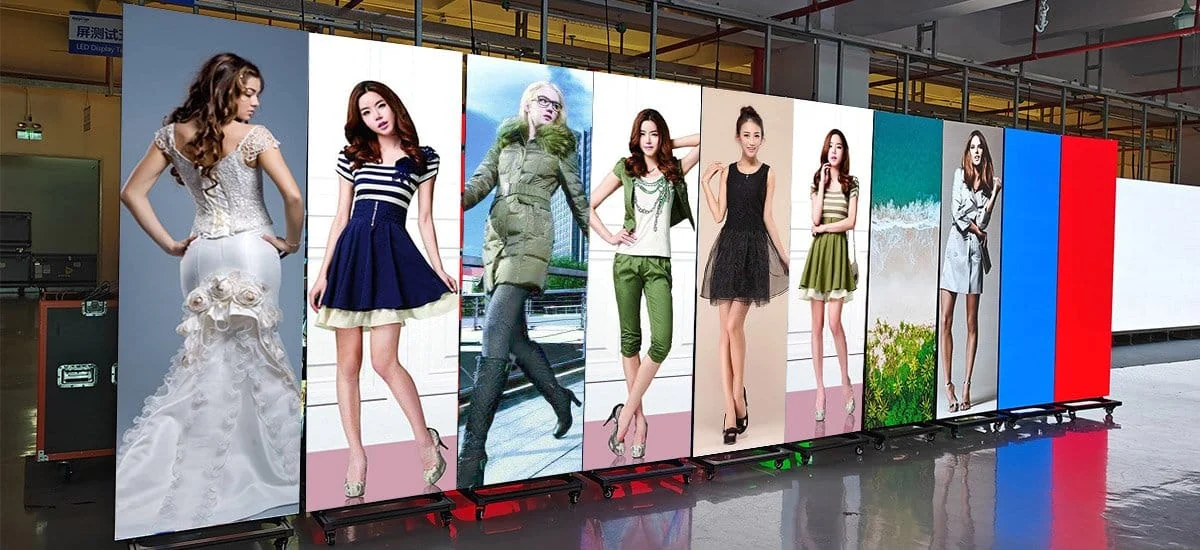
An LED poster video wall combines multiple direct-view LED poster displays into one image area. Each unit displays a designated region of a larger canvas, so a photograph, presentation, or animation extends across the complete arrangement.
Three operating modes are often confused:
- Independent playback: each poster runs its own content.
- Mirrored playback: every poster displays the same complete image.
- Spliced playback: each poster displays a different, correctly positioned section of one image.
Only the third mode creates the continuous picture intended here. Synchronization is a separate requirement: correctly positioned sections can still appear disconnected if neighboring players show different moments of the video.
Think of an LED poster video wall as four coordinated parts: the physical assembly, the signal path, the image map, and the playback timing. A successful installation validates all four. A stationary logo may reveal mapping errors, while a moving line crossing every join exposes timing differences that a still image cannot show.
This distinction also improves purchasing conversations. Ask for a demonstration of continuous moving content across the proposed number of units. A demonstration of identical videos on separate posters does not establish the required splicing behavior.
2. Which LED Posters Can Be Connected Together?
Choose posters that the supplier confirms can operate as one matched system. Similar dimensions or identical HDMI connectors do not establish compatibility for an LED poster video wall.
Check the exact model, pixel pitch, native pixel matrix, module construction, receiving configuration, controller hardware, and supported software versions. Mechanical compatibility includes the frame edges, joining hardware, base clearance, and alignment adjustment. Visual compatibility includes brightness, color, and grayscale behavior at the intended operating settings.
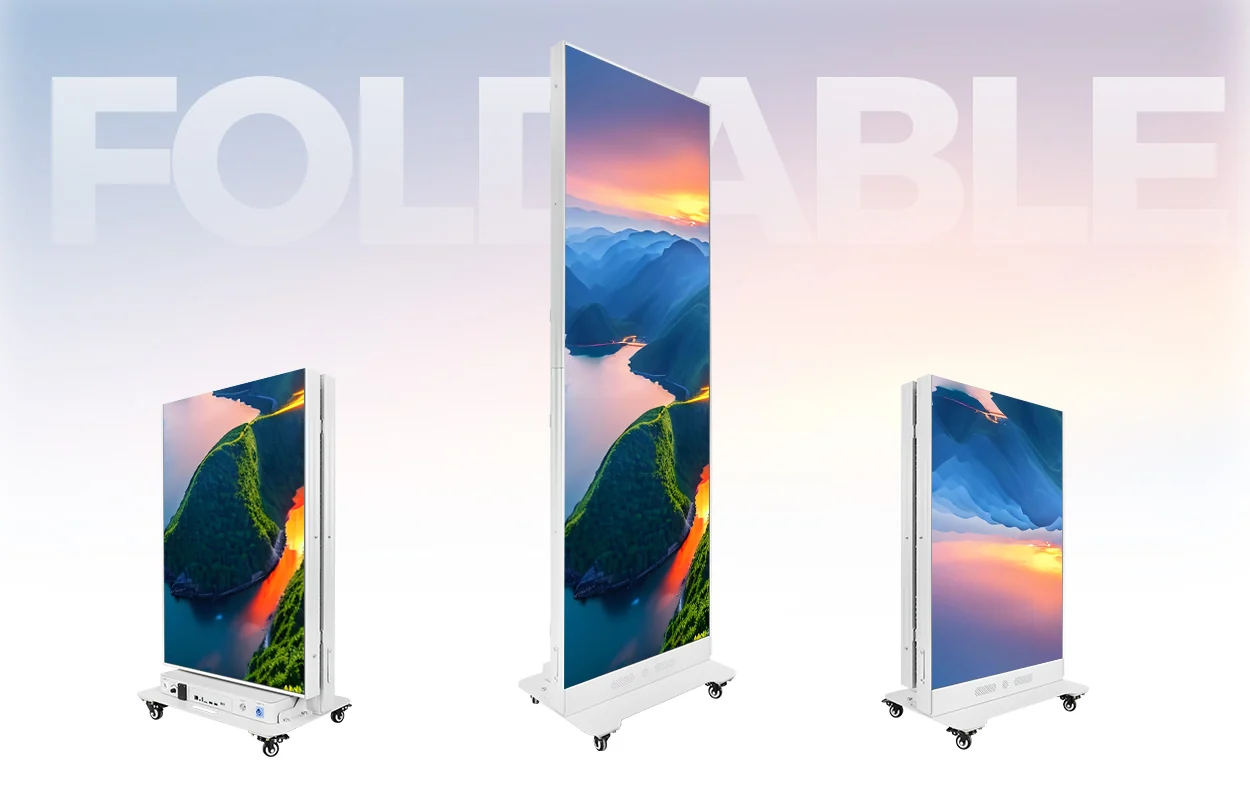
The EA1920iP5 foldable poster LED screen is listed with a 640 × 1920 mm display format, front maintenance, folding construction, and multi-screen splicing with quick locks. Its published options include several pixel pitches and different LED packaging choices. Select one matched configuration for the complete assembly.
The dimensions are approximately 25.2 × 75.6 inches; they are not the pixel resolution. Also, the “P5” within the EA1920iP5 model name should not be interpreted as a promise of 5 mm pixel pitch. The ordered pitch must appear separately on the quotation.
Before specifying an LED poster video wall, request the controller model, wiring diagram, approved poster count, and supported splicing mode in writing. The product overview alone does not establish every configuration’s limits. Keep these documents with the bill of materials so a later replacement order can reproduce the original system.
3. How Many LED Posters Do You Need for Your Screen Size?
Calculate both physical dimensions and native resolution before choosing the poster count. For an LED poster video wall arranged in one horizontal row, the combined active width is the sum of the individual active widths; the active height remains that of one unfolded poster.
Use the following planning formulas for identical units:
- Wall width: number of posters × active width per poster.
- Canvas width in pixels: number of posters × native horizontal pixels per poster.
- Total pixel load: canvas width × canvas height.
The table assumes an active area of 640 × 1920 mm per unit. For the resolution column only, it assumes an exact 2 mm pitch and a confirmed 320 × 960 pixel matrix. These are calculation examples, not confirmation that every listed quantity or controller configuration is supported.
| Posters | Active width × height | Example native canvas | Aspect ratio |
|---|---|---|---|
| 3 | 1.92 × 1.92 m (6.30 × 6.30 ft) | 960 × 960 pixels | 1:1 |
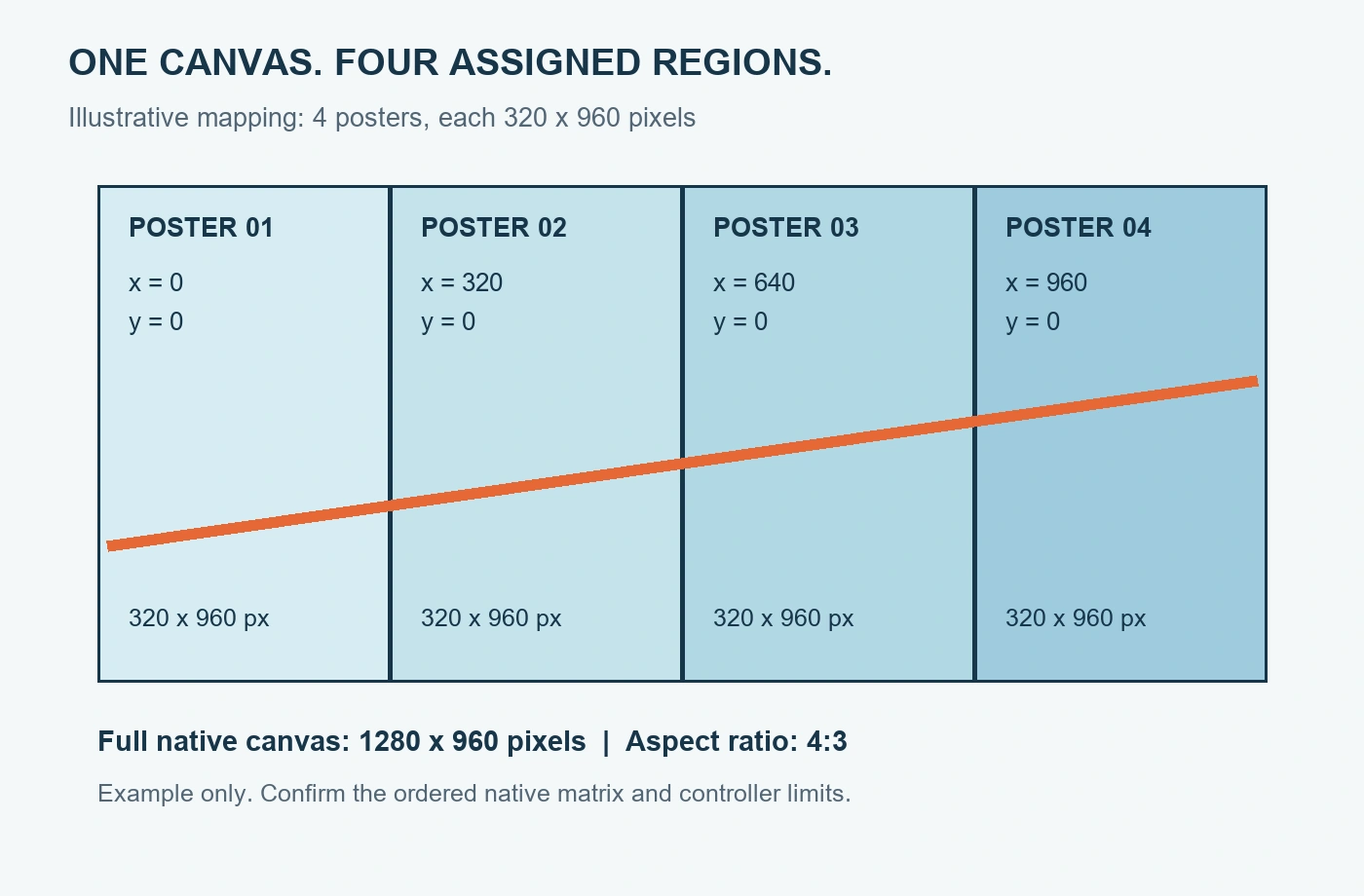
| 4 | 2.56 × 1.92 m (8.40 × 6.30 ft) | 1280 × 960 pixels | 4:3 |
| 5 | 3.20 × 1.92 m (10.50 × 6.30 ft) | 1600 × 960 pixels | 5:3 |
| 6 | 3.84 × 1.92 m (12.60 × 6.30 ft) | 1920 × 960 pixels | 2:1 |
Notice that adding posters does not automatically create a 16:9 screen. A six-unit layout in this example is 1920 pixels wide but only 960 pixels high. It is not a native 1920 × 1080 display.
For an LED poster video wall, the content designer needs the final matrix before producing graphics. Plan for cropping, letterboxing, or a custom composition when the source aspect ratio differs. Include bases, frame details, cable access, and required clearances in the installation drawing; active display dimensions alone do not describe the occupied floor space.
Use the supplier’s confirmed pixel matrix for final calculations, especially when commercial pitch names are rounded. EagerLED’s LED display resolution guide explains the distinction between native pixels and accepted input resolution.
4. LED Poster Connection Options: HDMI and Network Systems
The right signal architecture depends on the installed control hardware and the content source. An LED poster video wall may use a live HDMI source, coordinated local playback, or a compatible centralized LED control system. These methods are alternatives to evaluate, not interchangeable wiring instructions.
| Architecture | Useful when | Confirm before ordering |
|---|---|---|
| HDMI distribution or supported loop connection | A laptop, media player, or presentation system supplies live video | Output behavior, input formats, region assignment, cable limits, and supported chain length |
| Central sender with compatible receiving hardware | The project uses one configured LED canvas and centralized processing | Poster compatibility, port loading, receiving-card topology, and supported pixel mapping |
| Coordinated playback from individual players | Scheduled signage should run from content stored locally | Splicing support, clock synchronization, playback alignment, and restart behavior |
In a supported HDMI loop arrangement, the source feeds the first designated input, and documented outputs carry the signal onward. However, an HDMI output might provide a loop signal, a processed output, or another function. Follow the manual for the exact controller rather than assuming every connector marked OUT behaves identically.
An HDMI splitter distributes copies of a signal. It does not, by itself, assign a different picture region to every poster. That division must occur in the players, processor, or another supported mapping stage of the LED poster video wall.
Keep management networking separate from LED data distribution. A LAN connection may upload files and change settings, while a similarly shaped RJ45 LED output carries display data. An ordinary network switch belongs only in a network path explicitly supported by the equipment documentation.
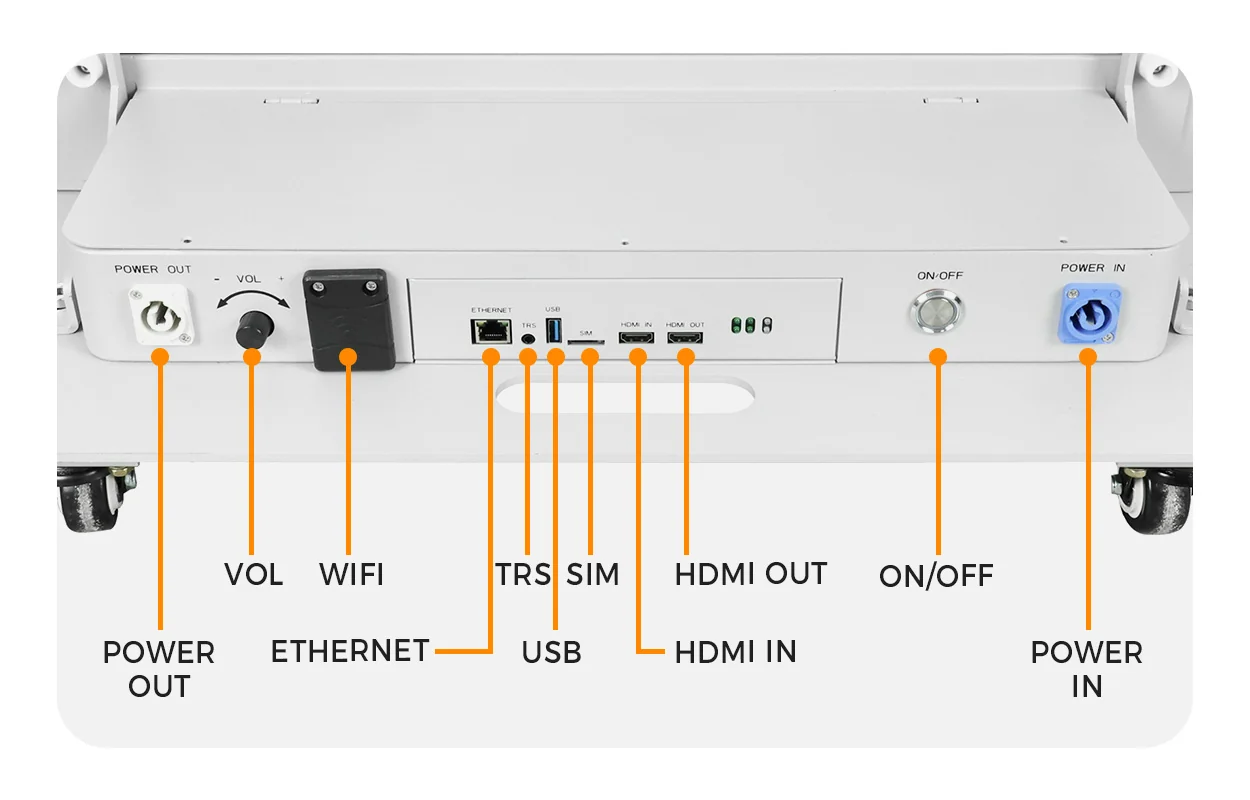
The EA1920iP5 product imagery shows HDMI IN and OUT, Ethernet, and other interfaces. Confirm their functions on the supplied version. EagerLED’s Huidu B6L controller guide provides background on one control platform; it does not establish that this controller is fitted to every EA1920iP5.
For an LED poster video wall used with live presentations, test the actual source device and output timing. For scheduled signage, test the chosen local playback method. Uploading content through Wi-Fi is not evidence of synchronized video across multiple screens.
5. How to Align, Secure, and Wire Multiple LED Posters
Commission each poster individually before assembling the LED poster video wall. Display a test image, verify its orientation, and record the unit’s identifier. This establishes a working baseline before cables and mapping introduce additional variables.
01. Prepare the floor and assembly position
Check the floor condition, equipment access, available power, ventilation, and public circulation routes. Place the posters in their intended order and label them from the audience’s viewpoint. Make the same labels appear on the layout drawing and cable schedule.
Unfold and position the EA1920iP5 units according to the supplied instructions. Account for the hinge area and movement clearance. A folded transport position is not an alternative assembly position unless the manufacturer specifically approves it.
02. Align the display faces and engage approved locks
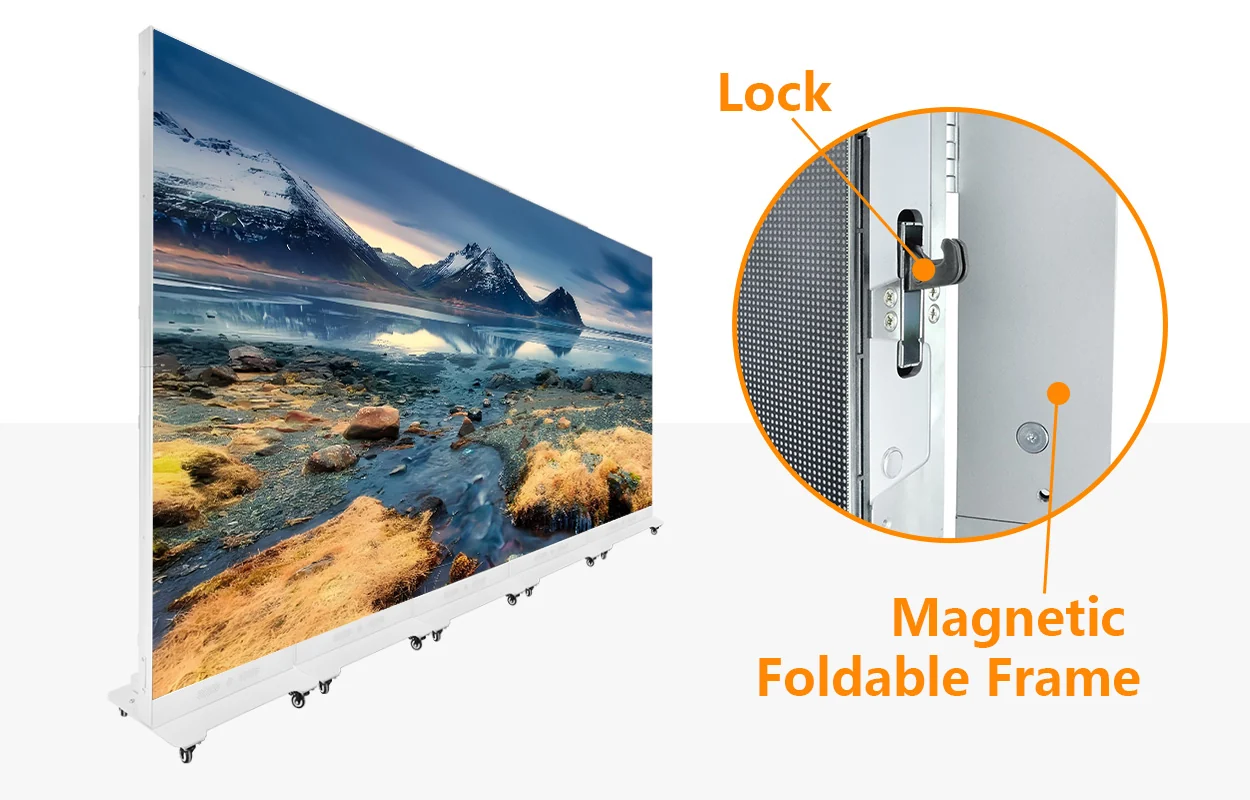
Bring adjacent surfaces into the same plane and check vertical alignment before tightening joining hardware. Do not use the locks to pull a distorted or unsupported assembly into shape. Inspect the top, middle, and bottom of each join.
The mechanical assembly of an LED poster video wall must suit its actual location. Joining locks do not automatically authorize suspension, stacking, or exposure to outdoor wind. Ask for an approved support arrangement where the proposed installation extends beyond the documented floor-standing use.
03. Route signal and power separately
Use the approved signal diagram, label both cable ends, and leave the movement allowance specified for hinges and service access. Protect connectors from strain and route cables away from walking paths.
Have qualified site personnel confirm circuit capacity, protective measures, and power distribution from the supplied electrical ratings. The presence of a power output connector does not establish how many posters can safely share a connection. Keep electrical loading calculations separate from video pixel-capacity calculations.
After assembly, photograph the cable routing and record the connection order. These records shorten troubleshooting when an LED poster video wall is moved to another venue.
6. How to Set Resolution, Screen Mapping, and Playback Sync
Configure the LED poster video wall as one defined canvas, then assign each unit its correct position. The exact menu names depend on the controller, so obtain the matching software version and configuration instructions before commissioning.
01. Define the canvas and each poster’s coordinates
Using the four-poster example above, the native canvas is 1280 × 960 pixels. Each poster occupies 320 × 960 pixels. With a top-left origin, the horizontal starting positions are 0, 320, 640, and 960; every vertical starting position is 0.
Check that the full image is covered once, with no missing or duplicated columns. Match the software layout to the physical arrangement and the documented signal topology. Do not copy another installation’s receiving-card configuration simply because its screen dimensions look similar.
02. Choose how source content fills the canvas
There are three common treatments for mismatched aspect ratios: fit the complete source with unused space, fill the canvas by cropping, or distort the source by stretching. Agree on the intended treatment before delivery. For branded graphics, a composition created for the exact canvas usually gives the designer more control.
An LED poster video wall does not gain physical pixels when a controller accepts a higher-resolution file. Verify input limits, decoding limits, output dimensions, total pixel capacity, and per-port capacity separately.
03. Test timing and recovery
Use a moving object that crosses every poster boundary, then inspect whether its edges remain continuous. Check actual operating content as well as a test pattern. A common start command alone does not prove that independent players will remain aligned throughout a long playback session.
Restart the complete system and repeat the test. Where local playback is required, also disconnect the content-management network under controlled conditions and verify the agreed behavior.
Save the accepted configuration, source settings, firmware versions, and a reference image of the correct result. An LED poster video wall should return to its intended state without requiring an installer to reconstruct the map after every restart.
7. How to Fix Black Screens, Mapping Errors, and Sync Issues
Diagnose an LED poster video wall in stages: power, source, signal path, mapping, timing, and image uniformity. A symptom narrows the investigation; it does not identify a failed component by itself.
| Symptom | First checks | Useful isolation test |
|---|---|---|
| All posters are black | Power state, selected input, source output, and blanking settings | Use a known working source and a supported timing |
| One poster is black | Local power, input selection, cable, and assigned image region | Test the unit independently using the documented procedure |
| Every poster repeats the whole image | Mirror mode or missing region assignments | Load a numbered grid and check each assigned section |
| A straight line breaks at a join | Physical alignment, scaling, and pixel coordinates | Compare a stationary grid with a moving line |
| Movement separates across posters | Playback synchronization and source or player timing | Run one continuous moving pattern across all boundaries |
| One unit looks brighter or differently colored | Brightness, color settings, calibration, and module compatibility | Compare uniform gray and primary-color fields |
Change one variable at a time. Record the original setting before modifying it, and preserve a backup before uploading new configuration files. Replacing several cables and changing multiple software parameters together can conceal the original fault.
For an intermittent LED poster video wall problem, record when it occurs: startup, source switching, scheduled playback, or extended operation. Include controller status information and the affected unit numbers. A short video showing the transition into failure can be more useful than a photograph taken afterward.
Do not treat visible joins as purely mechanical. A mismatch in brightness or grayscale can make a correctly aligned boundary stand out. Conversely, software correction cannot remove a physical step between adjacent display faces.
8. LED Poster Walls vs. Rental LED Walls: Benefits and Limits
An LED poster video wall suits projects that benefit from movable poster units and a repeatable, relatively simple arrangement. A modular rental wall offers a different assembly approach, with cabinet layouts selected to suit the required width, height, and support system.
| Decision | Joined foldable posters | Modular rental LED wall |
|---|---|---|
| Changing the layout | Can return to separate poster positions when the configuration supports it | Cabinets can form different approved row-and-column layouts |
| Screen height | A single row follows the unfolded poster height | Height changes through supported cabinet arrangements |
| Transport planning | Evaluate folded dimensions, bases, cases, and handling procedure | Evaluate cabinet cases, rigging components, and handling procedure |
| Structural requirements | Confirm stability and support for the joined floor-standing assembly | Confirm the ground-support or hanging system for the exact build |
| Operating cost | Include players, configuration, storage, spares, and repeated setup | Include processing, structure, transport, labor, and spares |
The advantage of an LED poster video wall is most relevant when the same inventory must alternate between individual signage and a wider presentation surface. For a tall stage backdrop or a specified aspect ratio, a cabinet-based design may fit the geometry more directly.
Neither format is automatically cheaper, sharper, or easier for every installation. Compare complete systems at the same required viewing distance, content quality, service access, and operating schedule. A lower equipment price can be offset by additional processing, unsuitable transport cases, or repeated content adaptation.
9. How to Choose an LED Poster Video Wall for Your Project
Start an LED poster video wall specification with the intended use, viewing positions, and content workflow. Then select the display configuration and control system that meet those requirements.
In retail, prioritize readable promotional text, appropriate indoor brightness, controlled scheduling, and access for maintenance. At exhibitions, consider loading routes, storage between events, repeated assembly, and whether different teams will operate the equipment. For presentations, confirm laptop connectivity, content scaling, and source-switching behavior.
The EA1920iP5 deserves consideration where folding, multi-screen assembly, and front access support these practical needs. Its published range includes SMD and COB options. Discuss the exact surface construction and maintenance requirements rather than assuming all versions behave identically under handling or service.
For distributor orders, agree on a repeatable package containing the selected displays, compatible controls, joining accessories, documented cable types, spare parts, and configuration backups. Define which components are included and which are supplied locally.
A useful acceptance brief for an LED poster video wall should require:
- Correct full-canvas mapping and readable representative content.
- Continuous motion across joins throughout the agreed test period.
- Consistent brightness and color at the intended settings.
- Successful restart and the agreed response to network interruption.
- Accessible service points and documented operator procedures.
If cameras will record the wall, add a demonstration using the intended camera and settings. A published refresh-rate specification alone cannot guarantee every camera result.
For remote content management, identify who owns the account, who can publish, and how access transfers at handover. These decisions affect everyday operation as much as the initial connection method.
10. FAQ
01. Can I expand an LED poster video wall with units purchased later?
Potentially, but expansion should be planned before the first order. Record the original module specifications, pixel matrix, controller hardware, firmware, and calibration requirements. Later production may differ even under the same product name. Ask the supplier to confirm compatibility, available control capacity, and the expected process for matching old and new units visually.
02. Can the posters share one audio output?
Decide which device will handle audio and how it connects to the venue system. Where multiple posters have speakers, playing every speaker may create an unsuitable sound field or audible timing differences. Confirm whether the selected configuration supports muting individual outputs and routing audio to the intended playback system.
03. What happens if one poster needs repair during operation?
The effect depends on signal routing, power distribution, and controller behavior. A failed intermediate device may affect downstream units in some arrangements. Ask for the documented isolation or bypass procedure and plan access accordingly. Do not assume that live removal is supported or that the remaining image will automatically resize around a missing poster.
04. Does an LED poster video wall require subscription software?
There is no universal answer. Local control software, cloud publishing, remote management, and cellular connectivity can have different licensing or service arrangements. Request a written breakdown of included software, account ownership, optional charges, and functions available without a subscription. Do not infer free cloud service from the presence of network interfaces.
05. Can I fold the posters without disconnecting the cables?
Follow the supplied folding and packing procedure for the exact model. Cable routing, connector clearance, and hinge movement determine what must be disconnected or secured. Do not assume the external cables used for a joined wall can remain attached during folding simply because the display contains an internal hinge.
06. Can an indoor poster wall operate beside a shop window?
Assess the actual environment, including sunlight on the display, heat buildup, reflections, ventilation, and moisture exposure. An indoor classification does not establish suitability for every window position. Provide site photographs and operating conditions to the supplier, then evaluate representative content at the intended viewing times before approving the location.
07. Can an LED poster video wall become an interactive touchscreen?
Touch interaction requires a compatible sensing system, software, and physical installation. It is not created by joining ordinary LED posters. If interaction is required, specify the usable area, input method, user position, and application behavior. Ask for a demonstrated integrated solution instead of assuming touch capability from the display’s connectivity.
08. What files should an integrator provide at handover?
Provide the approved layout, cable schedule, controller and receiving configuration backups, software versions, content templates, operating instructions, and recovery procedure. Include device identifiers and support contacts. Transfer account access securely through the customer’s agreed process. Keep a copy of the accepted test content so future service teams can compare results consistently.
11. Conclusion
A reliable LED poster video wall starts with matched displays and a documented control architecture. Its final quality depends on accurate physical alignment, correct image regions, stable playback timing, and a content canvas that matches the installed hardware.
For projects considering the EA1920iP5 640 × 1920 Indoor Foldable Poster LED Screen, confirm the ordered pixel pitch, native resolution, controller, supported poster count, and joining arrangement before purchase. Use a full-system demonstration to approve the result.
To plan your LED poster video wall, share the required screen width, nearest viewing distance, poster quantity, content source, and installation conditions with EagerLED’s project team. These details allow the proposal to address the display, control system, accessories, and commissioning requirements together.





