

If you are trying to make sense of the Novastar BR840, the easiest way to think about it is as a practical control board built for LED display systems. It is not the kind of product people buy because it sounds impressive on paper. Most of the time, it matters because it does a very specific job inside a larger display setup, and if that job is handled well, the rest of the system tends to behave much better too.
The BR840 is part of a technical world where details matter a lot. A connector that is slightly off, a pin definition that gets overlooked, or an electrical condition that is not matched properly can turn into a headache later. So when people look for information on this board, they are usually not looking for marketing language. They want to know what it does, how it fits into the system, what its limits are, and what to pay attention to during installation.
1.What the Novastar BR840 Is
2.Main Functions and Purpose of Novastar BR840 Receiving Card
3.Appearance and Physical Layout of Novastar BR840
4.Pin Definitions and Connectivity of BR840 LED Receiving Card
5.Electrical Specifications
6.Safety and Protection Considerations
7.EMC and Compliance of Novastar BR840
8.Operating Environment and Storage
9.Packaging and Logistics of Novastar BR840
10.Why the Spec Sheet Matters So Much
11.Conclusion
1. What the Novastar BR840 Is
At a basic level, the Novastar BR840 is an LED display control board. Its role is tied to power conversion and control inside the display system, which means it sits in that middle layer between the broader system and the actual display operation. That makes it one of those components that people may not think about much until something goes wrong.
The board is meant for use in LED display applications where control, compatibility, and stable operation are all important. In practice, that means it is used by technicians and integrators who need a board that can be wired correctly, operate within expected electrical limits, and fit into the mechanical structure of the display setup without surprises.
One thing to keep in mind is that a product like the BR840 is best understood through its specification document. That is where the real details live. The title tells you the model name, but the spec sheet tells you the wiring, the indicators, the dimensions, the electrical requirements, and the conditions it is designed to survive.
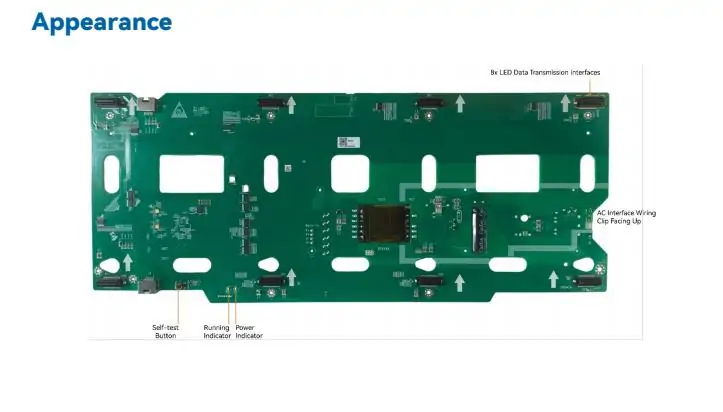
2. Main Functions and Purpose of Novastar BR840 Receiving Card
The main purpose of the BR840 is to support LED display operation in a controlled and reliable way. It is not just a passive part sitting in the cabinet. It handles defined functions in the system, and those functions are what make the display usable in real projects.
In most cases, users care about three things here: whether the board works with the rest of the setup, whether it can be installed without awkward mechanical issues, and whether it performs consistently under normal operating conditions. The BR840 is positioned around those expectations.
Its feature set is presented in a fairly direct way in the technical material, which makes sense. Boards like this are not usually described with long explanatory prose. Instead, the important points are listed as capabilities. That usually includes the core support for the display system, the interface layout, and the operating behavior that helps technicians confirm whether things are functioning correctly.
3. Appearance and Physical Layout of Novastar BR840
Physical layout matters more than people sometimes expect. In a rack or display cabinet, a board can be technically correct and still be annoying to work with if the spacing, indicator placement, or mounting style is awkward.
For the BR840, the appearance section and the mechanical information give you the practical side of the product. This is where you check how the board is arranged, where the indicators are located, and how much space it needs. If you have ever done installation work, you know that these small details are rarely small once you are on-site.
The indicator behavior is especially useful during setup and troubleshooting. A status light may seem trivial at first, but when you are trying to confirm power, signal, or normal operation, it can save a lot of time. That is why the indicator logic is always worth reading carefully instead of skimming past it.
The dimensions matter too. They tell you whether the board fits the intended housing and whether the installation space has enough clearance. In real projects, that is the kind of thing people sometimes only check after the parts arrive. That usually leads to unnecessary delay, so it is better to confirm it early.
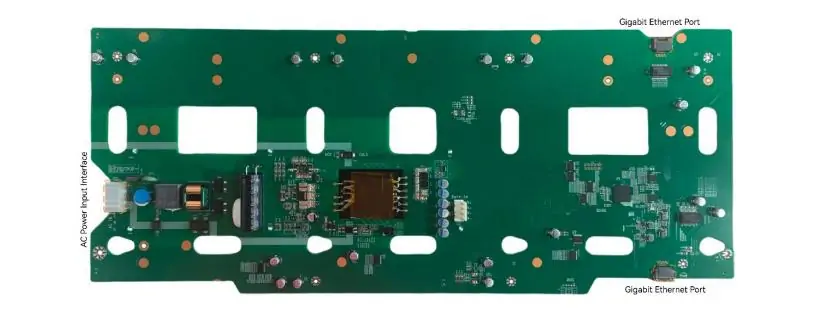
4. Pin Definitions and Connectivity of BR840 LED Receiving Card
This is the part most people end up returning to more than once. The pin definitions are where the BR840 becomes less abstract and more practical. If you are wiring the system, this is the section that tells you where each connection goes and what each pin is supposed to do.
The pinout table is not just a formality. It is the difference between a clean installation and a frustrating one. Even if the rest of the system is solid, a wiring mistake here can make the board appear faulty when the real issue is simply an incorrect connection.
In that sense, the connectivity section is where the document shifts from “what the product is” to “how you actually use it.” That is also why it is one of the most important parts for installers and maintenance staff. You do not need to memorize every pin, but you do need to understand the logic of the layout and follow the definition exactly.
If you are comparing the BR840 with another board, this is usually where the comparison gets real. Similar products can look close on the surface, but their pin assignments, signal arrangements, or interface details may not match. That is the sort of mismatch that causes avoidable problems in the field.
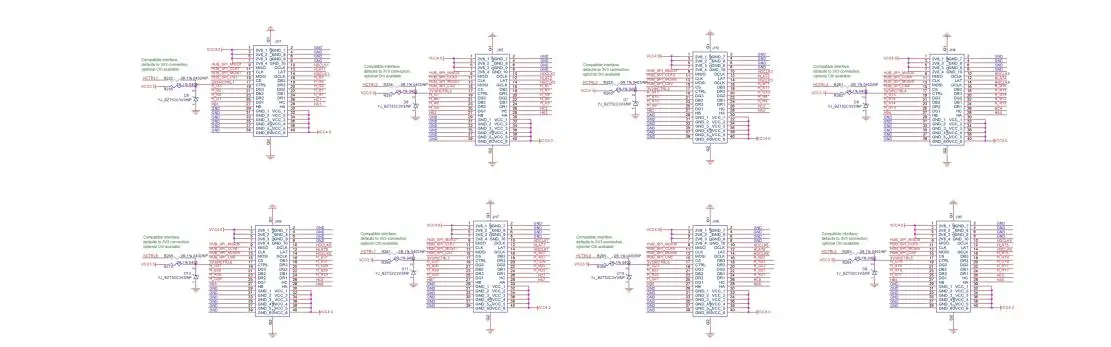
5. Electrical Specifications
Electrical information is where the BR840’s operating boundaries become clear. This section typically covers input and output conditions, efficiency-related notes, and any derating or limit information that applies under certain circumstances.
That sounds dry, and in a way it is, but it is also the part that protects the system. When technicians ignore electrical limits, the result is often poor performance or unstable behavior. Sometimes the board survives, sometimes it does not, and that is not a gamble worth taking.
The spec sheet’s electrical tables are important because they tell you what the board expects and what it can provide. If the input conditions do not match, the board may not function correctly. If the output side is not aligned with the rest of the system, the display may behave inconsistently. These things tend to show up during commissioning, which is exactly when nobody wants to discover them.
There is also the matter of efficiency and derating. Even if a board works well under normal conditions, performance can shift once temperature or load conditions move outside the comfortable range. That is normal for hardware like this, and it is one reason why the detailed specification section exists in the first place.
6. Safety and Protection Considerations
Safety is not the most exciting part of a control board document, but it is one of the parts you should read carefully. The BR840 includes protection mechanisms and safety-related guidance, and that information should not be treated as boilerplate.
In practical terms, this section tells you what the board expects in terms of insulation, grounding, and safe operation. For an installation team, that means checking not just whether the board powers on, but whether it is being integrated in a way that respects the electrical and mechanical setup around it.
Grounding, in particular, is one of those things people sometimes assume will be handled elsewhere. In reality, it is worth confirming on the board level as well. If the grounding scheme is wrong, you can end up with noise issues, unstable behavior, or worse. A good installation is usually boring in the best possible way, and grounding plays a big part in that.
Protection features also matter because they give the hardware some tolerance against common issues. They do not make the system invincible, of course, but they do add a layer of resilience that is useful in real-world environments where conditions are not always ideal.
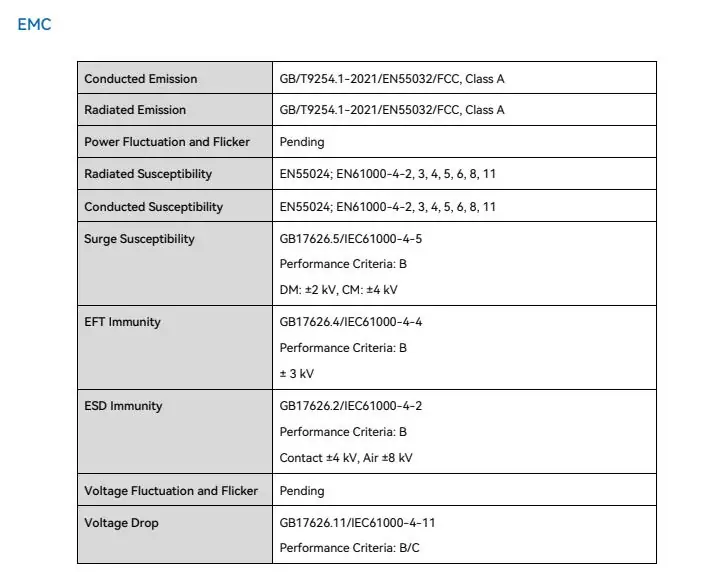
7. EMC and Compliance of Novastar BR840
The EMC section exists for a reason. LED display systems are often installed in environments where signal integrity matters, and they may sit alongside other electronic equipment that can create interference or be affected by it.
For the BR840, the compliance information helps set expectations for electromagnetic compatibility and related behavior. This is the kind of detail that can feel secondary until a system starts acting strangely. Then it becomes very relevant very quickly.
Compliance is also part of the broader picture of whether the board is suitable for a given project. It is not just about passing a checkbox. It is about knowing the device has been designed with the usual electrical environment in mind and that it can coexist with the rest of the system without creating unnecessary trouble.
If you are working on a larger installation, this section is worth keeping close by. It helps when checking whether the board fits the project environment and whether any extra precautions are needed during deployment.
8. Operating Environment and Storage
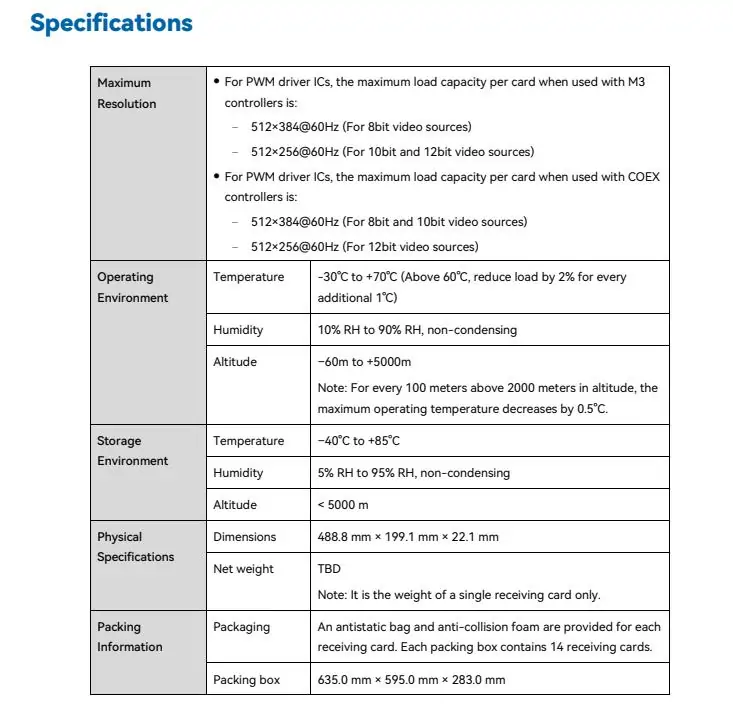
A control board does not live in a vacuum. It lives inside cabinets, racks, shipping boxes, storage rooms, and sometimes less-than-perfect workspaces. That is why the environmental information matters.
The BR840 specification includes the operating environment and storage conditions, which give you the boundaries for safe handling. This is the section that helps installers and warehouse staff avoid simple but costly mistakes. Leaving hardware in the wrong conditions for too long can cause problems before installation even begins.
There is also a difference between what the board can tolerate during use and what it can tolerate while sitting unused. That may sound obvious, but it is exactly the sort of thing that gets glossed over when people are moving quickly. In most cases, the environmental notes are there to prevent that kind of oversight.
If the display system is going into a location with temperature swings, humidity concerns, or other challenging conditions, this section becomes more than a formality. It is part of the planning process.
9. Packaging and Logistics of Novastar BR840
Packaging might seem like the least technical part of the document, but it still matters. The logistics information tells you how the product is supplied and what to expect when it arrives. That is useful for receiving teams, installers, and anyone responsible for checking parts before deployment.
This section also helps with planning. If you are managing multiple units or a larger rollout, knowing how the board is packaged can make inventory handling easier. It may not be the part people read first, but it is one of those details that becomes useful at the exact moment you need it.
10. Why the Spec Sheet Matters So Much
The Novastar BR840 is the kind of product that rewards careful reading. It is not enough to know the model name and assume the rest will take care of itself. The important information is in the specifications, the pin definitions, the electrical limits, and the installation notes.
That is pretty normal for LED control hardware. These products are built for systems where precision matters, and the documentation reflects that. If you are an engineer, integrator, or technician, the spec sheet is not just reference material. It is part of the job.
In actual use, the BR840 should be approached with the same mindset as any other serious control component: confirm compatibility, check the physical layout, follow the wiring table carefully, and pay attention to operating conditions. None of that is flashy, but it is exactly how reliable systems are built.
11. FAQs
1. What core functions does the Novastar BR840 provide?
It delivers stable signal transmission, high-resolution support and precise color calibration for LED screens.
2. Which LED display scenarios suit the Novastar BR840 best?
It is widely applied in indoor commercial screens, rental stage displays and high-definition exhibition walls.
3. Is the Novastar BR840 easy to install and configure?
This receiving card adopts plug-and-play design and intuitive software for fast on-site setup.
12. Conclusion
The Novastar BR840 is best understood as a technical component with a defined role in LED display systems. Its value comes from how it fits into the wider setup, how clearly its interfaces are defined, and how well it behaves within the limits laid out in the specification.
If you are evaluating it for a project, the most useful approach is simple. Start with the overview, then move through the physical layout, the pin definitions, the electrical specs, and the environmental notes. That sequence makes sense because it mirrors the actual installation process. First you check what the board is, then whether it fits, then whether it can be wired correctly, and finally whether it will operate reliably in the intended environment.
That is really the whole point of a product like this. Not drama, not hype. Just a control board that needs to do its job cleanly and predictably.