LED display solutions help businesses promote their brand with scheduled product videos, offers and event messages on a reusable digital screen. Choose the format around the audience: an LED poster for a retail promotion, a fixed video wall for a showroom, a rental screen for an exhibition, or an outdoor-rated display for an exposed location. Effective promotion also needs readable content, a compatible control system and a way to measure customer response.
For commercial advertising LED solutions, the useful starting point is the audience and site, not maximum screen brightness. A bright screen alone does not guarantee more sales. Start with one business goal and the action you want a viewer to take, then match the display and campaign to that task.

1. Match LED Display Solutions to the Promotion
The same brand campaign can need different LED display solutions in different locations. A passer-by outside a shop needs a short message; a visitor waiting at a trade-show booth can watch a product demonstration. Use the viewing situation to choose the format before requesting a specification.
| Business setting | Format to consider | Content priority | Check before choosing |
|---|---|---|---|
| Retail entrance or promotion area | Freestanding LED poster | One featured product, offer and next step | Footprint, close-view readability and safe placement |
| Showroom or brand experience zone | Indoor fixed LED video wall | Product demonstrations and brand stories | Viewing distance, image detail and service access |
| Glass storefront | Transparent LED display | Bold graphics with uncluttered backgrounds | Visibility through glass and daylight contrast |
| Trade show or temporary launch | Rental LED screen | Demonstrations, presentation visuals and booth identity | Assembly, transport, venue rules and signal inputs |
| Outdoor frontage or billboard | Outdoor-rated fixed display | Short messages readable from the intended distance | Weather exposure, brightness control and local approvals |
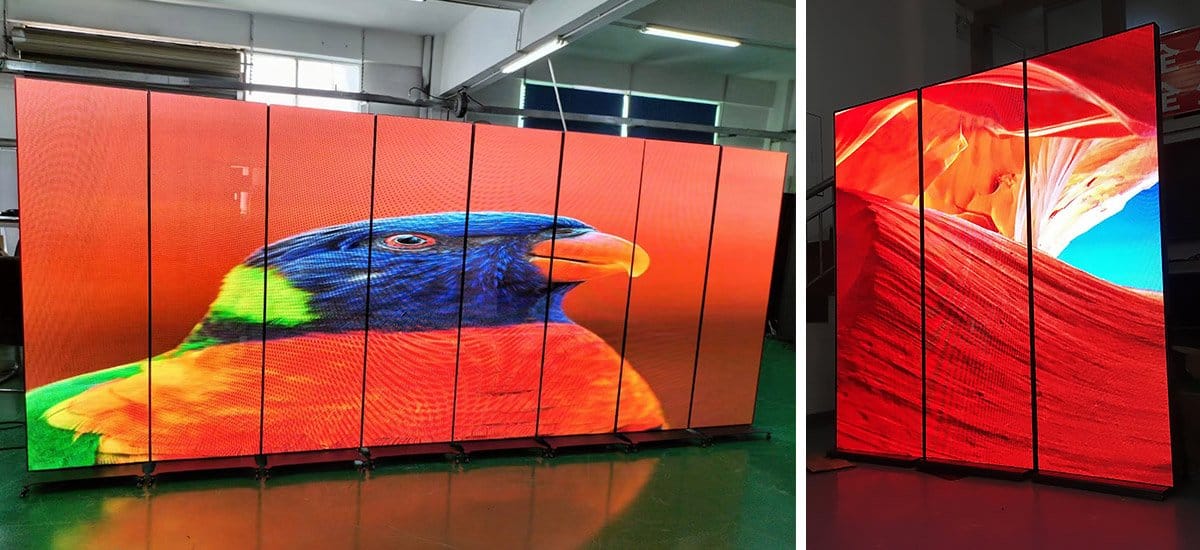
For movable retail signage, explore EagerLED LED poster displays. For temporary installations, compare rental LED screen formats. A wheeled indoor poster is not automatically suitable for an outdoor event; its environmental rating still matters.
2. Create Brand Content People Can Read
Build each message around one product or offer, one main benefit and one clear action. Keep your logo, colors and typography consistent with the rest of the campaign. Put the information that matters most on the screen immediately instead of saving it for the end of a long animation.
- Design for the actual canvas. Obtain the screen’s native pixel dimensions and orientation before producing artwork. A portrait poster and an ultra-wide wall need separate layouts.
- Test at the viewing position. Check product names, prices and offer conditions from where customers will stand or walk. A design that looks clear on a laptop may be unreadable on the installed screen.
- Use motion selectively. Product movement can explain a feature, but constant transitions make short messages harder to absorb. Keep essential information visible long enough to read.
- Make the next step practical. Direct visitors to a product area, demonstration or staffed counter. Use a QR code only where people can stop safely and scan it reliably.
- Plan for silent playback. Communicate the message without relying on audio, especially in shops and exhibition halls.
Illustrative campaign: a restaurant could schedule a breakfast menu in the morning, a lunch offer at midday and an evening promotion later. Each version should show the correct availability period and an action such as ordering at the counter. This is a planning example, not a measured customer success story.
3. How Can Businesses Schedule and Update LED Content?
Remote content updates require a compatible media player or controller, supported software and an appropriate network connection. The LED panel itself does not provide cloud management. Confirm these functions in the proposed system and ask the supplier to demonstrate the full update process.
Asynchronous playback stores a playlist on a media player for scheduled operation. Synchronous playback displays a live input, such as a presentation computer or video source. Some configurations support both. Choose around the task: scheduled offers in a shop or live demonstrations at an event.
- Prepare artwork in the required dimensions and supported file format.
- Upload through the agreed method, such as a local connection, USB transfer or supported cloud platform.
- Set campaign start and end times, store-specific details and playback order.
- Preview on the installed display and check text, color, cropping and timing.
- Confirm successful playback and remove expired offers.
For multiple locations, check account permissions, scheduling by location, software charges and device status reporting. Ask what happens if the internet connection fails: locally stored content may continue playing, but remote changes need connectivity. Do not assume that upload speed, offline behavior or phone control is identical across systems.
01. Map the LED Display Update Method to the Campaign
An LED display solution should fit the people who will operate it. A single shop may need a staff member to replace one weekly promotion, while a chain may need a central team to approve artwork and assign playlists by location. Before buying an LED display, document who creates files, who checks prices and dates, who publishes them and who removes expired messages. This operational plan matters as much as the screen specification.
| Campaign need | Possible workflow | Question to test |
|---|---|---|
| One LED display at a fixed shop | Local player or approved USB update | Can staff replace an offer without changing the LED display configuration? |
| Several LED displays across locations | Networked scheduling with location groups | Can the team publish only to the intended screens and confirm playback? |
| Live event LED display | Synchronous input from an event computer or switcher | Are inputs, resolution and signal backup compatible with the event plan? |
| LED display with frequent price changes | Template with a documented approval process | Who verifies each price and removes it when the offer ends? |
| Outdoor LED display with limited connectivity | Locally stored fallback playlist where supported | What continues to play if the network connection drops? |
Ask for a demonstration that starts with a new file and ends with the correct image on the LED display. Verify the time zone, scheduling cutoffs, aspect ratio and any approval permissions. A content platform may offer remote monitoring, but its features, licensing and network needs vary by controller. Keep an offline copy of approved artwork and a contact list for urgent corrections.
4. Check Screen Performance at the Site
The specification for LED display solutions must make your intended content readable under actual operating conditions. Review these points with the supplier using site photographs and representative artwork.
- Pixel pitch and resolution: pixel pitch is the distance between adjacent pixel centers. Smaller pitch provides more pixels within the same area, but the required detail depends on viewing distance and content. Request a demonstration of the smallest text you plan to use.
- Brightness and dimming: assess daylight, glass reflections and evening operation. Maximum brightness alone is not enough; the screen should remain comfortable and legible when dimmed.
- Environment: confirm whether the complete installation is appropriate for indoor use, a window location or direct outdoor exposure. Check the protection of the exposed surfaces and connections.
- Access and installation: allow for maintenance access, cable routing and a suitable support structure. Arrange qualified assessment of structural and electrical work.
For detailed hardware selection, see the commercial LED display buying guide. For outdoor promotional projects, review the LED advertising screen solutions.

01. Check the Installed LED Display View
Visit the proposed LED display location at the times the promotion will run. Photograph the audience approach, measure the available mounting area and note windows, sunlight, lighting fixtures and obstructions. A storefront LED display viewed at close range needs different image detail from a roadside screen seen briefly from farther away. The screen should also respect sightlines, accessible circulation and the host venue’s requirements.
Request a test with actual campaign artwork. Walk to the closest and farthest intended viewing positions, then check whether the headline, offer condition and action are readable without stopping in an unsafe place. Inspect the LED display after dark as well as in daylight when both conditions matter. Ask how automatic or scheduled dimming works, and confirm who can change brightness without disrupting the campaign.
For an outdoor LED display, the supplier should identify which cabinet faces, cable entries and controller enclosures are exposed to weather. The full installation needs suitable protection and a plan for drainage, power isolation and maintenance access. For a shop-window LED display, check reflections and whether the display blocks product visibility or daylight. Record these observations in the project brief instead of relying on a generic “indoor” or “outdoor” label.
5. What Should a Display Solutions Supplier Provide?
A useful proposal explains how the screen, control system, installation and ongoing support work together. Compare suppliers against the same project brief, not only a cabinet price or a claim of an “advanced” solution.
- Defined hardware: model, screen dimensions, native resolution, operating brightness, environmental rating and service method.
- Proven content workflow: controller model, software, supported inputs, update methods and any recurring licenses or connectivity costs.
- A complete cost breakdown: display, control equipment, structure, cabling, freight, installation, commissioning, training and spare parts, with exclusions clearly stated.
- Evidence relevant to the application: real installation photographs and a demonstration using comparable viewing distance, lighting and content.
- Written support terms: warranty scope, spare-part availability, support channels and responsibility for on-site work.
Ask who will create and approve campaign content after installation. Even a technically suitable display can become ineffective when no one owns the playlist or removes outdated promotions.
01. Compare Proposals on the Same Scope
Send each supplier the same dimensions, site photographs, viewing distances, content examples and operating schedule. Ask them to identify the proposed LED display model, cabinet layout, pixel dimensions, controller and mounting method. A proposal for an LED display is difficult to compare when one quotation includes structure and commissioning but another lists only display cabinets.
Request a drawing that shows the LED display size, service direction, power and data paths, supporting structure and any visible trim. Confirm which party obtains venue or local approvals and which party completes structural and electrical work. Ask for an acceptance checklist covering image uniformity, content playback, brightness control, network connection and spare-part handover. These checks turn a broad promise into work that can be verified at installation.
Support terms should name the LED display components covered, the process for reporting a fault, the expected spare-part arrangement and any exclusions for labor or travel. Keep the supplier’s demonstration files, controller settings and final as-built information in an accessible project folder. A reliable LED display program depends on trained operators and a repeatable repair path after the launch event.
6. Measure Campaign Results Beyond Screen Brightness
Choose a success measure before launch. Retail campaigns might track offer redemptions or visits to a promoted product area; exhibitions might track qualified inquiries or booked demonstrations. A play count shows that an advertisement ran, not that a person watched it or made a purchase.
Use a campaign-specific offer code, landing page or staff-recorded inquiry category where appropriate. Compare similar trading periods and record changes in promotions, pricing, opening hours and foot traffic. These factors can affect results independently of the display.
Include electricity, content production, software, maintenance and installation in the cost assessment. An LED screen can reduce repeated printing for changing campaigns, but lower total cost and increased sales must be demonstrated for the particular business.
01. Link Each Campaign Goal to Evidence
The way a business evaluates an LED display should follow the original objective. A retail offer can be tested with a unique code or a staffed tally, while a showroom may track requests for a specific demonstration. A brand awareness campaign may require a different survey or footfall method. Agree on a baseline before the LED display starts so that later changes have useful context.
| LED display goal | Possible evidence | Important limit |
|---|---|---|
| Promote a retail offer | Offer-code redemptions or recorded product inquiries | Pricing, stock and staff activity can also change results. |
| Generate exhibition leads | Qualified inquiries linked to a booth demonstration | Lead quality matters more than raw scans or booth traffic. |
| Explain a complex product | Demonstration requests and common customer questions | A play count alone does not show understanding. |
| Increase visits to a location | Comparable footfall periods or a campaign landing page | Weather, events and seasonality can affect visits. |
| Reduce recurring print work | Documented design, printing and replacement costs | Include LED display power, software and maintenance costs. |
Review results by campaign and by location. Keep the message, schedule and measurement method consistent long enough to learn from a change. When an LED display campaign underperforms, test one variable at a time: move the display within the permitted site, simplify the headline, change the offer or adjust the call to action. Do not attribute every change in sales to the LED display without accounting for other marketing and trading conditions.
7. Frequently Asked Questions
01. How much does a business LED display cost to install and operate?
There is no reliable single price without the screen area, pixel pitch, indoor or outdoor rating, cabinet type, controller and site scope. Ask for separate figures for hardware, steelwork or mounting, power and data cabling, freight, installation, commissioning, software, electricity, content production and maintenance. Compare the same scope across quotations and calculate operating cost for your actual hours and measured power draw.
02. What pixel pitch should I choose for a retail advertising LED screen?
Start with the closest position where a customer must read the smallest essential text, then test sample artwork on a display at that distance. A smaller pitch adds pixels and cost, but the screen dimensions and content determine whether the extra resolution helps. Ask the supplier for native pixel dimensions and a viewing demonstration rather than treating one pitch as universal.
03. Can I update LED advertising content remotely across several stores?
Yes, when the selected controller or media player supports networked management and compatible software. Confirm location groups, user permissions, scheduling by local time zone, playback confirmation, licensing, connectivity and what remains on screen during an outage. Test an actual upload before accepting the system.
04. Should a business rent or buy an LED screen for a promotion?
Compare rental for a short launch, exhibition or occasional campaign and purchase for frequent use at a stable site. Include repeated rental and crew fees, transport, storage, installation, software, content and support in the comparison. The break-even point depends on how often the display is used and who operates it.
05. Does an outdoor advertising LED display need a permit?
Requirements vary by location and can cover sign size, brightness, operating hours, structural safety and electrical work. Check the local authority and property owner requirements before ordering the screen. Provide the supplier with the permitted dimensions and operating restrictions so the proposed LED display solutions fit the site.
8. Prepare Your LED Promotion Project Brief
Write down the audience, campaign goal, screen location and next action you want viewers to take. Add site photographs, approximate dimensions and sample artwork so the proposed display can be evaluated against real use.
Send your project requirements to EagerLED to discuss a suitable configuration and quotation.
9. Conclusion
Effective LED display promotion starts with a clear audience, a readable message and a practical next step. Select the screen format for the location, test campaign artwork under real viewing conditions, confirm the content workflow and measure results against the original goal. Share the site details and sample content with a supplier before choosing a configuration.
Prepared for EagerLED’s business display audience. Product formats and control options are based on the EagerLED resources linked in this guide. Final capabilities depend on the selected model and configuration; campaign examples are illustrative.