An outdoor LED screen needs readable brightness, suitable weather protection, the right pixel pitch, reliable cooling, a properly designed power supply and a site-approved support structure. There is no universal 1920 x 1200 minimum resolution. The eight checks below help buyers turn an outdoor LED display quotation into a specification they can verify.
Use this guide for fixed advertising screens, building displays and outdoor event projects. Formal standards, manufacturer ratings and local installation requirements serve different purposes: an IP rating does not certify the entire installation. Structural and electrical design should be approved by qualified professionals for the project location.
On this page: Requirements overview | 1. Brightness | 2. Weather protection | 3. Pixel pitch | 4. Cooling | 5. Power and protection | 6. Structure | 7. Refresh and image quality | 8. Service access | Acceptance checklist | FAQ | Technical references
Outdoor LED Screen Technical Requirements at a Glance
The table is a purchasing checklist, not a set of universal legal minimums. Ask each supplier to identify the exact model and the evidence supporting each specification.
| Check | What to specify | What to verify |
|---|---|---|
| Brightness | Calibrated luminance in nits and a dimming range | Daylight readability and nighttime settings |
| Weather protection | Front/rear IP ratings and exposure limits | Test report, seals, cable entries and drainage |
| Pixel pitch | Pitch in mm and total native pixel dimensions | Cabinet layout and actual content at viewing distance |
| Thermal design | Operating temperature, humidity and cooling method | Installed airflow, solar exposure and temperature monitoring |
| Electrical protection | Maximum load, supply requirements and protection design | Project drawings and commissioning records |
| Structure | Cabinet mass, support design and site wind loads | Engineer-approved fixings and access arrangements |
| Image performance | Refresh rate, signal format and low-brightness quality | Real playback and camera tests where needed |
| Maintenance | Front/rear access, replaceable parts and spares | Safe replacement procedure and service documentation |
1. Specify Brightness, Contrast and Automatic Dimming
Brightness is measured in nits; 1 nit equals 1 cd/m2. A shaded storefront and a billboard facing afternoon sun need different operating settings. Ask for calibrated brightness, the measurement conditions and the output the screen can maintain within its rated temperature range.
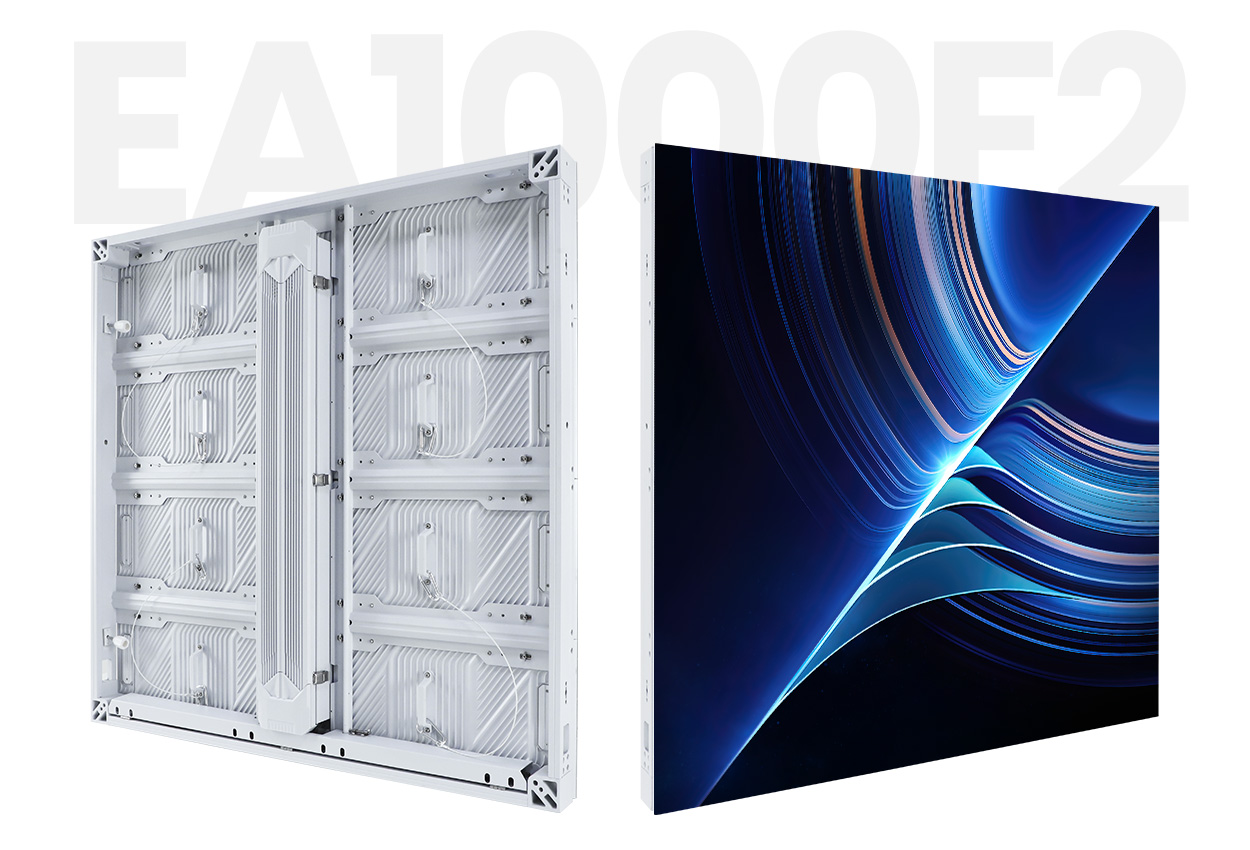
As a concrete product reference, EagerLED’s EA1000F2 outdoor advertising LED screen lists 5,000 or 6,500 cd/m2, depending on configuration. These values describe that product, not a mandatory brightness range for every outdoor installation.
Check contrast with the intended content in daylight. Dark masks, louvers, orientation and surface reflections affect readability. A direct-view LED screen does not universally require coated cover glass; adding a cover can change reflections, ventilation and service access. Specify automatic dimming or a controlled schedule and verify local restrictions on nighttime brightness and operating hours.
2. Verify IP Ratings for Both Front and Rear
Under the IEC 60529 classification, IP65 combines dust-tight protection with protection against water jets. The International Electrotechnical Commission’s IP ratings guide distinguishes this from immersion protection. IPX5 identifies a water-protection level; the X does not establish a dust-protection rating.
Check which parts were tested: LED module, cabinet front, cabinet rear or the complete assembly. For example, the published EA320F parameter table distinguishes IP65 at the front from IP54 at the rear. A front rating must not be silently applied to the back of the display.
- Request the test report and match its model designation to the quotation.
- Inspect cabinet joints, door seals, connectors and cable entries in their installed condition.
- Confirm drainage, the approved cleaning method and protection during servicing.
- For coastal or dusty sites, request separate evidence for corrosion resistance and environmental suitability. An IP code alone does not establish resistance to salt, UV exposure or condensation.
3. Calculate Pixel Pitch and Native Resolution
Pixel pitch is the distance between adjacent pixel centers, measured in millimeters. Smaller pitch gives more pixels within the same area. Choose it using the nearest important viewing position, text size and content detail, then confirm the final cabinet arrangement.
For an initial estimate: horizontal pixels = screen width in mm / pixel pitch in mm; use the same calculation for height. For the final design, multiply the exact module or cabinet pixel counts, because marketed pitch values can be rounded.
Calculated example: an EA320F P10 module is 320 x 320 mm with 32 x 32 pixels. A 960 x 960 mm cabinet contains 3 x 3 such modules, giving 96 x 96 pixels. A 6 x 3 cabinet layout is 5.76 x 2.88 m and 576 x 288 pixels. This is a configuration calculation from published dimensions, not an installed-project test.
The example shows why 1920 x 1200 is not a universal outdoor requirement. A higher-resolution video source can be scaled to a lower-resolution screen, but scaling cannot add physical pixels. Check text and logos at native resolution and verify controller capacity before approval. For fixed advertising applications, compare commercial LED display solutions.
4. Match Cooling and Environmental Limits to the Site
Read the selected model’s operating temperature and humidity limits, including whether humidity must be non-condensing. Do not apply one temperature range to every outdoor screen. EA1000F2’s published table lists -20 to +60 degrees C; that does not establish performance outside the specified conditions or inside an unventilated enclosure.
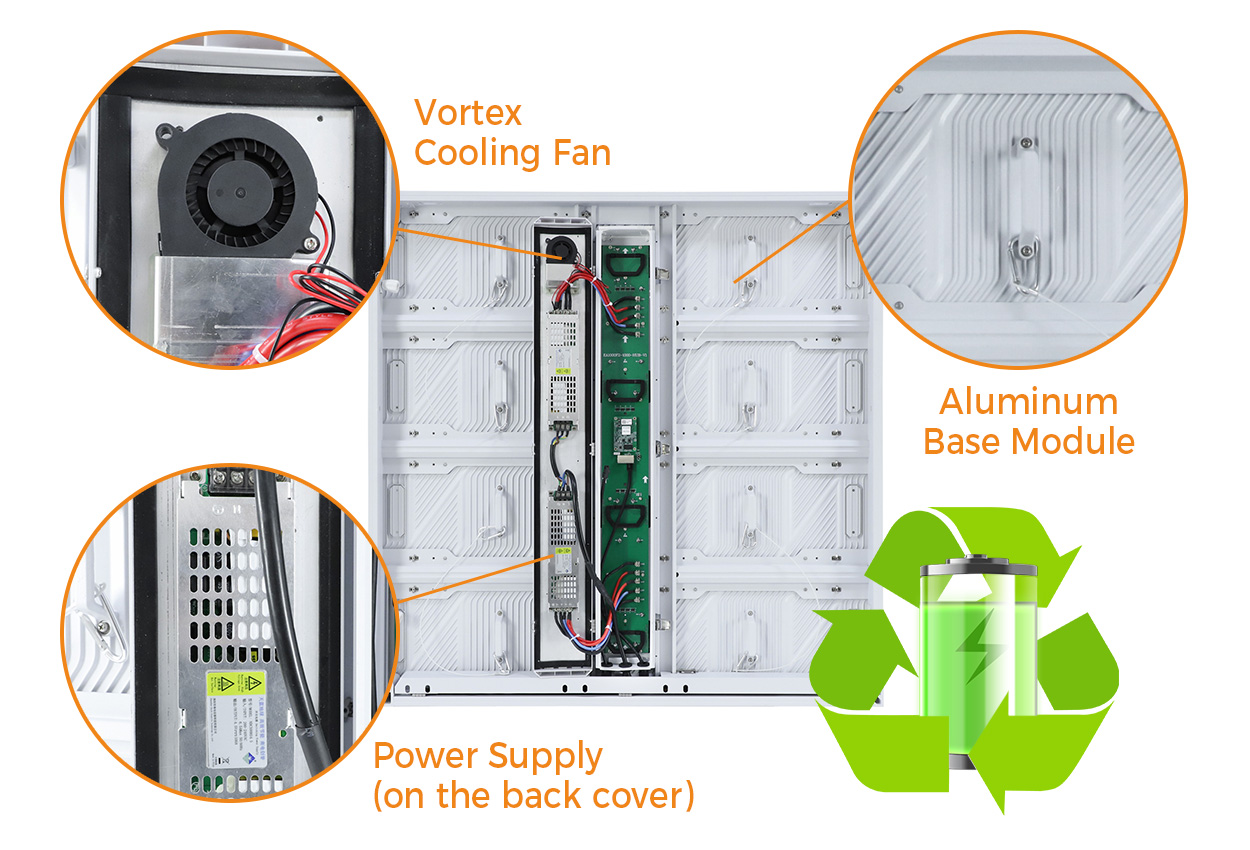
Review solar heating, ventilation clearance and the heat from power supplies and LED modules. A wall-mounted screen can have very different airflow from a free-standing cabinet. Ask how temperature is monitored, how blocked filters or failed fans are detected and what happens if the system overheats. Use air conditioning only where the site and enclosure design require it.
5. Separate Power Capacity from Energy Consumption
Size the electrical supply using the specified maximum load, not the average advertising-content consumption. Average consumption is useful for running-cost estimates, but it changes with brightness, content and operating schedule. Cooling equipment and control hardware also consume power.
For example, the flat EA1000F2 P6.25 configuration lists a maximum of 650 W/m2 and an average range of 100-200 W/m2. For a 10 m2 screen, that gives a calculated 6.5 kW maximum display load and a catalog-based average estimate of 1-2 kW. These figures exclude auxiliary equipment and are not a measured energy guarantee.
A qualified electrical designer should determine circuits, isolation, protective bonding, earthing and surge protection under applicable local requirements. Lightning-risk assessment, power protection and signal-cable routing must work together. A surge protector or a metal cabinet alone cannot guarantee protection against a direct lightning strike. Request the applicable safety and electromagnetic-compatibility documentation for the exact equipment.
6. Check Wind Loads, Fixings and Public Access
The supporting structure must be designed for the screen’s installed location, height, area and applicable wind loads. Cabinet weight is only part of the calculation: include the frame, cladding, service platforms and other installed equipment. Request an engineer-approved design for the foundations, anchors and supporting building where relevant.
For displays accessible to the public, specify lockable service doors, controlled access and protected cabling. Do not describe a screen as vandal-proof without a defined impact rating or test. For temporary installations, use the approved rigging or ground-support system and the supplier’s operating limits; follow the event’s weather and shutdown procedures. Compare rental LED display options separately from permanent billboard structures.
7. Test Refresh Rate and Image Quality with Real Content
Refresh rate in Hz and video frame rate in frames per second are different specifications. EA1000F2 lists a refresh rate of at least 3,840 Hz and a frame frequency of 50/60 Hz. These are product values, not a universal compliance threshold.
Check grayscale, color uniformity, cabinet seams, motion and small text at both daytime and nighttime brightness. For a screen that will be filmed, test the actual camera, shutter settings and signal chain. A high refresh-rate number alone cannot guarantee the absence of banding or other camera artifacts.
8. Plan Service Access and Spare Parts Before Installation
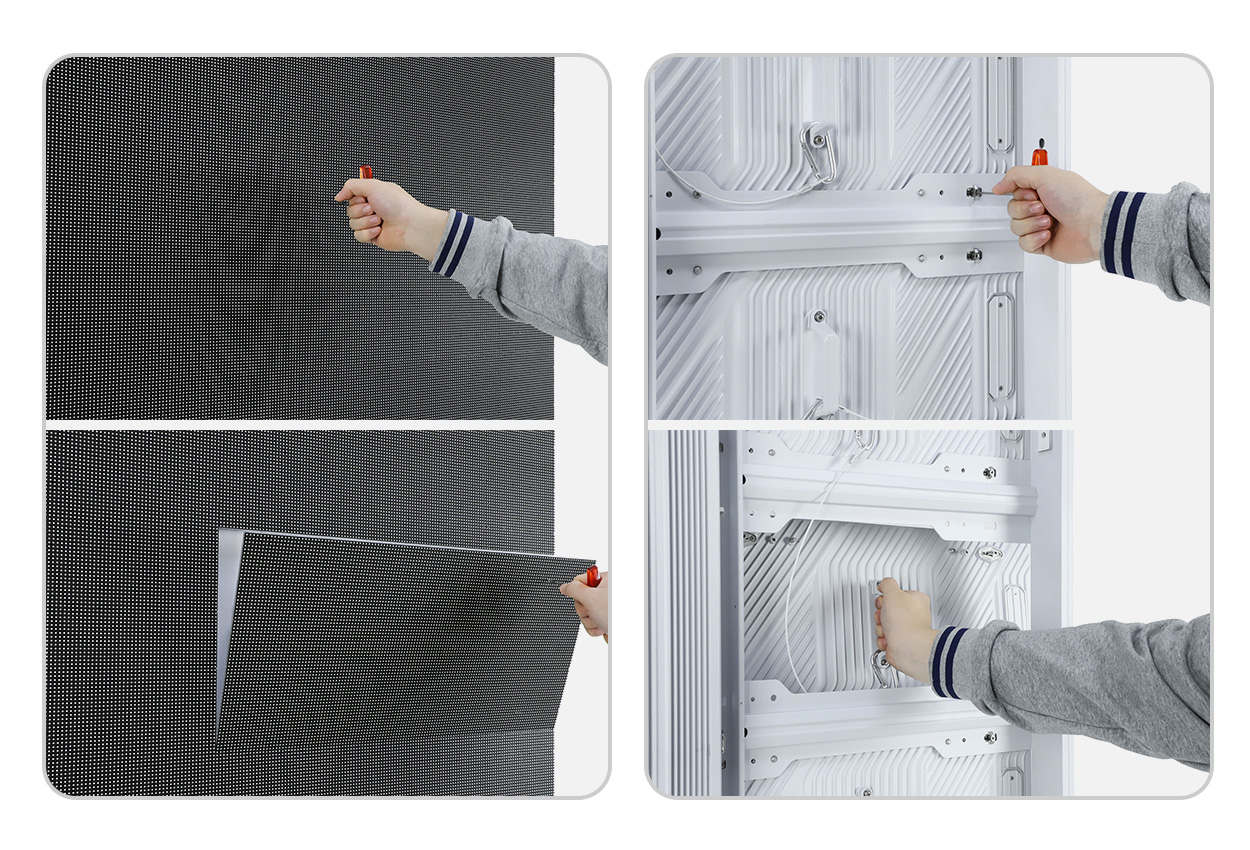
Front-service access can help where rear clearance is limited, but confirm which parts can actually be removed from the front. Modules, receiving cards and power supplies may have different replacement procedures. The maintenance plan should explain safe access, electrical isolation and how weather protection is restored after servicing.
Request spare modules appropriate to the supplied batch, compatible power supplies and receiving cards, configuration backups, calibration files and a documented parts-replacement procedure. Agree service responsibilities and spare-parts availability in the purchase specification.
Outdoor LED Display Acceptance Checklist
- Match the documents: verify the quoted model, cabinet count, native resolution, electrical ratings and environmental limits.
- Inspect the installed assembly: check fixings, protective bonding, seals, cable entries, drainage and service access against the approved design.
- Run representative content: test the planned input source, scaling, small text, motion, grayscale and uniformity.
- Check operating controls: verify dimming, temperature monitoring, startup, shutdown and the agreed response to signal or component failure.
- Record the handover: retain test results, configuration files, relevant compliance documents, service instructions and the spare-parts list.
Common buying mistakes include treating IP65 as an all-weather guarantee, sizing cables from average power, using a generic minimum resolution and comparing different scan configurations as if their brightness were identical.
To prepare a specification, send EagerLED your outdoor display requirements: installation city, screen dimensions, viewing distances, sunlight exposure, operating hours, content type and available maintenance access.
Frequently Asked Questions
What IP rating does an outdoor LED screen need?
IP65 is a common specification for exposed outdoor LED display surfaces. It means dust-tight protection and resistance to water jets under defined tests. Confirm the front and rear ratings, installation sealing and test report. IP65 does not establish immersion resistance or protection against salt corrosion.
How bright should an outdoor LED screen be?
Select brightness in nits (cd/m2) according to sunlight, screen orientation and local nighttime limits. For example, published EA1000F2 configurations provide 5,000 or 6,500 cd/m2. These are model specifications, not universal minimums. Verify daytime readability and automatic dimming at the actual site.
Does an outdoor LED display need 1920 x 1200 resolution?
No. Native resolution is determined by the number of pixels across the assembled screen. Choose screen size and pixel pitch for viewing distance and content. Sunlight readability also depends on brightness, contrast and reflections; a particular pixel count cannot guarantee it.
Is IP65 enough for a coastal installation?
An IP65 rating alone does not establish salt-corrosion resistance. A coastal project also needs suitable cabinet coatings, fasteners, connectors, drainage and a maintenance plan. Request relevant corrosion-test evidence and confirm the approved environmental limits for the exact configuration.
What should buyers request before accepting an outdoor LED screen?
Request the exact model datasheet, native pixel dimensions, front and rear IP evidence, maximum power load, thermal limits, structural design, applicable compliance documents, service instructions and spare-parts list. Complete a site acceptance test with representative content, dimming and the planned signal source.
Technical References and Scope
Sources checked September 7, 2026: International Electrotechnical Commission, IP ratings and Ingress protection (IP) ratings guide (IEC 60529 classification); EagerLED EA1000F2 flat-cabinet specification table; and EagerLED EA320F 320 x 320 mm module specification table. Standard names are provided as text; product values should be reconfirmed against the model-specific quotation.
Prepared for EagerLED’s outdoor display buyers. EagerLED supplies LED displays, so the product examples describe its own range. The calculations are planning examples derived from published specifications, not independent tests. This guide does not certify a product or replace local engineering approval.