

The VX1000 Pro is the objectively better controller — 4K@60Hz input, 6 layers, 256 presets, zero-frame latency, and USB 3.0 playback. The VX1000 is cheaper but carries an NRND (Not Recommended for New Design) status. For new projects in 2026, the Pro is the right pick roughly 80% of the time. The standard VX1000 only makes sense if you already own one, your signal chain is 1080p end-to-end, and you never need more than 3 layers.
1. How to Decide: A 5-Question Framework
Before comparing specs, answer these five questions. Your answers will tell you which controller you actually need — which may be neither of these two.
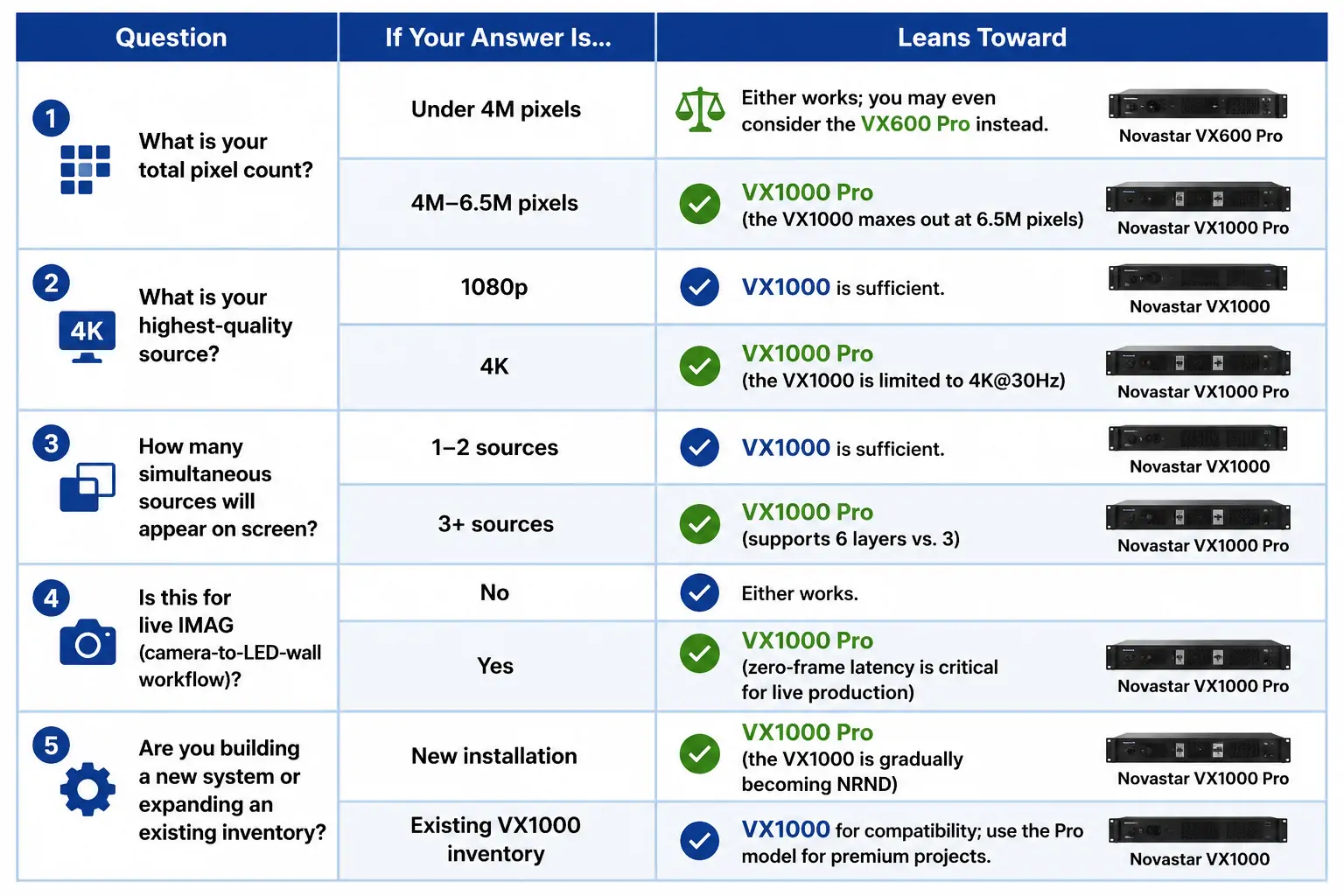
Count your “Pro” answers. Two or more, and the VX1000 Pro is your controller.
2. VX1000 Pro vs VX1000: Head-to-Head Comparison
At a Glance: Spec Table
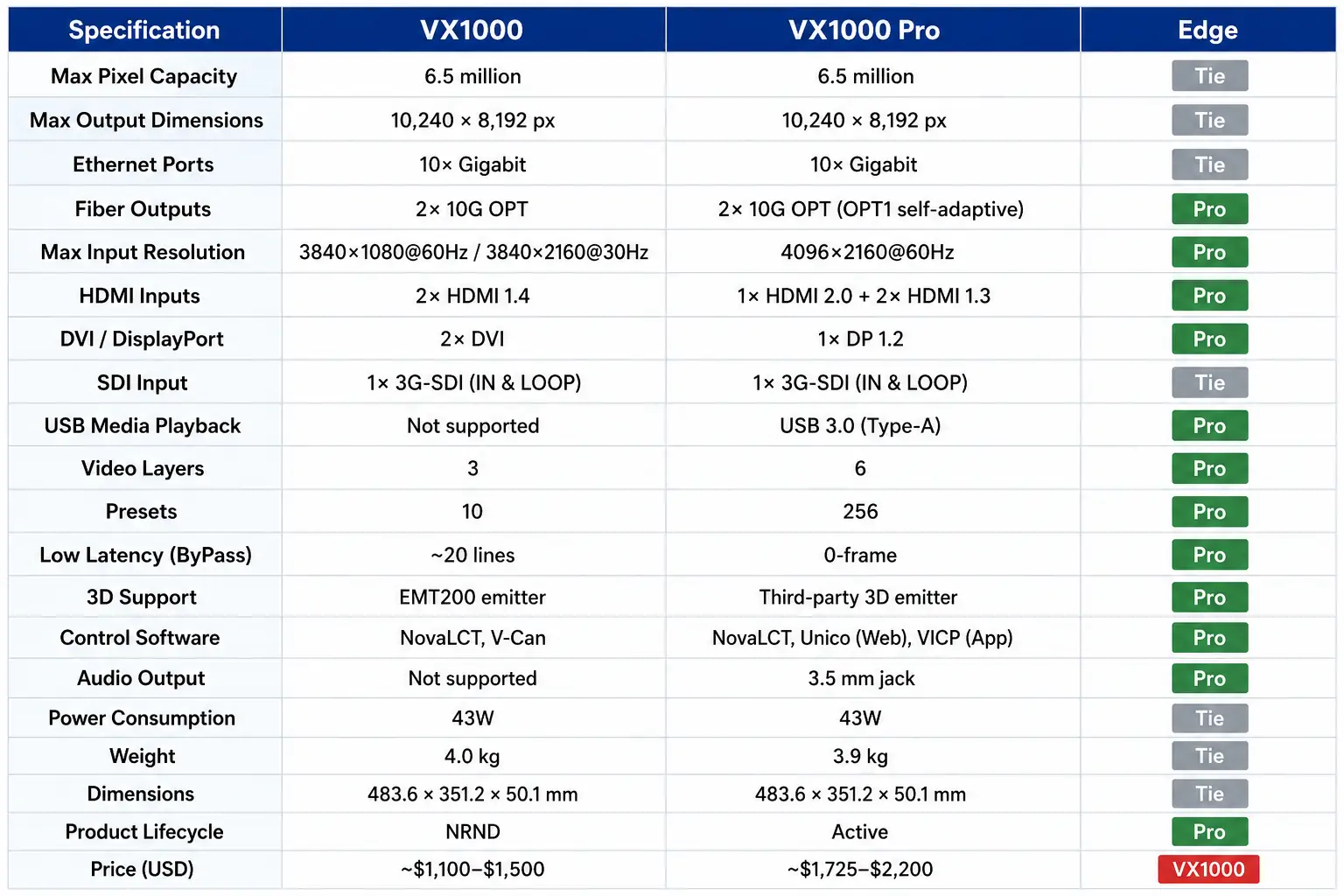
The pattern is clear: on the core processing architecture (pixel capacity, port counts, chassis), the two units are identical. On input capabilities, layer management, latency, and software ecosystem, the Pro is a generation ahead.
3. Which Is Better? A Category-by-Category Verdict
Rather than declare one overall winner, here is how each unit performs in the categories that drive real-world purchasing decisions.
3.1 Input Quality: VX1000 Pro Wins Decisively
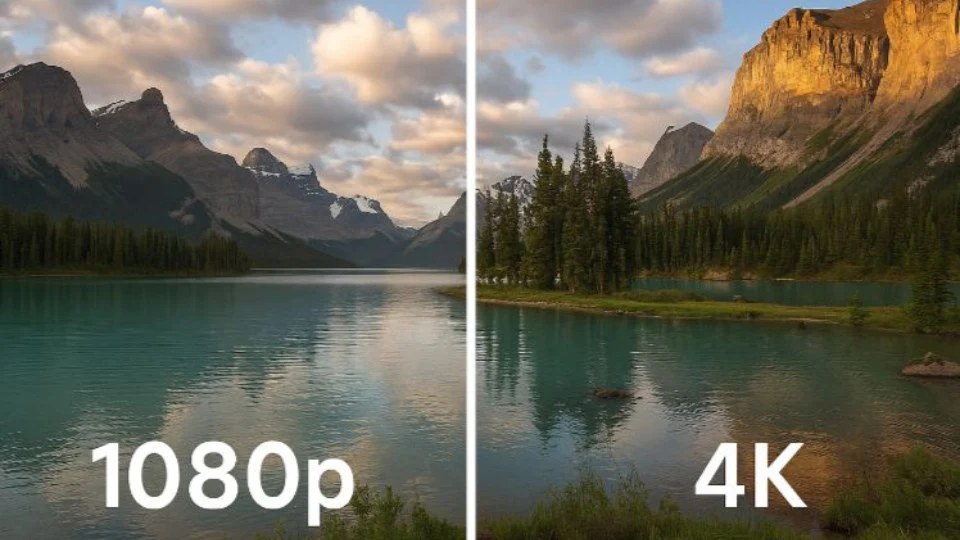
The standard VX1000 uses HDMI 1.4. That means its best-case input is 3840×1080@60Hz — a stretched 1080p signal that uses width to approximate 4K but delivers only 1080 lines of vertical resolution. You can feed it 3840×2160@30Hz for a true 4K pixel grid, but at 30Hz, any motion — camera pans, video playback, scrolling text — looks choppy on a large LED wall.
The VX1000 Pro’s HDMI 2.0 port accepts 4096×2160@60Hz natively, plus custom ultra-wide resolutions up to 8192 pixels wide. If your content is 4K — and in 2025, most live-event and broadcast content is — the Pro displays it smoothly. The VX1000 either downscales it or drops to a stuttering 30Hz.
Verdict: If 4K content touches your signal chain at any point, the Pro is the only real choice.
3.2 Layer Management: VX1000 Pro Wins Decisively
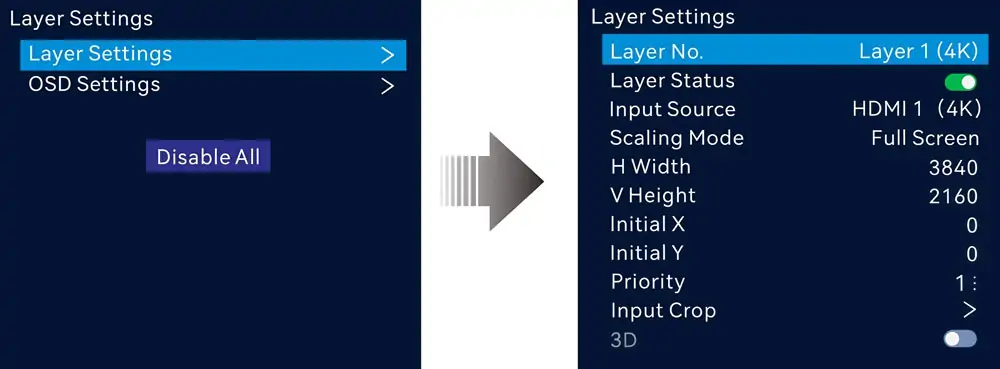
Three layers on the VX1000 means one background plus two picture-in-picture windows. For a single camera feed plus slides, that works. Add a second camera, a countdown timer, and a sponsor logo, and you are out of layers — one of those sources gets dropped or you start frantically switching during the show.
Six layers on the VX1000 Pro means you can build a real broadcast-style composition without compromise. Pre-stage every source for the entire event and switch between presets rather than between inputs.
Real example — corporate keynote:
- Layer 1: Presentation slides (full screen)
- Layer 2: Presenter close-up camera (PIP, lower-right)
- Layer 3: Wide-shot stage camera (PIP, top-right)
- Layer 4: Countdown timer (corner)
- Layer 5: Sponsor logo overlay (corner)
- Layer 6: Lower-third name/title ticker
On the VX1000, you run layers 1–3 and lose the timer, logo, and ticker — or you build those graphics into the slide deck, which is time-consuming and inflexible during the live show.
Verdict: For any event with more than two sources, the Pro’s 6-layer ceiling gives you creative headroom. The VX1000’s 3-layer limit forces compromises.
3.3 Latency: VX1000 Pro Wins (for Specific Workflows)
This one is use-case dependent.
The VX1000’s ByPass mode reduces latency to approximately 20 lines — roughly 0.3 milliseconds at 60Hz. For a presentation, a conference, a digital signage wall, or a DJ booth, that is imperceptible. Nobody in the audience notices 0.3ms.
The VX1000 Pro achieves true 0-frame latency in its ByPass mode. This matters for exactly one scenario: IMAG — Image Magnification, where a live camera is pointed at the stage and the feed appears on the LED wall behind the performer. In this use case, any latency creates a subtle visual echo between the real person and their on-screen image. Zero-frame latency removes this entirely.
Verdict: If IMAG is in your workflow, the Pro is mandatory. If it is not, both units perform fine.
3.4 Presets: VX1000 Pro Wins (for Rental and Touring)
Ten presets on the VX1000 is adequate for a fixed installation. A church, a corporate lobby, or a conference room might use three presets and never touch the others.
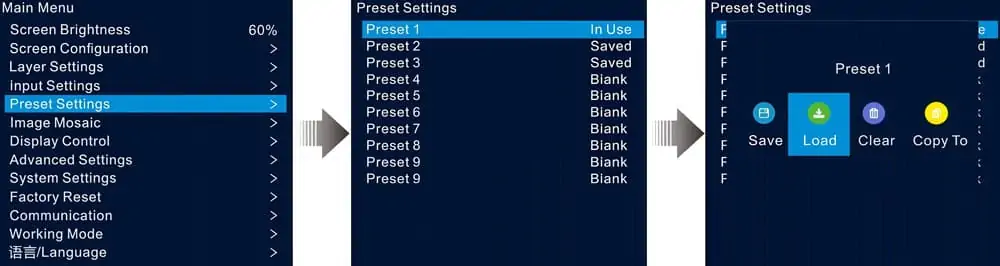
For a rental and staging company, 10 presets is a daily frustration. Every venue has different screen dimensions, input configurations, and client requirements. If you run 15 events per month across 12 different venues, you are constantly overwriting presets — or starting configuration from scratch on site.
The VX1000 Pro’s 256 presets eliminate this entirely. Save a named preset for every venue in your rotation, every repeat client, and every common screen configuration. Load it in seconds and spend your time fine-tuning instead of rebuilding.
Verdict: Fixed install = tie. Rental/touring = Pro wins by a wide margin.
3.5 Software and Control: VX1000 Pro Wins
The VX1000 relies on two Windows-only applications: NovaLCT for configuration and V-Can for firmware. Both require a PC connected to the controller.
The VX1000 Pro adds Unico, a built-in web server accessible from any browser on the same network. No installation, no OS dependency, no dedicated laptop — you can adjust layers, load presets, and manage USB playback from a tablet at the screen. The VICP mobile app adds basic monitoring and preset switching from your phone.
Verdict: The Pro’s web-based control makes a meaningful difference in real-world operation — especially for rental techs who move between venues with different devices.
3.6 Price and Value: It Depends on What You Use
| Purchase Channel | VX1000 (USD) | VX1000 Pro (USD) | Premium |
|---|---|---|---|
| US Authorized Dealer | ~$2,067 | ~$2,199–$2,599 | $130–$530 |
| China Direct (Alibaba) | ~$1,100–$1,340 | ~$1,725–$1,869 | $525–$625 |
The price premium is roughly $500–$600 through most channels. Here is what that premium replaces if you buy the standard VX1000 instead:
- A standalone 4K scaler/switcher to handle 4K@60Hz: $300–$800
- An external media player for USB playback: $100–$300
- Additional labor hours for on-site reconfiguration due to 10-preset limit: varies
Verdict: If you use 4K@60Hz, more than 3 layers, or USB playback, the Pro’s premium is cheaper than the workarounds you would need with the VX1000.
4. When the VX1000 Still Makes Sense
The standard VX1000 is not a bad product. It is a previous-generation product that still works reliably for the right use cases.
4.1 You Already Own VX1000 Units
If your rental inventory includes VX1000 units that are fully paid off and you are not bumping into their technical limits, keep running them. The existence of a Pro model does not make functioning hardware obsolete. Run them until maintenance costs or client requirements force a refresh, then replace with Pro units on the natural upgrade cycle.
4.2 Your Signal Chain Is 1080p End-to-End
If every source in your workflow is 1080p — laptops outputting 1920×1080, legacy cameras, media servers running HD content — the VX1000’s HDMI 1.4 limitation is irrelevant. You are not paying for 4K@60Hz because your content never asks for it.
4.3 You Run 3 Layers or Fewer
Conferences, worship services, and small corporate events that use slides plus one or two camera feeds will never exceed the VX1000’s layer limit. If 3 layers covers 100% of your events, 6 layers is headroom you will never use.
4.4 The VX1000 Is NRND — What That Actually Means
NovaStar has designated the standard VX1000 as NRND (Not Recommended for New Design). In the pro-AV industry, NRND is a formal product lifecycle stage meaning:
- The product remains available for purchase and supported for existing users.
- NovaStar does not recommend designing it into new installations.
- Firmware updates have slowed — the last major release was in 2023 — and will eventually stop.
- Spare parts availability will gradually decline over the next several years.
If you are buying your first controller for a new project in 2026, starting on an NRND platform to save $500 is short-sighted. If you already own the unit, NRND status does not create an emergency — it just means your next purchase should be a Pro.
5. Decision Matrix: Which One Should You Pick?
| Your Situation | Recommendation | Why |
|---|---|---|
| Starting a new LED project in 2026 | VX1000 Pro | VX1000 is NRND; starting new on discontinued hardware makes no sense |
| Already own VX1000s, they are paid off, you need more layers or 4K@60Hz | VX1000 Pro (add to fleet) | Mix Pro units into inventory for flagship gigs; keep standards for smaller jobs |
| Already own VX1000s, they are paid off, you do not need 4K@60Hz or 6 layers | Keep the VX1000s | They still work. Run them. |
| Rental/touring company expanding inventory | VX1000 Pro | 256 presets + USB playback + Unico web control = operational efficiency |
| Broadcast, IMAG, or live streaming | VX1000 Pro | Zero-frame latency and SDI loop-through are non-negotiable |
| Conference room or corporate fixed install, 1080p sources | VX1000 is fine — or consider VX600 Pro | If you don’t need 10 Ethernet ports, save money with a VX600 Pro |
| Fine-pitch LED wall (≤P1.8), 4K content | VX1000 Pro | Fine-pitch demands higher bandwidth and refresh; Pro delivers |
| Budget-constrained, buying used/secondary market | VX1000 | Used VX1000 units at $700–$900 can be good value for 1080p-only workflows |
6. Common Mistakes When Choosing Between These Two
6.1 Mistake 1: Buying the VX1000 Because ``It Supports 4K``
The VX1000’s maximum input is 3840×1080@60Hz or 3840×2160@30Hz. Neither is usable 4K for live content — the first is 1080p stretched wide, the second is 4K resolution at a halved frame rate that produces visible judder on LED walls. Do not buy a VX1000 expecting it to handle 4K content smoothly. It will no
6.2 Mistake 2: Buying the VX1000 Pro When a VX600 Pro Would Suffice
If your LED wall is under 3.9 million pixels, a VX600 Pro delivers the same 6-layer, 4K@60Hz, zero-frame-latency feature set for roughly $500 less. The only reason to step up to the VX1000 Pro is pixel capacity (6.5M vs 3.9M) and Ethernet port count (10 vs 6). Do not pay for capacity you will not use.
6.3 Mistake 3: Assuming the Two Units Can Be Mixed Interchangeably
While both units can be cascaded together (up to 4 units via USB), they run different firmware branches and have different control software ecosystems. The VX1000 Pro works with Unico and VICP; the VX1000 does not. If you mix units in a multi-controller setup, you will manage them through two different interfaces — NovaLCT for the VX1000s, Unico for the Pros. It works, but it is not seamless.
6.4 Mistake 4: Overlooking the NRND Status When Budgeting
If you buy a VX1000 for a new project in 2026, you are starting the clock on a product whose support window is already shrinking. In three years, when the VX1000 Pro is still receiving firmware updates, the VX1000 may be entirely discontinued. The $500 saved today could mean a full replacement purchase sooner than expected.
7. FAQs
1. Which is better, the VX1000 or the VX1000 Pro?
The VX1000 Pro is objectively better on every technical metric: 4K@60Hz vs 4K@30Hz, 6 layers vs 3, 256 presets vs 10, zero-frame latency vs 20-line latency, USB 3.0 playback, web-based Unico control, and active product lifecycle vs NRND. The VX1000 is only “better” in one category: price.
2. Is the VX1000 Pro worth the extra money?
For new projects in 2025: yes. The $500–$700 premium buys hardware capabilities (4K@60Hz, 6 layers, USB playback) that would cost $900–$2,600 to replicate with external gear on a VX1000. For existing VX1000 owners: only if you are actively hitting the layer limit, need 4K@60Hz input, or require zero-frame latency for IMAG.
3. Can I upgrade a VX1000 to VX1000 Pro with firmware?
No. The VX1000 Pro uses different internal hardware — HDMI 2.0 chipset, USB 3.0 controller, DisplayPort 1.2 input, and an updated processing pipeline. Firmware cannot add hardware ports or capabilities that the physical board does not support.
4. Does the VX1000 Pro work with my existing NovaStar receiving cards?
Yes. Both controllers are fully compatible with the NovaStar receiving card ecosystem (A5s, A7s, A8s, A10s, MRV series, Armor series). You can swap a VX1000 for a VX1000 Pro without touching your receiving cards or Ethernet cabling.
5. Is the VX1000 still supported?
The VX1000 is in NRND status. Existing units continue to receive basic support, firmware updates are available for critical bug fixes, and spare parts remain stocked. However, new feature development has moved entirely to the Pro series. NovaStar recommends the VX1000 Pro for all new designs.
6. How do I choose between VX1000 Pro and VX2000 Pro?
Step up to the VX2000 Pro if: your project exceeds 6.5 million pixels, you need 12 layers, you require 40G fiber output, or you are doing XR virtual production. For everything else under 6.5M pixels, the VX1000 Pro is the right fit.
7. Can I cascade VX1000 and VX1000 Pro units together?
Yes, up to 4 units total can be cascaded via USB Type-A to Type-B connections, and all units stay frame-synchronized via the Genlock loop. However, mixed fleets require managing some units through NovaLCT (VX1000) and others through Unico (VX1000 Pro), which adds operational complexity.
8. Conclusion
The VX1000 Pro is the better controller. That is not a close call — on input resolution, layer count, latency, preset storage, media playback, control software, and product lifecycle, the Pro leads in every category that matters.
The real question is whether you need the better controller.
- If you are building something new in 2026: buy the Pro.Starting on NRND hardware to save $500 makes no sense.
- If you already own VX1000s that are paid off and working: keep them.They are solid controllers. Refresh to Pro on your natural replacement cycle.
- If your workflow is 1080p-only with 3 or fewer layers: either works.The VX1000 is cheaper; the Pro is more future-proof. On a tight budget, a used VX1000 at $700–$900 is fair value for this use case.
- If 4K@60Hz, 6 layers, IMAG, or USB playback describes your work: the Pro is not optional.The VX1000 cannot do what you need it to do.