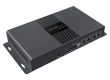
NovaStar VX2000 Pro vs VX2000 is one of the most common comparisons for LED video controllers. Although they share a similar name, they belong to different hardware generations. The VX2000 Pro offers higher pixel capacity, 4K support, HDR, more layers, and lower latency, while the VX2000 remains a reliable and cost-effective choice for standard LED display projects.
This guide compares their features, specifications, performance, pricing, and applications to help you choose the right controller for your needs.
Table of Contents
1.NovaStar VX2000 Pro vs VX2000 Overview
2.NovaStar VX2000 Pro vs VX2000 Specifications
3.Key Feature Differences
4.NovaStar VX2000 Pro vs VX2000 Feature Comparison
5.Performance Comparison
6.Application Comparison
7.NovaStar VX2000 Pro vs VX2000 Price Comparison
8.Which One Should You Choose?
9.FAQ
10.Conclusion
1.NovaStar VX2000 Pro vs VX2000 Overview
1.1 What Is the NovaStar VX2000?
The NovaStar VX2000 is an all-in-one LED video controller that combines a video processor and sending card in one device. It supports up to 6.5 million pixels, 10 Gigabit Ethernet ports, and 2 fiber outputs.
The VX2000 is a good choice for conference rooms, churches, retail displays, digital signage, and small rental events. If your project doesn’t require 4K@60Hz, HDR, or advanced layer management, it remains a reliable and cost-effective solution.
1.2 What Is the NovaStar VX2000 Pro?
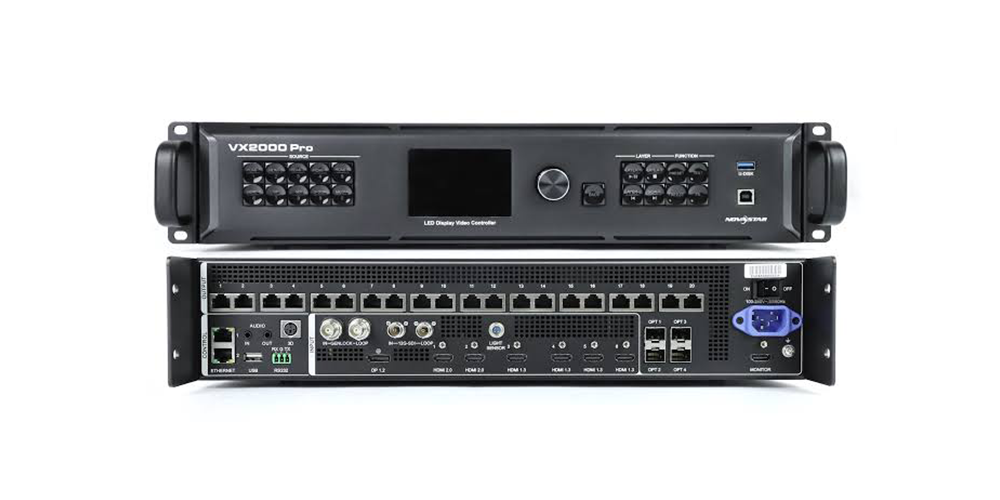
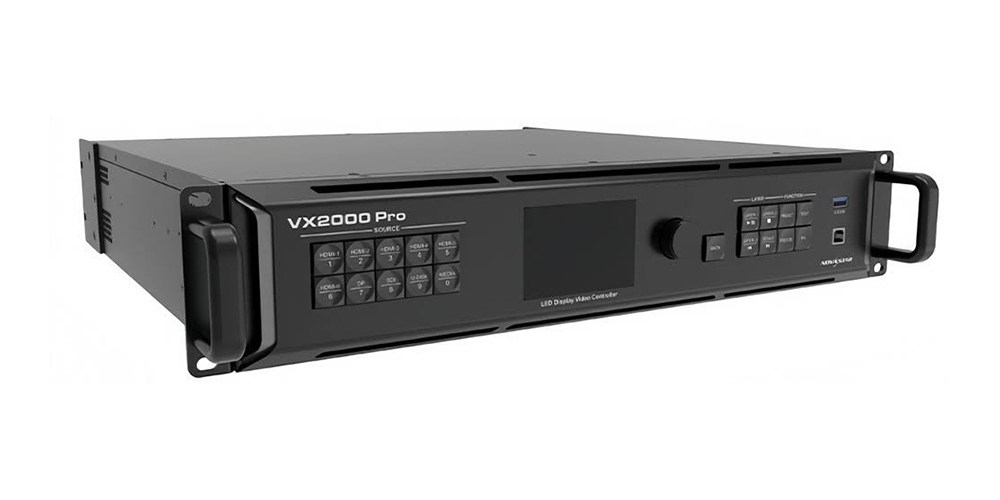
The NovaStar VX2000 Pro is the latest model in the VX Pro Series. Compared with the VX2000, it offers 13 million pixels, 20 Gigabit Ethernet ports, 4×10G fiber outputs, 4K@60Hz, HDR, 12 layers, and 0-frame latency in ByPass mode.
It is designed for large rental LED displays, live events, XR studios, broadcast, concerts, and other high-end LED display projects.
2.NovaStar VX2000 Pro vs VX2000 Specifications
2.1 Hardware Specifications Comparison
| Specification | NovaStar VX2000 | NovaStar VX2000 Pro |
| Max Pixel Capacity | 6,500,000 px | 13,000,000 px |
| Max Output Width | 10,240 px | 16,384 px |
| Max Output Height | 8,192 px | 8,192 px |
| Ethernet Outputs | 10× RJ45 | 20× RJ45 |
| Pixels per Ethernet Port (8-bit) | ~650,000 px | ~650,000 px |
| Fiber Outputs | 2× OPT | 4× 10G OPT |
| Max Layers | 6 | 12 |
| User Presets | 10 | 256 |
| Power Consumption | ~43 W | ~80–83 W |
| Weight | ~4 kg (8.8 lbs) | ~6.5–7.4 kg (14.3–16.3 lbs) |
| Dimensions | 2U rack design | 482.6 × 493 × 94.6 mm (2U) |
| Fan Noise | Lower | ~45 dB(A) |
| Warranty | 3 Years | 3 Years |
The NovaStar VX2000 Pro offers twice the loading capacity, more Ethernet ports, more layers, and significantly higher overall performance. The VX2000 remains a practical choice for medium-sized LED display projects.
2.1 Input Interfaces
| Interface | VX2000 | VX2000 Pro |
| HDMI 2.0 | None | 2× (4096×2160@60Hz) |
| HDMI 1.3/1.4 | 2× HDMI 1.4 | 4× HDMI 1.3 |
| DisplayPort | None | 1× DP 1.2 (4096×2160@60Hz) |
| SDI | 1× 3G-SDI | 1× 12G-SDI (Loop Out) |
| Optical Fiber Input | 2× OPT | 2× 10G OPT |
| USB | None | 1× USB 3.0 |
| Genlock | No | Genlock IN & LOOP |
| Audio | HDMI Embedded Audio | 3.5 mm Audio In & Out |
The NovaStar VX2000 Pro supports more modern input interfaces, including HDMI 2.0, DisplayPort, 12G-SDI, USB 3.0, and Genlock. These upgrades make it a better choice for 4K video, broadcast, XR production, and live events.
2.1 Output Interfaces
| Interface | VX2000 | VX2000 Pro |
| Ethernet (RJ45) | 10× Gigabit | 20× Gigabit |
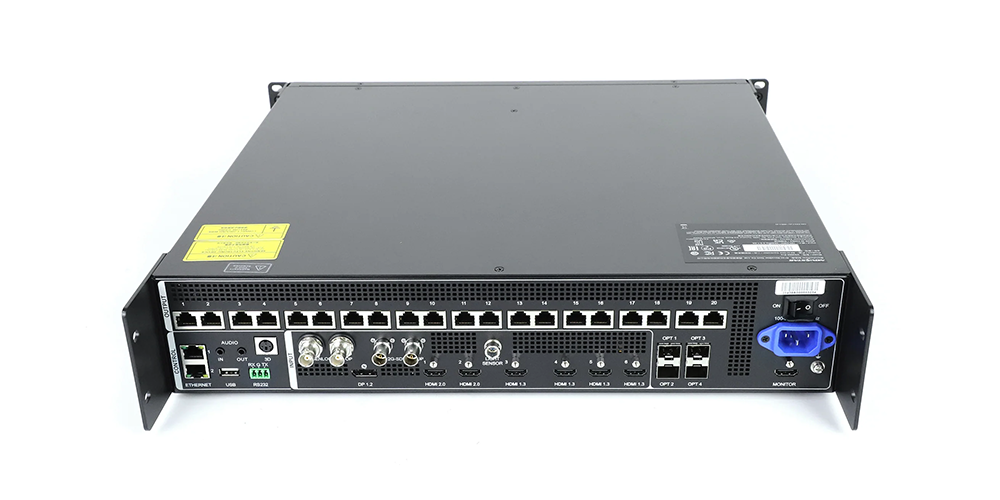
| Optical Fiber | 2× OPT | 4× 10G OPT (OPT 3/4 Backup) |
| HDMI Monitor Output | No | 1× HDMI 1.3 |
| SDI Loop | 3G-SDI Loop | 12G-SDI Loop |
| 3D Sync | No | 1× 3D Connector |
The additional outputs on the NovaStar VX2000 Pro provide greater flexibility for large LED video walls, long-distance fiber transmission, and redundant system design.
3.Key Feature Differences
3.1 Video Processing Performance
The biggest difference between the NovaStar VX2000 Pro and VX2000 is the image processing engine.
The NovaStar VX2000 Pro uses NovaStar’s latest SuperView III engine. It supports 4K@60Hz, HDR10, HLG, and 10/12-bit color, delivering sharper images and richer colors. The VX2000 supports 4K@30Hz and standard SDR content only.
For conference rooms, churches, and digital signage, the VX2000 delivers excellent image quality. For live events, broadcast, XR, and high-end LED displays, the VX2000 Pro provides a much better viewing experience.
3.2 Layer Management
Both controllers support multiple display layers, but the capacity is very different.
The VX2000 supports 6 fixed layers, which is enough for most standard LED display projects.
The NovaStar VX2000 Pro supports up to 12 layers, giving users much more flexibility for live production. You can easily display multiple camera feeds, presentations, logos, timers, and background videos at the same time.
If your event requires many video sources, the VX2000 Pro is the better choice.
3.3 Loading Capacity
Loading capacity determines how large an LED display a controller can drive.
|
Controller |
Max Pixel Capacity |
|
VX2000 |
6.5 Million Pixels |
|
VX2000 Pro |
13 Million Pixels |
The VX2000 Pro supports twice the pixel capacity of the VX2000. This makes it ideal for large LED video walls, fine-pitch LED displays, and 4K LED screens.
For medium-sized LED displays, the VX2000 is usually sufficient. For larger projects, the VX2000 Pro reduces the need for multiple controllers and simplifies system design.
3.4 Signal Inputs
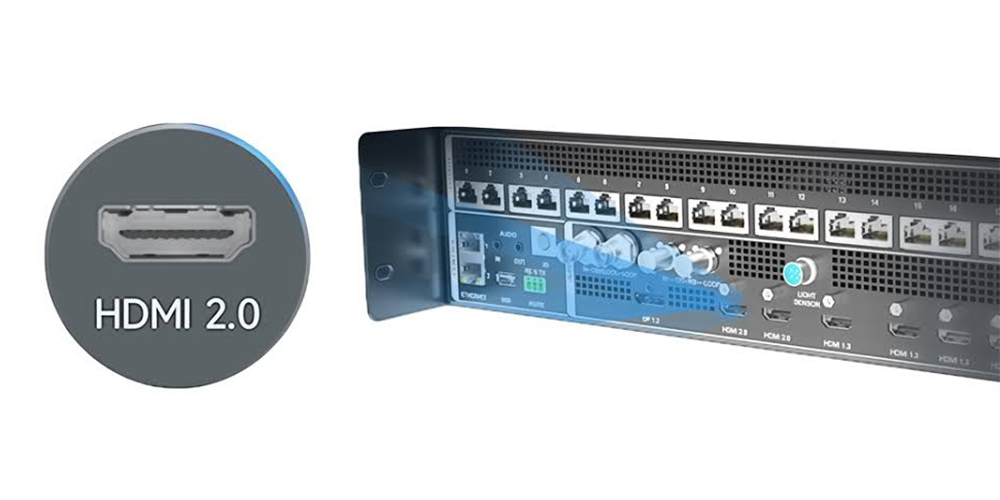
The VX2000 Pro supports more video input options than the VX2000.
| Input Type | VX2000 | VX2000 Pro |
| HDMI 2.0 (4K60) | — | 2 |
| HDMI 1.3/1.4 | 2 | 4 |
| DisplayPort 1.2 | — | 1 |
| SDI | 1× 3G-SDI | 1× 12G-SDI |
| Optical Fiber | 2 | 2 |
| USB Playback | — | USB 3.0 |
The additional HDMI 2.0, DisplayPort, and 12G-SDI inputs make the VX2000 Pro compatible with more devices, including media servers, broadcast cameras, gaming PCs, and 4K laptops.
3.5 Fiber Transmission
Both controllers support optical fiber transmission for long-distance LED display installations.
The VX2000 provides 2 fiber ports, while the VX2000 Pro provides 4×10G fiber ports with backup support.
For large venues, stadiums, and outdoor events, the extra fiber ports improve system reliability and make long-distance transmission much easier.
If signal redundancy is important, the VX2000 Pro is the better option.
3.6 Low Latency
Both controllers offer low-latency performance, but the VX2000 Pro goes one step further.
The VX2000 provides approximately 20-line latency in ByPass mode, which is fast enough for most LED display applications.
The NovaStar VX2000 Pro supports true 0-frame latency, making it ideal for XR virtual production, broadcast studios, esports, and live concerts where every frame matters.
For conference rooms and standard rental LED displays, the difference is rarely noticeable. For professional live production, the VX2000 Pro delivers the best performance.
4.NovaStar VX2000 Pro vs VX2000 Feature Comparison
| Feature | VX2000 | VX2000 Pro |
| Max Pixel Capacity | 6.5 Million Pixels | 13 Million Pixels |
| Ethernet Ports | 10 | 20 |
| Fiber Ports | 2 | 4×10G |
| Video Inputs | HDMI, 3G-SDI | HDMI, DP, 12G-SDI, USB, Fiber |
| Max Input Resolution | 4K@30Hz | 4K@60Hz |
| Max Layers | 6 | 12 |
| HDR Support | No | HDR10 & HLG |
| Genlock | No | Yes |
| User Presets | 10 | 256 |
| 3D Support | No | Yes |
| USB Playback | No | Yes |
| Audio | HDMI Audio | 3.5 mm Audio In/Out |
| Backup Features | Basic | Device, Input & Port Backup |
| Control Software | NovaLCT, V-Can | Unico, VICP, NovaLCT |
| ByPass Latency | ~0.3 ms | 0-Frame |
| Power Consumption | ~43 W | ~80 W |
| Weight | ~4 kg | ~6.5–7.4 kg |
| Typical Price (2026) | $1,500–2,000 | $2,800–3,500 |
Which One Is Better?
The NovaStar VX2000 is a reliable choice for conference rooms, churches, retail displays, and medium-sized LED screens. It offers solid performance at a lower price.
The NovaStar VX2000 Pro delivers twice the pixel capacity, more video inputs, HDR, 4K@60Hz, 12 layers, and 0-frame latency. It is the better option for large rental LED displays, live events, broadcast, XR production, and other professional applications.
Note: Prices may vary by region and distributor. Buying from an authorized NovaStar dealer ensures genuine products, warranty coverage, firmware updates, and technical support.
5.Performance Comparison
5.1 Image Quality
The NovaStar VX2000 Pro delivers better image quality for large LED displays, especially when playing 4K content. Powered by the SuperView III processing engine, it supports a 10/12-bit processing pipeline that creates smoother color transitions and reduces image banding in areas such as skies, gradients, and dark backgrounds.
The VX2000 uses an 8-bit processing pipeline, which works well for standard content but may show more visible color steps in gradient scenes.
The VX2000 Pro also supports HDR10 and HLG, providing a wider dynamic range. Bright areas keep more details without overexposure, while dark areas maintain more texture instead of losing details.
When displaying 4K content, the VX2000 is limited to 30Hz, which may cause slight motion blur or less smooth movement during fast camera movements. The VX2000 Pro supports smoother 4K playback at 60Hz, making it a better choice for large stage screens, live events, and broadcast applications.
5.2 Color Accuracy
The VX2000 Pro supports RGB 4:4:4, YCbCr 4:4:4, and YCbCr 4:2:2 color formats. Combined with NovaLCT calibration technology, it allows precise brightness and color correction at the pixel level.
This is especially useful for large LED walls built from multiple batches of cabinets. Small differences between LED panels can create visible color gaps, but calibration helps achieve a more uniform display.
The VX2000 provides basic image adjustments, including brightness, contrast, saturation, and hue. However, it does not offer the same level of pixel-level calibration as the VX2000 Pro.
5.3 Refresh Rate Support
Both controllers support refresh rates up to 60Hz under standard operating conditions. However, there is an important difference when handling 4K content.
The VX2000 Pro maintains 60Hz output at 4K resolution (4096 × 2160), while the VX2000 is limited to 30Hz at 4K.
For 1080p video sources, both controllers can provide smooth 60Hz performance. However, for LED displays requiring ultra-high refresh rates such as 120Hz or higher, a dedicated high-performance controller is recommended instead of the VX series.
5.4 Processing Speed
The VX2000 Pro features a newer FPGA platform and the SuperView III engine, delivering faster processing performance than the VX2000.
In real-world applications, the Pro model provides:
- Faster input switching
- Smoother image scaling
- Lower processing delay
- Better handling of multiple video sources
The VX2000 performs well for basic applications such as single-source playback or standard event displays. However, when used for complex productions with multiple cameras, live switching, or different video formats, the VX2000 Pro offers a smoother workflow with faster response times and more stable performance.
5.5 Reliability and Redundancy
Both the VX2000 Pro and VX2000 come with a 3-year warranty from authorized NovaStar distributors.
The main difference is the VX2000 Pro’s advanced redundancy features. It supports:
- Device backup:A backup VX2000 Pro can automatically take over if the main controller fails.
- Input backup:The system can switch to a backup video source automatically when the main signal is interrupted.
- Output redundancy:Ethernet and fiber ports support backup options for more reliable transmission.
For applications such as live broadcasting, large concerts, and XR virtual production, these features greatly reduce the risk of screen failure during critical moments.
The VX2000 is suitable for regular events and commercial LED displays, while the VX2000 Pro is designed for projects where stability, uptime, and signal security are top priorities.
6.Application Comparison
6.1 Rental LED Displays
Winner: VX2000 Pro
Rental LED displays need flexibility because every event can have different requirements. The VX2000 Pro supports 256 presets, allowing operators to quickly recall different screen configurations for concerts, corporate events, and exhibitions without rebuilding settings from scratch.
With support for 12 layers and a maximum load capacity of 13 million pixels, the Pro model can handle larger LED walls and more complex video setups. Features such as 0-frame latency and redundancy options are especially valuable for professional rental projects where signal stability is critical.
The VX2000 is still a good choice for small rental events with simple 1080p workflows and fixed configurations. Its compact size and lower weight make it easier for small teams to transport and install. However, for rental companies that need one controller for different types of events, the VX2000 Pro offers more long-term flexibility.
6.2 Fixed LED Displays
Winner: VX2000 (for most standard installations)
Most fixed LED displays in corporate buildings, retail stores, and digital signage projects have stable requirements. They usually use a fixed screen size, limited input sources, and simple playback systems.
The VX2000 supports up to 6.5 million pixels and 6 layers, which is enough for many standard LED installations. In these applications, advanced features of the VX2000 Pro, such as higher pixel capacity, HDR processing, and additional input options, may not be fully utilized.
For normal fixed LED projects, choosing the VX2000 can help reduce costs while still providing reliable performance.
However, for large fine-pitch LED walls, especially displays using P1.5 or smaller pixel pitches, the total pixel count can quickly exceed 6.5 million pixels. In these cases, the VX2000 Pro becomes the better choice.
6.3 Conference Rooms
Winner: VX2000
Conference rooms usually have simple signal requirements. Most setups use a laptop, presentation system, or video conferencing camera with 1080p or 4K content.
The VX2000 can easily handle these applications with its 6-layer processing and 6.5 million pixel capacity. Its smaller size, lower power consumption, and affordable price make it suitable for meeting rooms, training rooms, and corporate AV systems.
The VX2000 Pro provides more processing power than most conference rooms need, so the additional features may not provide enough value for standard presentation environments.
6.4 XR Virtual Production
Winner: VX2000 Pro
XR virtual production requires extremely low latency, accurate synchronization, and advanced signal processing. The VX2000 Pro is designed for these demanding workflows.
Its 0-frame latency mode, 12G-SDI input, Genlock support, and multi-layer processing make it suitable for virtual studios, film production, and broadcast environments.
The VX2000 lacks several professional features required for advanced XR applications. For virtual production projects, the VX2000 Pro provides the performance and reliability needed for real-time camera tracking and LED wall synchronization.
6.5 Broadcast Studios
Winner: VX2000 Pro
Broadcast studios require stable signal transmission, accurate synchronization, and compatibility with professional camera systems.
The VX2000 Pro supports features such as:
- 12G-SDI input
- Genlock synchronization
- HDR10/HLG processing
- Redundant signal backup
These features help maintain accurate colors, stable images, and reliable operation during live broadcasts.
The VX2000 is suitable for basic LED display applications but does not provide the same level of professional broadcast support. For studio LED walls connected to modern camera systems, the VX2000 Pro is the better choice.
6.6 Live Events
Winner: VX2000 Pro
Concerts, festivals, and large corporate events often require multiple cameras, media servers, graphics overlays, and live IMAG (Image Magnification).
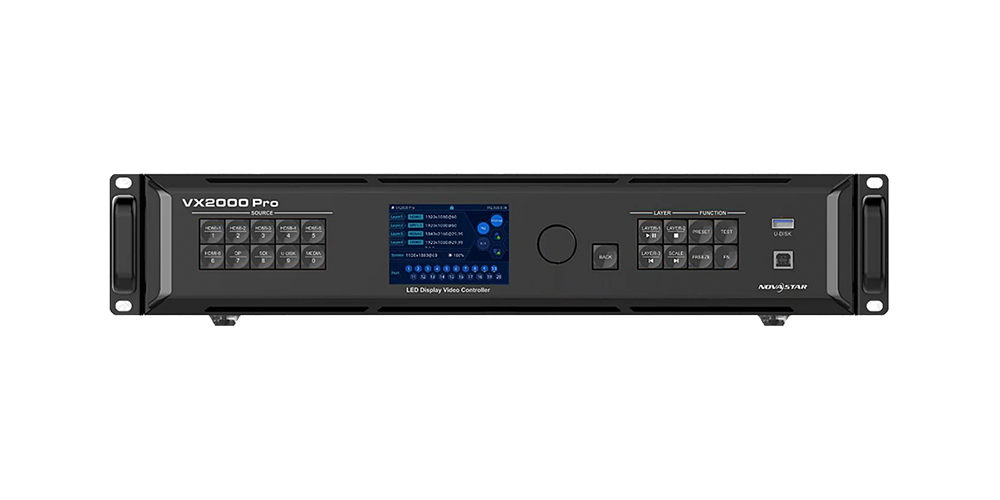
The VX2000 Pro is better suited for these complex productions with:
- 12-layer processingfor multi-source layouts
- 256 presetsfor fast configuration changes
- 0-frame latencyfor synchronized IMAG display
- HDR supportfor high-quality video output
- Redundancy featuresfor improved reliability
The VX2000 can handle smaller events with fewer video sources and simpler setups. However, for large-scale productions where flexibility and stability are important, the VX2000 Pro provides a more complete solution.
7.NovaStar VX2000 Pro vs VX2000 Price Comparison
7.1 NovaStar VX2000 Price
The NovaStar VX2000 price is generally around $1,500–$2,000 USD in 2026, depending on the supplier and market.
As an entry-level professional LED controller, the VX2000 provides the essential features needed for many LED display projects, including video processing, scaling, and multi-source control.
It is a practical choice for:
- Small and medium LED screens
- Fixed LED installations
- Conference rooms
- Churches and event venues
- Basic rental applications
For projects using standard video sources and moderate screen sizes, the VX2000 offers excellent value without paying for features that may not be used.
7.2 NovaStar VX2000 Pro Price
The NovaStar VX2000 Pro price is usually around $2,800–$3,500 USD. The final price may vary based on the supplier, region, and configuration.
The VX2000 Pro costs more because it is designed for larger and more demanding LED display applications. Compared with the standard VX2000, it provides upgrades in several important areas:
| Feature | VX2000 | VX2000 Pro |
| Maximum Pixel Load | 6.5 million pixels | 13 million pixels |
| Processing Layers | 6 layers | 12 layers |
| 4K Performance | 30Hz | 60Hz |
| HDR Support | No | HDR10 / HLG |
| Advanced Redundancy | Limited | Supported |
| Professional Inputs | Basic | More options |
The additional investment mainly improves system flexibility, processing capability, and reliability for professional productions.
7.3 Is VX2000 Pro Worth the Extra Cost?
The answer depends on your project requirements.
The VX2000 Pro is worth the extra cost when you need:
- A large LED screen with more than 5 million pixels
- Smooth 4K 60Hzplayback
- HDR content processing
- Multiple video layers for complex layouts
- Professional applications such as broadcasting, XR production, concerts, and large events
- Backup functions to reduce the risk of signal interruption
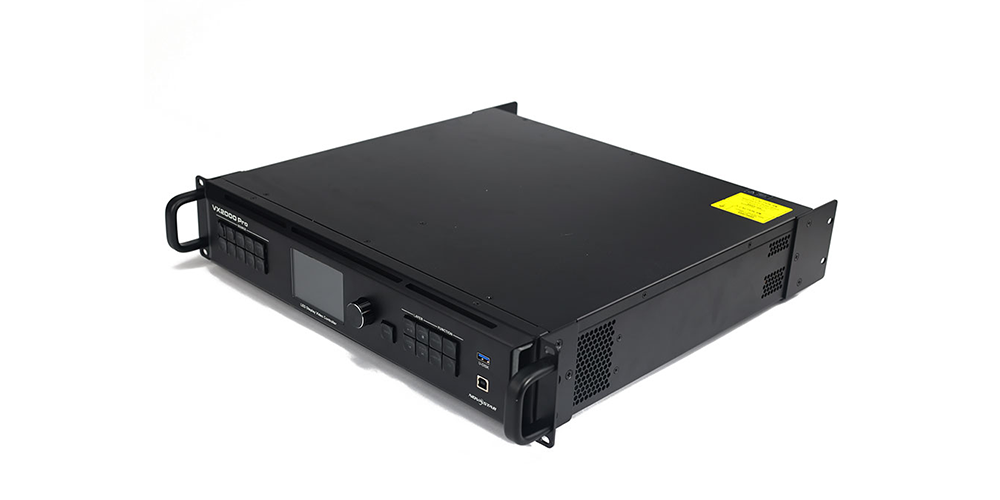
For these applications, the extra cost is not only about higher specifications. It helps improve workflow efficiency, reduce setup time, and provide more stable performance during important events.
The VX2000 is the better choice when:
- The LED display size is within its pixel capacity
- The content is mainly standard SDR video
- The system uses only a few video sources
- Advanced backup features are not required
For regular fixed installations and smaller events, the VX2000 can provide everything needed at a lower cost. The saved budget can be invested in other important parts of the LED system, such as higher-quality LED modules, spare components, or installation equipment.
7.4 Quick Buying Recommendation
Choose VX2000 if you need a reliable controller for standard LED displays at a reasonable price.
Choose VX2000 Pro if you need higher processing power, future expansion, or professional-level reliability.
For rental companies, broadcast studios, and large event suppliers, the VX2000 Pro is usually the better long-term investment. For simple fixed installations, the VX2000 provides a more cost-effective solution.
8.Which One Should You Choose?
Choosing between the NovaStar VX2000 and VX2000 Pro depends on your screen size, content requirements, and future expansion plans.
Choose the VX2000 if:
- Your processor budget is around $2,000 orless
- Your LED wall is within 5 million pixelsand future upgrades are unlikely
- Your content mainly comes from 1080p SDR sources
- Your production requires6 or fewer layers
- You are installing LED displays for:
- Corporate meeting rooms
- Houses of worship
- Retail signage
- Small and medium events
- You need a lightweight controller for easier transportation and installation
- You already use VX2000 controllers and want consistent equipment across your inventory
The VX2000 is a cost-effective solution for standard LED display projects that do not require advanced processing features.
Choose the VX2000 Pro if:
- Your LED wall is larger than 5 million pixelsor you plan future expansion
- You need 4K 60Hz processingthrough HDMI 2.0, DisplayPort 1.2, or 12G-SDI
- You require HDR10/HLG supportfor professional video workflows
- Your production needs more than 6 layersor complex multi-source layouts
- You work with XR virtual production, broadcast studios, concerts, or large live events
- System backup and redundancy are important for critical applications
- You operate a rental business and need a controller that can handle different event requirements
- You prefer a current-generation platform with more room for future upgrades
The VX2000 Pro is designed for users who need higher performance, more flexibility, and stronger reliability for professional LED applications.
Quick Decision Guide
Choose VX2000:
For standard LED displays, fixed installations, and projects where cost efficiency is the priority.
Choose VX2000 Pro:
For large LED walls, professional productions, rental applications, and projects requiring advanced features or future expansion.
9.FAQ
9.1 Is the VX2000 Pro replacing the VX2000?
No. The VX2000 Pro and VX2000 are still available as different options. The VX2000 Pro uses a newer processing platform with higher performance, while the VX2000 remains a cost-effective choice for standard LED display projects.
9.2 What is the biggest difference between VX2000 Pro and VX2000?
The biggest difference is 4K processing capability. The VX2000 Pro supports 4K 60Hz, while the VX2000 supports 4K 30Hz. The Pro also doubles the pixel capacity from 6.5M to 13M pixels.
9.3 Does the VX2000 Pro support larger LED displays?
Yes. The VX2000 Pro supports up to 13 million pixels, making it suitable for larger LED walls and fine-pitch displays. The VX2000 supports up to 6.5 million pixels.
9.4 Which controller is better for rental LED screens?
The VX2000 Pro is better for professional rental applications because it offers higher pixel capacity, more layers, lower latency, and better reliability. The VX2000 is suitable for smaller rental projects with simple setups.
9.5 Which controller is better for conference rooms?
The VX2000 is usually the better choice. Most conference rooms only need basic video playback, a few sources, and standard resolutions, making the Pro features unnecessary.
9.6 Can both controllers use NovaLCT?
Yes. Both VX2000 and VX2000 Pro support NovaLCT for LED screen setup, calibration, and configuration.
9.7 Is the VX2000 still worth buying in 2026?
Yes. The VX2000 remains a good option for LED displays under 6.5 million pixels with standard video sources. For 4K 60Hz, HDR, large LED walls, XR, or broadcast applications, the VX2000 Pro is the better choice.
10.Conclusion
The NovaStar VX2000 Pro and VX2000 are designed for different types of LED display projects.
The VX2000 is a cost-effective solution for fixed installations, conference rooms, retail displays, houses of worship, and small rental events. It delivers enough performance for many standard LED applications while keeping costs under control.
The VX2000 Pro is built for larger LED walls and more demanding workflows. With higher pixel capacity, 4K 60Hz support, more processing layers, HDR compatibility, and advanced redundancy, it is better suited for live events, broadcast studios, XR virtual production, and other professional applications.
Before choosing a controller, consider your screen size, video sources, processing requirements, and future expansion plans. If your project requires the additional features offered by the VX2000 Pro, the higher investment can provide greater flexibility over time. Otherwise, the VX2000 remains an excellent choice for many everyday LED display projects.
Finally, purchase from an authorized NovaStar distributor whenever possible. This helps ensure you receive a genuine product, official warranty coverage, firmware updates, and access to technical support.