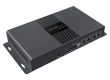


The Novastar VX2000 Pro represents the pinnacle of all-in-one LED display controllers, designed for today’s most demanding visual productions. Whether you’re powering massive concert screens, XR studios, or mission-critical command centers, this controller delivers the processing power and reliability needed for flawless performance. By integrating video processing and screen control into a single unit, the VX2000 Pro eliminates the need for multiple rack-mounted devices while supporting up to 13 million pixels with true 4K input capability.
If you’re planning a sophisticated LED project, understanding Novastar VX2000 Pro Price and capabilities is essential for making an informed decision that balances performance with budget considerations.
1.What Makes the Novastar VX2000 Pro Special?
2.Key Advantages and Features of Novastar VX2000 Pro
3.Detailed Technical Specifications of VX2000 Pro LED Controller
4.Control and Operation of Novastar VX2000 Video Processor
5.Novastar VX2000 Pro vs VX4000 Pro
6.Applications and Use Cases of Novastar VX2000 Pro LED Controller
7.Novastar VX2000 Pro Resource Downloads
8.Novastar VX2000 Pro Price
9.FAQs
10.Summary
1. What Makes the Novastar VX2000 Pro Special?
The VX2000 Pro LED Controller stands apart through its exceptional combination of raw power and operational flexibility. Unlike conventional controllers that require separate processing and control units, the VX2000 Pro consolidates these functions into a single, robust chassis. This integration significantly reduces system complexity while enhancing reliability – a critical advantage for live events and permanent installations where downtime is not an option.
The controller’s architecture supports three distinct working modes:
- Video Controller Mode: Full video processing with layer management and scaling
- Fiber Converter Mode: Optical signal conversion with data transmission
- ByPass Mode: Near-zero latency operation for time-critical applications
This versatility makes the Novastar VX2000 Video Processor suitable for diverse applications, from rental stages to fixed installations where signal integrity and processing power are paramount.
2. Key Advantages and Features of Novastar VX2000 Pro
2.1 Unmatched Processing Power
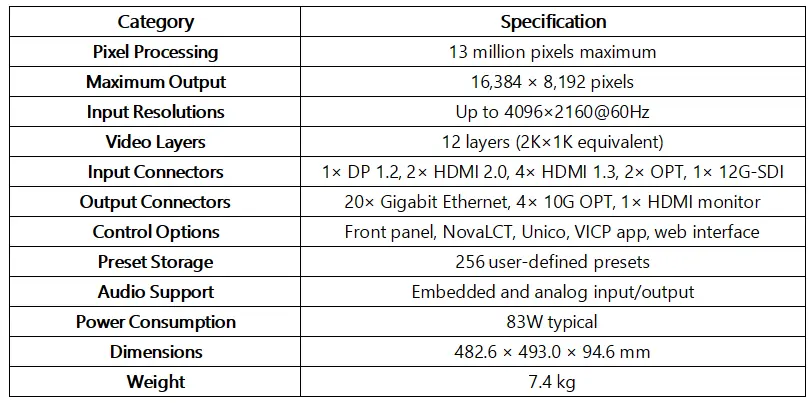
The VX2000 Pro handles up to 13 million pixels with maximum output dimensions of 16,384 pixels wide by 8,192 pixels high. This massive capacity ensures support for even the largest LED installations without compromising performance. The VX2000 Pro 4K LED Processor capabilities include native 4096×2160@60Hz input through multiple connectors, ensuring compatibility with high-end video sources.
2.2 Advanced Layer Management
With support for 12 independent layers (equivalent to 2K×1K resources), the controller enables complex display compositions. Users can create layers in different specifications (4K×2K, 4K×1K, or 2K×1K), with flexible positioning, scaling, and priority management. This layered approach allows for sophisticated content arrangements, including picture-in-picture, side-by-side displays, and overlay graphics.
Comprehensive Connectivity
The input section includes:
- 1× DP 1.2 connector
- 2× HDMI 2.0 ports (4K@60Hz)
- 4× HDMI 1.3 ports
- 2× self-adaptive 10G optical fiber ports
- 1× 12G-SDI with loop output
- 1× USB 3.0 for media playback
Output capabilities feature:
- 20× Gigabit Ethernet ports
- 4× 10G optical fiber outputs
- 1× HDMI monitoring output
- 1× 3D emitter connection
This extensive connectivity ensures compatibility with virtually any video source and display configuration.
2.3 Operational Excellence
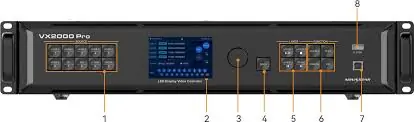
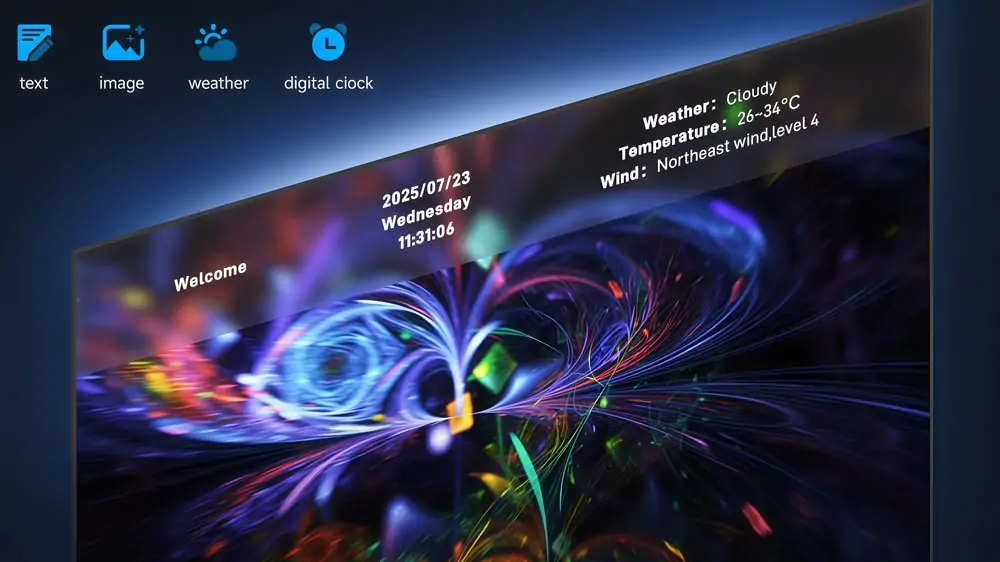
The controller supports 256 user-definable presets for instant scene recall, perfect for live events requiring rapid display changes. USB plug-and-play functionality enables direct media playback without external computers, while the comprehensive OSD system supports text, image, weather, and time overlays without additional hardware.
3. Detailed Technical Specifications of VX2000 Pro LED Controller
Understanding the Novastar VX2000 Pro Specs is crucial for determining its suitability for your projects:
3.1 Input Capabilities
The Novastar VX2000 Video Processor handles diverse signal types with exceptional flexibility. HDMI 2.0 inputs support 4K@60Hz with 8/10/12-bit color depth, while the DP 1.2 connector offers similar capabilities. The self-adaptive optical ports automatically configure for input or output operation based on connected devices, simplifying system integration.
3.2 Output Performance
Each of the 20 Gigabit Ethernet ports supports up to 650,000 pixels at 8-bit color depth, with intelligent load distribution across multiple ports. The optical outputs enable long-distance signal transmission up to 10km with single-mode modules, ideal for large-scale installations where cable runs exceed copper limitations.
4. Control and Operation of Novastar VX2000 Pro Video Processor
4.1 Multiple Control Methods
The VX2000 Pro supports various control interfaces to suit different operational requirements:
4.2 Front Panel Operation
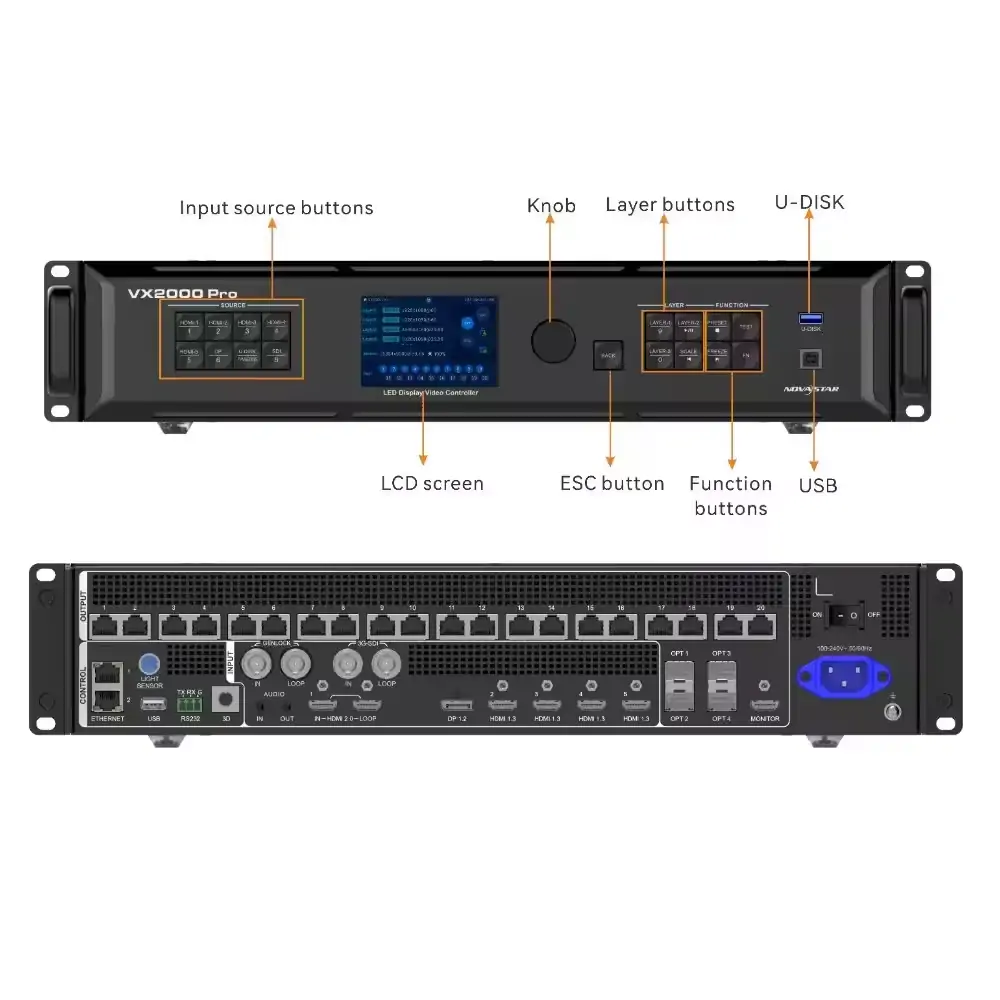
The intuitive front interface features a rotary knob with push-button confirmation, dedicated layer buttons, and source selection keys. The high-resolution LCD displays current status, menu options, and configuration parameters. Users can lock the front panel to prevent accidental changes during critical operations.
4.3 Software Control
- NovaLCT: Comprehensive configuration and monitoring software for Windows and macOS
- Unico Web Interface: Browser-based control accessible from any network-connected device
- VICP Mobile App: iOS and Android application for remote monitoring and basic control
4.4 Practical Operation Guide
1. Switching Input Sources
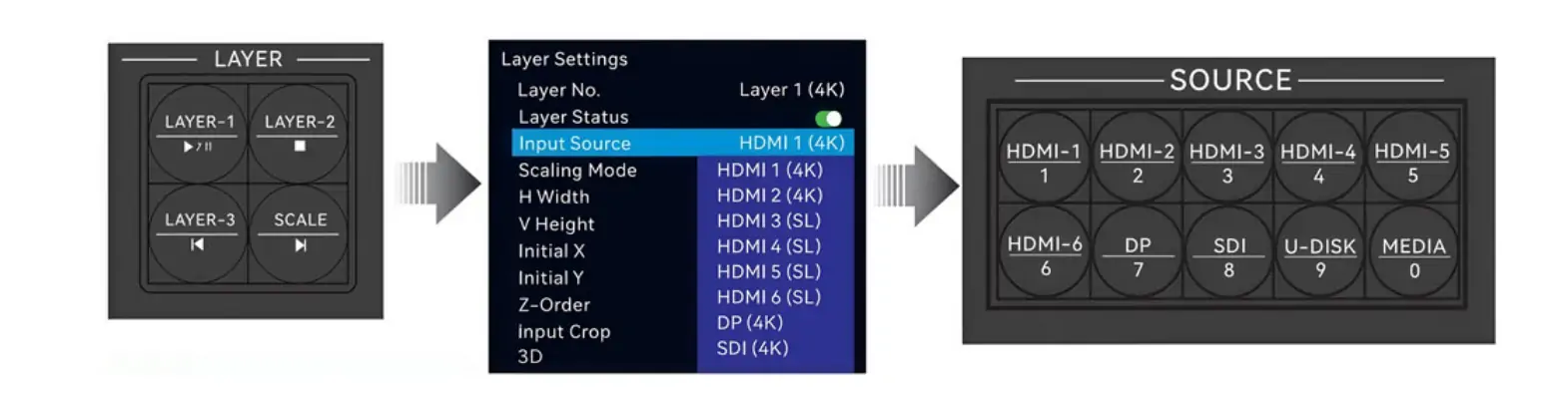
- Rotate the front panel knob to highlight the input menu
- Select desired input source (HDMI, DP, SDI, OPT, or USB)
- Press the knob to confirm selection
- The connected display will immediately show the selected source
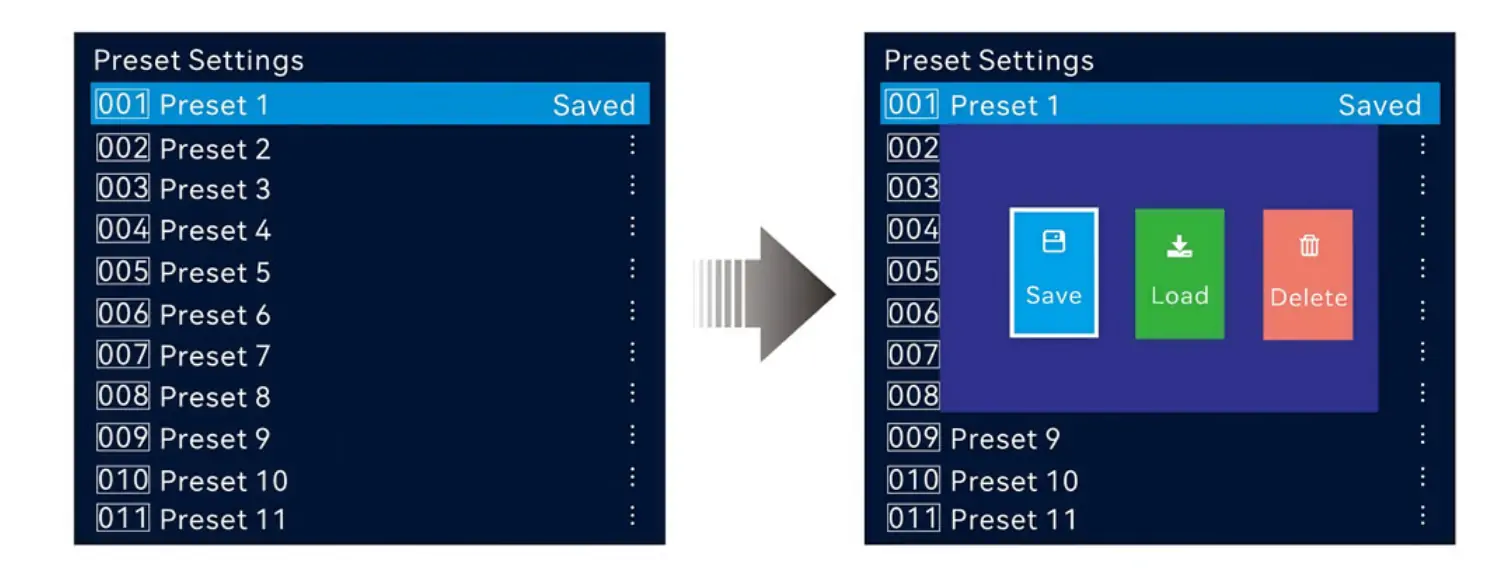
2.Saving and Recalling Presets
- Configure layers, inputs, and display parameters
- Access the preset menu from the main interface
- Select an unused preset number (1-256)
- Press “Save” to store the current configuration
- Recall anytime by selecting the preset and pressing “Load”
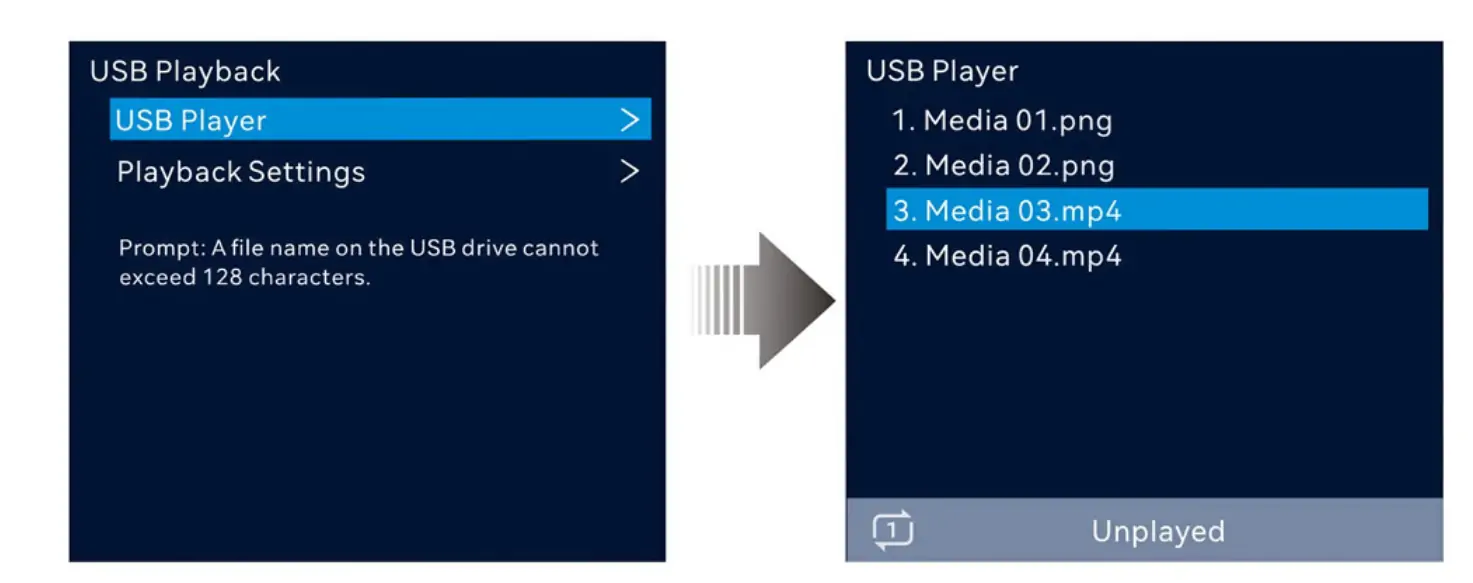
3. USB Media Playback
- Insert USB drive into the front panel USB 3.0 port
- Access the USB player from the main menu
- Browse supported formats (MP4, MOV, MKV, JPG, PNG)
- Select file and press play
- Use layer buttons for playback control (play/pause, previous/next)
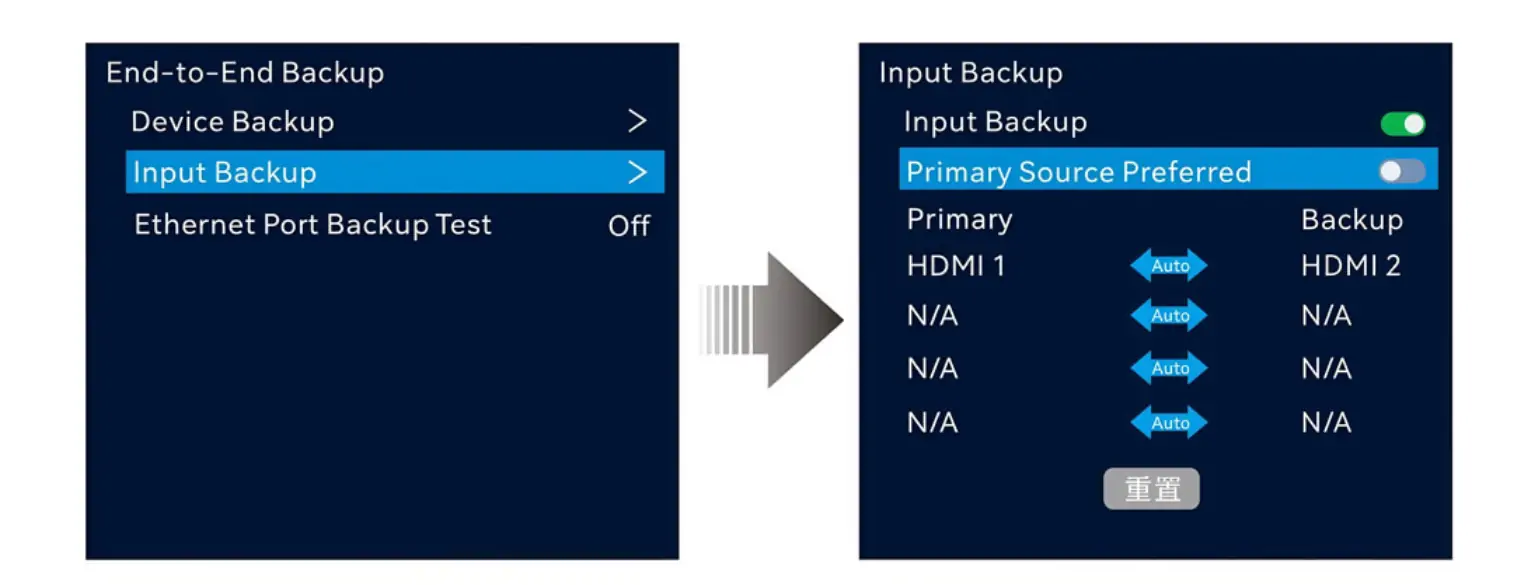
4. Backup Configuration
- Connect primary and backup sources to appropriate inputs
- Access input backup settings in the menu system
- Define backup relationships between input pairs
- Enable “Primary Source Preferred” if needed
- The system automatically switches to backup sources on signal loss
5. Novastar VX2000 Pro vs VX4000 Pro
When comparing Novastar VX2000 Pro vs VX4000 Pro, several key differences emerge:
The VX2000 Pro serves as the flagship all-in-one controller with balanced processing power and connectivity, while the VX4000 Pro represents a more specialized solution with enhanced capabilities for specific applications. The VX2000 Pro’s 20 Ethernet ports provide superior loading flexibility compared to the VX4000 Pro’s configuration, making it better suited for ultra-wide and complex display arrangements.
In terms of raw processing, both controllers support 4K input, but the VX2000 Pro offers more comprehensive layer management with 12 simultaneous layers versus the VX4000 Pro’s arrangement. The VX2000 Pro also includes more extensive input options, particularly with its four HDMI 1.3 ports complementing the high-speed HDMI 2.0 and DP connections.
For most applications requiring a balance of processing power, connectivity, and operational flexibility, the VX2000 Pro represents the optimal choice. The VX4000 Pro may be preferable for specialized scenarios requiring its specific feature set.
6. Applications and Use Cases of Novastar VX2000 Pro LED Controller
The VX2000 Pro LED Controller excels in numerous professional scenarios:
6.1 Live Events and Concerts
With its robust construction and reliable performance, the controller handles the demanding environment of live productions. The preset system enables rapid scene changes, while backup features prevent show-stopping failures.
6.2 XR and Virtual Production
Low latency operation and precise synchronization make the VX2000 Pro ideal for virtual production stages. The ability to handle multiple layers enables complex compositing with real-time camera tracking.
6.3 Broadcast and Command Centers
24/7 operation capability and comprehensive monitoring ensure uninterrupted performance in critical environments. The extensive input options accommodate multiple source types simultaneously.
6.4 Architectural and Large-Scale Installations
High pixel loading capacity and long-distance signal transmission via optical fiber support massive display walls and unusual aspect ratios.
7. Novastar VX2000 Pro Resource Downloads
To fully leverage the VX2000 Pro’s capabilities, access the complete Novastar VX2000 Manual and supporting resources:
- User Manual: Comprehensive operation and configuration guide
- NovaLCT Software: Download the latest version for system configuration
- Firmware Updates: Ensure optimal performance with current firmware
- Quick Start Guide: Rapid setup instructions for time-sensitive situations
These resources provide the technical foundation for maximizing your investment in the VX2000 Pro platform.
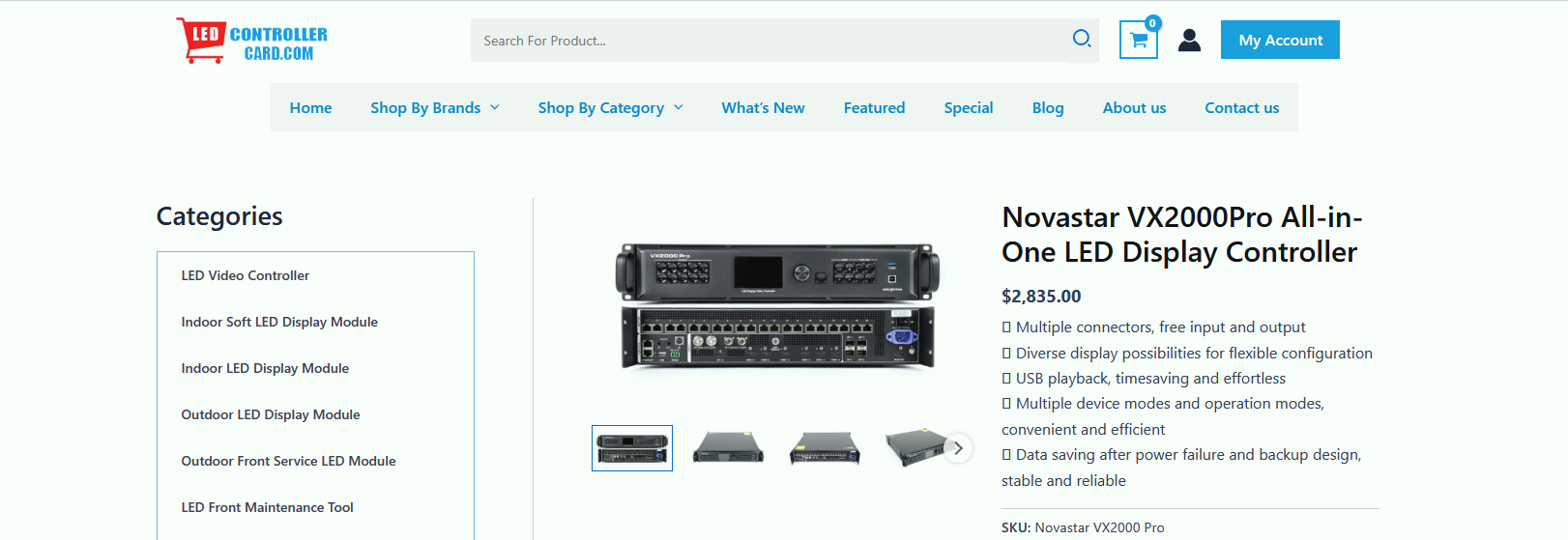
8. Novastar VX2000 Pro Price
Pricing varies based on region, supplier, and package options. For accurate pricing, contact authorized NovaStar distributors or register on the manufacturer’s platform for formal quotations.
8. FAQs
1. Does the controller support HDR content?
Yes, the VX2000 Pro supports HDR10 and HLG standards when used with compatible receiving cards, providing enhanced contrast and color performance for HDR content.
2. Can the VX2000 Pro handle non-standard display shapes?
Yes, the controller supports free topology, allowing irregular display configurations without unused blank areas. This is particularly valuable for creative installations and architectural applications.
3. How does the backup system work in practice?
The controller supports multiple backup levels: device-to-device, input source redundancy, Ethernet port backup, and optical fiber backup. If a primary source fails, the system automatically switches to the backup without interruption.
4. What is the real-world latency of the VX2000 Pro?
In Video Controller mode with low latency enabled, the delay is 1-2 frames. ByPass mode reduces this to 0 frames, while Fiber Converter mode operates at 0 frames latency.
10. Conclusion
The Novastar VX2000 Pro sets a new standard for all-in-one LED display controllers, offering powerful processing, flexible operation, and exceptional reliability. Though positioned as a premium solution, its value lies in replacing multiple devices, simplifying setups, and ensuring stable performance. Designed for large events, virtual production, and high-end installations, the VX2000 Pro delivers unmatched visual quality and efficiency while providing a scalable foundation for future display advancements.