


A commercial LED display is a modular, direct-view screen used to present advertising, information and branded content in a business environment. Its value depends on whether the intended audience can see a useful message at the right time. Choose the operating plan, location and measurable business objective before choosing a screen size.
This guide helps business owners, distributors and AV integrators plan an indoor, outdoor or mobile installation. It covers campaign management, site checks, energy calculations and ownership costs. It does not assume that buying a larger screen automatically increases sales or advertising revenue.
Use the planning tables to brief your marketing, facilities and installation teams together. Product examples identify specific EagerLED configurations; the financial calculations are illustrative assumptions, not quotations or promised returns.
1. Commercial LED display use and operating duty
A commercial LED display builds an image from light-emitting pixels arranged in modules and cabinets. This differs from an LCD signage panel that uses an LED backlight. Clarify which technology a quotation describes: the word “LED” alone does not establish that a product is a modular video wall.
Commercial operation can mean a shop open ten hours a day, a reception display following office hours, or a transport environment with a longer duty cycle. Specify the actual schedule, including weekends, seasonal closures and overnight dimming. A commercial LED display is not automatically approved for every continuous-use scenario simply because the product is marketed for business.
Ask the supplier to confirm the intended operating environment and warranty conditions for the proposed configuration. An LED package lifetime estimate is not a warranty for the complete installation. Power supplies, controllers, connectors, ventilation arrangements and maintenance access all affect practical availability and repair time.
01. Define what the screen must accomplish
Write one primary objective for the commercial LED display: explain a product offer, help visitors find a destination, support a brand presentation, or deliver paid advertising. Secondary messages can share the schedule, but competing objectives need clear priority. A menu, sponsor advertisement and emergency instruction should not all compete for the same moment.
Separate the physical display from the content operation. Someone must prepare artwork, check prices, approve promotions, schedule expiry dates and respond to faults. Without those responsibilities, a technically capable commercial LED display can keep showing an outdated offer long after the campaign ends.
| Objective | Useful content | Evidence to collect | Operating responsibility |
|---|---|---|---|
| Promote an in-store offer | One offer, availability and a clear next step | Redemptions or enquiries during comparable periods | Store team confirms stock and expiry |
| Sell advertising inventory | Approved advertiser files and scheduled slots | Playback logs, uptime and contracted delivery | Media operator manages bookings and make-goods |
| Explain products in a showroom | Demonstrations, comparisons and readable specifications | Qualified conversations and demonstration requests | Sales team verifies technical claims |
| Guide visitors | Directions, opening times and service information | Observed navigation problems and staff feedback | Facilities team maintains current information |
Use this table to define success before requesting hardware. A commercial LED display proposal becomes easier to evaluate when suppliers know the objective, content format, operating hours and person responsible for the service after installation.

2. Advertising objectives and location
Foot traffic is a starting point, not a count of people who read an advertisement. For a commercial LED display, examine the direction people face, obstructions, walking speed and time spent within a useful viewing area. A busy entrance may offer only a brief glance; a waiting area may allow a more detailed message.
Survey the location during representative daylight and evening conditions. Record the nearest and farthest useful viewing positions, sunlight direction, reflections from glazing and competing signs. Check the proposed mounting height from a customer’s position rather than relying on a floor plan alone.
01. Make the content fit the viewing opportunity
Design a short message for a brief encounter. Use one clear offer and a readable call to action rather than placing a full brochure on the screen. Longer product demonstrations suit audiences who deliberately stop. Test actual artwork at the expected distance before approving the final pixel pitch. EagerLED’s pixel pitch guide explains the trade-off in more detail.
A commercial LED display can use a landscape, portrait or custom canvas when its cabinet arrangement, mounting system and processor mapping support that design. Do not assume an existing landscape video can simply be rotated. Artwork, safe margins and playback resolution should match the agreed physical layout.
The pixel canvas also matters. As an illustrative calculation, a screen measuring 3.2 by 1.92 metres with a 2.5 mm pitch has a nominal canvas of 1,280 by 768 pixels. Confirm the real module and cabinet matrix before ordering. Sending a 4K video to that canvas does not create additional physical pixels.
| Survey item | Record on site | Decision affected |
|---|---|---|
| Viewing opportunity | Distance, obstructions, viewing direction and typical dwell time | Text size, content duration and screen position |
| Ambient light | Day and night photographs, direct sun and window reflections | Brightness strategy and daypart settings |
| Maintenance route | Front clearance, rear access, lift access and working restrictions | Service design, repair time and labour cost |
| Building interface | Available drawings, attachment points and cable routes | Structural design and installation scope |
| Operating context | Opening hours, neighbours, noise constraints and approval owner | Schedule, cooling arrangement and permissions to verify |
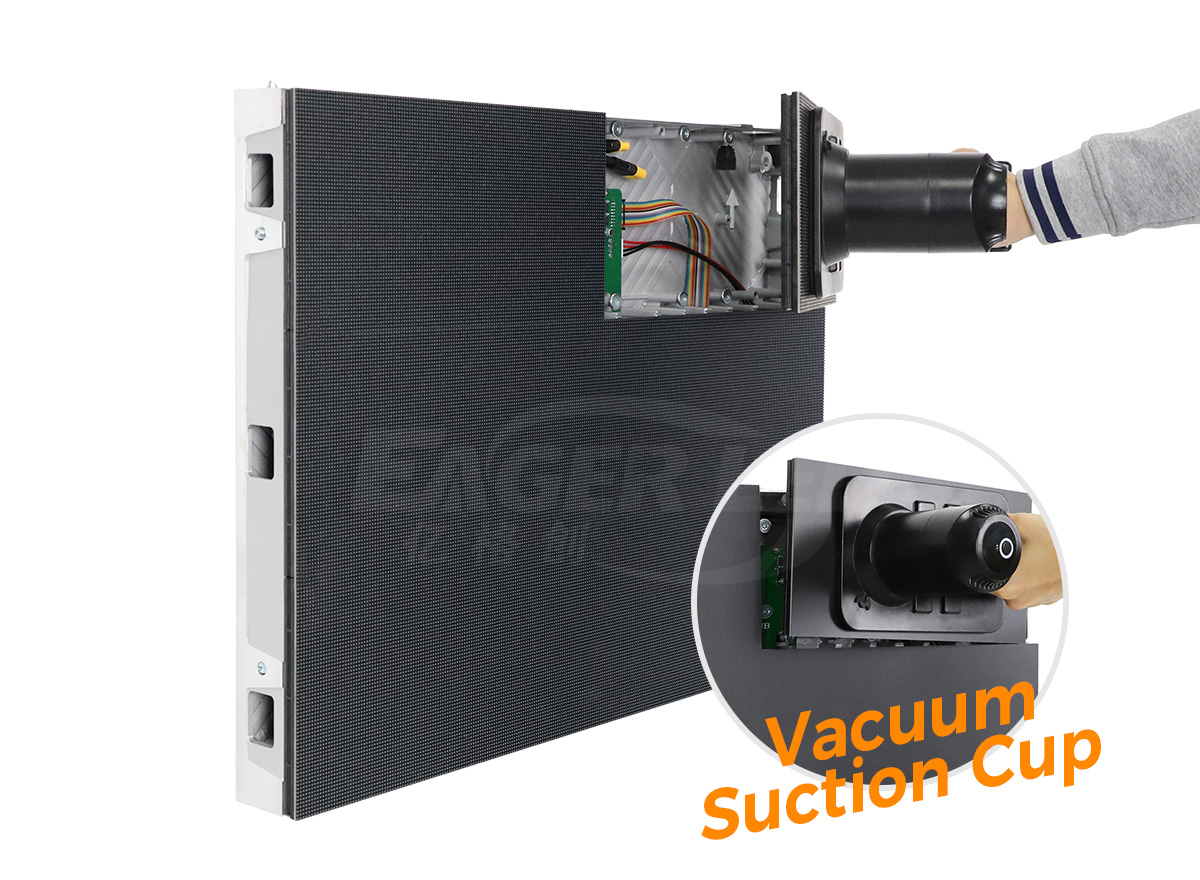
For close indoor viewing, service access can be as important as appearance. The EA640F2 indoor LED display uses a 640 × 480 mm cabinet and supports front servicing. Those features provide a specific option to discuss; they do not prove that a particular wall, recess or installation depth is suitable without drawings.
02. Measure business outcomes without overstating attribution
Choose a practical measurement method for the commercial LED display campaign. A campaign-specific landing page, a clearly labelled offer code or a recorded enquiry source can help. Keep the measurement consistent and avoid treating every nearby purchase as a screen-generated sale.
Compare equivalent weekdays and operating periods where possible. Record concurrent promotions, stock changes, weather and store closures. If these conditions differ substantially, describe the result as an observation rather than a causal sales uplift. A commercial LED display can support a campaign without being its only influence.
For paid media, distinguish scheduled plays from verified playback and from audience exposure. A player log can establish that a file ran, but it cannot by itself prove how many people looked at it. Define the evidence and any compensation for interrupted delivery in the advertising agreement.
3. Commercial LED display energy, heat and configuration
There is no sound basis for claiming that every commercial LED display consumes less energy than every alternative video wall. Compare equal display areas, operating hours, content, ambient conditions and brightness settings. A specification labelled maximum power is different from measured average consumption during the intended playlist.
Request maximum power for electrical design and representative average power for operating estimates. Have the project electrician confirm supply capacity, circuit distribution, protection and installation requirements. An average-energy calculation is not a circuit-sizing calculation and should not replace the electrical design.
01. Calculate an energy budget with stated assumptions
For a commercial LED display, estimated energy in kilowatt-hours equals area in square metres multiplied by average watts per square metre, divided by 1,000, then multiplied by operating hours. Add the player, control equipment and any dedicated cooling loads separately.
| Assumption or result | Scenario A | Scenario B |
|---|---|---|
| Display area | 10 m² | 10 m² |
| Assumed average screen power | 150 W/m² | 250 W/m² |
| Daily schedule | 12 hours | 12 hours |
| Calculated screen energy | 18 kWh/day | 30 kWh/day |
| Illustrative tariff | USD 0.15/kWh | USD 0.15/kWh |
| Calculated cost over 30 days | USD 81 | USD 135 |
The assumed power levels are examples, not measurements of an EagerLED model. Replace them with representative readings or a documented supplier estimate for the actual commercial LED display. The example excludes taxes, demand charges, control equipment and cooling, so it is not a complete utility budget.
Measure a representative playlist at the planned brightness after installation. Record the meter boundary: screen only, screen plus processor, or the complete installation. If the boundary changes between tests, apparent savings may reflect the measurement method rather than an improvement in the equipment.
02. Plan for heat, weather and repair access
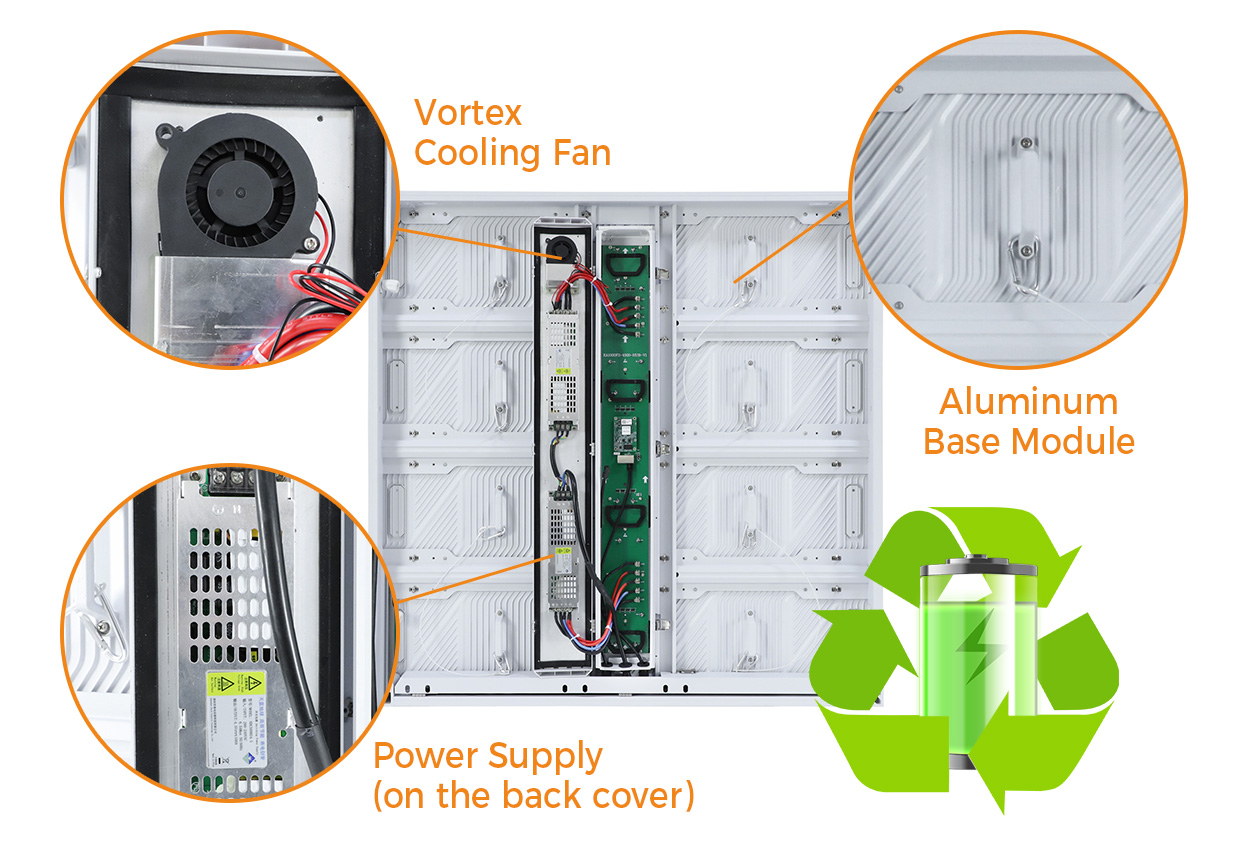
Electrical input becomes heat and light, while solar exposure adds heat to outdoor installations. Confirm the environmental limits and cooling arrangement of the commercial LED display configuration. Do not enclose ventilation paths behind decorative cladding without an approved thermal design.
The EA1000F2 outdoor advertising LED screen is described by EagerLED as supporting front and rear service. Its product page specifies an IP65 protection claim. Ask which surfaces and assembled conditions that rating covers, and obtain the applicable documentation for the supplied system.
Choose pixel pitch from the actual viewing task, then confirm cabinet resolution, brightness controls and service arrangement together. A historic list of popular pitches is not a substitute for a current configuration sheet. Require the quotation to identify the model and options being supplied.

4. Mobile campaigns and temporary locations
A vehicle-mounted commercial LED display can serve different locations, but mobility does not guarantee more useful exposure. Build the campaign around approved stopping positions, audience schedules, access routes and time available to operate. Travel time is not automatically advertising delivery time.
Establish whether the vehicle will display content while parked, moving or both, and obtain the relevant local approvals before committing. Confirm the vehicle operator’s responsibilities, installation loads, power source, weather limits and deployment procedure with qualified providers. This guide does not establish permission for any particular route or operating mode.
For a mobile commercial LED display, allow for setup, inspection, generator fuel or electrical connection, crew time and pack-down. A campaign quote should state who supplies the vehicle, driver, content system and technical support. Comparing only the screen rental charge can hide much of the operating cost.
Prepare a fallback plan for weather, access restrictions and equipment faults. Confirm what evidence demonstrates completion at each location, such as a time-stamped operating log and an approved photograph. Avoid collecting identifiable audience information when simple delivery records are sufficient.
Use a pilot event to test whether the commercial LED display suits the location before buying a permanent system or booking a long campaign. Evaluate sightlines, content readability, setup effort and the quality of the enquiries generated. A temporary campaign can reveal practical constraints that a product specification cannot.
Prepare the daily handover as carefully as the creative material. The crew should know which files are approved, when each message expires and whom to contact if the schedule changes. Keep an offline copy of the approved playlist when the selected player supports it. Confirm the screen is showing the correct campaign after every relocation.
5. Ownership costs, maintenance and rollout
Evaluate the commercial LED display as an operating service with capital and recurring costs. Separate screen hardware from structural works, electrical works, logistics, commissioning, content creation and support. Ask each bidder to identify exclusions so a lower initial figure does not conceal necessary work.
| Cost group | Items to define | Evidence before acceptance |
|---|---|---|
| Display and control | Cabinets, processor, receiving system, spares and licences | Model-specific bill of materials and software ownership |
| Site installation | Frame, attachment design, power, data, lifting and access | Approved drawings and clear contractor boundaries |
| Content operation | Creative work, scheduling, approvals and campaign changes | Named owner and tested publishing workflow |
| Ongoing service | Energy, inspections, cleaning, replacement labour and access equipment | Service scope, response expectations and exclusions |
| Handover and recovery | Configuration files, credentials transfer, training and restoration procedure | Demonstrated restart and documented recovery test |
Use contribution rather than sales revenue when considering payback. Suppose, purely for planning, that an installed project costs USD 30,000 and produces USD 1,000 of additional monthly contribution after recurring costs. Simple payback would be 30 months. Neither input is a quotation or forecast; financing, taxes and time value are excluded.
Test a downside case before approving the commercial LED display investment. Lower campaign income, additional access equipment or slower repairs can change the result substantially. If the project primarily improves wayfinding or customer experience, use operational measures rather than inventing a sales return.
01. Keep serviceable parts and usable records
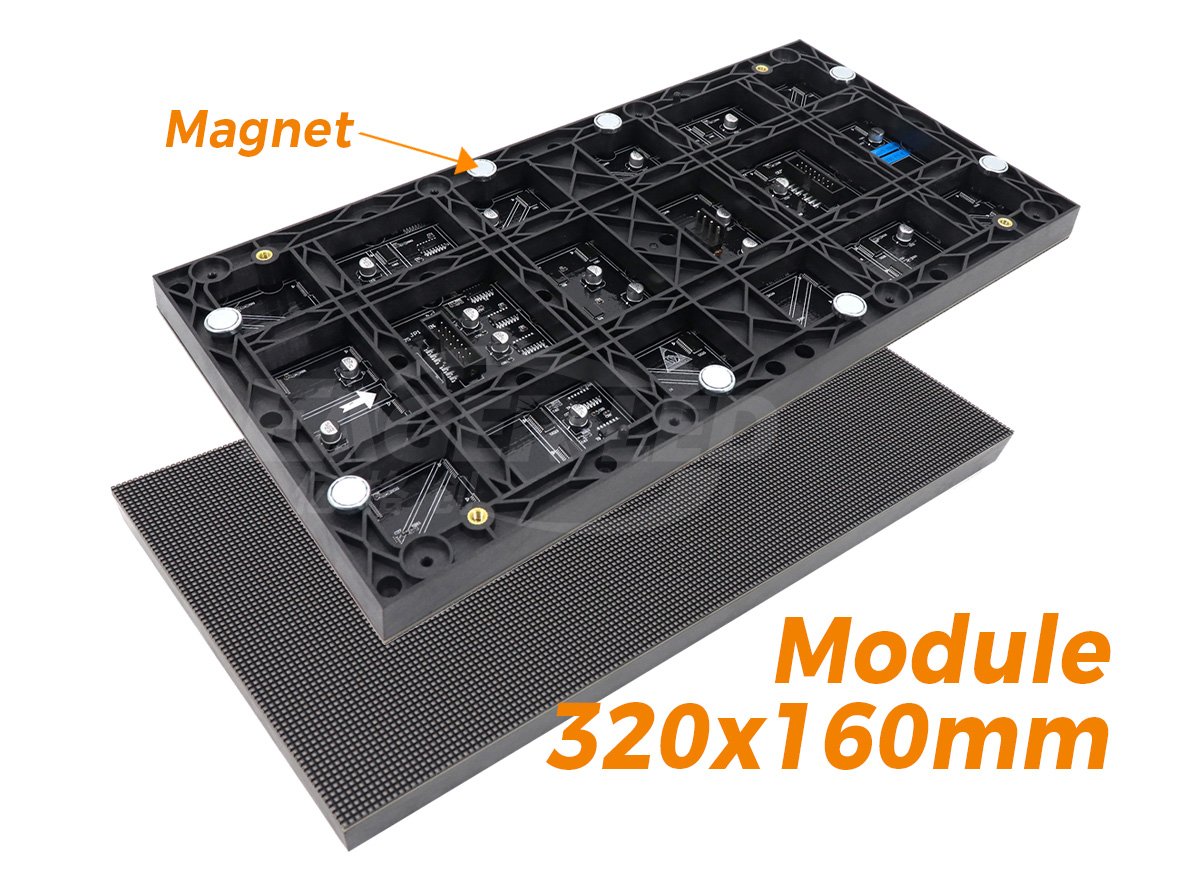
Agree on spare modules, power supplies and control parts for the exact supplied configuration. Record part numbers and revision information. A spare with the same physical size may still have different electrical, colour or configuration requirements. Confirm compatibility and calibration arrangements before relying on it.
Maintain an asset register for each commercial LED display location. Include the cabinet map, service contacts, installed settings, approved content formats and backup files. Give the operator access to the records needed for recovery, while restricting administrative accounts to the people who maintain the system.
At acceptance, run the actual playlist, inspect representative viewing positions and confirm scheduling, dimming and restart behaviour. Demonstrate how to remove an expired advertisement and restore a known working configuration. Record outstanding defects and responsibility for closing them before the project is considered complete.
For a multi-site rollout, approve one representative installation before repeating the specification. Record any differences in light, access and power at each location. Keep the content template consistent where useful, but allow local operating hours and offers to vary. Assign a person to check that location-specific information remains current.
6. Commercial LED display FAQ
01. What pixel pitch should a commercial LED display use?
Start with the nearest normal viewing position and the smallest content that must remain legible. A rough planning rule is one metre of viewing distance for each millimetre of pixel pitch, but test real artwork on a sample because text size, eyesight and ambient light matter. See EagerLED's pixel pitch guide for a fuller comparison.
02. How bright should an indoor or outdoor LED screen be?
Specify the ambient light at the installation, including direct sun and night operation, then request a model-specific brightness range and automatic dimming. Maximum brightness is not an all-day target: excessive output can reduce comfort and raise energy use. Check readability on site at the proposed settings.
03. Can a commercial LED display show a true 4K image?
Only if its physical pixel canvas contains at least 3,840 by 2,160 addressable pixels and the signal chain supports that resolution. A 4K input file sent to a smaller canvas is scaled down. Calculate the cabinet matrix and total native resolution before specifying content production.
04. What does an IP65 rating cover on an outdoor LED display?
IP ratings describe tested resistance to dust and water under defined conditions. They do not by themselves approve every mounting orientation, connector, cabinet joint or exposure scenario. Ask for the model-specific test documentation and clarify which faces of the fully assembled commercial LED display carry the stated rating.
05. What happens if the content network goes offline?
That depends on the controller and media player. Specify whether approved local content keeps playing, what fallback appears, how faults are reported and how schedules recover when service returns. Test the agreed behaviour during commissioning.
06. How are failed LED modules repaired?
Confirm whether the exact cabinet supports front or rear access, which tools and safe working space are needed, and whether compatible calibrated spare modules will be held. The supplier should document power isolation, replacement and post-repair colour checks for the supplied system.
07. Do I need permission to install a commercial LED display?
Requirements vary by location and may involve the landlord, building authority, signage rules, electrical work and public-space restrictions. Obtain the applicable local decisions before ordering the structure or planning a mobile route; a product specification is not an installation approval.





