Control room LED acceptance should prove that operators can read the required information, recognize stale data and recover an agreed working layout. Pixel pitch is part of that specification. It does not, by itself, establish end-to-end availability, current data or reliable alarm handling.
For corporate AV buyers specifying an indoor fine-pitch wall for operational dashboards, begin with the decisions operators make. Identify the labels, values and status changes that must be distinguishable from each working position. This article provides a conditional pixel-budget example and an acceptance record for an approved demonstration environment, not a certified safety-system design.
In this guide
Start control room LED acceptance with operator tasks
Ask the operational team to mark the smallest essential text, the values that must be compared simultaneously and the action associated with each displayed state. Separate persistent context from information that only needs to appear when selected. Showing every available dashboard at once can make the important details harder to read.
Use nonconfidential samples with representative long labels, decimals, units, negative numbers and timestamps. Include an unusual but valid value and a disconnected-source state. The goal is to test interpretation, not simply to show that the display produces a colorful image.
Record the actual operator positions, ambient lighting and intended brightness. A standing viewer beside a sample panel is not equivalent to a seated operator at the back of the room. Have the people who use the information judge the task under the agreed conditions.
Budget pixels for each dashboard window
The EA250WH3 product page, reviewed on October 22, 2026, lists 250 × 250 mm modules with different native pixel matrices. It is used here as a verifiable indoor hardware reference. The product page does not establish a complete mission-critical system, an availability commitment or suitability for every control-room duty.
| Published option | Module matrix | Complete native canvas | Each equal quadrant |
|---|---|---|---|
| P1.25 | 200 × 200 | 2400 × 1200 | 1200 × 600 |
| P1.56 | 160 × 160 | 1920 × 960 | 960 × 480 |
| P1.95 | 128 × 128 | 1536 × 768 | 768 × 384 |
These figures assume complete modules and an equal two-by-two layout without borders or interface controls. The complete wall has a 2:1 aspect ratio, as does each quadrant. A 1920 × 1080 source is 16:9, so fitting it into a quadrant without cropping leaves unused space rather than filling that quadrant exactly.
In the P1.56 example, fitting the entire source into a 960 × 480 quadrant makes height the constraint. The scale factor is 480 ÷ 1080, approximately 0.444. The fitted image is approximately 853 × 480 pixels. A 24-pixel-high source label is therefore represented by approximately 10.7 output pixels in height, before rendering and scaling details.
This is a sampling calculation, not a reading-distance guarantee. It explains why a desktop that looks clear on a local monitor can lose fine labels in a multi-window wall. For control room LED acceptance, test the final window layout through the actual output chain. Increase application zoom, simplify the dashboard or enlarge the selected window when the task requires it.
A finer pitch provides more samples within the same physical space. It does not automatically make a letter physically larger when the same source image is fitted to the same window. Specify the content layout and physical reading task alongside the pixel matrix. The LED display resolution guide explains native canvas and input resolution separately.
Make stale data visibly different from normal data
Agree how the application communicates source identity, data age, invalid values and disconnection. A frozen image can remain bright and sharp while its information becomes obsolete. A processor showing the last good frame is not necessarily providing the operational behavior the buyer needs.
In an authorized demonstration system, stop updates to a harmless sample feed while leaving its last image visible. Observe whether the agreed status becomes apparent at the operator positions. A clock overlay generated by a different device may keep changing even while the underlying values are stale; establish what every timestamp actually represents.
Do not rely on color alone to distinguish the sample states. Ask the operational and application teams to define labels, symbols and contrast appropriate to their users. The display supplier cannot establish correct alarm semantics simply by selecting a brighter module.
Retain an observation-based acceptance record
For control room LED acceptance, keep the test input, layout version, source settings, processor configuration and observed result together. Record exceptions explicitly. Use the approved test environment and local procedures; do not interrupt live operational services to create a demonstration.
| Test | Observation to retain | Responsible party to identify |
|---|---|---|
| Small labels and similar values | Correct interpretation at named positions and final window size | Operator lead and AV integrator |
| Stopped sample updates | Visible stale-data behavior and meaning of timestamps | Application or data-system owner |
| Source interruption | What stays visible, what changes and the recovery steps | Source, processing and integration teams |
| Approved restart | Restored layout, source assignments and usable status | Commissioning team |
| Replacement or service rehearsal | Isolation procedure, access and restored visual match | Qualified display service team |
In the control room LED acceptance brief, define required recovery time and acceptable information loss with the buyer before procurement. Do not infer failover from a spare port, duplicate cable or a generic redundancy label. Ask which failure each proposed arrangement handles and what shared components remain. Verify the actual supplied design against the agreed demonstration.
Keep service requirements separate from image specifications
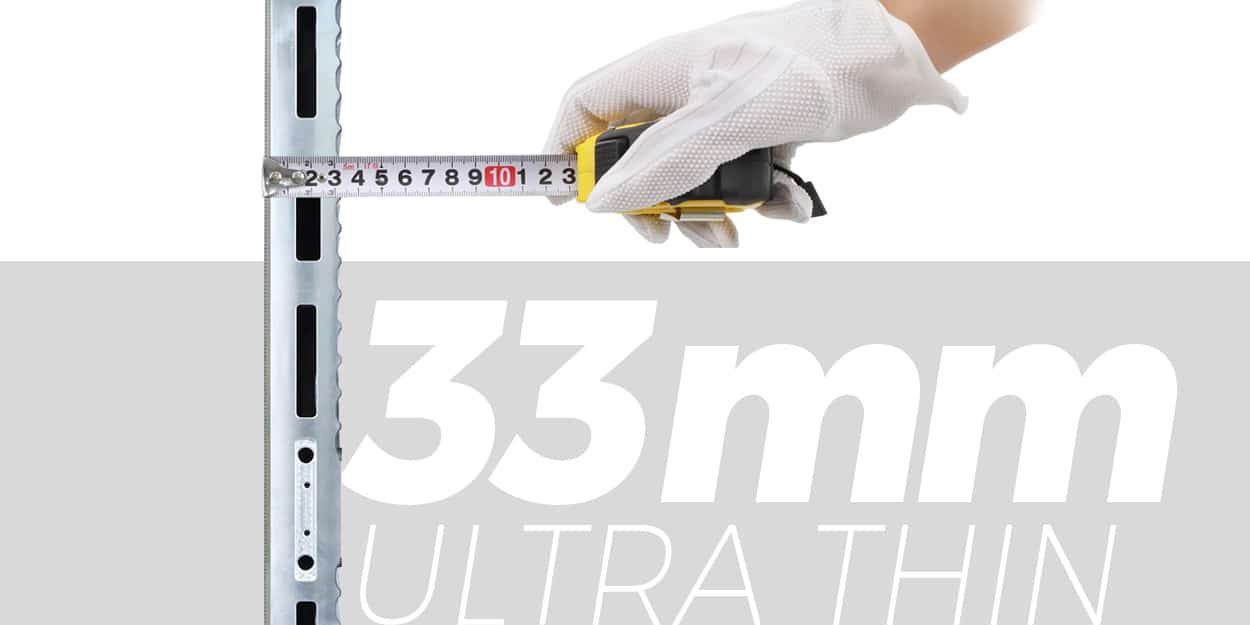
The EA250WH3 page describes front service, a 33 mm cabinet and HUB connections. These are useful configuration facts, but the installed depth includes more than the cabinet. Structure, wiring, ventilation and working access require their own drawing. HUB connections do not establish wireless networking or system redundancy.


Ask for the exact compatible spare identities, configuration backups and procedure for checking a replacement at operating brightness. Record who authorizes service and how operators obtain essential information during the interruption. Control room LED acceptance should include that operating arrangement as well as the repaired image.

The official @EagerLED EA250WH3 hardware demonstration shows the product construction. Its home-theater context is different from a control-room deployment. Observe the physical access features; it does not verify operational availability or your dashboard workflow.
Frequently asked questions
Does a 3840 Hz refresh specification prove data updates are fast?
No. LED refresh describes display driving, while data freshness depends on acquisition, applications, networking and processing. Measure the information path and make its status understandable to operators.
Should every dashboard receive an equal quadrant?
No. Allocate area according to the operator’s task. A priority view can need more room than a contextual feed, and some information may be clearer when selected on demand rather than displayed permanently.
Can a screenshot establish live-system acceptance?
For control room LED acceptance, a screenshot can retain the tested layout and image appearance, but it cannot establish update behavior, transitions or recovery by itself. Keep observations of the agreed live demonstration alongside the screenshot.
What if operators read the local monitor but not the wall?
Compare source scaling, window size, physical letter height and viewing position. Do not assume the LED hardware is defective or that changing pitch alone will resolve an unsuitable application layout.
Should operational test samples contain real confidential data?
Use approved nonconfidential material with representative structure and difficulty. Keep any necessary operational testing within the organization’s authorized environment and procedures.
Prepare an operator-led specification
Send the room drawing, working positions, proposed active dimensions, simultaneous sources, smallest required labels and agreed interruption behavior. Request control room LED acceptance criteria alongside the model, native matrix, processing design and service scope. Discuss the dashboard canvas and demonstration requirements