Quick answer: which is better, LCD or LED?
- Monitors and TVs: a product sold as an “LED” monitor or TV is an LCD lit by LEDs, so you are comparing panel specs, not two technologies. Choose by resolution, panel type, refresh rate and contrast.
- Desks, menu boards and small indoor signs: an LED-backlit LCD usually gives the sharpest text for the money.
- Large seamless walls, stages, bright venues and outdoor signs: direct-view LED is usually the better choice, because it scales without bezels and reaches much higher brightness.
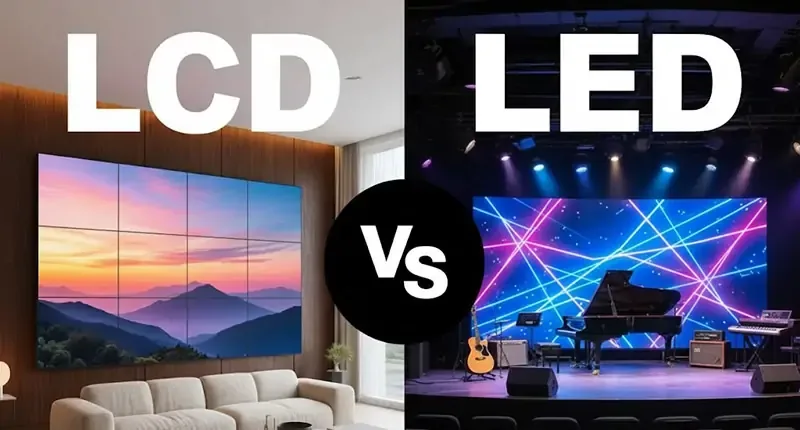
LCD vs LED: which display is better? The answer depends first on what “LED” means. A consumer LED TV or LED monitor is normally an LCD panel illuminated by LED backlights. A commercial direct-view LED display (dvLED) is different: red, green and blue LEDs form the visible pixels, with no liquid-crystal layer or separate backlight. Comparing an LCD monitor with an “LED monitor” is therefore mostly a comparison of LCD backlights and panel specifications; comparing an LCD video wall with a direct-view LED wall is a comparison of two display systems.
For a desk, menu board or modest indoor sign viewed close up, an LED-backlit LCD usually gives the sharpest text for the money. For a large seamless wall, stage, high-ambient-light venue or outdoor installation, direct-view LED can justify its higher system cost. This LCD vs LED guide explains the difference with examples, measurable specifications, installation questions and a practical buying checklist.
1. What do LCD and LED mean?
01. LCD and LED-backlit LCD
An LCD (liquid-crystal display) controls how much light passes through each pixel. Its liquid crystals do not emit light. Older LCDs often used cold-cathode fluorescent lamps (CCFLs); nearly all current televisions and monitors instead use LEDs behind the liquid-crystal panel. Thus a product advertised as an “LED TV” is normally an LED-backlit LCD. Edge-lit, direct-lit, full-array local dimming and mini-LED describe different backlight arrangements, not a change from LCD image formation to self-emissive pixels.
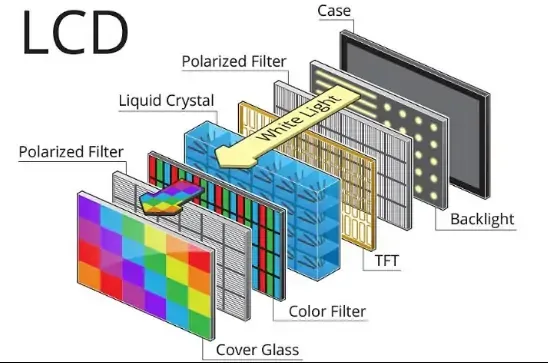
Example: a 55-inch office monitor labeled “LED” still has a fixed 3840 × 2160 LCD pixel grid if its specification says “LED-backlit LCD.” Its image quality depends on panel type, backlight design, dimming, brightness, surface finish, refresh rate and calibration. A mini-LED LCD can deliver stronger local contrast than a simple edge-lit LCD, but blooming around bright objects may remain because dimming zones are larger than individual pixels.
02. Direct-view LED and the meaning of pixel pitch
A direct-view LED display assembles modules or cabinets into a larger image. Each addressable pixel contains light-emitting red, green and blue elements. There is no LCD shutter or backlight. Manufacturers describe pixel density through pixel pitch, the center-to-center distance between pixels in millimeters. P1.5 has a 1.5 mm pitch; P4 has a 4 mm pitch. A smaller pitch provides more pixels across the same physical width, generally at a higher purchase price and with more demanding alignment and service requirements.
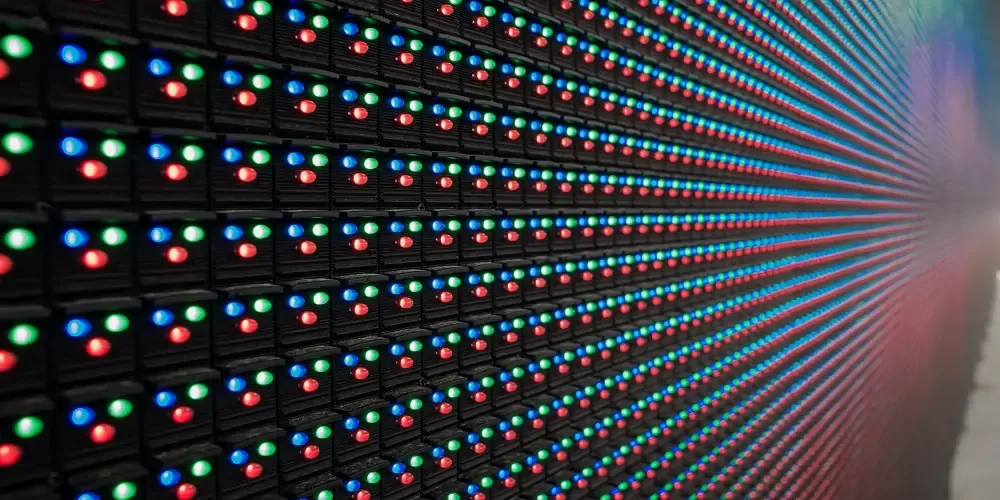
Example: a 3.84 m-wide P2 wall has about 1,920 horizontal pixels (3,840 ÷ 2). A P4 wall of the same width has about 960. Confirm the proposed wall’s actual width, height and total pixel matrix before approving content designed for Full HD or 4K. For more on modules and package choices, see EagerLED’s LED display module guide.
03. A comparison that uses the right terms
| Question | LED-backlit LCD | Direct-view LED |
|---|---|---|
| What makes the image? | Liquid crystals modulate an LED backlight. | LED pixels emit the image directly. |
| Typical format | One fixed-size monitor, TV or signage panel; multiple panels form a video wall. | Modules or cabinets combine into a wall sized for the project. |
| Resolution | Specified per panel, such as 1920 × 1080 or 3840 × 2160. | Calculated from installed dimensions divided by pixel pitch. |
| Visible joins | Single panels have none; multi-panel walls show bezel lines. | Cabinet joins can be visually seamless after accurate installation and calibration. |
| Best starting use | Close-viewing text, standard indoor signs and tight budgets. | Large-format, high-impact, custom-shape or suitable outdoor displays. |
2. LCD vs LED: which performance differences matter?
01. Brightness, contrast and ambient light
Brightness is measured in cd/m², commonly called nits. Compare usable operating brightness, not just a maximum specification. A shaded lobby may need far less light than a sun-facing storefront. High-brightness LCD signage exists, while a direct-view LED wall can be specified for very bright environments. Outdoor direct-view LED also needs an appropriate enclosure, ingress rating, temperature design and ambient-light control. An indoor LED wall is not outdoor-ready merely because its pixels can become bright.
Contrast depends on the whole optical system. Direct-view LED can turn dark pixels down individually, but reflected room light and surface finish affect perceived blacks. LCD contrast varies greatly between IPS, VA and locally dimmed panels; “LCD has poor contrast” is too broad. Compare displays in the actual room, at intended brightness and with representative dark and bright content.
02. Detail, viewing distance and text
For close viewing, a high-density LCD often displays fine text and interface elements more economically than a large LED wall. Direct-view LED must be selected by the nearest normal viewer, the text size and the target content resolution. A rough screening rule sometimes pairs a pitch in millimeters with a viewing distance in meters, but it is not a substitute for a full-size sample: eyesight, content and acceptance criteria differ. Ask to view moving video, small text, gradients and a neutral gray field from the nearest seat.
The LCD vs LED distinction also affects multi-screen layouts. One LCD panel has a precisely defined resolution and no internal seam. A wall made from several LCD panels introduces bezels that can interrupt charts, faces and typography. Direct-view LED avoids bezel lines but may show pixel structure up close if pitch is too coarse. Choose based on what the audience will actually see, rather than an isolated specification.
03. Refresh, motion and camera capture
For a gaming monitor, compare panel refresh rate in hertz, pixel response, input latency and synchronization features. An “LED” label does not give an LED-backlit LCD a faster response than another LCD. For a direct-view LED wall, compare controller frame rate, grayscale performance, scan design and the manufacturer’s refresh specification. Camera use also requires testing shutter settings and scan artifacts at the planned dimming level. These are separate quantities; a quoted 3,840 Hz LED scan refresh does not mean the input video is 3,840 frames per second.
04. Power, heat, lifespan and service
Power draw is not a universal LED victory. An LED wall’s consumption changes with image content, brightness and wall area; its supply must still cover the specified peak. LCDs have electronics and backlights that also consume power. Request typical and maximum watts for the complete installed system, including processors, controllers, fans and media players. Then estimate annual energy with real operating hours and brightness settings.
Similarly, a quoted LED lifetime is usually an optical depreciation target under stated conditions, not a promise that every component will last that long. Ask for the test condition, replacement-part availability, spare-module plan and warranty scope. LCD video walls may need whole-panel replacement; modular direct-view LED can allow module or power-supply replacement, depending on front or rear access. Both need cleaning, ventilation and periodic calibration.
| Metric to request | Why it matters | What to verify in a quote |
|---|---|---|
| Brightness (nits) | Readability in the real ambient light | Normal operating value, control range and outdoor suitability |
| Resolution or pixel pitch | Small-text clarity at the nearest viewer | Installed total pixel matrix and sample viewing test |
| Power (W) | Electrical and cooling design | Typical and maximum for screen plus control equipment |
| Refresh and latency | Motion and camera behavior | Input frame rate, LED scan refresh, processor and camera test |
| Service access | Repair time and wall clearance | Front or rear access, spare parts and warranty response |
| Environmental rating | Weather and temperature reliability | Rated enclosure, operating range and installation details |
3. Which screen is better for each application?
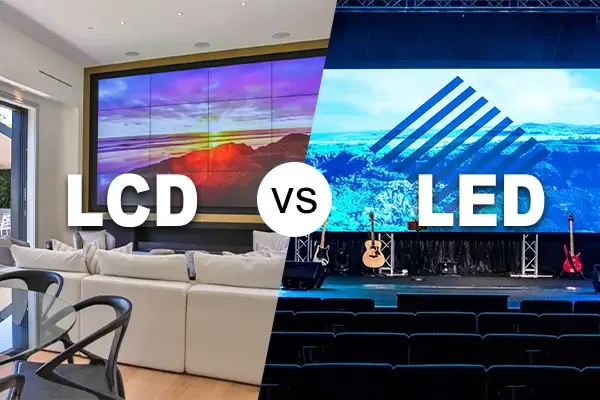
01. Monitors, TVs, Home and Office
LCD vs LED monitor: what to compare. Almost every monitor sold today is an LCD with an LED backlight, so “LED monitor” and “LCD monitor” usually describe the same kind of screen. The differences that matter are the panel type (IPS for colour and viewing angle, VA for contrast, TN for speed and price), resolution for your screen size, refresh rate for gaming or fast motion, and the backlight design. Mini-LED backlit models are still LCDs, but their many small dimming zones raise contrast and HDR performance. OLED is a different, self-emissive technology; see our OLED vs LED comparison.
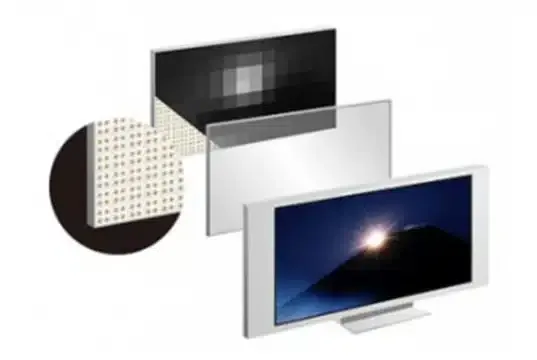
For a computer desk or meeting-room monitor, choose an LCD by resolution, panel behavior, glare, ports and ergonomics. Most products called LED monitors are already LED-backlit LCDs. A direct-view LED display is normally unnecessary for one user’s close-range spreadsheets or reading. A large boardroom wall can be a different case: an appropriately fine-pitch LED system may be worth comparing if viewers need a single large canvas without bezel interruptions.
02. Retail signage, menus and control rooms
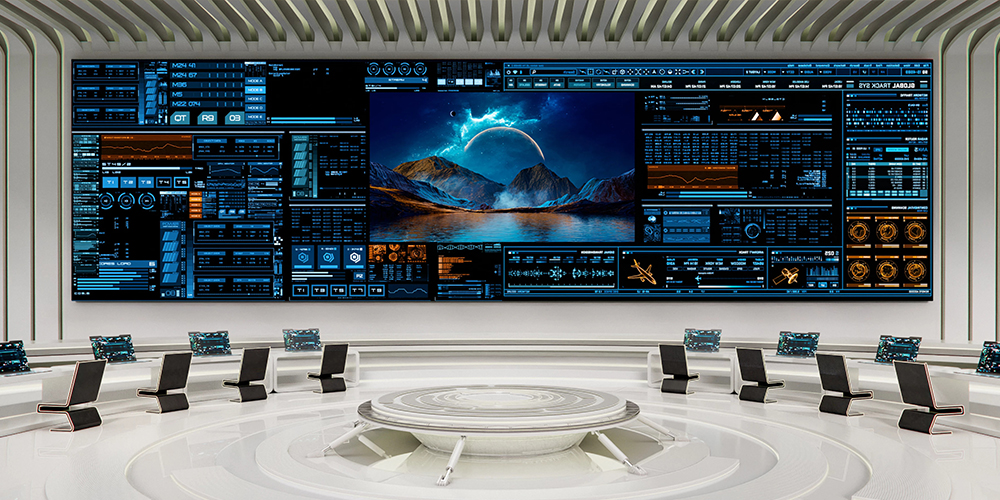
A single commercial LCD is often efficient for a menu board or portrait retail sign because it offers crisp text, standardized mounting and a predictable price. If several LCDs form a video wall, map the content around bezel crossings. Direct-view LED becomes attractive for a large storefront feature, irregular architecture or a wall that must appear as one continuous image. In a control room, inspect small labels and multi-source layouts at the operator position before selecting LED pitch; bezel-free aesthetics alone do not guarantee readable data.
03. Stages, events and outdoor advertising
Direct-view LED suits scalable stage backdrops, rental cabinets, unusual aspect ratios and distant audiences. For events, include rigging loads, cable paths, processor capacity, spare modules, rapid-service access and a camera rehearsal. Outdoor advertising adds weather rating, wind and structural engineering, local brightness rules and safe access for maintenance. An LCD panel can still be sensible in a protected kiosk or enclosure, but that enclosure and its thermal management must be part of the comparison. Review EagerLED’s commercial LED display options for project types.
| Use case | Likely starting choice | Decision test |
|---|---|---|
| Desk monitor or detailed dashboard | LED-backlit LCD | Can the nearest user read fine text comfortably? |
| One menu or retail information screen | Commercial LCD | Does standard size and indoor brightness fit? |
| Large lobby feature wall | Compare LCD wall and direct-view LED | Are bezels acceptable, and what is the nearest viewer distance? |
| Stage or touring event | Direct-view LED | Do rigging, camera and fast repair requirements fit the design? |
| Open-air billboard | Outdoor-rated direct-view LED | Are brightness, weather protection and structural approvals adequate? |
4. How should you specify an LED wall or LCD video wall?
01. Start with the audience and content
Record the nearest and farthest normal viewing positions, wall dimensions, daylight exposure and whether the source is text, video, advertising or mixed. State the smallest text that must remain legible. For an LCD video wall, document panel size, number of panels, bezel-to-bezel gap and total canvas resolution. For direct-view LED, document pixel pitch, exact cabinet layout and native wall resolution. A content team should receive those dimensions before producing graphics.
02. Validate the installed system, not a brochure number
Ask suppliers for a drawing with screen area, weight, mounting depth, signal path, controller model, power distribution, access space and cable routes. Check color and brightness uniformity across the whole wall. Confirm who performs calibration after replacement modules are installed. If the wall will appear on camera, request a filmed sample at expected shutter speed and dimming levels. For either LCD or LED, insist on a site survey when mounting, ventilation or sunlight could change performance.
03. Compare total cost of ownership
LCD vs LED pricing depends on size, pitch, panel grade, enclosure, processor, structure, installation and service contract. A direct-view LED quote that omits processing or structural work cannot be compared fairly with a turnkey LCD wall quote. Calculate a common planning horizon: upfront equipment and installation, annual electricity, preventive service, likely spare parts and downtime. Use the actual warranty terms rather than a generic lifespan claim. A fine-pitch LED wall may cost substantially more upfront, yet a very large LCD array also brings mounts, bezel alignment and more panel units.
Quote checklist: request a layout drawing; brightness and power at named operating settings; native pixel matrix; front/rear service method; environmental rating where relevant; calibration procedure; spare-part quantities; warranty exclusions; and a content demonstration. EagerLED’s LED display range gives examples of indoor, outdoor and rental formats, but project specifications should be confirmed for the selected model.
5. Common LCD vs LED buying mistakes
01. Treating an LED TV as a direct-view LED wall
This is the central LCD vs LED terminology problem. If a TV specification lists an LCD panel and LED backlight, the image still passes through liquid crystals. “LED” in a wall-system proposal can instead mean direct-view pixels. Ask every supplier to state the image-forming technology in writing. This one clarification prevents incorrect claims about bezels, resolution, modularity and maintenance.
02. Choosing pitch or brightness without site conditions
Too-wide LED pitch makes fine text coarse for nearby visitors; unnecessarily fine pitch increases cost without a visible gain for a distant audience. Likewise, full outdoor brightness indoors can cause discomfort and waste energy, while a low-brightness unit behind sunlit glass can become unreadable. Test a sample at the intended distance and ambient light. Request automatic brightness scheduling if the environment changes through the day.
03. Assuming every LED system uses less power or lasts longer
Power and service life depend on design and use. A large, bright LED wall can consume more total electricity than a smaller LCD sign because it covers far more area. High temperatures, poor airflow and sustained maximum brightness can shorten the life of either system. Compare measured system watts and documented service assumptions. Avoid “100,000 hours versus 50,000 hours” claims unless the quoted products use the same lifetime definition and test conditions.
6. Maintenance and troubleshooting
01. Preventive care for LCD and direct-view LED
Keep vents unobstructed, follow the manufacturer’s approved cleaning method and log temperature, hours, brightness settings and faults. On an LCD video wall, check bezel alignment, panel color match, backlight uniformity and image retention behavior. On direct-view LED, inspect module alignment, dead pixels, receiving cards, power supplies and calibration files. Arrange safe access before installation; a screen that looks easy to service on a bench may be difficult to reach above a lobby or stage.
02. What to check when an LED wall shows a fault
If a section goes dark, first identify whether the fault follows one module, a cabinet, a data chain or a power branch. Do not swap live components unless the manufacturer’s procedure permits it. Record the controller status and test signal before replacing parts. A color mismatch after repair often needs the correct calibration file, not another module. Keep spares from the approved batch when color matching matters.
03. What to check when an LCD panel looks wrong
For an LCD, isolate the source, cable, panel settings and backlight before deciding the display has failed. Uneven brightness may reflect local dimming or aging; a line defect may require panel service. In an LCD video wall, compare adjacent panels using the same test pattern and settings. Follow the product’s service manual for any internal repair and document the failure for warranty support.
04. Maintenance and troubleshooting illustrations
The original LCD vs LED maintenance and fault illustrations are grouped below for quick reference. Open each image at full size to inspect its checklist.
| Topic | Original illustration |
|---|---|
| Preventive LCD and LED care | 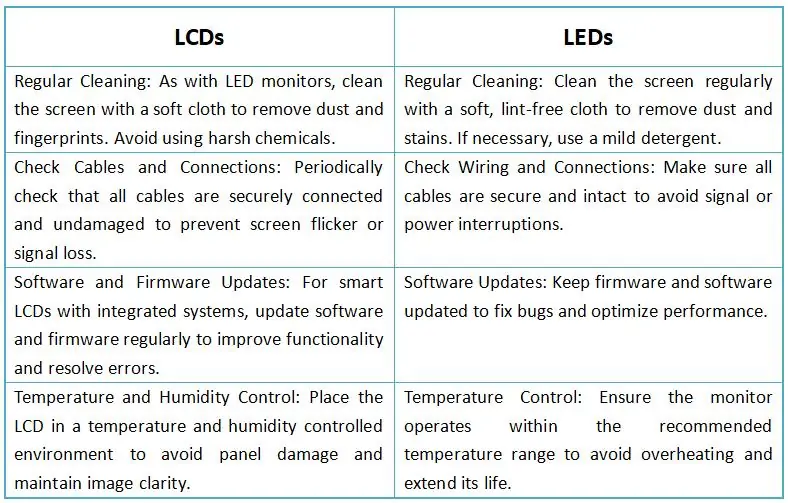 |
| LED wall faults and solutions | 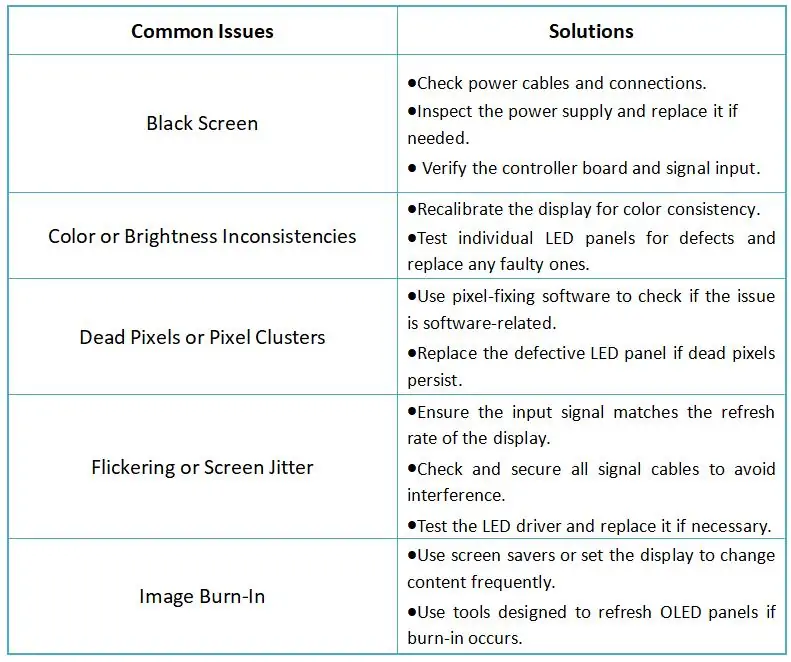 |
| LCD panel faults and solutions | 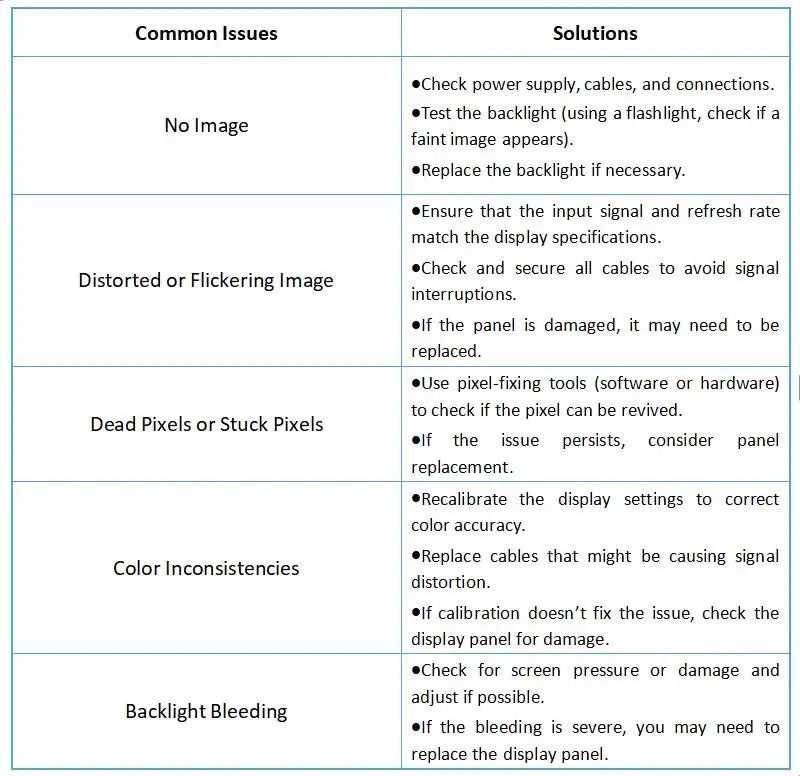 |
7. LCD vs LED FAQs
01. Is LCD or LED better for a monitor?
For a desk monitor, the product called an LED monitor is usually an LED-backlit LCD. Compare resolution, panel type, refresh rate, contrast, glare, ports and ergonomics. Direct-view LED is generally a wall technology and is rarely the economical choice for one close viewer.
02. What is the difference between LCD and LED with an example?
A 55-inch LED TV is commonly an LCD panel lit by LEDs. A modular stage wall is direct-view LED: its LED elements make the visible pixels. Both contain LEDs, but only the second forms the image directly with them.
03. Is direct-view LED brighter than LCD?
It can be specified for much brighter and outdoor applications, but brightness varies by model. High-brightness LCD signage also exists. Compare usable nits in the actual ambient light and make sure outdoor equipment has suitable weather and thermal design.
04. Which is cheaper: LCD or LED?
A single LED-backlit LCD is often cheaper than a comparably large direct-view LED installation. For very large walls, compare turnkey quotes that include mounts, controllers, electrical work, cooling, service and downtime. Pixel pitch strongly affects LED price.
05. Does LED always use less electricity than LCD?
No. Compare total system watts at the same screen area, intended brightness and content, plus operating hours. Direct-view LED power changes with image content; LCD backlights and electronics also draw power.
06. Which screen is easier on the eyes?
Neither label guarantees visual comfort. Set appropriate brightness for the room, control glare, choose readable text and check flicker or dimming behavior if viewers are sensitive. Viewing distance and breaks matter more than the marketing term.
07. How do I tell if my screen is LCD or direct-view LED?
Read the specification. Terms such as LCD panel, IPS, VA or LED backlight identify an LCD. A direct-view LED system specifies pixel pitch, modules or cabinets and a calculated total pixel matrix. A thin bezel or high brightness alone is not reliable proof.
08. Is LED better than LCD?
It depends which LED you mean. An LED TV or LED monitor is an LCD lit by LEDs, so you are comparing backlights and panel specs, not two different technologies. Against an LCD video wall, a direct-view LED wall is usually better for large seamless, very bright or outdoor screens, while an LED-backlit LCD is usually better value for close-range viewing.
8. Conclusion: choose by the job, not the label
For most personal monitors and standard indoor signs, the practical LCD vs LED choice is an LED-backlit LCD with the right resolution, panel quality and brightness. For a large seamless canvas, custom form factor, event backdrop or appropriately engineered outdoor sign, direct-view LED may be the better display. The critical step is to distinguish the two meanings of “LED,” then compare a complete design at the actual viewing distance.
Shortlist equipment using content clarity, usable brightness, total pixel matrix, power at operating settings, service access and five-year project cost. Request a site-specific demonstration and a written specification before committing. That process gives a defensible answer to “LCD vs LED: which is better?” and prevents a marketing label from replacing engineering judgment.
Comparing direct-view LED for a wall, stage or outdoor sign? Read our guides to LED wall vs projector and choosing pixel pitch, or send EagerLED your size and viewing distance for a recommended screen and quote.