


1. What Is an LED Podium Display?
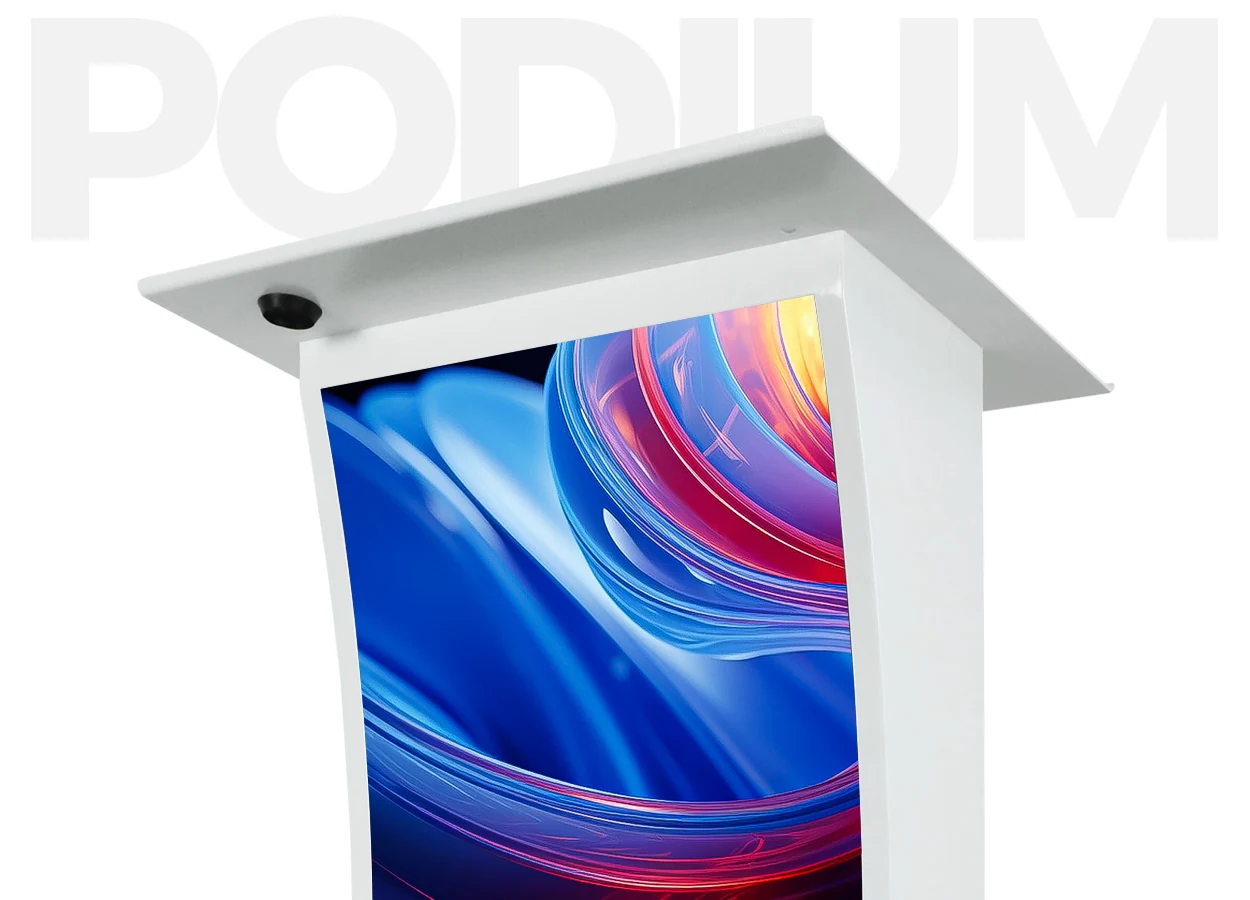
The defining feature of an LED podium display is the audience-facing LED surface integrated into the lectern. Individual light-emitting pixels form the image directly. The screen can be flat or shaped around the cabinet, depending on the module construction and mechanical design.
“LED lectern display,” “digital podium screen,” and “lectern LED screen” often describe similar equipment. However, “digital podium” is a broader term: it may describe a lectern containing a computer, touchscreen, or AV control panel without any audience-facing LED screen. Request a drawing that identifies every display and its intended viewer.
The front panel normally supports concise visual communication. A logo may remain visible throughout a speech, while a session title changes between presenters. Detailed slides usually belong on a separate screen sized for the audience and viewing distance. A compact podium face cannot automatically replace that screen.
An LED podium display also does not inherently include a microphone, amplifier, computer, or room-control system. These may be integrated, supplied separately, or omitted. The equipment schedule should distinguish the LED display package from the wider presentation system.
2. How Does an LED Podium Display Work?
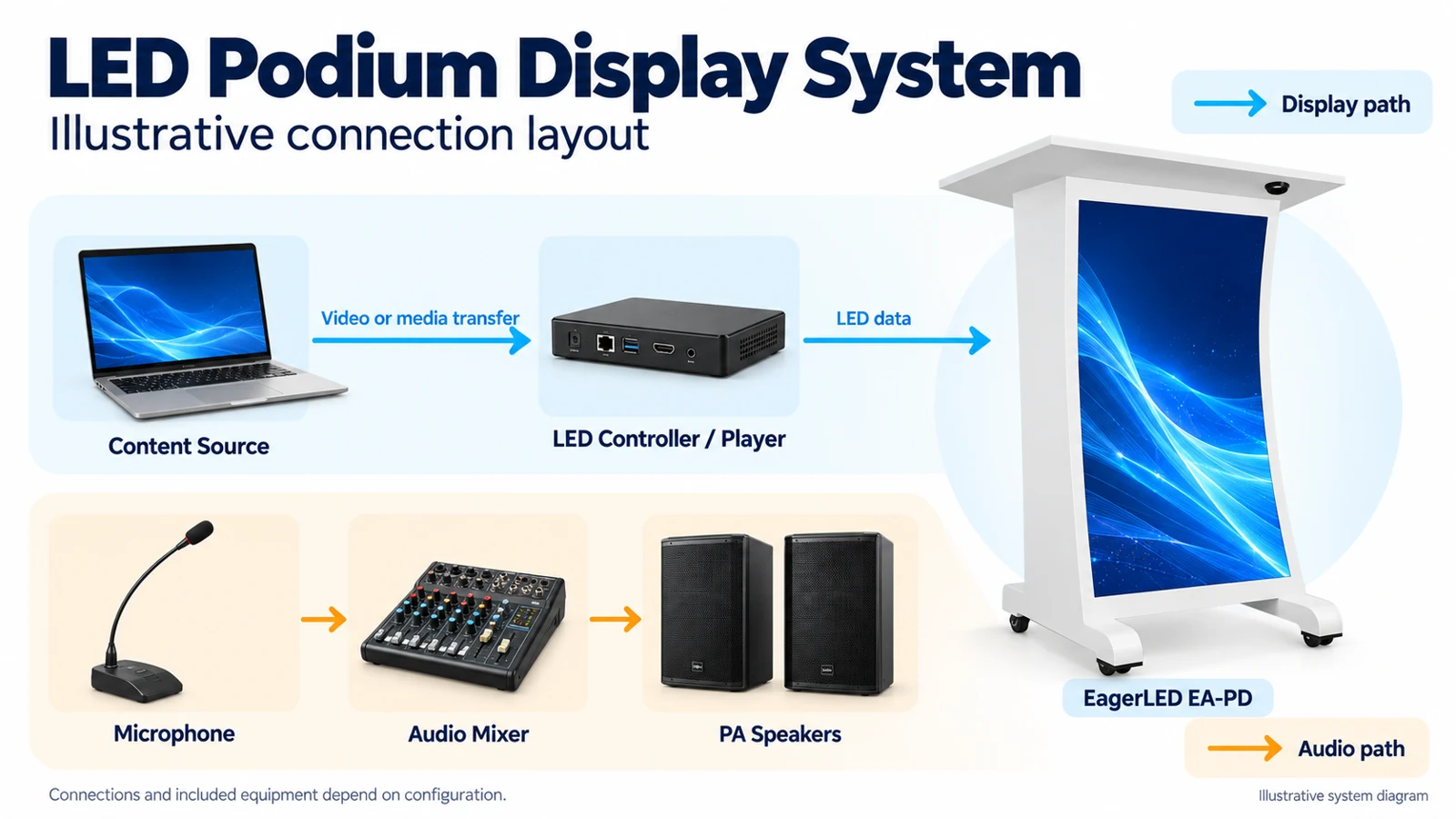
An LED podium display turns prepared media or a live video signal into image data mapped to its physical pixels. The exact hardware varies, but the functional path usually includes a source, a controller or player, receiving electronics, and LED modules. Some compact controllers combine several of these functions.
01. Choose live input or stored playback
With synchronous operation, an external source supplies the live image. That source might be a presentation computer or event media system. It must remain available while its output is displayed.
With asynchronous operation, a compatible player stores and runs prepared content. This suits a podium showing a scheduled branding loop without a permanently attached laptop. Some systems support both methods; the feature must be confirmed for the selected controller. These operating distinctions are illustrated in EagerLED’s hosted synchronous and asynchronous controller manual.
For an LED podium display, specify the workflow first: who prepares content, how it reaches the player, and who changes it during an event. A USB connector alone does not establish which files the equipment can play.
02. Map content to the display canvas
The controller assigns image regions to the receiving electronics and modules. Content must match the screen’s orientation, aspect ratio, and pixel dimensions. Sending a widescreen desktop to a narrow portrait panel without a prepared layout can produce cropping, stretching, or unreadable text.
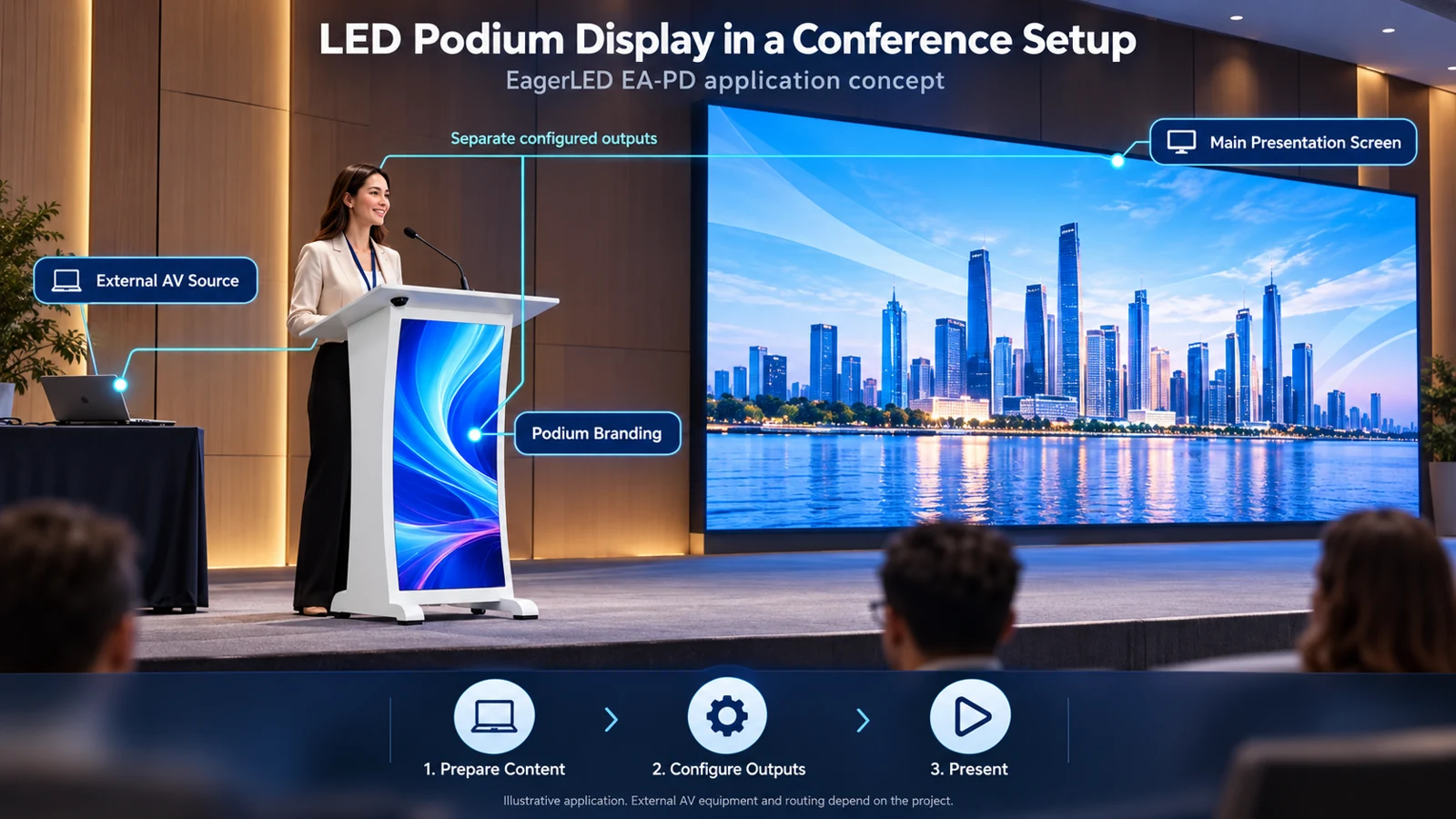
Treat the podium and main stage screen as separate destinations when they need different content. A shared source is possible, but routing, scaling, and independent outputs must be planned. The front display should not reveal presenter notes or an operator’s desktop during a source change.
03. Separate display control from audio
Audio integration is a parallel requirement. Confirm microphone connections, mixing, and the interface to the venue sound system independently. An LED podium display should not be assumed to provide room audio simply because the cabinet includes presentation controls.
3. Key Features: Pixel Pitch, Brightness, and Content Control
01. Pixel pitch and native resolution
Pixel pitch is the center-to-center spacing between adjacent pixels, expressed in millimeters. At the same active screen size, a smaller pitch provides more pixels. That can improve the reproduction of small lettering and detailed artwork, although the physical size of the text still limits readability at a distance.
For an LED podium display, check both pitch and native resolution. “Supports 4K input” describes an input or decoding capability; it does not establish that the screen contains a 4K pixel matrix.
As a hypothetical calculation, a flat active area measuring 480 × 960 mm (18.9 × 37.8 in) at exactly 2 mm pitch would contain 240 × 480 pixels. This is a mathematical example, not an EagerLED product specification. Actual resolution must follow the supplied module matrix and layout; rounded pitch labels can produce misleading calculations.
02. Brightness and low-light appearance
An LED podium display should remain readable under the intended room lighting while allowing the speaker to remain the visual focus. Maximum brightness alone is an incomplete purchasing criterion.
Ask to see the proposed screen dimmed to its expected operating level. Evaluate dark brand colors, gradients, white lettering, and reflections from stage lighting. Record the brightness setting used during approval so commissioning can reproduce it.
03. Refresh behavior and camera performance
The quoted LED driving refresh rate is different from the incoming video frame rate. It does not describe how many unique video frames the source provides. Camera exposure, scan configuration, and low-brightness behavior also influence recorded results; EagerLED’s refresh-rate guide explains these distinctions.
Spatial moiré is a separate issue: interference between the display’s pixel structure and camera sampling can create false patterns. A higher refresh specification does not remove that underlying cause. Test the actual camera framing and lens settings, particularly when the podium occupies a large part of the recorded image. See EagerLED’s explanation of moiré patterns on LED screens.
04. Surface protection and service access
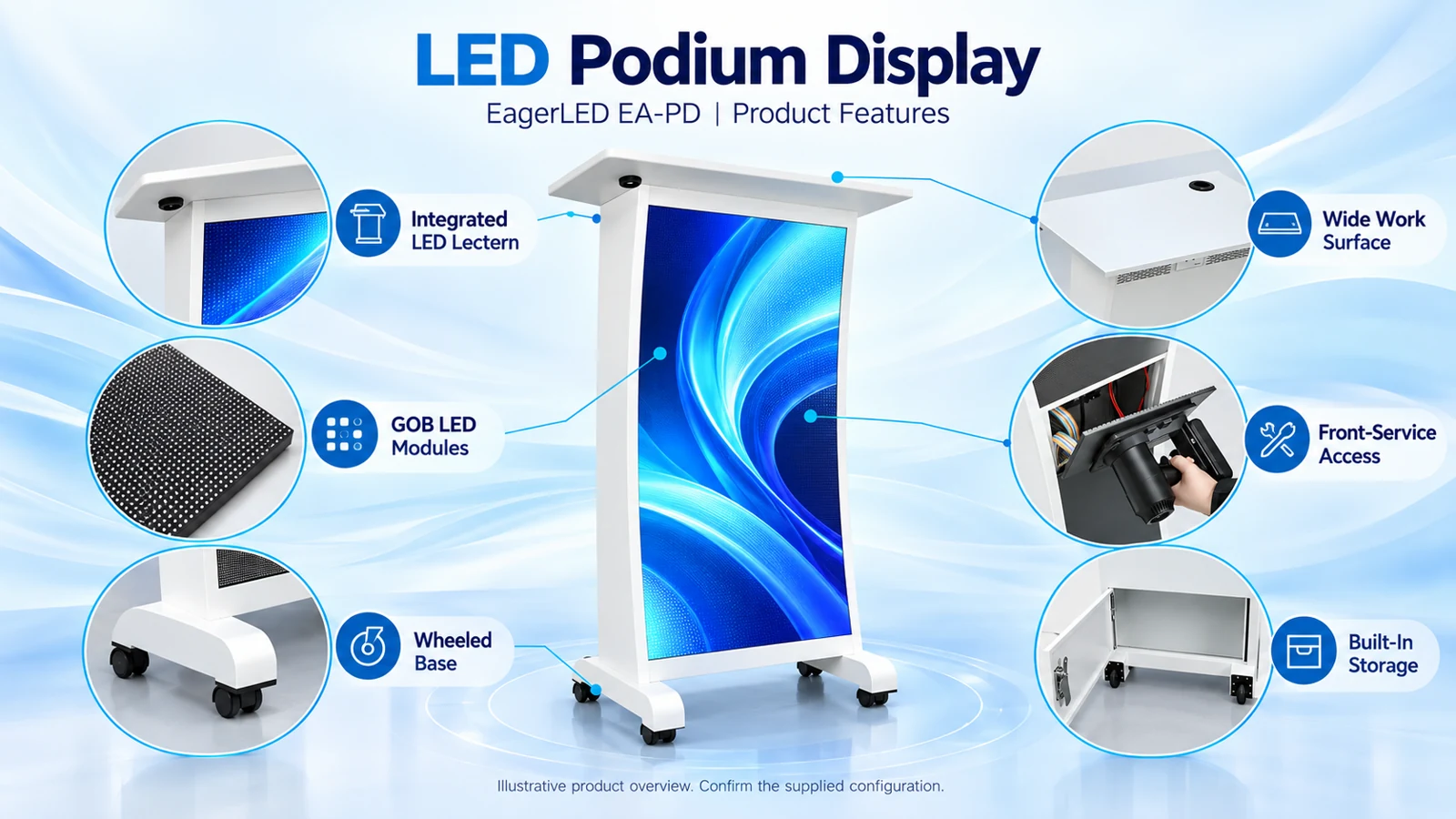
Some products use glue-on-board, or GOB, encapsulation over the LED surface. Protection, cleaning methods, and repair procedures depend on the construction. Do not translate a surface-protection claim into an outdoor rating for the complete lectern.
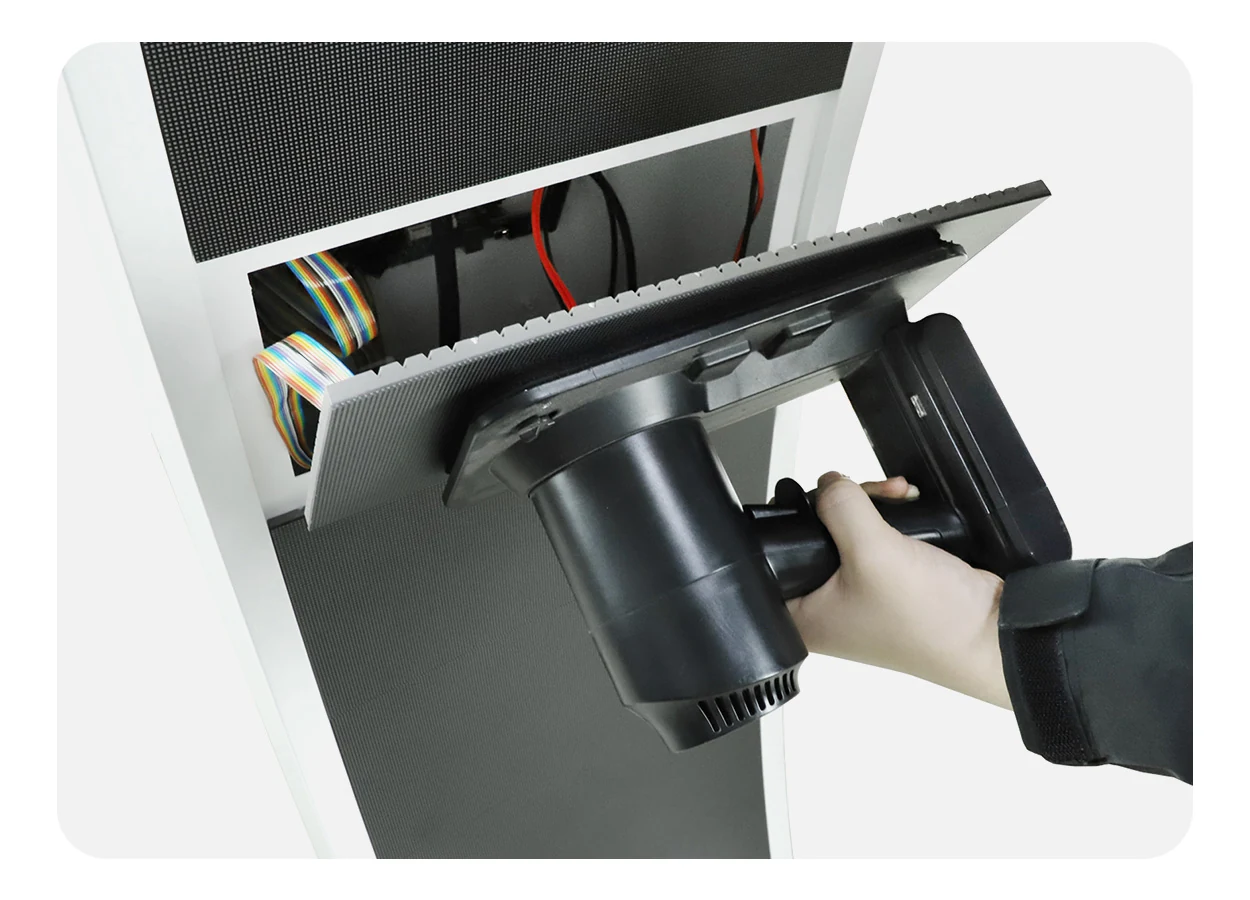
EagerLED’s EA-PD indoor podium screen is a specific example combining GOB modules, front service, and a wheeled cabinet. These are model features, not universal characteristics of every LED podium display.
| Feature | Evidence to request | Purchasing question it answers |
|---|---|---|
| Pixel pitch and resolution | Exact active dimensions and module pixel matrix | Will the required artwork fit with sufficient detail? |
| Brightness control | Demonstration under representative lighting | Does the screen remain balanced with the speaker? |
| Camera performance | Original footage with recorded camera settings | Does the proposed setup work in the required shots? |
| Playback system | Controller model and supported workflow | Can the venue operate it with existing staff and equipment? |
| Surface protection | Construction details and cleaning instructions | What handling and maintenance are appropriate? |
| Service access | Component-access demonstration | Which repairs can technicians perform on site? |
4. LED vs. LCD Podium Displays vs. Traditional Lecterns
An LED podium display is one option for presenting information at the speaking position. An LCD-equipped lectern and a conventional lectern with printed branding may meet the same brief differently.
Check the technology carefully. An “LED monitor” can mean an LCD panel with an LED backlight. That differs from a direct-view LED surface built from modules. Product names alone are insufficient for a meaningful comparison.
| Decision factor | Direct-view LED lectern | LCD-equipped lectern | Traditional lectern |
|---|---|---|---|
| Image construction | Light-emitting pixels arranged in modules | LCD image panel with a backlight | Printed or physical branding |
| Content changes | Through a compatible source or player | Through the monitor’s source or player | By replacing the physical graphic |
| Screen geometry | Determined by available modules and cabinet design | Usually follows the selected panel format | Determined by the available branding area |
| Fine text | Depends on pitch, resolution, and text size | Depends on panel resolution and text size | Depends on print quality and text size |
| Servicing | Module-level access may be available | Panel or electronics replacement depends on design | Primarily cabinet and finish maintenance |
| Operational requirements | Power, content preparation, configuration | Power, content preparation, source connection | No display power or playback system |
A compact LCD panel may suit detailed graphics at close range. Modular LED construction may suit a particular display shape or service strategy. Printed branding may be sufficient when content rarely changes. Compare actual products at the required size instead of assigning a universal winner to a technology.
The same caution applies to projector comparisons. A projection system normally addresses a larger presentation surface. Buying an LED podium display does not eliminate that requirement when the audience still needs to read slides, diagrams, or captions across the room.
5. Benefits and Limitations of LED Podium Displays
The practical benefit of an LED podium display is reusable visual branding at the speaking position. An event operator can change the organization, speaker, or session identity without replacing a printed front panel.
That flexibility matters when one venue serves several clients. Prepared templates can preserve consistent logo placement while allowing approved text and colors to change. The value comes from an organized content process as much as the screen itself.
An LED podium display can also keep branding within photographs and video shots that include the lectern. However, visibility depends on framing: a tight head-and-shoulders shot may exclude the screen. Review the planned camera composition before treating the display as guaranteed sponsor exposure.
There are physical limits. A narrow front panel provides relatively little room for information. Finer pitch adds pixels but does not make a small sentence physically larger. Stacking sponsors, names, dates, and animated messages onto the same canvas can weaken all of them.
There are operational costs as well. Someone must maintain approved media, check playback, manage cables, and support the electronics. A portable cabinet still needs suitable packing and handling; wheels do not solve stairs, vehicle loading, or uneven thresholds.
An LED podium display is most useful when frequent content changes or a defined visual requirement justify those responsibilities. If the venue only needs a permanent logo, compare the electronic option with a simpler lectern before committing the budget.
6. Common Uses in Conferences, Churches, and Live Events
01. Conferences and corporate presentations
At conferences, an LED podium display can identify the current session or organization while the main screen carries presentation material. Keep the front graphic readable as a composition: a clear logo and a short title usually demand less interpretation than a miniature slide deck.
For multi-session events, prepare an approved running order and identify who triggers changes. A polished screen showing yesterday’s sponsor is still an operational failure. Rehearsal should include the transitions between sessions, not just the opening graphic.
02. Churches and community venues
An LED podium display in a worship space may show an organization’s identity, a service theme, or a restrained seasonal visual. Content should match the room and service style. Fast motion or overly bright graphics can compete with the speaker.
Lyrics, scripture passages, and accessibility information generally need separate audience displays with suitable coverage. Position and text size matter more than whether the podium can technically accept those files.
03. Universities and public speaking venues
Lecture halls can use a digital lectern screen for institutional identity, guest-speaker information, or event titles. Teaching content belongs wherever students can see it clearly. The purchasing brief should also cover how different presenters connect equipment and whether daily operation requires specialist support.
04. Exhibitions, launches, and rental events
For a rental operator, an LED podium display can become a reusable branded asset across unrelated events. Standard content templates, labeled connections, and documented settings help different crews prepare it consistently.
Exhibition use introduces another consideration: people may see the lectern from the side or walk close to it. Check the actual cabinet shape, visible display area, and cable routing. A visually attractive front view does not establish suitability for every position on an open booth.
7. How to Choose the Right LED Podium Display for Your Venue
Start with a project brief that another person can evaluate. “Sharp picture, easy to use” leaves too much interpretation. Provide the intended content, the closest audience position, the required camera shots, and the operating routine.
01. Define the visible area and content
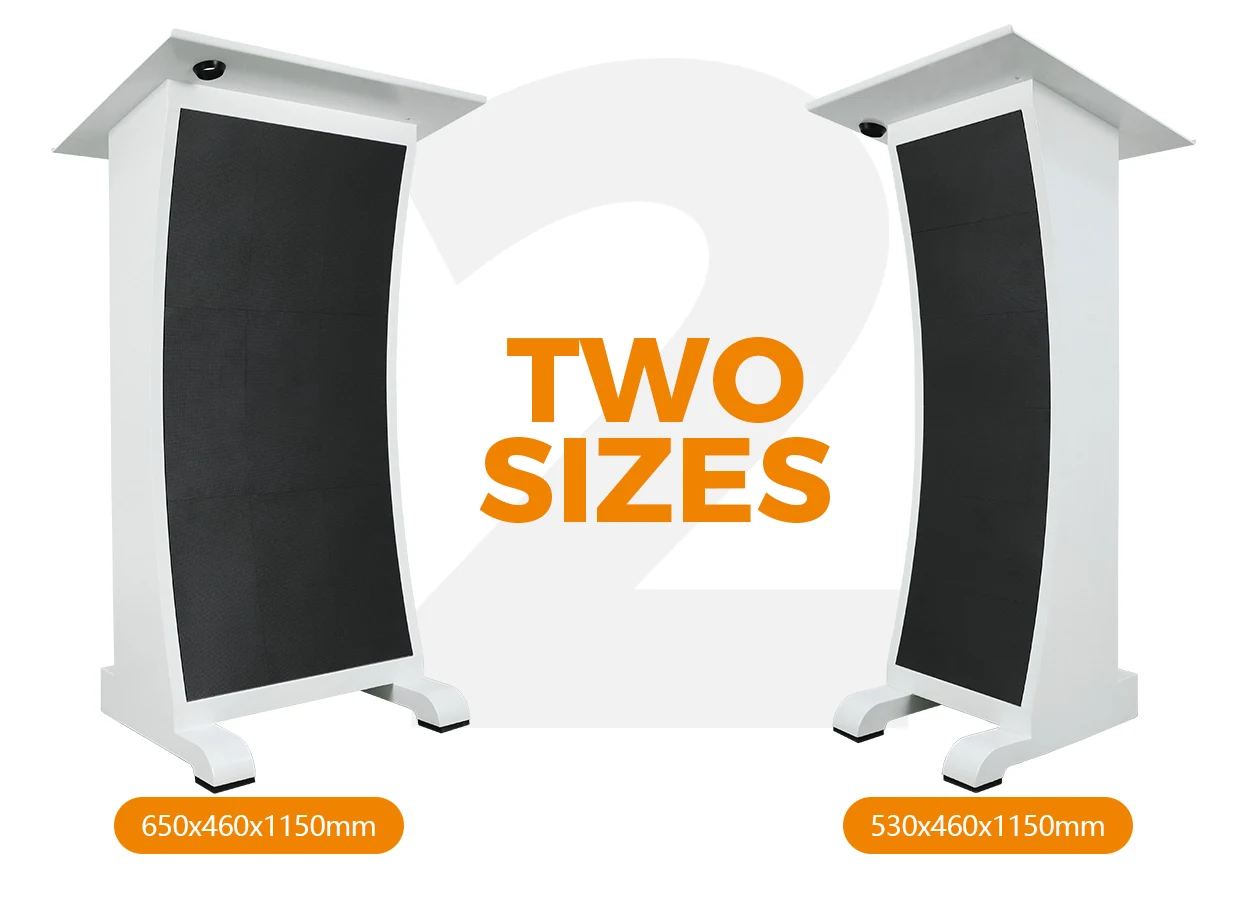
Request separate dimensions for the cabinet and active display. A wide tabletop does not mean the screen beneath it has the same width. Review a scaled drawing with the actual logo and longest expected session title placed on the active area.
For an LED podium display, this artwork test often reveals a mismatch before hardware is ordered. If the text needs to become unreasonably small, simplify the graphic or reconsider the display proportions.
02. Check the room and handling route
Measure door openings, storage space, transport-case clearance, and the route to the speaking position. Review tabletop height, usable work area, microphone placement, and cable exits with the intended users.
Ask for the complete assembled weight and packed dimensions. Confirm how the cabinet is secured during use and how it should be moved. Have the project’s qualified personnel review electrical connections and mechanical installation requirements.
03. Agree on acceptance before ordering
An LED podium display should be approved against representative tasks. Use the intended files and source equipment instead of relying only on a supplier’s demonstration video.
| Test | Method | Record before acceptance |
|---|---|---|
| Content layout | Display the approved logo, longest title, and sample animation | Cropping, proportions, text legibility |
| Room appearance | Evaluate under planned lighting at operating brightness | Approved settings and visible reflections |
| Camera capture | Record required close, medium, and wide shots | Camera configuration and observed artifacts |
| Playback changes | Load and switch the intended event files | Operator steps and transition behavior |
| Fault response | Safely simulate source loss and restart with supplier guidance | Fallback image and recovery procedure |
| Serviceability | Demonstrate access to replaceable components | Tools, clearances, and replacement instructions |
Keep the accepted configuration, drawings, and content templates with the project handover. For distributors supplying repeat orders, identify the module and controller revisions so later shipments can be checked for compatibility.
When evaluating an LED podium display for a larger room upgrade, coordinate it with the venue’s indoor LED screen requirements. The podium graphic, presentation wall, and camera output can then be designed as related elements with distinct jobs.
8. What Affects LED Podium Display Pricing and Ownership Costs?
An LED podium display price is meaningful only when its configuration and delivery scope are defined. Two quotations can describe similar-looking lecterns while including different controllers, accessories, service provisions, and shipping arrangements.
Avoid comparing only the cabinet price. Establish what is necessary to receive, commission, operate, and maintain the equipment in the intended venue.
| Cost category | What to clarify in the quotation |
|---|---|
| Display hardware | Active area, pixel pitch, module type, surface treatment |
| Control equipment | Player, receiving electronics, processing, required licenses |
| Cabinet and integration | Finish, custom details, interfaces, supplied accessories |
| Logistics | Packing, transport case, freight terms, import responsibilities |
| Commissioning | Configuration, content templates, on-site work, training |
| Maintenance | Spare parts, service tools, repair responsibilities, warranty exclusions |
| Ongoing operation | Electricity, content administration, storage, handling labor |
Pixel pitch is only one cost driver. A customized enclosure, specified playback workflow, or extensive transport package may also change the total. Request itemized proposals against the same brief and identify optional items separately.
For an LED podium display, electricity estimates should use representative operating consumption, not simply the maximum power rating. A planning calculation is average input power in kilowatts multiplied by operating hours and the applicable electricity tariff. Ask how that average was measured and whether it includes the player and connected accessories.
Warranty language also deserves comparison. Confirm which components are covered, who pays transport costs for repairs, and what information is required for support. A longer stated period does not explain the service process by itself.
The useful question is which LED podium display meets the agreed requirements at an acceptable ownership cost. Without a defined configuration and current quotation, a generic price range can create more confusion than guidance.
9. FAQ
01. Can an LED podium display run without an internet connection?
Yes, if its configured playback method supports local operation. A compatible player can run stored content, and a local video source can supply a live signal without internet access. Cloud publishing, remote monitoring, or online media may require connectivity. Confirm offline playback and update procedures for the supplied controller.
02. Can I play a PowerPoint presentation directly from a USB drive?
Do not assume direct PowerPoint playback. USB support may cover media import, firmware, or specific playback formats. Check the player’s documented capabilities. A connected computer can render slides through a supported video path, while exported images or videos may suit stored playback. Test fonts, animation, and aspect ratio before use.
03. Can an existing wooden lectern be converted to an LED version?
Potentially, but conversion requires more than fastening modules to the front. An integrator must assess structural support, available depth, ventilation, wiring, service access, and stability. Compare the complete retrofit scope with a purpose-built cabinet. Existing furniture dimensions may prevent a suitable display layout or practical component access.
04. Can an indoor LED podium display be used outdoors temporarily?
Temporary use does not remove environmental requirements. Ask the supplier to confirm suitability for the expected moisture, temperature, sunlight, and exposure conditions. Surface encapsulation alone does not establish protection for cabinet openings, power connections, or electronics. Do not infer outdoor suitability from a covered stage or a protected module face.
05. Does the podium screen work as a teleprompter?
An audience-facing screen is not a conventional teleprompter because the speaker normally stands behind it. Presenter notes require a separate display arrangement, such as a confidence monitor or teleprompter system positioned for the speaker. Specify the direction of view and content routing so private notes cannot appear on the audience-facing panel.
06. What happens if the video source disconnects during a speech?
Behavior depends on the controller and configuration. The screen might go black, retain an image, or switch to a configured fallback. Ask for a demonstration using the proposed equipment. Document the recovery procedure and provide an approved holding graphic if the selected system supports that function.
07. Which spare parts should be ordered with the lectern?
Ask the supplier to recommend compatible modules, power supplies, receiving electronics, and necessary service tools for the exact build. Record hardware identifiers and retain configuration backups. Matching dimensions and pixel pitch alone does not guarantee that a replacement module will work correctly or match the existing screen’s appearance.
08. Can several podiums display coordinated branding at the same time?
Yes, with an appropriate distribution or content-management system. Distinguish coordinated scheduling from frame-accurate synchronization: starting similar playlists does not prove that moving images remain aligned. Describe whether each lectern needs identical branding, independent session information, or synchronized animation, then verify the selected system against that requirement.
10. Conclusion
An LED podium display should be specified around a clear communication task: what the audience needs to see at the speaking position, how operators will update it, and how it must appear in the room and on camera. Screen technology is only one part of that decision.
Before requesting a quotation, prepare the active display requirements, sample artwork, viewing conditions, camera needs, playback workflow, and transport arrangements. Ask suppliers to respond to the same acceptance checklist and identify exactly what their offer includes.
To discuss an LED podium display for your project, contact EagerLED with those details and your delivery destination. A defined brief makes it easier to evaluate the proposed configuration, resolve integration questions, and agree on a system that the venue can operate and maintain.





