For LED screen rental in Boston, a conference organizer should request a room-specific display and service proposal, not just a screen size and daily rate. The quotation needs to cover readable presentation content, caption delivery, source switching, rehearsal access, technical staffing, and the venue services required to make those pieces work together.
This guide addresses academic conferences with detailed slides and parallel sessions. It explains how to compare proposals before booking and how to turn the chosen scope into acceptance checks. Local rental availability, event pricing, and venue approval must come from the suppliers and venue responsible for your actual dates.
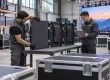
EagerLED supplies LED display equipment. The product photographs below illustrate rental-cabinet considerations; they are not evidence of an EagerLED Boston rental fleet, local crew, or completed Boston installation. Equipment purchasing and booking an installed conference service are different transactions.
1. Confirm Venue Interfaces Before Booking LED Screen Rental in Boston
Identify the exact building and booked rooms before asking suppliers to finalize a technical scope. Boston conference venues have different installed systems, access arrangements, and service responsibilities. A provider’s experience elsewhere in the city does not establish permission to connect to your room’s audio, network, power, or suspended infrastructure.
For example, the Massachusetts Convention Center Authority’s published BCEC audiovisual page names Projection Presentation Technology as its in-house AV provider and states that only that provider may operate the in-house audio system. Treat this as a specific service boundary to confirm with the venue for your event, not as proof that every audiovisual service or external screen rental is exclusive.
Current Signature Boston material uses the Menino Convention & Exhibition Center name, while some service pages retain BCEC wording. Put the venue’s confirmed event name, building address, room identifiers, and current service documents in the brief. This helps vendors avoid applying an old guide or a similarly named room’s requirements to the wrong location.
When planning LED screen rental in Boston, also separate installed advertising displays from a session screen. Signature Boston describes a marquee, lobby video wall, and digital signage network as event marketing opportunities. Their existence does not mean that a lecture can use them as its presentation output, or that access is included in a room rental.
Ask the venue which services the event organizer must order directly and which the screen supplier may arrange. Confirm access to the in-house audio system, approved cable routes, electrical orders, network provision, and the process for any hanging or floor-supported structure. Obtain the current event-specific requirements rather than assigning responsibilities from a generic city guide.

2. Issue a Room-by-Room Conference Brief
A usable request for LED screen rental in Boston starts with the program and audience layout. List the plenary, breakout rooms, overflow spaces, and speaker-ready area separately. Identify which sessions need live camera, remote presenters, captions, confidence monitors, or a recording feed. A single equipment total can conceal a missing room or operator.
Give each room a simple identifier and a timetable showing setup, technical checks, rehearsal, attendee access, sessions, and removal. Include breaks that are genuinely available for technical work. A coffee break in the program may still leave attendees in the room, making a cabinet repair or cable change impractical.
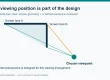
Attach a floor plan with the stage, screen positions, seating, aisles, presenter position, and control location. Mark the closest and farthest viewing positions and any seats with restricted sightlines. Ask the supplier to show the active image area and support footprint on the same plan, including service access behind or beside the screen.
For parallel tracks, decide whether rooms operate independently or receive a common program feed. Independent sessions need separate sources and a clear file-delivery process. An overflow room needs a defined route for the shared program and any audience interaction. State whether a change in the main room must appear automatically in the overflow space.
The best brief for LED screen rental in Boston includes representative material early: a dense chart, a slide with footnotes, an embedded video, and the intended caption layout. Remove unpublished research or personal data from test samples unless disclosure is approved. A public or sanitized sample can reveal most display problems without circulating confidential presentations.
| Room or function | Information to supply | Required supplier response |
|---|---|---|
| Plenary | Audience plan, slide examples, cameras, captions and session hours | Image area, native canvas, source layout and operating crew |
| Breakout rooms | Parallel timetable and independent presentation requirements | Per-room equipment and operator coverage |
| Overflow space | Shared program, sound and audience participation needs | Feed route, latency considerations and return communications |
| Speaker-ready area | Submission deadlines, file formats and late-change procedure | Checking, version control and delivery responsibilities |
| Venue interfaces | Confirmed room services and event-specific restrictions | Included orders, excluded services and approval owner |
3. Specify Readable Slides and a Separate Caption Layout
For technical presentations, screen dimensions alone are an inadequate specification. Ask for the native pixel canvas and the usable presentation area after captions, branding, and camera windows are added. A wide event backdrop can have a relatively small slide window, leaving detailed figures harder to read than the overall width suggests.
01. Test the smallest necessary information
Choose the smallest text and chart features that the audience must understand, then test them from the intended seats. Include axis labels, legend symbols, superscripts, and the smallest footnote that carries essential meaning. If an element is unreadable, discuss larger content, a different layout, a larger image, or a finer native raster before choosing the hardware.
A proposal for LED screen rental in Boston should state the cabinet model and actual pixel count used to form the presentation area. For a hypothetical twelve-by-six cabinet wall with 500 × 500 mm cabinets, the active dimensions are 6 × 3 m (19.7 × 9.8 ft). The cabinet count is seventy-two; the pixel canvas still depends on the selected configuration.
As a model-specific example, the published EA500H9 rental board specification lists 250 × 250 mm modules. Its indoor P1.95 and P2.6 configurations list module rasters of 128 × 128 and 96 × 96 respectively. With four modules in a cabinet, the hypothetical wall would provide 3072 × 1536 or 2304 × 1152 pixels. These are calculations, not a recommendation for a particular room.
Neither example is a native 16:9 canvas. A supplier should show how a 16:9 slide deck will be fitted, including unused areas or reserved caption space, without stretching scientific plots. Compare proposals using the resulting slide size and readable content, not a processor’s advertised input resolution.
02. Treat captions as a delivered service
Ask who produces the captions, who receives the feed, and who places it on the screen. Specify supported languages, terminology preparation, display position, and how the audience is informed if the caption feed becomes unavailable. A blank reserved strip is not a complete captioning service.
For LED screen rental in Boston, require a sample layout that shows captions together with the most demanding slide. Check that neither overlaps the other and that captions remain visible from the back and side seats. If captions are also sent to personal devices or a webcast, identify those outputs separately; one display route does not establish every required delivery route.

4. Assign Every Signal and Operating Responsibility
Draw a simple source-to-output schedule for the conference. Identify presentation computers, remote contributors, camera feeds, playback, caption input, switching, screen processing, sound, recording, and streaming. Put a responsible supplier or named role next to each connection. The gaps between suppliers are often more consequential than the choice of display cabinet.
For example, the screen provider may deliver a working wall while another team supplies the switcher and program output. Agree on the connector, format, timing, and test point between those teams. State who changes the layout when a remote presenter joins and who confirms that the correct content reaches the audience and recording.
A request for LED screen rental in Boston should identify the speaker’s confidence view separately from the audience output. Notes, timers, and next-slide previews may belong on the confidence monitor but should not appear on the main wall. Test the actual presentation mode and monitor arrangement during rehearsal rather than relying on a generic desktop demonstration.
For hybrid sessions, verify the planned network service with the venue and the streaming or remote-contribution provider. Do not assume general attendee Wi-Fi is the approved production connection. Specify the tested route, a responsible contact, and what the room will display if a remote contribution is interrupted.
Use the existing auditorium signal-planning guide for the underlying display workflow, then add the conference’s room schedule and vendor boundaries. The Boston inquiry should resolve who delivers each service and when it will be tested, rather than merely requesting a list of compatible devices.
5. Normalize Quotes Before Comparing the Total
Compare LED screen rental in Boston on a common service schedule. One proposal may include build, rehearsal, operating crew, and removal; another may cover equipment for the session day only. Ask every vendor to return the same scope table and label each item included, excluded, optional, or dependent on a venue order.
Separate equipment days from labor periods. A wall built the previous evening may need equipment reserved overnight even if the conference runs for one day. Clarify early access, late removal, overtime triggers, travel, parking, storage, and responsibility for delays. Obtain actual prices and conditions from the vendors; there is no reliable citywide rate implied by a generic screen size.
Ask how substitutions will be approved. A replacement cabinet configuration might change the native pixel canvas, service method, or overall footprint while retaining the same nominal dimensions. Require notice and a comparison against the agreed acceptance criteria before accepting substituted equipment.

| Quote line | Make comparable | Clarify the exclusion |
|---|---|---|
| Display system | Active area, native pixels, model and processor | Scenic surround, supports and spare parts |
| Venue services | Electrical, audio connection, network and access orders | Which party places and pays for each order |
| Content workflow | Speaker checks, captions, playback and switching | Late edits, format conversion and caption production |
| Crew schedule | Build, rehearsal, operating hours, breaks and removal | Overtime, extra attendance and relief staffing |
| Recovery provision | Replacement equipment and agreed response coverage | Off-site response versus parts and technician on site |
| Changes and cancellation | Decision dates, scope revisions and documented conditions | Costs caused by changed access or program hours |
6. Reserve Time for a Real Acceptance Rehearsal
Booking LED screen rental in Boston should include a test period after the complete signal path is available and before attendee access. A wall tested before the caption provider, sound operator, or presentation team arrives has only passed a partial check. Build those dependencies into the call schedule.
Run the opening sequence, a demanding technical presentation, an embedded video, a remote speaker transition, and the closing layout. Include a last-minute file replacement through the approved speaker-ready process. Confirm that the operator selects the intended version and that fonts, aspect ratio, audio, and captions survive the complete route.
Review the image from representative front, rear, and side seats with normal room lighting. Check readability, reflections, camera framing where relevant, and whether the screen or its support blocks sightlines. Record the accepted layout and operating settings so a subsequent adjustment can be evaluated against the same conditions.
Agree which recovery tests can be performed safely during rehearsal. Demonstrate the prepared holding slide, backup presentation source, and communication procedure for a failed input. Do not disconnect live venue systems without the responsible team’s approval. A recovery plan is useful only if the people who must execute it have rehearsed their roles.
Assign a show caller or conference contact who can authorize a pause, a holding slide, or a move to backup content. Share a contact sheet with the room operators and venue service team. Test the communications method in the actual control positions, including any staff working behind the stage or outside the room.
Keep a short defects list with an owner and retest time. Distinguish a required fix from a cosmetic preference, and do not accept a missing caption route or unreadable essential content as a minor issue. If the program must change to accommodate a limitation, the conference organizer should approve and communicate that change.

7. Define Support Until the Final Session Ends
Support for LED screen rental in Boston needs a location and a time boundary. Clarify whether the technician remains in the room, serves several rooms, or responds from elsewhere. A telephone number alone does not establish how quickly a spare module or replacement processor can reach the active session.
Identify on-site spares and who is authorized to use them. The appropriate provision depends on the configuration, failure tolerance, and service access. For the pictured EA500H9, the manufacturer shows a detachable power box and front/rear module service; those design features do not establish a promised repair time in your finished stage layout.
Specify what happens when a session overruns, a breakout is added, or a room remains occupied during planned removal. Keep the crew’s end time and the organizer’s decision contact explicit. Avoid relying on informal arrangements made during a busy conference changeover.

After the final session, record equipment performance, interruptions, and unresolved issues before closing the order. Retain the approved quote, room plan, accepted content layout, and event report. For a recurring conference, these records provide a more useful starting point than simply repeating last year’s screen dimensions.
Frequently Asked Questions
Can the venue’s lobby video wall replace the conference screen?
Only if the venue confirms the intended use, access, content layout and operating arrangements. An advertising display may be sold as a media placement rather than a presentation service. Check the booked room and audience needs independently.
Does a higher input resolution guarantee readable scientific figures?
No. Readability depends on the physical image size, native pixels allocated to the slide, source quality, content design and viewing positions. Use a representative figure and evaluate its essential labels from the planned seats.
Should captions be embedded in the slide deck?
Live captions normally need their own production and delivery workflow. Prerecorded media may include prepared captions, but those do not replace captions for live speech. Agree the relevant routes and layouts with the conference accessibility and production teams.
Can one technician cover every breakout room?
That depends on the parallel timetable, room locations and complexity. Ask the provider to explain coverage during simultaneous starts, source changes and faults. If the required response cannot be met, price additional operators or simplify the workflow.
Is buying cabinets equivalent to booking LED screen rental in Boston?
No. A cabinet purchase supplies equipment under its agreed terms. A local event rental may include transport, approved supports, installation, operation and removal. Identify the contracting provider for each service rather than assuming a manufacturer inquiry books a staffed event.
Prepare a Conference Supplier Request That Can Be Tested
Send prospective rental providers the venue-confirmed room details, audience plans, session schedule, sample content, caption requirements and service boundaries. Ask for a marked-up scope table, a native-canvas drawing and a rehearsal plan. Those documents make LED screen rental in Boston proposals comparable before the event is committed.
If your AV business is purchasing rental LED display equipment for recurring conference work, send EagerLED your cabinet and operating requirements. Local availability, venue services and crew bookings remain matters for the providers contracted to deliver your Boston event.