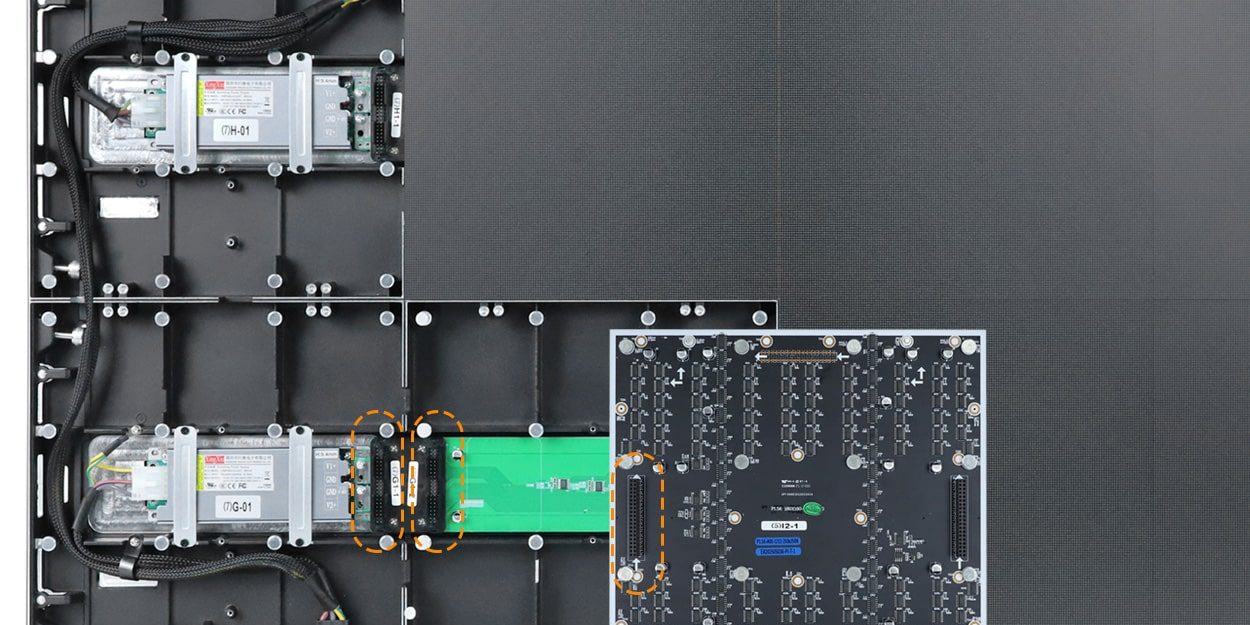
An LED screen service handover should prove that the local team can identify the correct component, find the approved instructions and return the display to an agreed working condition. For front-maintenance screens in narrow service areas, a supplier demonstration is useful only when it connects the hardware to the tools, records and local skills that will actually be available.
This guide is for system integrators in Latin America qualifying a Chinese front-maintenance LED display supplier before ordering. It proposes a practical handover assessment, rather than a repair tutorial or a wall-recess design. Ask which documents, demonstrations and training options are included in the quotation; do not assume they accompany every cabinet purchase.
In this guide
1. Define the LED screen service handover before comparing suppliers
Write down the tasks your local team will perform and the tasks reserved for a specialist. Routine image observations, content operation, module handling, internal electrical work and controller configuration require different permissions and competence. A single attendance certificate does not establish that every participant can perform every task.
Give suppliers the same proposed handover scope. Specify the installed equipment, destination city, intended local service organization, available tools, documentation language and site-access constraints. Ask each bidder to mark items as included, optional, excluded or requiring further confirmation.
For constrained spaces, approve the physical access design separately. The front-service wall specification guide covers the coordinated opening and component-removal route. This article addresses the next purchasing question: whether the supplier can transfer usable service knowledge and records to the team responsible for that installation.
2. Match the demonstration to the quoted hardware
The EA250WH3 product page, checked October 21, 2026, describes full front maintenance, a 33 mm (1.30 in) cabinet profile and a HUB connection between module and cabinet. Its modules are based on a 250 × 250 mm (9.8 × 9.8 in) format. These published features identify a candidate system; they do not prove a technician’s competence or approve a particular service space.

Begin the LED screen service handover with equipment identity. Ask the demonstrator to show the module, cabinet and relevant electronics labels, then locate the corresponding entries in the proposed parts schedule. The local team should understand which identifying details matter when requesting a replacement.
Do not accept “same size and pitch” as the entire compatibility rule. Connector arrangement, electrical configuration, revision and image-matching requirements can matter. Ask for written confirmation of compatible spare identities for the actual order and an explanation of how substitutions will be approved.
The current EA250WH3 page uses “wireless connection” to describe its HUB arrangement. That is not evidence of Wi-Fi content control. Keep cabinet interconnection, the video signal path and any network or remote-support functions separate in the documentation.

3. Ask the local team to demonstrate understanding
A useful LED screen service handover includes a supervised explanation by the receiving technician, not just a supplier presentation. The technician should locate the relevant manual, identify the permitted task and explain where work stops if the observed condition is outside the approved procedure.
Agree the assessment conditions with the supplier and the local service organization. Hands-on work must use qualified personnel, approved equipment and the applicable safe isolation process. This purchasing checklist does not prescribe a live electrical test or a universal removal sequence.
| Exercise | What the receiving team demonstrates | Evidence to retain |
|---|---|---|
| Identify equipment | Match a sample label to the order’s parts schedule | Approved identifiers and relevant revision |
| Find the procedure | Locate instructions for an agreed permitted task | Document title, version and responsible role |
| Prepare the service area | Explain access, tool and site-control requirements | Site-specific preparation checklist and unresolved restrictions |
| Select a spare | Distinguish the approved replacement from an unconfirmed alternative | Spare identity and supplier compatibility confirmation |
| Close the intervention | Explain required settings and functional checks after work | Agreed completion record and escalation conditions |
In a narrow corridor, record where equipment can be staged and who controls the work area. If access conditions cannot be represented at the supplier’s premises, mark that part as pending site verification. A workshop exercise should not be relabeled as proof that the finished building arrangement works.
The official EA250WH3 video below provides a hardware reference for the discussion. Its title presents a home-theater application; it is not evidence of a Latin American installation or completed local training. Watch the cabinet and front-access construction, then ask which demonstrated details match the quoted revision.
EA250WH3 demonstration from EagerLED. Use it to prepare supplier questions, alongside the model’s approved documents.
4. Test whether the delivered records are usable
An LED screen service handover is incomplete if the correct file exists only on a former technician’s computer. Ask for an indexed package tied to the order and the as-built system. Identify who owns it locally and how the team finds the current approved version.
For the LED screen service handover, separate the cabinet and receiving configuration, screen map, calibration information and playback content according to the system actually supplied. Ask what each file contains, which equipment it applies to, and what approved recovery process uses it. An unlabeled file extension does not explain its role.
Verify file access and recovery understanding in an agreed non-disruptive assessment. Do not overwrite an operating screen simply to prove that a backup exists. If a controlled restore demonstration is required, agree its equipment, authorization, rollback method and acceptance conditions with the responsible technical team.
| Package item | Acceptance question | Record as pending when |
|---|---|---|
| Equipment and spare schedule | Can the local technician match actual labels to approved entries? | A part or revision is unidentified |
| Manuals and tool list | Do they match the supplied revision and agreed tasks? | A generic document leaves the method unclear |
| Configuration package | Are purpose, applicable equipment and approved version identified? | Files cannot be traced to the delivered system |
| Service report example | Does it record the fault, action, checks and outstanding issues? | A completion note only says “screen works” |
| Support route | Are contact method, availability and responsibility boundaries written? | Response or local work is only assumed |
5. Rehearse the support request before a real outage
As part of the proposed LED screen service handover, ask the local team to prepare a sample fault record without sending a real incident. Include screen identity, affected location, symptom, relevant settings, permitted observations and the time the problem occurred. Use fictional test identifiers where necessary; do not disclose a customer’s private network or access credentials in a shared worksheet.
Ask the supplier what evidence its support team needs and which actions require local qualified personnel. Clarify language, time-zone coverage and whether remote diagnosis, replacement parts, freight and on-site labor are included or separately arranged. Do not convert a general offer of support into an invented response-time promise.
Record open items with an owner and an agreed resolution milestone. A supplier can explain that a requested service is unavailable; that is more useful for selection than an ambiguous “full support” statement. Compare suppliers on what they can document and deliver for this project.
Frequently asked questions
Does a product demonstration count as technician training?
Not by itself. It shows the demonstrated equipment and actions. Qualification also needs the appropriate instructions, permitted task scope, local competence assessment and records tied to the supplied revision.
Must all documents be translated into Spanish or Portuguese?
Agree the working language with the receiving team and supplier. Critical instructions must be understandable to the people using them. Confirm which translations are available and technically reviewed rather than assuming a translated brochure covers service work.
Can a front-service label eliminate every rear-access task?
No. Confirm the maintenance route for each internal component and for external processors, power distribution, network equipment and cable junctions. The front-service claim applies to the specified hardware scope, not automatically to all building services.
What if the local technician changes after installation?
Keep the approved package accessible to the service organization and define how a replacement technician is introduced to the system. Attendance at the original handover does not transfer knowledge automatically to a new team member.
Who signs off an unresolved site-access restriction?
The project should name the responsible local design, safety and service roles. Record the restriction and required action explicitly; do not ask a generic supplier video or a cabinet thickness figure to approve the building arrangement.
Request a service-ready supplier proposal
Send the installation city, screen configuration, available front working area, corridor constraints, local service capability and documentation language. Ask which LED screen service handover materials and demonstrations can be included, with exclusions clearly stated. Discuss the front-maintenance project with EagerLED.