

Novastar Novastar TU15 Pro is an all-in-one box that combines three devices into a 1.12 kg enclosure: an Android 11 media player, a 4-port LED sending card, and a basic video scaler. For integrators, the pitch is straightforward — one device, one power supply, one point of failure.
It replaces a standalone sending card plus an external media player plus a basic scaler. It does not replace a video wall processor. There’s no multi-layer PIP, no Genlock, no low-latency scaling for broadcast. Treat it as a media player with a built-in sending card and you’ll have the right expectations. Treat it as a budget video processor and you’ll be back on site swapping hardware.
1. Specs of Novastar TU15 Pro That Matter for Installers
The full spec sheet runs 30 pages. Here’s what you actually need for site planning.
The pixel ceiling is 2.6 million. A standard 1920×1080 display uses roughly 2.07 million — comfortably within budget. A 2048×1152 display at 2.36 million still fits. Anything larger needs the TU20 Pro (3.9 million pixels). Freeform cabinet layouts don’t waste load capacity on blank space, so irregular shapes don’t eat into your pixel budget the way they would with a traditional sending card.
Power is 21W via a 12V 3A DC adapter. No PoE, no internal AC PSU. Plan a power outlet within reach of the mounting location. Standby draw is under 0.5W, and the unit wakes via the IR remote — useful for installs where clients want to leave it powered but dormant.
Operating range is -20°C to +50°C. Indoor-only unless you put the unit itself in a climate-controlled enclosure. The LEDs it drives can be outdoor-rated. The Novastar TU15 Pro sitting in an unheated electrical cabinet through a Russian February will not survive.
Video decoding covers H.264 4K@30fps and H.265 4K@60fps at up to 100 Mbps bitrate. HDMI inputs accept 8-bit only — no 10-bit HDR passthrough. If the client needs HDR workflows, spec a different box.
2. Port Layout of Novastar TU15 Pro: What It Means for Cabling
The back panel tells you more about a Novastar TU15 Pro install than any marketing brochure.
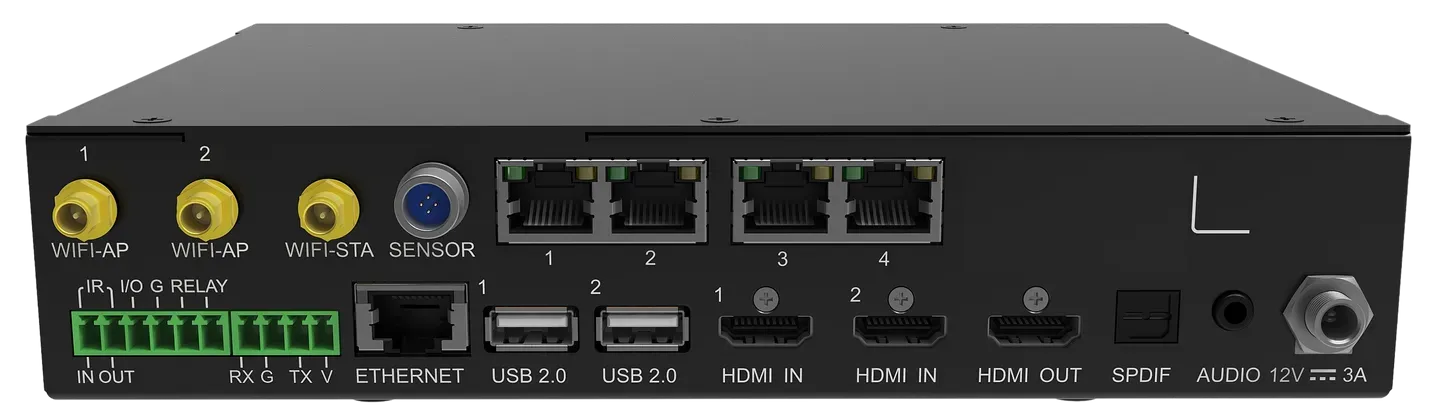
4× RJ45 Ethernet outputs (1 Gbps each) drive four independent receiving card chains. Load balancing is manual — each port handles its share of the 2.6 million pixel total. If one chain has significantly more panels, redistribute before hitting the per-port ceiling.
2× HDMI 1.3 inputs support custom resolutions from 800 to 4096 pixels wide and 600 to 4096 pixels tall. HDCP 1.4 only — a protected 4K Netflix stream from a laptop won’t pass through. For signage and presentation content, this is rarely an issue. For digital menu boards pulling from a media server, check the source’s HDCP requirements first.
3× USB 2.0 ports (one front, two rear) accept FAT32 and NTFS only. They do not read exFAT. Most new USB drives ship exFAT-formatted out of the box, and an unreadable drive is the single most common support ticket after a Novastar TU15 Pro handover. Reformat the client’s USB stick during commissioning or leave a formatted spare on site.
The SENSOR port is a single 4-pin Phoenix connector shared by the light sensor and temperature/humidity sensor. You pick one — not both — unless you add an external sensor hub downstream.
The RELAY port (30V DC, 3A max) can trigger an AC contactor for sequenced screen power control. It’s the most underused feature in Novastar TU15 Pro installs. Wiring it takes five minutes and saves clients from walking behind the screen to flip a switch every morning.
3. Accessories of Novastar TU15 Pro: Which Ones Earn Their Keep
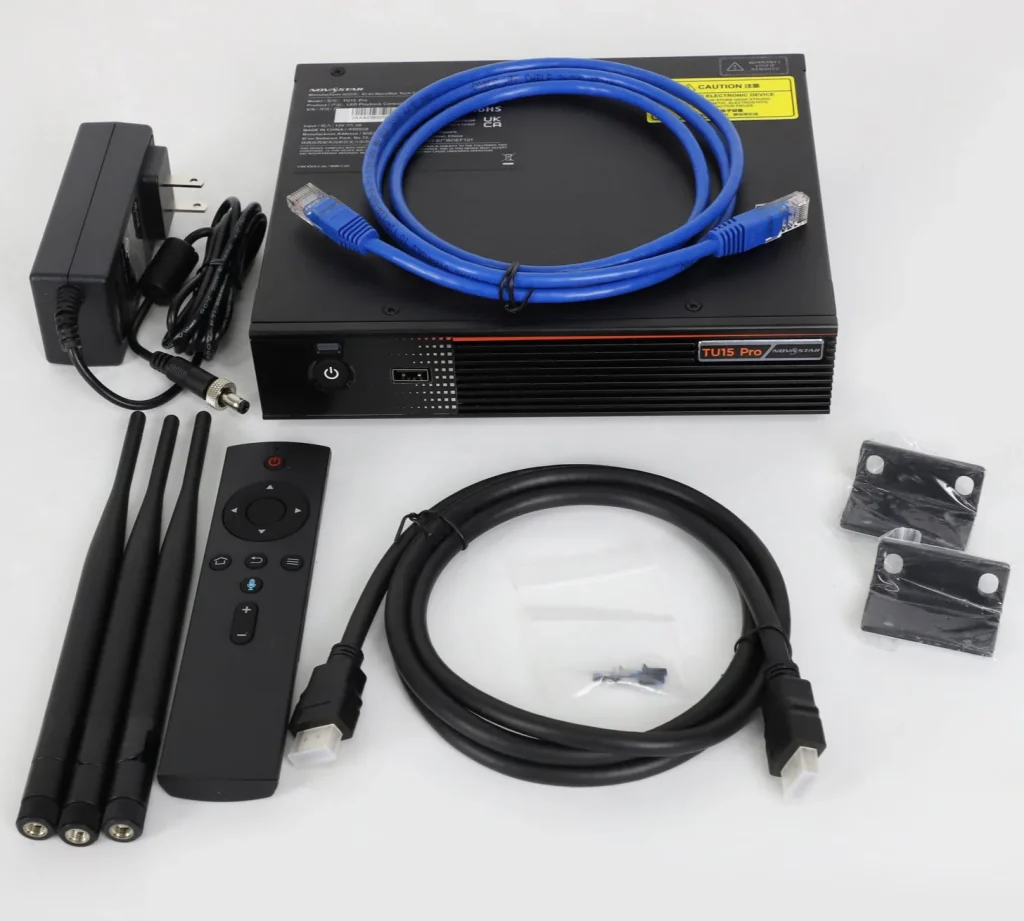
The Novastar TU15 Pro ships with the unit, a 12V power adapter, Bluetooth voice remote, three Wi-Fi antennas, one HDMI cable, one Ethernet cable, two hanging brackets, and two AAA batteries. Everything below is sold separately.
3.1 PTB1304 Wireless Mirroring Dongle — Buy If Wireless Matters
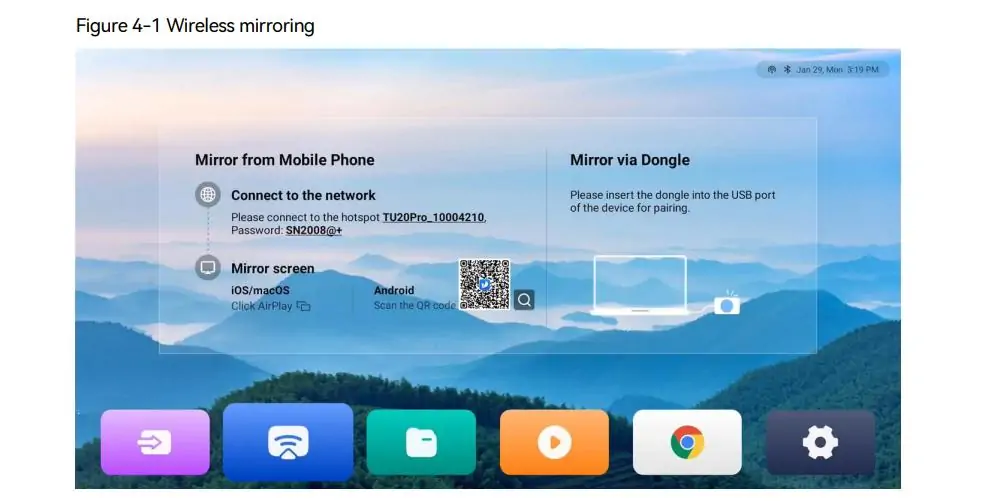
The PTB1304 is a Type-C dongle that enables wireless screen mirroring from Windows, macOS, iOS, and Android at 1080p@60fps with latency under 80ms at 8 meters. It costs roughly $90 from dealers and is not included in the box.
Setup takes two steps: insert the dongle into the Novastar TU15 Pro’s USB port for initial pairing (about 10 seconds), then plug it into the presenter’s laptop. After pairing, pressing the button starts mirroring. No driver installation on Windows or macOS.
The 80ms latency is fine for slides, documents, and video playback. It’s too slow for live camera feeds or real-time interaction. For a meeting room or classroom where three different presenters share screens throughout the day, the PTB1304 pays for itself in eliminated cable-swapping friction. For a lobby signage display running 24/7 from USB or HDMI, skip it.
Verdict: Buy for meeting rooms, classrooms, and huddle spaces. Skip for fixed-content signage and USB-only playback.
3.2 Light Sensor & Temperature/Humidity Sensor — Buy for Unattended Installs
Both sensors share the single SENSOR port. The light sensor enables automatic brightness adjustment — genuinely useful for indoor displays near large windows or in atriums where lighting changes throughout the day. The temperature and humidity sensor feeds environmental data into the VNNOX Care monitoring app, which matters for installs where nobody checks the equipment room daily.
Verdict: Worth the small cost for digital signage in bright lobbies, shop windows, and unattended locations. Skip for manned meeting rooms where someone adjusts brightness manually.
3.3 Whiteboard Activation Code + Infrared Touch Frame — Niche but Powerful
The whiteboard activation code is a one-time software license that unlocks on-screen drawing, annotation, and touch interactivity. Combined with a third-party infrared touch frame (not sold by NovaStar), it turns the LED wall into a giant interactive whiteboard.
This combination makes sense only in education and corporate training rooms where presenters actively mark up content. For standard meeting rooms doing screen mirroring, the activation code adds cost with no practical benefit. The touch frame is a separate purchase from a different vendor — test compatibility before the site visit.
Verdict: Buy for classrooms and training rooms with a dedicated interactive use case. Skip for everything else.
3.4 Bluetooth Peripherals — Free Feature, Worth Using
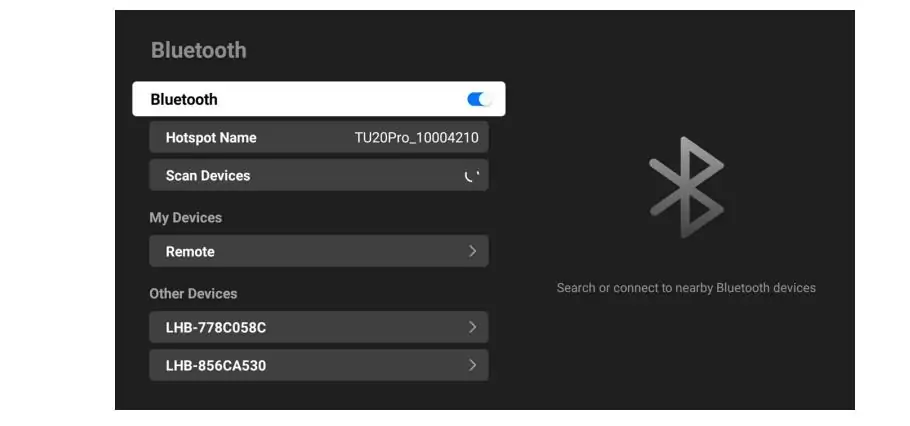
Bluetooth 5.1 supports up to 7 simultaneous device connections. A Bluetooth keyboard with integrated touchpad eliminates the need for a control PC at the display — useful when the client wants to manage content directly on the Novastar TU15 Pro. The included voice remote handles basic navigation, so only add a keyboard if on-device content management is part of the workflow.
Verdict: Add a Bluetooth keyboard + touchpad combo (~$30) if the client manages content on the device. Otherwise, the included remote is sufficient.
4. Novastar Novastar TU15 Pro vs TU20 Pro vs TU40 Pro
| Spec | Novastar TU15 Pro | TU20 Pro | TU40 Pro |
| Max Pixel Load | 2.6 million | 3.9 million | Higher capacity |
| Ethernet Outputs | 4 | 6 | More outputs |
| Price (approx.) | ~$500 | Higher | Highest |
Choose the Novastar TU15 Pro for single-screen indoor installs up to 1920×1080 with four or fewer receiving card chains. For a standard meeting room, classroom, or lobby display, the extra capacity of the TU20 Pro is headroom you’ll pay for and never use.
Step up to the TU20 Pro if your pixel count exceeds 2.6 million or you need more than four Ethernet chains for cabinet layout reasons. The TU20 Pro adds two more outputs and roughly 50% more pixel capacity — worth the premium when the Novastar TU15 Pro simply won’t cover the canvas.
Skip the entire Taurus Ultra line if you need multi-layer video processing, Genlock, or frame sync. That’s VX-series territory, and no firmware update will bridge the gap.
5. What First-Time Buyers Get Wrong
The most common support call after a Novastar TU15 Pro handover is “the USB drive doesn’t work.” The Novastar Novastar TU15 Pro reads FAT32 and NTFS. It does not read exFAT, and most new USB drives ship exFAT-formatted from the factory. Reformatting a drive takes 30 seconds. Making a return site visit to do it takes an afternoon.
Another recurring problem: expecting the Novastar TU15 Pro to function as a video processor. The two HDMI inputs pass through basic scaling, but there’s no multi-layer compositing, no EDID management beyond custom resolution entry, and no low-latency mode for live camera feeds. Integrators who spec this box for a broadcast control room or live event setup will be back on site replacing it. The Novastar TU15 Pro is a media player with a built-in sending card — if that’s what the install needs, it’s excellent at the job. If it isn’t, no accessory will fix the mismatch.
People also overlook the RELAY port. A five-minute wiring to an AC contactor gives the client sequenced power control — screen on before the controller boots, controller off before the screen cuts. For unattended installs, this eliminates hard power-offs that corrupt Android’s filesystem over time.
6. FAQs
1. Where can I download the Novastar TU15 Pro manual?
The official spec sheet and user manual are available on NovaStar’s support portal at oss.novastar.tech. The ViPlex Handy and VNNOX Care apps are on Google Play and the Apple App Store.
2. What does the Novastar TU15 Pro cost?
Approximately $500 from authorized dealers. The PTB1304 mirroring dongle adds roughly $90. Volume pricing is available for multi-unit orders through distribution.
3. Does it work with non-Novastar receiving cards?
No. It’s designed for NovaStar receiving cards. Mixing card brands on the same Ethernet chain is unsupported and will produce unpredictable results.
4. Can I install third-party Android apps?
Yes. Android 11 runs without a locked bootloader. Apps like VLC or custom CMS clients install via USB or the built-in browser. Test thoroughly before deploying at scale — not every Android app handles fixed landscape orientation and non-touch default input gracefully.
5. Is the Novastar TU15 Pro suitable for outdoor LED displays?
The unit can drive outdoor displays, but the Novastar TU15 Pro itself must live in a protected indoor or IP-rated enclosure. It carries no IP rating, and its -20°C to +50°C operating range is not rated for direct outdoor exposure.
7. Conclusion
Buy the Novastar TU15 Pro for single-screen indoor LED installs up to 1080p in meeting rooms, classrooms, hotel lobbies, and corporate signage. At ~$500, it’s cheaper than a separate sending card plus media player, and the single-device architecture means fewer cables, fewer power supplies, and faster commissioning.
Consider alternatives if your pixel count tops 2.6 million (step up to the TU20 Pro), you need multi-layer video processing (VX series), or the install is outdoor with no climate-controlled equipment space.
Skip it for broadcast, live production, or any workflow requiring Genlock, frame sync, or sub-frame latency. The Novastar TU15 Pro isn’t built for that, and trying to make it work will cost more in labor than buying the right processor from the start.
Here are the related files for your reference: Novastar TU15 Pro Specs and TU15 Pro User Manual