

Managing an LED display the old way means juggling three boxes: a Windows PC running playback software, a sending card inside the screen cabinet, and a media player bridging the two. Three devices. Three power supplies. Three things that can fail during a live presentation.
The Novastar TU20 Pro crams all three jobs into a single box about the size of a hardcover. It runs Android 11 on a quad-core ARM A55, bakes the sending card directly onto the board, and handles media playback on its own. I have not had a unit on my bench long enough to speak to long-term reliability, but the spec sheet and setup workflow paint a clear picture of where this thing fits and where it doesn’t.
1.What the TU20 Pro actually is
2.Hardware specs that matter
3.How much screen can it actually drive?
4.Picture quality and display modes
5.Wireless screen mirroring is why you buy this
6.Playback and decoding of Novastar TU20 pro
7.Meeting room tricks
8.The cloud stuff integrators actually care about
9.TU20 Pro vs. TU15 Pro
10.What it costs and where to find one
11.How to set up Novastar TU20 pro?
12.What people get wrong about this box
13.FAQs
14.Conclusion
1. What the TU20 Pro actually is
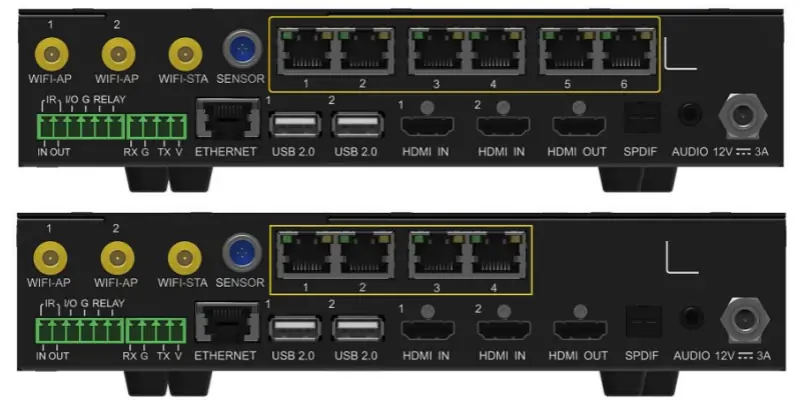
It’s the top model in Novastar’s Taurus Ultra series, a line of playback control processors built for indoor fixed installation LED displays. Three devices in one enclosure: an Android media player, a 6-port LED sending card, and a wireless presentation gateway. It weighs 1.12 kg.
The target audience is anyone who does not want a dedicated PC in the signal chain: corporate meeting rooms, hotel lobbies, retail signage, lecture halls, exhibition booths. Plug in power, connect your LED cabinets to the six RJ45 ports, and the display is live. No computer required.
2. Hardware specs that matter
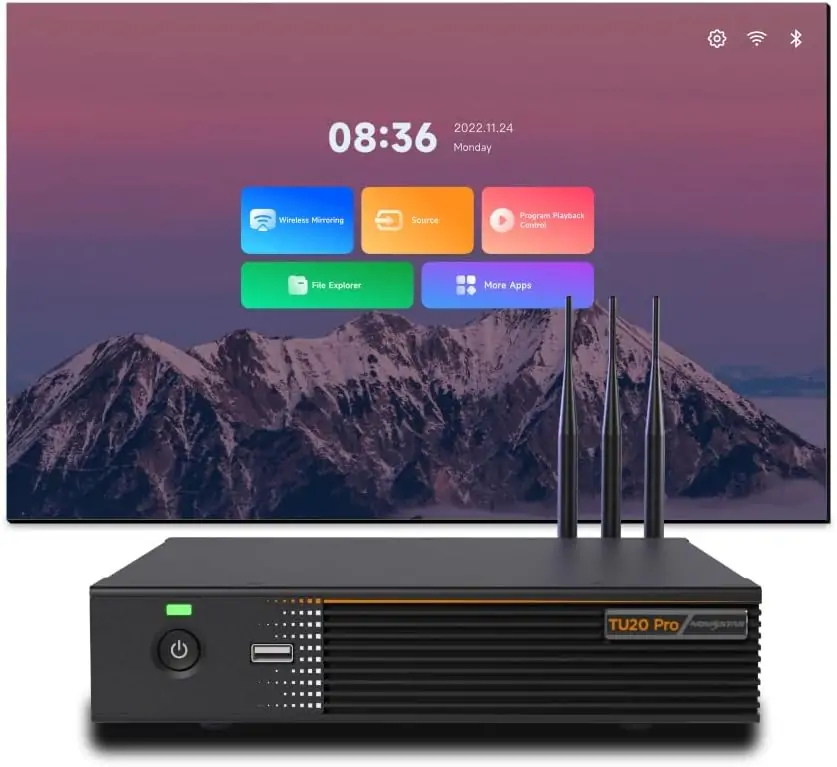
Quad-core 1.8 GHz ARM A55. 4 GB of RAM. 32 GB of internal storage. The unit is actively cooled and rated for continuous use from -20°C to +50°C, which covers an air-conditioned boardroom and a sun-baked lobby enclosure equally well.
Inputs:
- 2x HDMI 1.3 (Type A), up to 2048×1152 at 60 Hz, HDCP 1.4
- 3x USB 2.0 for storage and peripherals
- Bluetooth 5.1
Outputs:
- 6x Gigabit Ethernet (RJ45) to the LED receiving cards
- 1x HDMI OUT at 1080p for a confidence monitor
- 1x 3.5 mm analog audio and 1x SPDIF optical digital audio
Control and integration:
- 1x Gigabit Ethernet for LAN control and TCP/IP
- RS232 on a 4-pin Phoenix connector, relay output on a 6-pin Phoenix connector
- A sensor port for light, temperature, and humidity sensors
- Dual-mode Wi-Fi: 2T2R for AP mode and 1T1R for STA mode, running at the same time
Physical footprint: 211.7 x 185.0 x 50.6 mm. Power draw is 21 W during operation, under 0.5 W in standby. The box includes a 12V/3A power adapter, three external antennas, a Bluetooth voice remote, mounting brackets, and cables.
3. How much screen can it actually drive?
The TU20 Pro handles up to 3.9 million pixels, max width of 4096 pixels, max height of 1920 pixels. The pixel-to-pixel ceiling is 2.88 million. One detail worth knowing: Novastar does not enforce a rectangular frame restriction. Blank space in your canvas does not eat into the load budget, so irregular layouts work fine.
A 1920×1080 LED wall (2.07 million pixels) leaves enough headroom for a second content zone or a ticker strip. For a typical P2.5 indoor screen at 4 meters wide by 2.25 meters tall (a 1600×900 grid, roughly 1.44 million pixels), the controller is barely working. That headroom translates to cleaner scaling and better bit depth.
4. Picture quality and display modes
Four presets, each tuned for a different job:
- Standard— balanced contrast and saturation, fine for general signage
- Meeting— text clarity and slide legibility take priority; saturation is pulled back so presentation graphics don’t clip
- Vivid— contrast and saturation get pushed up for video and marketing content
- Skin— preserves natural skin tones; the one you want for video calls and talking-head shots
There is also an eye comfort mode that cuts blue light across all four presets. In a meeting room where people face the screen for hours, this matters.
The image enhancement (contrast, detail sharpness, color accuracy) runs at the hardware processing level, not as a software filter. No added latency.
5. Wireless screen mirroring is why you buy this
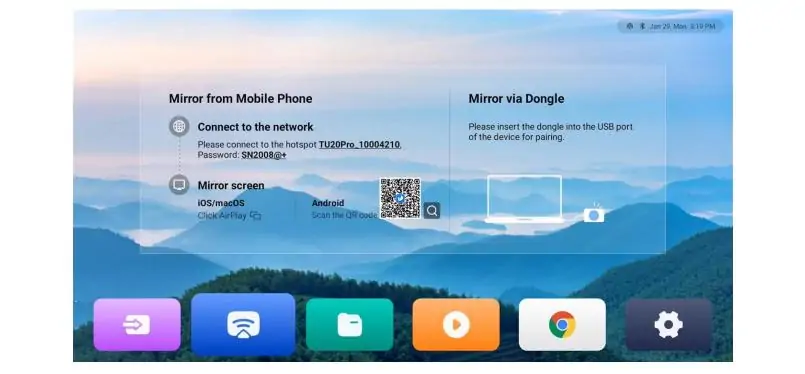
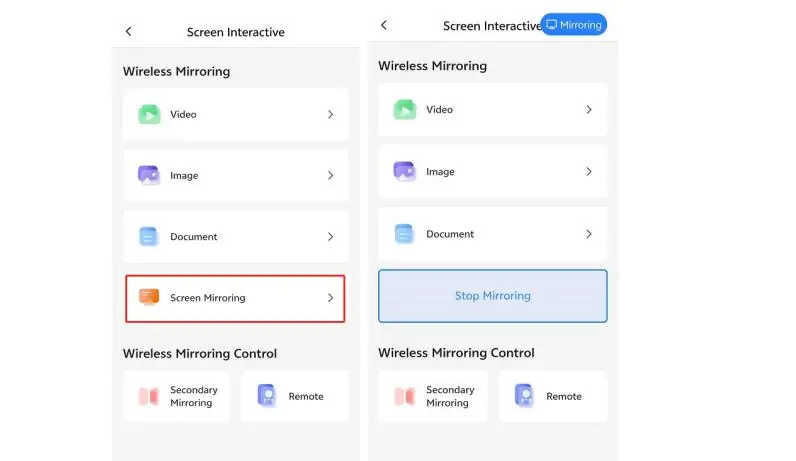
This is the feature that makes the TU20 Pro more than a media player in a different box. Wireless screen mirroring works across Windows, macOS, iOS, and Android, no dongle and no app install needed for basic mirroring. You get 1080p at 60 fps with latency under 80 ms at distances up to 8 meters. Slide transitions feel instant. Video is smooth.
The part that surprises people: nine devices can share the screen at once. In a conference room, a remote Zoom participant, a local slide deck, and a live dashboard all sit on the same canvas. No input switching, no cable swaps.
The dual-mode Wi-Fi chip is what enables it. In AP mode the TU20 Pro broadcasts its own network that presenters join directly. In STA mode it connects to the building network. Both modes run at the same time, so you can have a dedicated presentation SSID alongside an internet-connected management interface.
5.1 What it looks like in a real room
Team walks in. Someone opens ViPlex Handy, scans a QR code, and their phone appears on the LED wall. A colleague on a Windows laptop connects through the TU20 Pro’s own Wi-Fi. A remote participant joins via Teams and their face lands in one zone of the split screen. Nobody touched an HDMI cable. That’s the workflow this device was built for.
6. Playback and decoding of Novastar TU20 pro
For standalone playback from USB, the TU20 Pro decodes H.264 up to 4K at 30 Hz and H.265/HEVC up to 4K at 60 Hz. Multi-stream playback:
- 2 streams of 4K
- 5 streams of 1080p
- 5 streams of 720p
- 8 streams of 480p
- 10 streams of 360p
This matters for signage operators running multiple content zones on one screen: brand video here, social feed there, static logo somewhere else.
6.1 USB playback: what works and what doesn't
FAT32 and NTFS drives work. exFAT does not. A lot of high-capacity USB drives ship as exFAT out of the box, so check before you load content onto one.
| Media Type | Supported Formats |
|---|---|
| Images | JPG, BMP, PNG, GIF, WEBP |
| Video | AVI, MOV, MKV, MP4, TS, FLV, 3GP, WEBM |
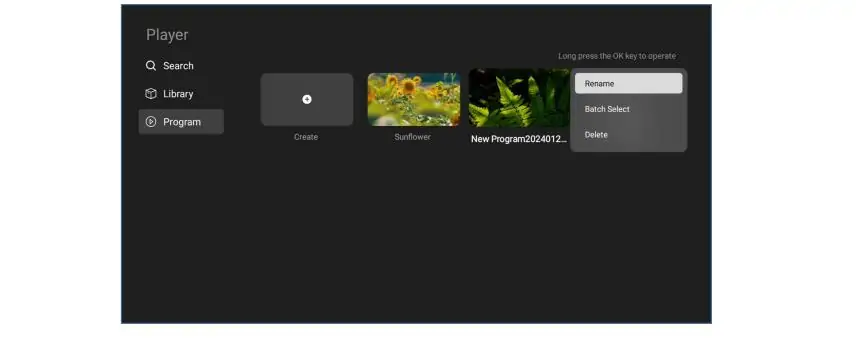
Content auto-plays when you insert the drive if you set it up that way, which is handy for retail where staff swap a USB stick to update the day’s content and nothing else.
7. Meeting room tricks
Screen annotation and drawing works with an infrared touch frame, but you need a separate activation code and the hardware itself. Budget for both if interactive whiteboarding matters to you.
Wireless audio routes a presenter’s phone mic to the LED screen’s sound system. No audio cable to the podium. The TU20 Pro acts as the display and audio endpoint when a connected PC or phone runs Zoom, Teams, or Tencent Meeting. It does not run these apps natively.
Voice control and phone-to-screen photo capture exist in the ViPlex Handy app. Nice to have, not why you buy the box.
8. The cloud stuff integrators actually care about
For teams managing multiple screens, the TU20 Pro connects to Novastar’s VNNOX platform. The companion app, VNNOX Care, handles configuration: scan a QR code to pull the receiving card’s config, snap a photo of the cabinet layout to auto-map the topology. Novastar claims this takes about 10 minutes for a typical setup.
Once online, you get 24/7 monitoring, fault alerts, remote diagnostics, and cloud backup of configs. For an integrator with dozens of installed screens, diagnosing a problem from the office instead of dispatching a tech saves real money.
ViPlex Handy handles the daily stuff: playlists, scheduling, remote publishing from a phone.
9. TU20 Pro vs. TU15 Pro
The TU15 Pro is the step-down model. Same processor, same RAM, same storage, same software. The only differences are I/O and pixel budget:
| Specification | TU15 Pro | TU20 Pro |
|---|---|---|
| Max Pixel Load | 2.6 million | 3.9 million |
| RJ45 Outputs | 4 | 6 |
| Processor | Quad-core ARM A55 | Quad-core ARM A55 |
| RAM / Storage | 4 GB / 32 GB | 4 GB / 32 GB |
| HDMI Inputs | 2× HDMI 1.3 | 2× HDMI 1.3 |
| Approximate Price | $500 – $600 | $700 – $1,050 |
My take: if your wall is under 2.6 million pixels and four Ethernet runs cover the cabinet layout, get the TU15 Pro. You get the same software for less money. If you need the extra pixel headroom, or six ports so you are not daisy-chaining too many receiving cards on one run, step up. Don’t overthink this one.
10. What it costs and where to find one
Roughly $700 to $1,050 USD, depending on region and distributor. Authorized sellers in Europe include LED-TEK in Germany (€869) and Grand Technix in the UK (£824). Also on Amazon in some regions and Alibaba for international orders.
If warranty matters to you, buy from an authorized regional distributor. The savings on the cheapest marketplace listing disappear the first time you need support.
11. How to set up Novastar TU20 pro?
- Connect the hardware.Plug in the 12V adapter. Run Ethernet from the six RJ45 ports to the receiving cards in order (port 1 to first card, port 2 to next). Connect HDMI sources, USB peripherals, and speakers as needed.
- Install the apps.VNNOX for content and playlists, VNNOX Care for screen config. Both on your phone or tablet.
- Configure the screen.Open VNNOX Care, scan the QR code on the receiving card, photograph the cabinet layout. The app maps the topology. Claimed time: about 10 minutes.
- Initialize.Pick language, pair the remote, connect Wi-Fi (or skip it for USB-only mode), pair screen mirroring devices. Done.
11.1 What it looks like in a real room
One: exFAT USB drives will not be recognized. Reformat to FAT32 or NTFS first.
Two: connect the Ethernet cables to the RJ45 ports in order, starting from port 1. Random assignment makes the topology mapping messy and you will end up redoing it.
12. What people get wrong about this box
The most common assumption: an all-in-one device must cut corners somewhere. The TU20 Pro decodes 4K HEVC at 60 fps and drives 3.9 million pixels. For indoor conference rooms, retail displays, and lobby screens, it’s fine. The only setups that push past its limits are ultra-fine-pitch walls wider than 4096 pixels or broadcast productions needing HDMI 2.0 bandwidth.
Another one: wireless mirroring means visible lag. Under 80 ms within 8 meters, the difference between wired and wireless is invisible for slide decks and video. Live esports or frame-accurate production work is a different conversation. That’s not who this box is for.
13. FAQs
1. Can it work without internet?
Yes. USB playback and HDMI input run fully offline. Wi-Fi is only needed for mirroring and cloud management, and mirroring works over the TU20 Pro’s own local AP network without internet.
2. How many receiving cards?
Six RJ45 outputs, each supporting a chain of cards. Total pixel load (3.9 million) is the real limit, not card count.
3. Does it do 4K?
The decoder does: H.264 at 4K30 and H.265 at 4K60. But the LED output is capped at 3.9 million pixels. A 4K signal (8.3 million pixels) gets downscaled. If you need native 4K pixel-for-pixel, this is the wrong device.
4. Outdoor use?
Yes, if the controller is inside a dry enclosure. The unit has no IP rating. Weather protection comes from the cabinet, not the controller.
5. Non-Novastar receiving cards?
No. Novastar cards only.
6. Do I need a PC?
No. Content comes through the VNNOX app, USB drive, or HDMI input. A PC is never part of the workflow.
14. Conclusion
The TU20 Pro solves a real problem: too many devices, too many cables, too many failure points. The integration is clean, and the software (VNNOX Care, ViPlex Handy, VNNOX) feels like one product, not three tools stapled together.
What I like:
- No PC in the signal chain means less cost and one less thing to troubleshoot
- Wireless mirroring across all four platforms, sub-80ms
- 9 million pixel load with non-rectangular layout support
- Cloud management is not fluff. For integrators with multiple sites, remote diagnostics saves money
- 10-minute config claim is believable and a genuine time-saver if it holds up in the field
What holds it back:
- HDMI 1.3, not 2.0. Fine for 1080p, not for 4K60 over HDMI
- USB 2.0, not 3.0. File transfers are slower than they should be
- No exFAT support. Minor, but annoying given how many drives ship exFAT these days
- Screen annotation needs a separate activation code and IR touch frame
This device makes the most sense for corporate meeting rooms, hotel lobbies, retail signage, and any fixed indoor install where running a PC is more hassle than it’s worth. Integrators managing fleets of screens will get the most from the remote monitoring.
If you need HDMI 2.0 bandwidth or your wall exceeds 3.9 million pixels, look elsewhere. For everyone else, this is the cleanest all in one LED controller on the market right now.