A stadium LED display can look impressive in a supplier demonstration and still disappoint inside a venue. Spectators in distant seats may struggle to read scores, afternoon sunlight may reduce contrast, or a poorly positioned screen may disappear behind roof structures. These problems begin with specification decisions made long before installation.
For LED display buyers, distributors, AV integrators, and project contractors, the challenge is to translate venue requirements into a workable system. Screen dimensions, pixel pitch, brightness, mounting geometry, content design, and maintenance access all influence the result. Selecting each item independently can create expensive compromises.
A well-specified stadium LED display starts with three questions: What must people see? Where will they see it from? Under what lighting conditions? This guide explains how to turn those answers into a purchasing brief, compare display formats, and evaluate EagerLED’s stadium products against the needs of a real project.
1. Stadium LED Displays: Scoreboards, Replays, and Advertising
A stadium LED display is a direct-view screen assembled from LED modules and cabinets. The LEDs produce the visible image, while receiving cards, processors, and content systems control what appears across the display surface.
The physical screen is only one part of the installation. A functioning system also needs power distribution, signal connections, mounting hardware, control software, and an operating workflow.
01. Define the display’s primary job
Different positions inside a venue serve different audiences. A main video board helps spectators follow the event. Pitchside advertising boards may also need to look clear through broadcast cameras. Ribbon displays communicate along seating tiers, where their shallow format limits the amount of information that fits comfortably.
On smaller screens, swipe horizontally to read the full table.
| Display application | Primary content | Main planning priority |
|---|---|---|
| Main stadium video board | Live video, replays, player introductions | Image size for distant seating |
| Dedicated scoreboard | Scores, clocks, match status | Immediate recognition and reliable data |
| Perimeter LED boards | Sponsor messages and animations | Camera visibility, protection, field access |
| Ribbon or fascia display | Short messages, statistics, sponsor branding | Legibility across a shallow canvas |
| Entrance or concourse screen | Directions, schedules, promotions | Readability at closer distances |
A stadium LED display project should identify one primary function for each screen before selecting hardware. Trying to make a narrow perimeter board carry detailed statistics, for example, creates a content problem that additional brightness cannot fix.
02. Map the operating workflow
Establish who controls live video, scoring, advertising, and announcements. Confirm whether operators need separate permissions and whether sponsor playback must continue while the main production system changes sources.
This planning also reveals integration requirements early. A display controller receives and distributes imagery; it does not automatically provide scoring software, replay production, or advertising management.
2. Stadium LED Screen Size: Choosing Dimensions for Your Venue
Choose physical screen size around the farthest intended viewer and the smallest essential content element. Seating capacity alone is an unreliable sizing method because venues with similar capacities can have very different shapes.
A stadium LED display serving a long, shallow grandstand faces a different viewing problem from one overlooking a compact arena.
01. Start with the content layout
Sketch the screen during an actual event. Will live video occupy the entire surface? Will scores, sponsor logos, and statistics remain visible beside it?
If a large board is divided into several zones, the effective video image becomes smaller. The specification should therefore state both the overall dimensions and the minimum dimensions of critical content areas.
A useful starting brief includes:
- Nearest and farthest viewing positions.
- Seating sections the screen must serve.
- Required video, score, and advertising zones.
- Smallest essential text or number.
- Available mounting space and structural constraints.
02. Understand aspect ratio
A 16:9 layout is convenient for conventional widescreen video. However, cabinet dimensions, architectural restrictions, and dedicated scoring areas may justify another shape.
For illustration, a screen exactly 12 meters wide at 16:9 would be 6.75 meters high:
Height = width × 9 ÷ 16
This is a geometry example, not a recommended stadium size or a claim about an available product configuration. Final dimensions must follow the selected cabinet grid.
Project video: a P8 perimeter-screen configuration. See how cabinet dimensions translate into a complete perimeter-screen configuration in EagerLED’s pre-delivery video for an Italy customer. This footage shows the assembled display before delivery.
03. Test the smallest critical information
For a stadium LED display, the most useful sizing check may be a match clock or player name rather than a full-screen photograph.
Prepare representative layouts and assess them from the farthest seats. A scaled simulation can help compare options, but a physical mock-up or on-site demonstration provides stronger evidence. Include realistic sponsor artwork and multilingual content where applicable; thin lettering and dense logos often reveal weaknesses that bold test patterns hide.
For broader large-screen format comparisons, see our Jumbotron size and selection guide.
3. Stadium LED Pixel Pitch: Resolution and Viewing Distance
Pixel pitch is the center-to-center spacing between adjacent pixels, expressed in millimeters. A smaller pitch places more pixels within the same physical area.
For a stadium LED display, this affects how much detail the screen can reproduce and how visible the pixel structure appears to nearby viewers. Physical dimensions still determine how large the image looks from distant seats.
01. Calculate native resolution
For a uniform pixel grid:
Horizontal pixels = screen width in millimeters ÷ pixel pitch
Vertical pixels = screen height in millimeters ÷ pixel pitch
The following calculations use a hypothetical 12 × 6-meter active display area. They illustrate the relationship rather than describe available cabinet combinations.
On smaller screens, swipe horizontally to read the full table.
| Illustrative pitch | Calculated resolution | Total pixels | Purchasing implication |
|---|---|---|---|
| 10 mm | 1,200 × 600 | 720,000 | Lower pixel count for the same surface |
| 8 mm | 1,500 × 750 | 1,125,000 | More detail without changing dimensions |
| 6 mm | 2,000 × 1,000 | 2,000,000 | Greater processing and data capacity required |
| 4 mm | 3,000 × 1,500 | 4,500,000 | Highest pixel count among these examples |
Actual resolution must be calculated from the confirmed module and cabinet configuration. Marketing labels such as “HD” are less useful than an exact pixel map.
02. Treat distance formulas as screening tools
Published viewing-distance guidance can help establish an initial shortlist. However, seeing a coherent image, no longer noticing individual pixels, and reading small text are different outcomes. Daktronics distinguishes minimum viewing distance from smooth-image distance in its display viewing-distance guidance.
A stadium LED display should therefore be evaluated using actual content at relevant distances. Compare nearby premium seating, the main spectator area, and distant stands.
A finer pitch may improve detail without improving the readability of undersized text. Conversely, a larger screen with appropriately designed content may serve distant spectators better than a smaller, higher-resolution alternative. Resolve that tradeoff before committing to the cabinet quantity. Our LED pixel pitch guide provides additional selection context.
4. Stadium LED Display Brightness: How Many Nits Do You Need?
A nit is one candela per square meter, a unit of luminance. It describes the light emitted from the display surface.
There is no single brightness requirement for every stadium LED display. Direct sunlight, roof shade, screen orientation, surrounding lighting, and nighttime operation all change the conditions.
As a product reference, Daktronics lists calibrated brightness of 6,000–10,000 nits across its outdoor video-display offering, depending on the selected configuration. That range demonstrates available product capability; it is not a universal venue specification. See its outdoor LED video-display specifications.
01. Specify operating conditions, not just maximum output
A maximum-brightness figure does not explain how the screen performs after color calibration or when dimmed for an evening match.
On smaller screens, swipe horizontally to read the full table.
| Venue condition | Brightness priority | Evidence to request |
|---|---|---|
| Direct afternoon sunlight | Readable images under strong ambient light | Demonstration in comparable exposure |
| Covered outdoor stand | Output matched to changing shade | Daylight and shaded operation samples |
| Indoor sports arena | Comfortable viewing and useful dimming | Evaluation under event lighting |
| Evening outdoor event | Controlled output with stable color | Low-brightness video and grayscale tests |
| Broadcast-facing perimeter | Balanced camera exposure | Tests using intended camera settings |
For a stadium LED display used from afternoon through evening, ask how brightness schedules, light sensors, and manual overrides are implemented. Confirm which functions belong to the supplied control system and which require additional equipment.
02. Evaluate contrast and dimming together
Sunlight reflected from a screen raises the apparent black level. More emitted light can help, but module surface treatment, masks, installation orientation, and content contrast also influence visibility.
Review dark video scenes, gray gradients, white sponsor backgrounds, and saturated colors at the intended operating levels. A stadium LED display should retain useful image quality when dimmed, rather than looking acceptable only at maximum output.
Finally, request the conditions behind each brightness claim: measurement method, white point, calibration state, and operating settings. Comparable measurements make competing quotations easier to evaluate.
5. Stadium LED Screen Sightlines: Viewing Angles and Placement
Sightlines describe whether viewers have an unobstructed view of the screen. Viewing angle describes how image performance changes when the display is observed away from its central axis.
A stadium LED display can satisfy a viewing-angle specification and still be hidden by railings, roof columns, standing spectators, or temporary event equipment.
01. Review the seating bowl in three dimensions
Assess representative positions across the venue, including front rows, upper tiers, accessible seating areas, hospitality spaces, and seats near the screen’s side edges.
Check the entire active image, especially the lower edge. A spectator who can see most of the video but cannot see the score strip does not have an adequate view.
For an initial vertical-angle calculation:
Elevation angle = arctan(vertical height difference ÷ horizontal distance)
This helps compare mounting positions. It does not establish a universal comfort limit; venue geometry and the expected duration of viewing still matter.
02. Ask what the viewing-angle number means
A quoted angle may use a manufacturer-defined brightness threshold. It does not automatically establish equal color, contrast, or readability across the entire stated range.
For a stadium LED display, request off-axis demonstrations using white, neutral gray, skin tones, and sponsor colors. Assess both horizontal and vertical positions.
On smaller screens, swipe horizontally to read the full table.
| Sightline issue | Likely consequence | Design response |
|---|---|---|
| Screen mounted too high near front rows | Difficult upward viewing | Reassess height, tilt, or secondary coverage |
| Obstructed lower edge | Scores or captions disappear | Reposition the screen or critical content |
| Extreme side viewing | Reduced apparent width and image quality | Adjust orientation or add another display |
| Perimeter board tilted poorly | Weak spectator or camera visibility | Test bracket positions on site |
| Temporary stage or equipment conflict | Event-specific blind spots | Review alternative event layouts |
Document accepted viewing positions before approval. That gives the integrator, supplier, and venue a shared basis for commissioning the stadium LED display.
6. LED Scoreboards vs. Stadium Video Walls: Pros and Cons
A dedicated scoreboard and a full-color video wall solve different operational problems. Neither format automatically replaces the other.
The right stadium LED display configuration depends on the importance of live production, advertising flexibility, scoring continuity, and operator workload.
On smaller screens, swipe horizontally to read the full table.
| Option | Main advantage | Main limitation | Suitable priority |
|---|---|---|---|
| Dedicated LED scoreboard | Clear, focused game information | Limited visual flexibility | Scoring and timing |
| Full-color video board | Flexible video, graphics, and advertising | More production and control requirements | Multi-purpose event presentation |
| Scoreboard plus video board | Separate functions can remain visible | More equipment and integration | Venues needing both dedicated scoring and video |
| Perimeter LED system | Advertising positioned around the field | Shallow format restricts content | Sponsor exposure |
| Ribbon display | Messaging distributed along seating tiers | Unsuitable for large conventional video images | Short messages and supporting information |
01. Compare the operator experience
A video board can display scores, but the scoring feed, graphics software, and fallback behavior need to be defined. If the production computer stops responding, what remains visible?
For a stadium LED display carrying essential match information, establish how operators restore the score layout, switch to a backup source, or recover from a signal interruption.
02. Match commercial expectations to usable inventory
More display area does not automatically produce more advertising revenue. The venue still needs sellable locations, suitable content, scheduling, and advertiser reporting.
For perimeter and ribbon systems, clarify whether sponsors buy exposure on individual sections, synchronized messages across the venue, or specific event intervals. These choices affect content mapping and playback controls.
A distributor can strengthen a proposal by showing how the selected format supports the venue’s operating model, rather than presenting screen area as the sole measure of value.
7. Indoor vs. Outdoor Stadium LED Displays: Key Requirements
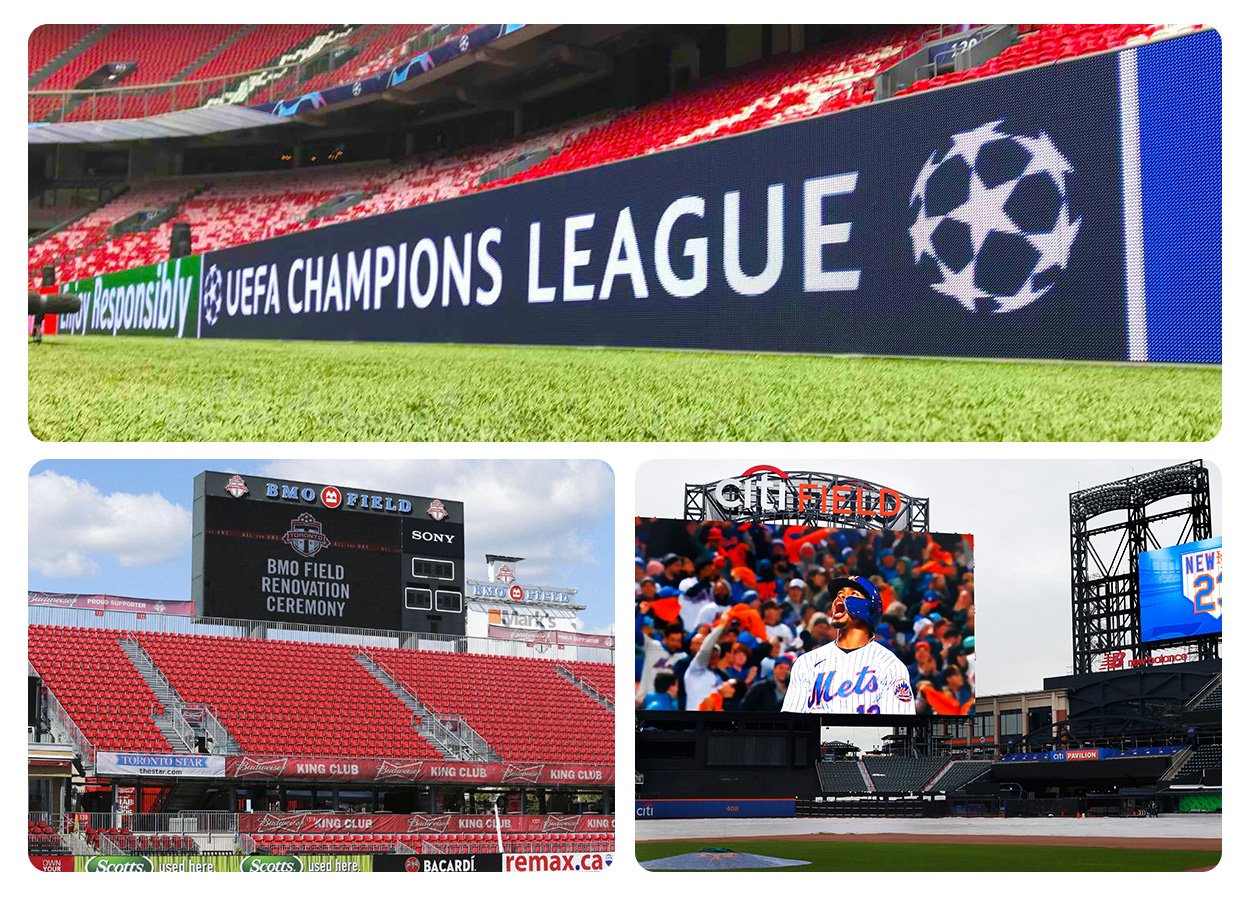
An outdoor stadium LED display must be selected for the exposure at its actual installation position. A roof above the screen does not necessarily eliminate wind-driven rain, condensation, dust, or strong sunlight.
Indoor installations have different priorities, including ambient lighting, ventilation, service clearance, and the appearance of the display at lower brightness.
01. Check the complete enclosure
Ask for the ingress-protection rating of the relevant cabinet surfaces, connectors, and installed assembly. Confirm the conditions under which the rating applies, including closed service covers and correctly fitted cables.
Ingress protection does not, by itself, establish resistance to corrosion, ultraviolet exposure, mechanical impact, or structural loading. These require separate consideration.
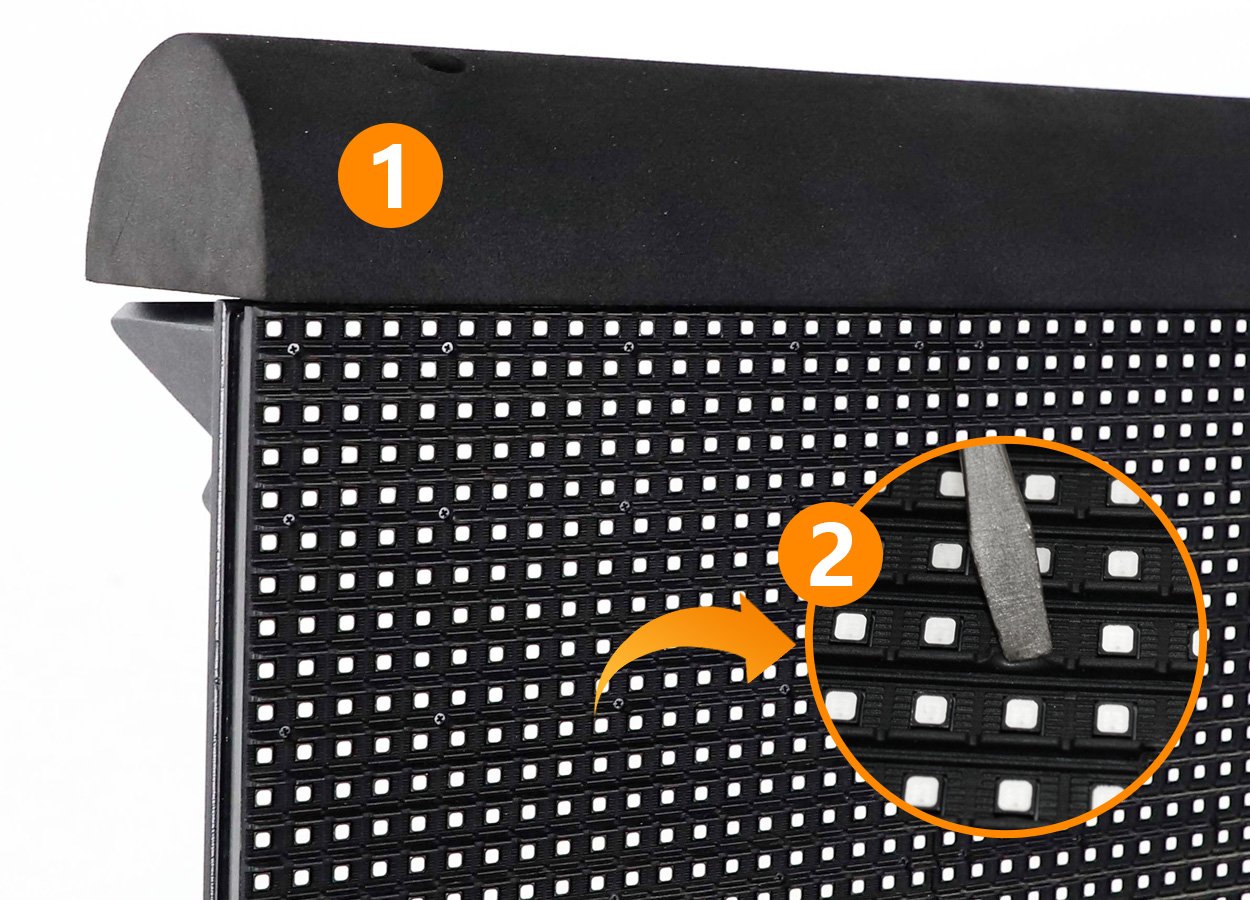
For a stadium LED display near the playing surface, review protective padding, module masks, rear supports, cable routing, and access around the installation. Protective features should be assessed as part of the venue layout.
02. Design maintenance into the installation
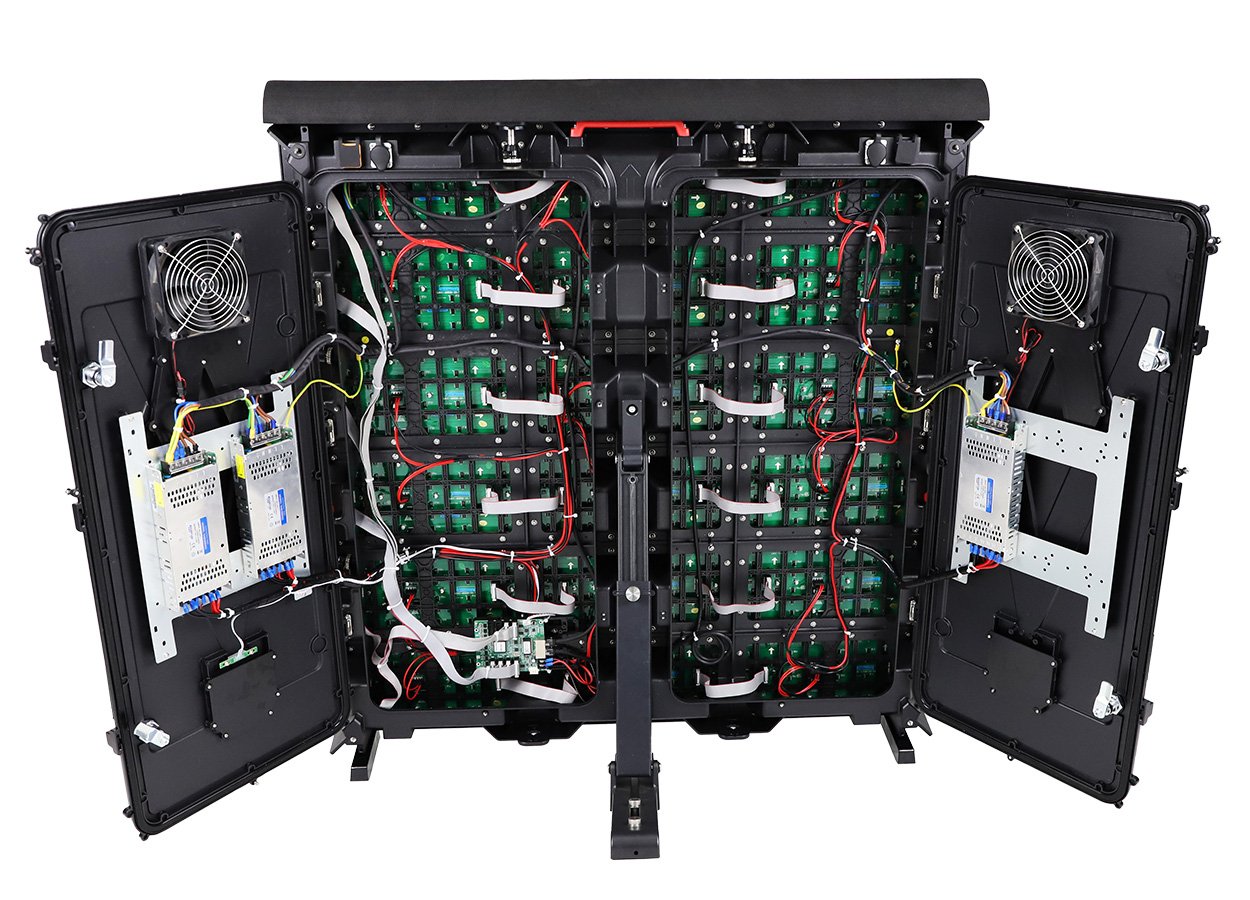
Front-service cabinets can be useful when rear access is restricted. Rear-service products require enough space to open covers, remove components, and work safely.
Ask the supplier to demonstrate a module, power-supply, and receiving-card replacement. The procedure should reflect the proposed mounting arrangement rather than an easily accessible showroom cabinet.
03. Include the environmental operating envelope
Specify expected temperature, humidity, dust, and cleaning conditions. Consider heat generated inside enclosed mounting spaces and the effect of afternoon sun on the cabinet.
For permanent outdoor structures, qualified project engineers should determine mounting and electrical requirements for the site. The LED supplier’s cabinet drawing is an input to that work, not a complete installation design.
A stadium LED display that is easy to inspect and repair is more practical to operate throughout a busy event calendar. For additional exposure checks, consult our outdoor LED screen guide.
8. Stadium LED Display Buying Guide: Cost, Installation, and Support
A meaningful stadium LED display quotation identifies what is included, what is excluded, and which assumptions affect the price.
Price per square meter alone does not account for structural work, processors, power distribution, installation access, or commissioning.
01. Compare the full scope
On smaller screens, swipe horizontally to read the full table.
| Cost category | What the quotation should identify | Common ambiguity |
|---|---|---|
| LED cabinets | Model, pitch, quantity, active dimensions | Similar-looking cabinets with different components |
| Processing and control | Capacity, interfaces, software, redundancy | Hardware supplied without required functions |
| Mounting system | Frames, brackets, drawings, installation scope | Support steel assumed to be by others |
| Electrical infrastructure | Distribution, connections, protection scope | Cabinet power figures treated as a complete design |
| Logistics and installation | Packing, delivery terms, lifting, labor | Freight or access equipment omitted |
| Commissioning | Calibration, mapping, testing, training | “Installation” excluding operational handover |
| Service and spares | Parts list, warranty process, response arrangements | Coverage without a practical repair plan |
Compare proposals against the same bill of quantities and acceptance criteria. Otherwise, a cheaper offer may simply contain less work.
02. Separate energy estimates from electrical sizing
For operating-cost planning:
Energy use in kWh = average operating power in kW × operating hours
For example, an assumed average load of 20 kW over five hours equals 100 kWh. This is an arithmetic illustration, not an EagerLED product specification.
Actual consumption depends on content, brightness, configuration, and operating conditions. Electrical infrastructure must account for the applicable maximum loads and installation requirements rather than rely solely on average consumption.
03. Write acceptance tests before ordering
For a stadium LED display, the purchase specification should define how the parties will check:
- Active dimensions and native resolution.
- Brightness and color under agreed settings.
- Module alignment, uniformity, and pixel defects.
- Source switching and scoring integration.
- Camera performance where required.
- Recovery from agreed signal or equipment failures.
- Maintenance access and operator training.
Distributors should also record component versions, configuration files, and spare-part compatibility. A stadium LED display may need support years after the original installation team has changed, making documentation part of the deliverable. Use our LED screen supplier factory checks when preparing supplier questions.
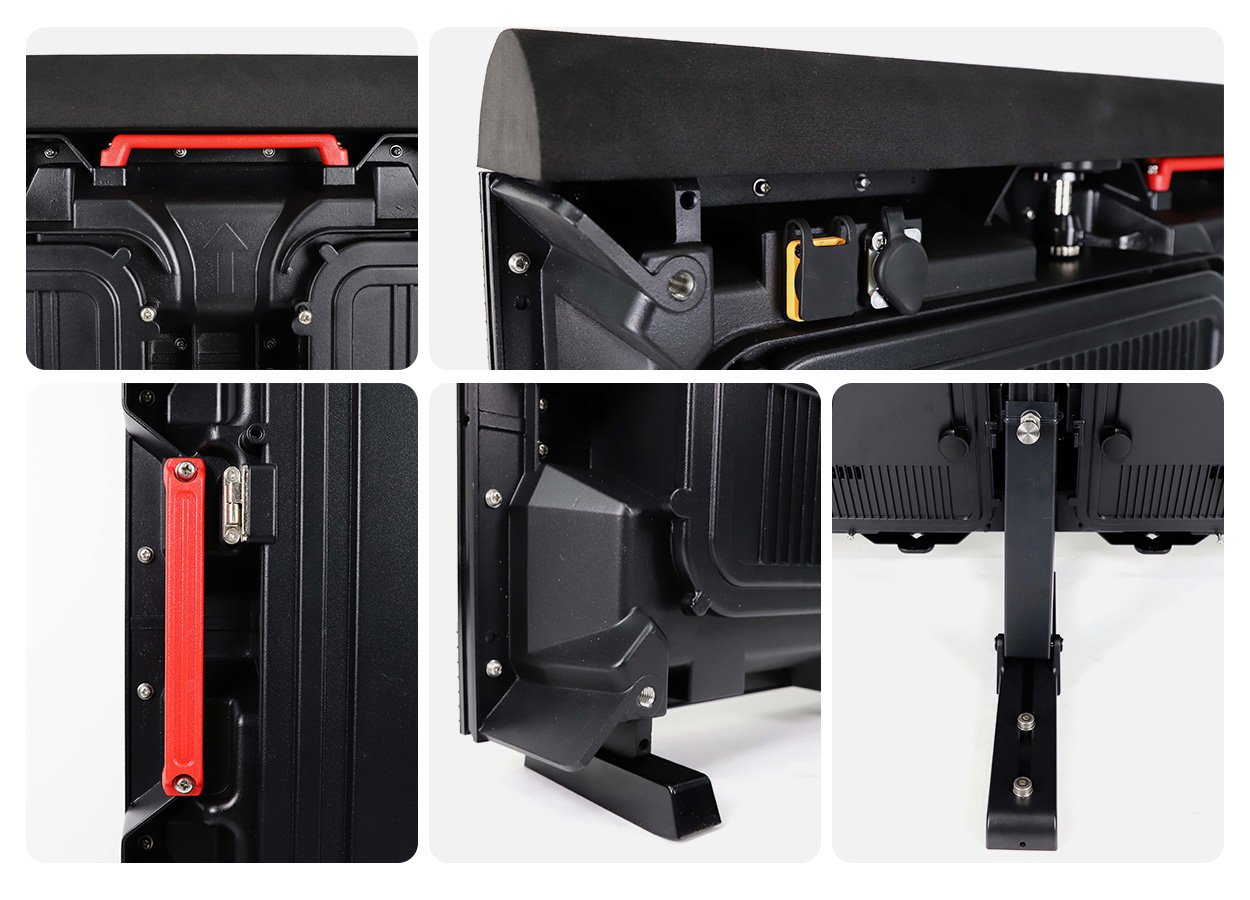
Product video: inspect the cabinet details. When reviewing a supplier proposal, use a product demonstration to identify practical questions about supports, locks, and protection. EagerLED’s EA1280SP1 demonstration below provides a visual example of these features; confirm the specifications of the model included in your own quotation.
9. Why Choose EagerLED for Stadium LED Display?
EagerLED is worth evaluating for projects requiring stadium perimeter products and a broader range of LED screen formats. Its published portfolio includes indoor, outdoor, rental, and stadium perimeter displays, allowing buyers to discuss several venue applications with one manufacturer. See EagerLED’s company and product overview.
01. Published features provide a starting point for specification
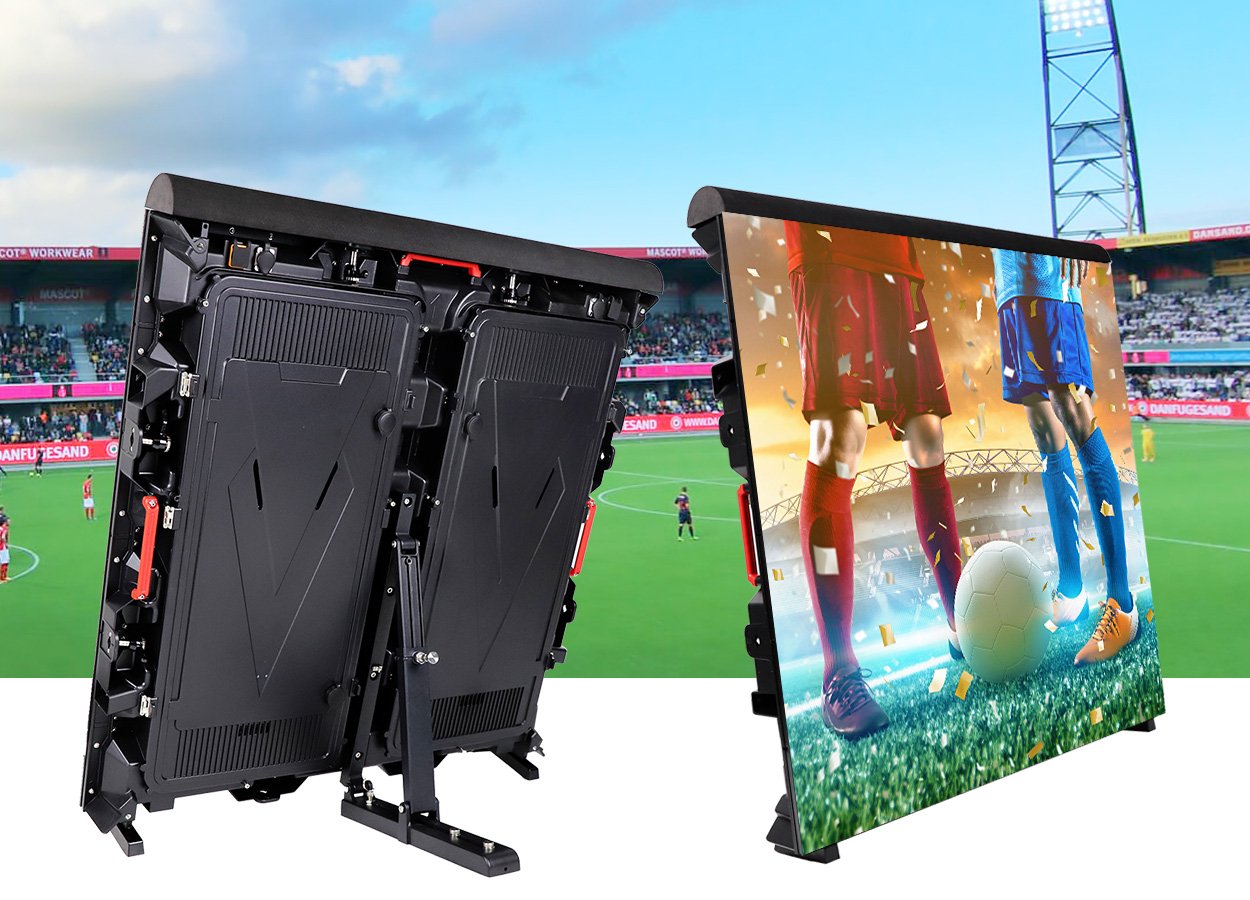
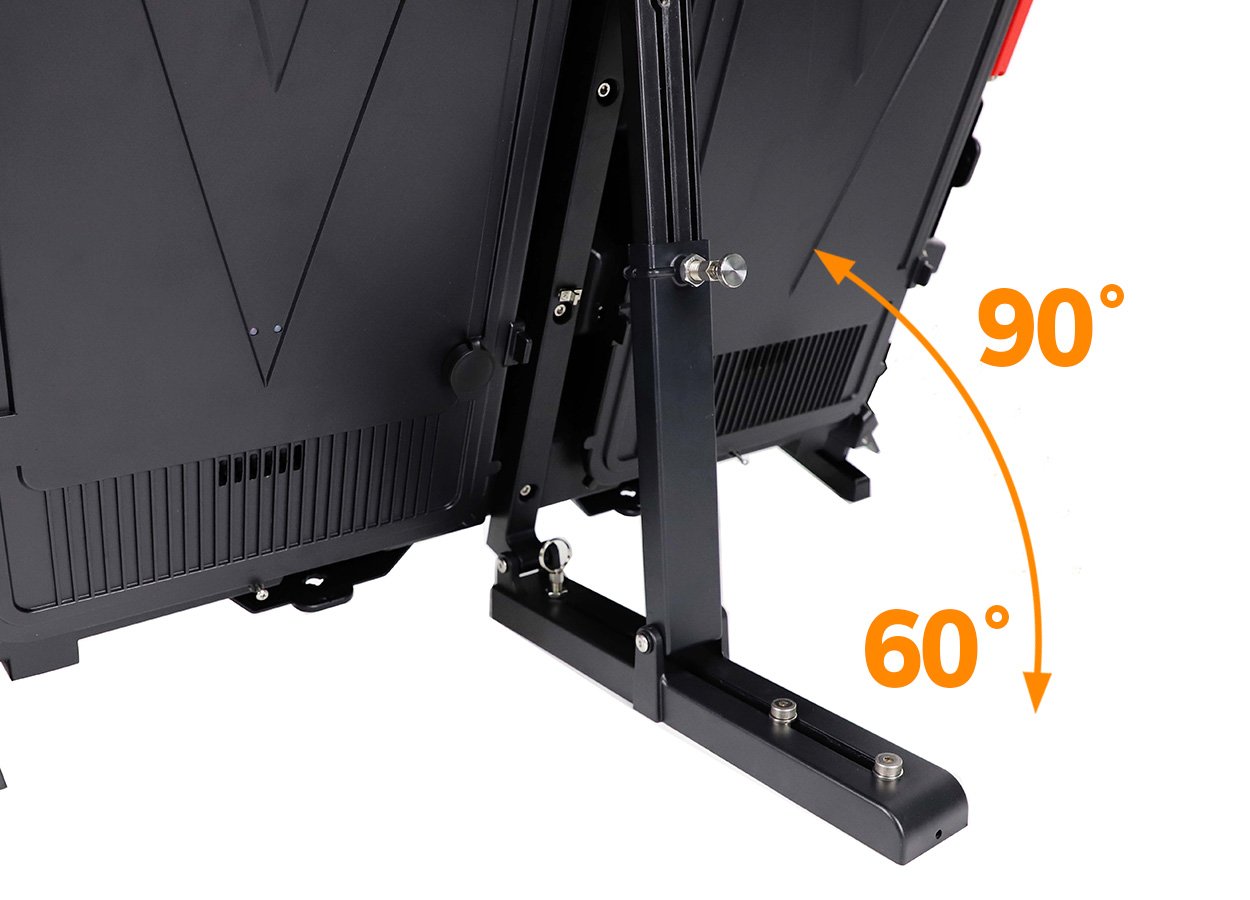
EagerLED’s EA960SP4 product page lists a 60°–90° adjustable rear bracket, protective padding and a soft mask, rear maintenance access, brightness up to 6,000 cd/m², and a refresh rate of at least 3,840 Hz. Its parameter table lists IP65 front/IP54 rear protection and different brightness values by configuration. Confirm the exact pixel-pitch version and protection ratings in the quotation; these are not specifications for every EagerLED stadium LED display. Review the EA960SP4 product details.
For a buyer, these features create specific questions: Does the support arrangement fit the intended perimeter position? Is rear service access available? Does the proposed configuration perform satisfactorily under the venue’s daylight and camera conditions?
02. Evaluate support alongside the hardware
EagerLED’s company page advertises a two-year warranty for displays, modules, and components, with stated conditions for repairs and shipping. Obtain the applicable terms in the quotation, including exclusions, freight responsibility, and the service process.
For a stadium LED display proposal, request a project-specific package containing the cabinet layout, pixel map, component list, control architecture, power information, spare-parts schedule, and delivery scope.
Send EagerLED the venue drawings, intended content, viewing distances, lighting conditions, and maintenance constraints. That brief gives the supplier a stronger basis for recommending a configuration and gives the buyer a practical way to judge the response.
10. FAQ
01. Can a stadium LED display work with existing scoring software?
Often it can, but compatibility must be verified across the complete signal path. Identify the scoring system, its available output or data interface, the graphics application, and the LED processor. Request a demonstration of live score updates and reconnection after an interruption. An available video input does not automatically mean the display system can interpret raw scoring data.
02. Does a high refresh rate guarantee flicker-free broadcasts?
No. Camera results also depend on shutter settings, scanning behavior, synchronization, and the relationship between the camera and LED timing. Brompton explains these interactions in its technical discussion of LED scan artifacts. Test the exact stadium LED display configuration with the intended cameras, including slow-motion modes when relevant.
03. Can a stadium LED display accept 4K video without 4K pixels?
Yes, if the processing system supports that input and can scale it to the display’s native resolution. Accepting a 4K signal does not make the physical screen a 4K display. Confirm input formats, scaling quality, canvas dimensions, and output capacity separately. Check whether fine text remains readable after scaling.
04. How many spare LED modules should a buyer order?
There is no universal percentage suitable for every installation. Base the quantity on module count, event criticality, replenishment time, and local repair capability. Include appropriate power supplies and receiving cards where needed. For a stadium LED display, request documented part compatibility and retain calibration information to help manage the appearance of future replacements.
05. Can new LED cabinets be added to an existing installation?
Sometimes, but expansion requires more than matching cabinet dimensions and nominal pitch. Check mechanical interfaces, module design, receiving cards, firmware, electrical loads, and processor capacity. Existing LEDs may also differ visually from new units because of aging or production variation. Ask for a side-by-side assessment before purchasing additional cabinets.
06. Is renting or buying better for occasional stadium events?
Compare the full cost and operating responsibility over the expected event schedule. Rental may suit occasional events or changing layouts, while ownership can suit regular use and permanent integration. Include transport, setup labor, storage, testing, and technical staffing in the comparison. A stadium LED display rental package should also state who handles weather-related decisions and equipment recovery.
07. How can operators secure remote display access?
Use named accounts, appropriate permissions, controlled network access, and a documented process for supplier support sessions. Identify who can upload content, change settings, and authorize remote connections. Request the controller supplier’s security guidance. Operational planning should also include configuration backups and a way to recover local control if the remote connection fails.
08. What should happen if the video source fails during an event?
Define the behavior before commissioning. Options may include a backup input, a stored graphic, or an operator-selected fallback layout, depending on system capabilities. Test the actual failure scenario rather than assuming redundant equipment will switch correctly. The recovery plan should cover the source, processor, signal path, and power arrangement as separate possible failure points.
11. Conclusion
A successful stadium LED display begins with a clear understanding of the venue. Physical size determines how large essential information appears; pixel pitch determines the available detail; brightness supports visibility under the expected lighting; and sightline planning establishes which spectators can actually see the image.
For professional buyers, the strongest specification connects those decisions to content, camera use, maintenance, and acceptance testing. It also makes quotations comparable by defining the complete installation scope.
When evaluating an EagerLED stadium LED display, provide a detailed project brief and request a configuration supported by drawings, current specifications, demonstrations, and written service terms. That approach turns a screen purchase into a system the venue can operate, maintain, and use effectively.