


A used LED video wall is worth considering when you can verify the identity and condition of the entire batch, reproduce its working configuration and obtain compatible service parts. A convincing demo of a few panels is not enough. Inspect the cabinets you will actually receive, test them together and tie the identified equipment to the agreed delivery and acceptance process.
This guide is for an AV rental company evaluating second-hand inventory before purchase. The central question is whether the equipment can become a dependable, serviceable part of your fleet. That requires more than comparing pixel pitch and advertised screen area: mixed replacement modules, worn connections and missing configuration files can change the practical value of the offer.
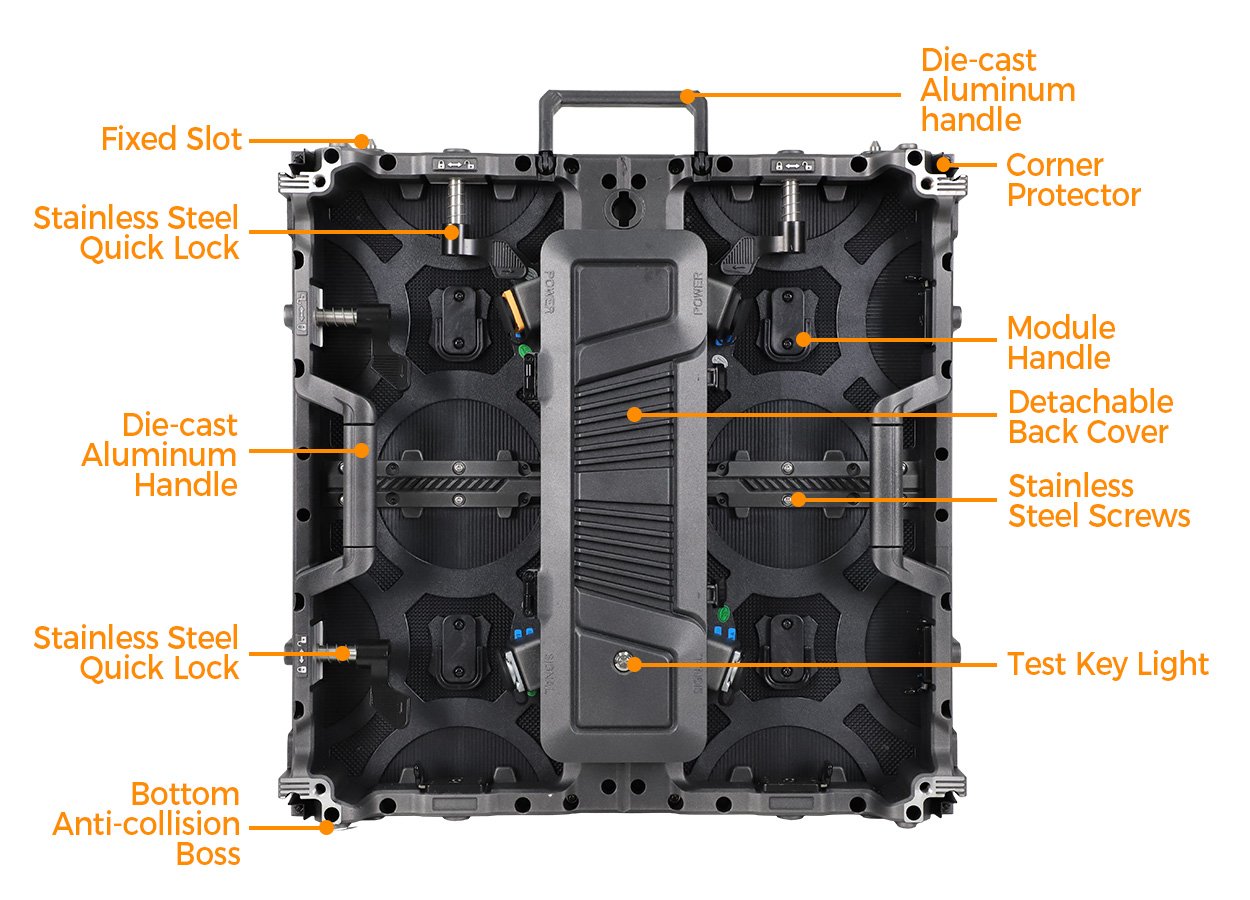
The product photographs below show EagerLED EA500C6 construction details as inspection examples. They are not photographs of used stock offered for sale, evidence of refurbishment or a promise that a particular second-hand batch has passed inspection. Apply the checks to the exact model and revision you are assessing.

1. Establish what the used LED video wall includes
Request a cabinet inventory before discussing the purchase as one large screen. Each entry should identify the manufacturer, model, serial number or asset number, pixel pitch, cabinet resolution and any known revision. Include the number of working cabinets, repair candidates and spares separately. A headline area can hide the difference between usable inventory and equipment included only for parts.
Ask the seller to connect that inventory with the equipment’s history. Useful records include original purchase documents, previous fleet ownership, typical use, storage conditions, repair reports and the date of the most recent full-batch test. Record missing information as unknown. A neat warehouse and clean cases are useful observations, but neither establishes how the panels were operated.
For a used LED video wall, operating hours are one input rather than a complete condition grade. A counter may describe a controller or receiving card instead of the original cabinet’s full history. Replacement electronics can also interrupt the record. Compare any available hours with service documentation and physical inspection, and ask what the counter actually measures before relying on it.
Identify what the seller means by tested, serviced or refurbished. Request the work performed, parts replaced, test conditions and remaining defects. These words do not have a universal scope across second-hand offers. If the seller replaced only failed LEDs, do not assume the price includes new power supplies, renewed locking hardware or optical recalibration.
| Record | What it establishes | What remains to verify |
|---|---|---|
| Cabinet inventory with serials and revisions | The identity and quantity of the offered equipment | That the inspected and shipped cabinets match the list |
| Repair report with replaced part numbers | Which assemblies have changed | Visual matching and compatibility after those repairs |
| Full-batch test record with settings | The configuration used during the demonstration | Repeatability after transport and reassembly |
| Original technical and support documents | The intended model specification and procedures | Whether the present hardware still matches that configuration |
| Itemized accessory and spare-parts list | The stated delivery scope beyond cabinets | Condition, compatibility and actual quantities in the cases |
Keep ownership evidence and technical condition as separate checks. A used LED video wall can be technically functional while the seller’s right to transfer particular software or accessories still needs clarification. Have the responsible purchasing team resolve those matters before relying on the equipment for a booked event.
2. Check for mixed panels and replacement modules
01. Compare identities before comparing pictures
Inspect module labels, receiving-card models, power-supply labels and cabinet markings across the batch. Record differences without assuming they are automatically defects. A documented service replacement may be acceptable; an unexplained mixture needs a technical review. The important question is whether the actual combination is supported and can produce the required image consistently.
Matching pixel pitch alone does not establish interchangeability. Module dimensions, pixel dimensions, mounting points, connectors, electrical requirements and control parameters all matter. Ask the original manufacturer or a qualified service provider to review uncertain combinations. Do not test a questionable electrical substitution by connecting it to a live cabinet and seeing what happens.
A used LED video wall may contain cabinets that share the same outer frame but have different internal revisions. Photograph the identifying details and link them to the inventory. If a lot has been assembled from several former fleets, ask the seller to state that explicitly. You can then assess each group instead of treating an unknown mixed lot as a single matched set.
02. Test visual matching at useful operating settings
Assemble the proposed batch in a representative layout and display uniform white, red, green, blue and several gray levels. Look for localized defects and visible boundaries between modules or cabinets. Examine the result at the brightness levels you expect to use, including dim indoor settings when relevant. Attractive moving video can conceal differences that uniform patterns reveal.
Check a used LED video wall from normal audience positions as well as close range. Repeat observations at representative off-axis positions. A close photograph helps identify individual defects, but it does not describe the appearance of the whole wall to a client. Keep the room lighting, display settings and camera exposure consistent when recording before-and-after comparisons.
Calibration may improve brightness and color uniformity within the capabilities of the hardware. It does not replace damaged LEDs, repair a bent cabinet or guarantee that unrelated modules will match. Review the calibration scope and limitations before accepting a promise that every visible mismatch can be corrected later.
If the seller proposes recalibration as a remedy, require another demonstration of the same identified batch afterward. Retain the final settings and data with the acceptance record. A verbal plan to improve the image after payment leaves the most important visual result unresolved.
3. Inspect the connections that repeated rentals wear
The mechanical condition of a used LED video wall affects assembly, alignment and service. Inspect frames, cabinet edges, handles, locating features, quick locks, threaded connections and protective parts. Record bent components, missing fasteners, unusual repairs and visible wear. Qualified personnel should assess anything that could affect load-bearing performance; a photograph of an assembled screen is not structural verification.
Have the seller demonstrate joining and separating representative cabinets using the correct procedure. The panels should align without improvised force or unapproved replacement hardware. Compare examples from different parts of the batch, especially those with visibly different wear or repair history. Include spare cabinets in this check, because an unusable spare cannot support your event recovery plan.
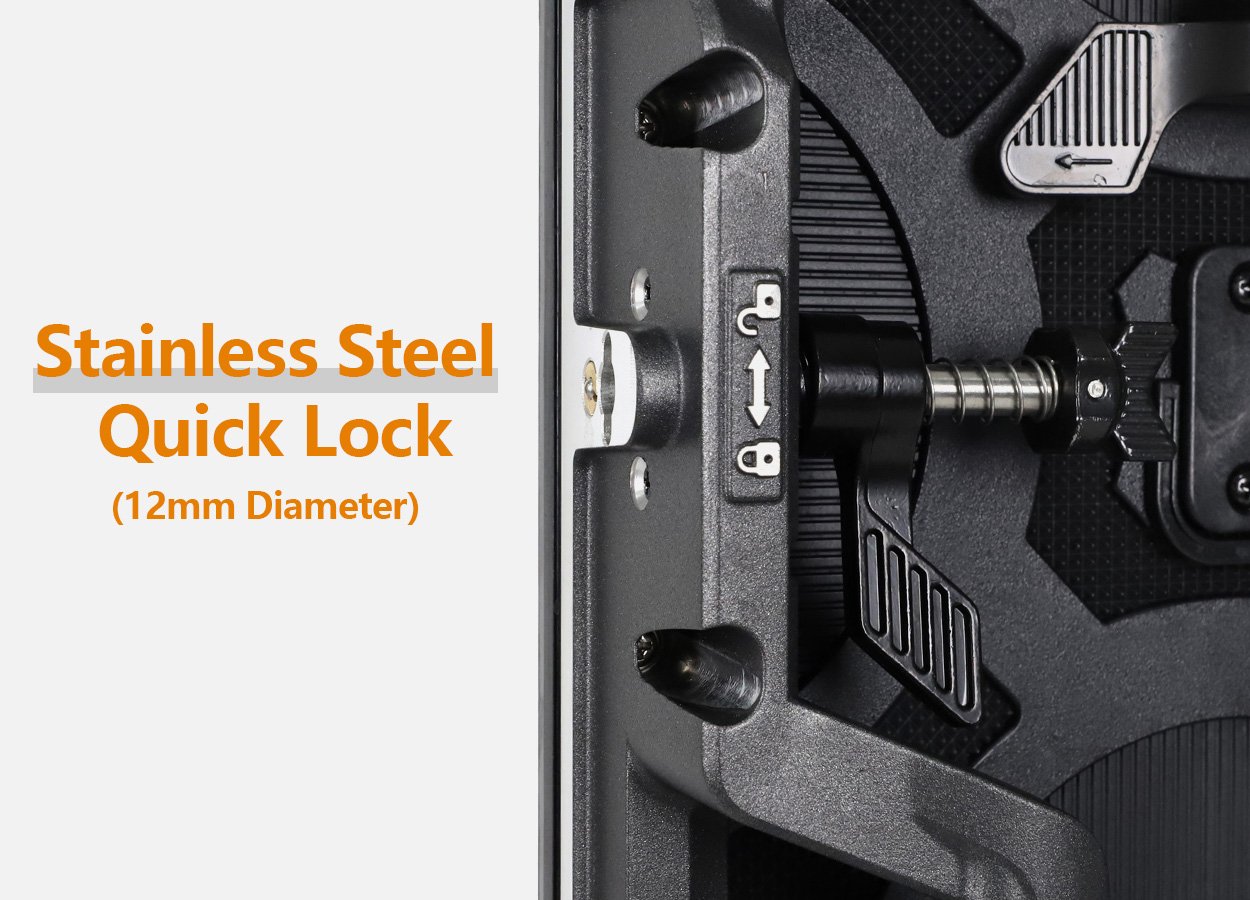
Check hanging bars, support adapters and stacking components as their own equipment items. They need identifiable models, compatible connections and the appropriate documentation. Do not assume hardware supplied in the same flight case belongs to the cabinet model. Your intended rigging or ground-support arrangement must be reviewed for the actual equipment and event conditions.
Look closely at power and data connectors, cable strain relief, damaged housings and signs of contamination. Electrical inspection and any internal work should be performed by qualified personnel with the equipment safely isolated under the applicable procedure. Note concerns for service review rather than making undocumented repairs during a buying inspection.
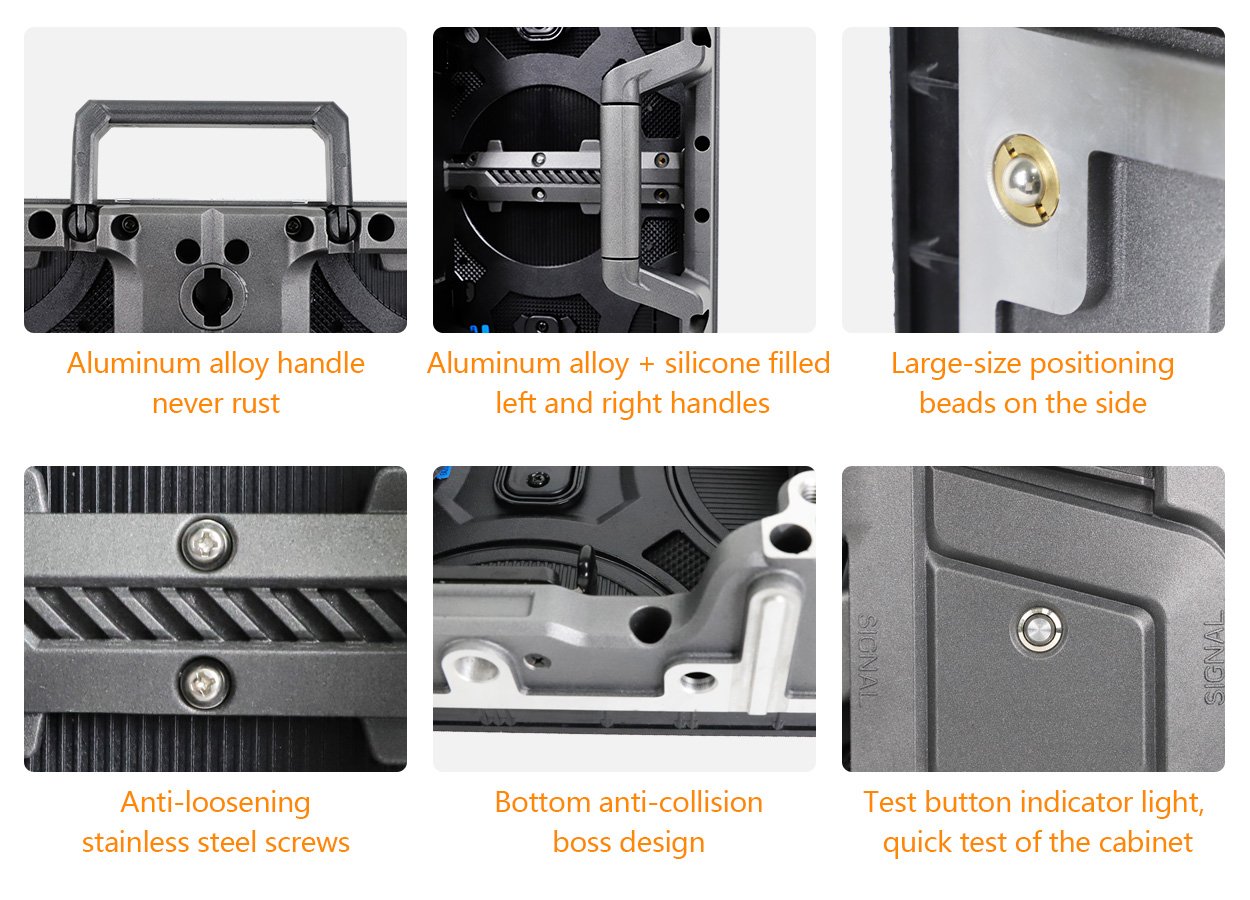
Ask whether the used LED video wall has been altered from its original construction. Added brackets, replacement connectors or changed power components can affect service procedures and the relevance of original documents. Record each alteration and request supporting information. An undocumented modification is a reason to pause the technical assessment, not to assume the original specification still applies.
4. Test the full system, not a selected sample
Agree a written test sequence for the used LED video wall before the inspection. Define the cabinet population, processor, receiving-card configuration, software version, source, brightness settings and test duration. The sequence should include a cold start, operation under the intended conditions and a restart. Choose the duration with the service team; a brief demonstration cannot establish long-term reliability.
Every cabinet in the sale should be accounted for in testing. Where the complete batch cannot be assembled at once, use a documented rotation that identifies each group and its neighboring panels. A random sample may help you decide whether to travel for inspection, but it should not be presented as proof that all untested cabinets are ready for rental service.
Run uniform patterns, gradients, fine text and representative client content. Record dead or stuck pixels, intermittent sections, color differences, unstable connections and any unexpected resets. Use a cabinet map to locate findings. Classify observations against the acceptance criteria agreed for your business; do not substitute a seller’s undefined grade for your clients’ actual requirements.
Include the intended video chain when assessing a used LED video wall. Check the native pixel layout, mapping, scaling and the input formats your rental work requires. If camera capture is part of the use case, test representative camera settings with the complete system. A refresh-rate number in an old brochure cannot prove acceptable results for every camera and operating mode.
| Finding | Evidence still needed | Purchase response to discuss |
|---|---|---|
| Several cabinets show different color | Module identities and a repeat test after the proposed correction | Hold acceptance until the agreed visual result is demonstrated |
| Some inventory cannot be powered for inspection | Individual test records or a later witnessed test | Separate unverified units from the working-equipment price and scope |
| Locking hardware is damaged or altered | Qualified assessment and documented replacement parts | Exclude affected hardware from service until resolved |
| Configuration files are missing | A supported backup and demonstrated recovery process | Make configuration delivery a specific outstanding item |
| Spare modules exist but have never been fitted | Compatibility and visual replacement demonstration | Count only verified replacements as operational spares |
Photograph the test layout and the labels of inspected cabinets, then retain the original result files. Keep defects visible in the report, including anything the seller intends to correct. A good record distinguishes observed facts, proposed remedies and items that have actually passed a second test.
5. Verify spares, configuration and service support
Ask for exact part numbers and quantities for spare modules, receiving cards, power supplies, cables and mechanical items. Establish whether those parts are included, available separately or no longer obtainable. For a used LED video wall, a small stock of known compatible spares may be more useful than a general claim that equivalent components can be found later.
Request a supported replacement demonstration on a suitable cabinet. Confirm the physical fit, required configuration steps and appearance after replacement. NovaStar documentation, for example, makes some module-calibration recovery features conditional on receiving-card capability and module flash memory. Do not assume automatic recovery exists on every older panel or every control system.
Preserve the working receiving-card parameters, cabinet connection map and available calibration data through the manufacturer’s supported tools. Also retain controller presets, relevant software versions and a readable inventory linking files to the actual batch. Store an independent copy in your company records. A backup whose purpose cannot be identified is difficult to trust during an event fault.

For the used LED video wall you are buying, verify support with the party that will actually perform repairs. Ask about the supported revisions, replacement options, diagnostic charges and the process for unavailable parts. Seller support, manufacturer support and a local service contractor are separate commitments. Record their boundaries instead of assuming one automatically includes the others.
Use the LED display handover checklist to organize the technical package. For a new-system comparison, the EA500C6 rental cabinet page provides a current product reference. Compare it with the actual second-hand offer on usable inventory, serviceability and total scope, without treating a current model’s specification as the specification of an older batch.
6. Make delivery and acceptance match the inspection
Identify the inspected used LED video wall in the purchase documentation by its cabinet inventory and accessories. Specify how any substitutions will be reviewed. If cabinets are repaired or exchanged after inspection, require updated records and the relevant repeat tests. This connects the visual demonstration with the equipment that ultimately arrives at your warehouse.
Separate the equipment price from the work needed to put it into service. Include freight, protective packing, local inspection, confirmed repairs, spare parts, compatible processing, support hardware and staff preparation. Obtain actual quotations for these items. A generic discount against a new screen does not establish the final cost of usable rental inventory.
Agree when and where arrival checks occur, how discrepancies are documented and who handles transport damage or missing items. The responsible purchasing team should put the agreed remedies and payment conditions into the transaction documents. This article provides an inspection framework, not a universal contract or a claim about rights in a particular jurisdiction.
Before booking a used LED video wall onto a client’s event, repeat the agreed receiving tests after transport. Match serials, check cases and accessories, rebuild a representative layout and verify the saved configuration. Keep unresolved items out of the operational fleet. A purchase can be commercially complete while some equipment still needs technical release for service.
Frequently asked questions
Is a lower purchase price enough to justify an older pixel pitch?
Only if the resulting resolution and viewing performance fit the jobs you expect to deliver. Test your smallest text, closest audience position and normal content. A cheaper batch that cannot satisfy your recurring clients may require another purchase, regardless of its condition.
Can indoor cabinets be reassigned to outdoor rental work?
Do not assume that they can. Confirm the original intended environment and the condition of the complete enclosure, connectors and protection systems. An improvised cover does not establish outdoor suitability. Ask the manufacturer and the responsible technical team to assess the proposed application.
Can a video call replace an in-person inspection?
It can support an initial review if the seller shows the inventory, labels, test settings and requested patterns in a continuous session. It offers limited evidence of mechanical condition and subtle visual differences. Use it to identify questions and decide the next inspection step, not to imply that unobserved equipment has passed.
Should cosmetically marked cabinets be rejected?
Distinguish appearance from function. A surface mark may be acceptable for your fleet, while damage near a connector, lock or alignment feature needs a different assessment. Record the location and have the relevant specialist review uncertain damage; do not grade condition from the display face alone.
What if the seller cannot provide a complete operating history?
Record the limitation and increase the emphasis on identified-batch testing, independent assessment and verified support. Missing history is not proof of failure, but it reduces what you can conclude about past exposure and repairs. Your buying decision should reflect that uncertainty rather than replacing it with an estimated history.
Prepare a documented purchase decision
Bring together the cabinet inventory, inspection findings, test results, repair proposals, spare-parts evidence and delivery scope. Decide which findings are acceptable, which need correction and which remain unknown. That package gives your rental team a practical basis for deciding whether a used LED video wall fits its next stage of work.
If you want to compare the offer with a new EagerLED rental system, send EagerLED your fleet requirements, target layouts, viewing conditions and service expectations. Request a clearly scoped proposal so both options can be compared against the same operating requirements.





