

If you’ve ever tried running a 4K LED wall from a laptop wedged behind a rack with the lid permanently open because someone might need to change the playlist, you already understand why a dedicated media server exists. The Novastar ET1S-G is NovaStar’s answer to that exact problem: a 1U rack-mount box that plays content, manages playlists, and keeps running after the laptop crowd goes home.
It’s not a video processor. It’s not a sending card. It’s a Windows-based media server with NovaStar’s Kompass FX1 playback software pre-installed, designed to sit between your content and your LED processor and do one job reliably. For exhibitions, showrooms, conference rooms, and any fixed install where the content loop matters more than live switching, the ET1S-G is the right category of product. Whether it’s the right product in that category is what we’ll dig into here.
1.What is Novastar ET1S-G?
2.What Novastar ET1S-G Actually Does
3.Novastar ET1S-G Technical Specs at A Glance
4.Kompass FX1: Software that Makes or Breaks the Box
5.Where Novastar ET1S-G Fits in NovaStar’s Lineup
6.Novastar ET1S-G vs Alternatives
7.Novastar ET1S-G Media Server: Limitations & Areas for Improvement
8.Who Should buy Novastar ET1S-G?
9.FAQs
10.Conclusion
1. What is Novastar ET1S-G?
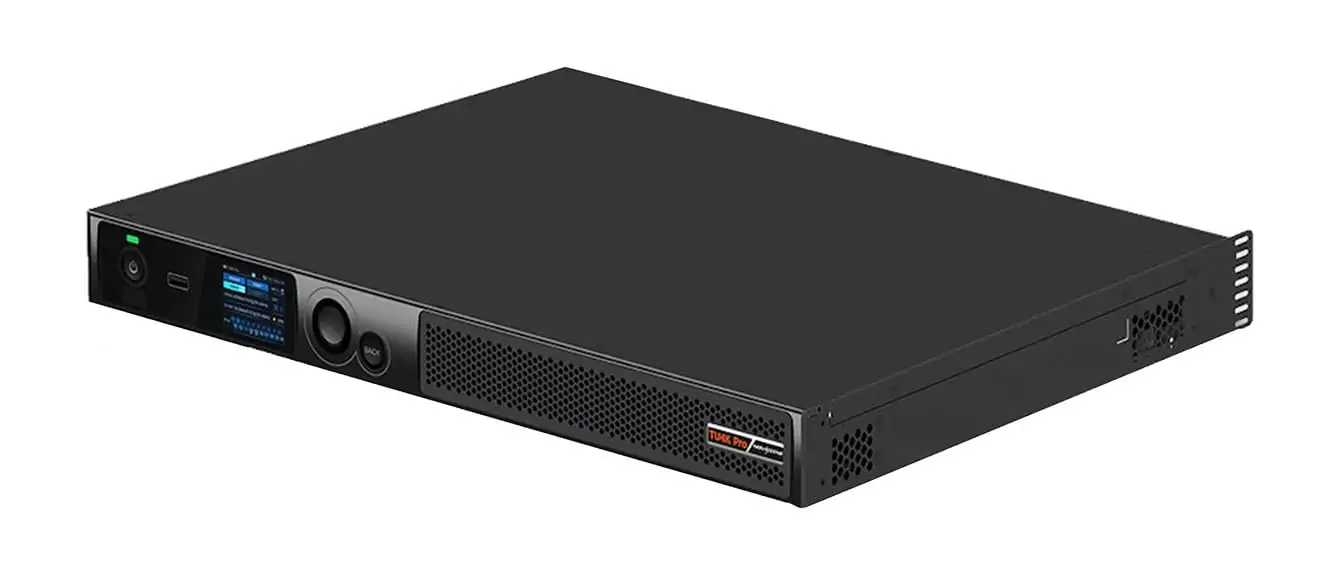
Novastar ET1S-G is a 1U media server built on an Intel Core i3-1215U processor with 16 GB of DDR4 RAM and a 256 GB SSD, running Windows 10 Enterprise LTSC. It ships with NovaStar’s Kompass FX1 software for media playback, playlist management, and scheduling. Physically, it’s 482.6 × 407.5 × 50.1 mm and weighs 5.2 kg. Power draw maxes out at 80 watts.
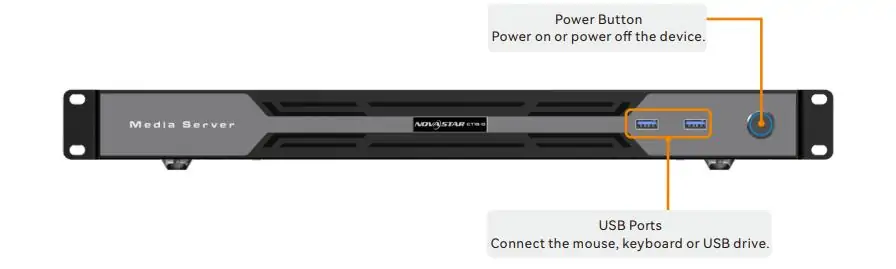
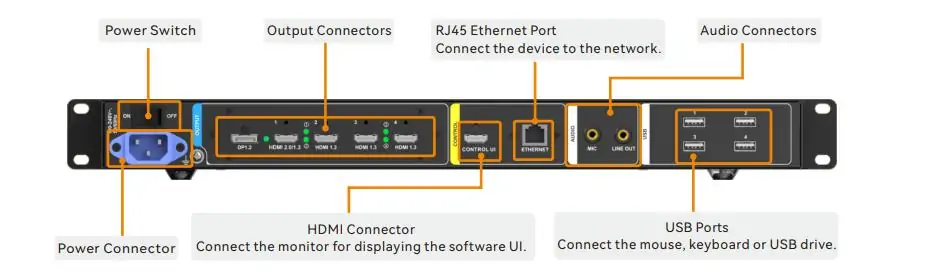
The rear panel gives you one DisplayPort 1.2, one HDMI 2.0, and four HDMI 1.3 outputs. On the front, two USB 3.0 ports. On the rear, four more USB 2.0 ports, a Gigabit Ethernet jack, mic in, and line out. There’s also a dedicated HDMI port labeled CONTROL UI for a monitoring screen, which is a small touch but one that makes life easier when the main outputs are buried in cabling and you just need to see the desktop.
Storage is a 256 GB SSD. That’s enough for a show reel, a corporate playlist, or a rotating set of exhibition content. If you need more, NovaStar sells an ET1S-500G variant with a 500 GB drive. If you need more outputs, there’s the ET2S-G (2U, dual 4K), ET4S-G (4U, quad 5K), and ET16S-G (server-class, multi-8K). The ET1S-G is the entry point.
2. What Novastar ET1S-G Actually Does
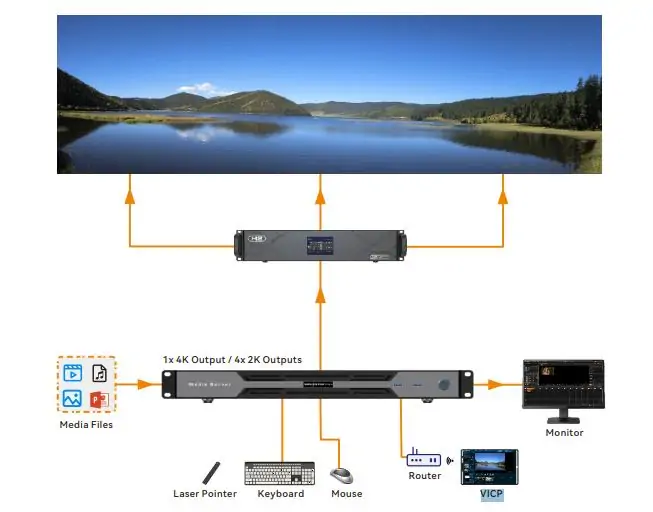
A media server sits in a different part of the signal chain than the processors we usually talk about. Novastar ET1S-G doesn’t scale live inputs or manage layers from multiple cameras. It plays pre-produced content — video files, image sequences, audio tracks — and sends a finished signal to whatever processor or sending card sits downstream.
The Kompass FX1 software handles the playback side. You import media into a library, drag clips onto a timeline, set playlists and schedules, and the software takes it from there. It supports up to four simultaneous video layers plus one audio stream, with crossfade transitions between programs. If you’re running a lobby display that cycles through brand videos, a museum exhibit with timed content triggers, or a conference room that needs a rotating slide deck with embedded video, this is the workflow.
Novastar ET1S-G can output a single 4K@60Hz signal or split its bandwidth into four 2K@60Hz streams across the HDMI 1.3 ports. For ultra-wide displays, it supports custom output resolutions up to roughly 8,192 pixels wide and 4,095 pixels tall, with up to 1,024 partitions per output. That last feature is useful for creative installations where one content canvas needs to map across multiple physical displays in irregular arrangements.
NDI support is included, which means the ET1S-G can receive NDI streams over the network and play them back as sources. For a corporate campus or a broadcast facility where content originates elsewhere and needs to arrive at the display over IP, this is more practical than running dedicated HDMI runs.
3. Novastar ET1S-G Technical Specs at A Glance
| Parameter | Novastar ET1S-G Specs |
|---|---|
| Processor | Intel Core i3-1215U (6C/8T, up to 4.4 GHz) |
| RAM | 16 GB DDR4 |
| Storage | 256 GB SSD (500 GB variant available) |
| OS | Windows 10 Enterprise LTSC |
| Max output | 1× 4K@60Hz or 4× 2K@60Hz |
| Video outputs | 1× DP 1.2, 1× HDMI 2.0, 4× HDMI 1.3 |
| Max layers | 4 video + 1 audio |
| Max partitions per output | 1,024 |
| USB | 2× USB 3.0 (front), 4× USB 2.0 (rear) |
| Network | 1× Gigabit Ethernet |
| Audio | Mic in (3.5mm), Line out (3.5mm) |
| NDI support | Yes |
| Power | 80 W max |
| Dimensions | 482.6 × 407.5 × 50.1 mm (1U) |
| Weight | 5.2 kg |
| Software | Kompass FX1 (pre-installed) |
| Remote control | VICP (TCP/IP) |
| Price | ~$875–$1,099 USD |
4. Kompass FX1: Software that Makes or Breaks the Box
The hardware inside Novastar ET1S-G is a competent but unremarkable small-form-factor PC. What you’re actually paying for is Kompass FX1, the pre-configured Windows LTSC build with no bloatware and no Windows Update surprises, and the assurance that NovaStar has tested this exact hardware configuration with their software stack.
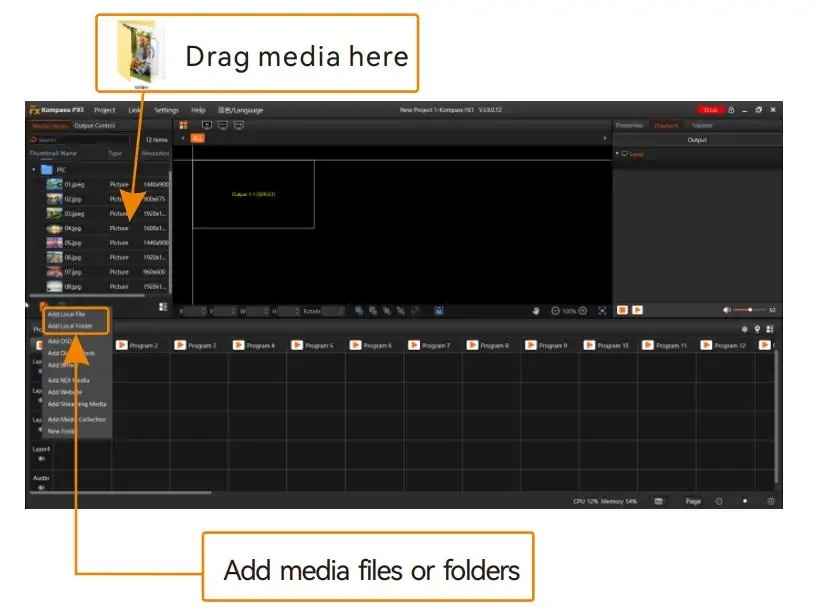
Kompass FX1 is a media playback and show control application, not a full NLE or compositing tool. The workflow: import media into the library (it handles H.264, H.265, MPEG-4, WMV, plus common image and audio formats), organize clips into programs, arrange programs into playlists, set schedules, and let it run. You can configure crossfade durations between programs, layer multiple video tracks with transparency, apply masks and cropping, and use the built-in library of 20-plus transition effects and 3D video templates.
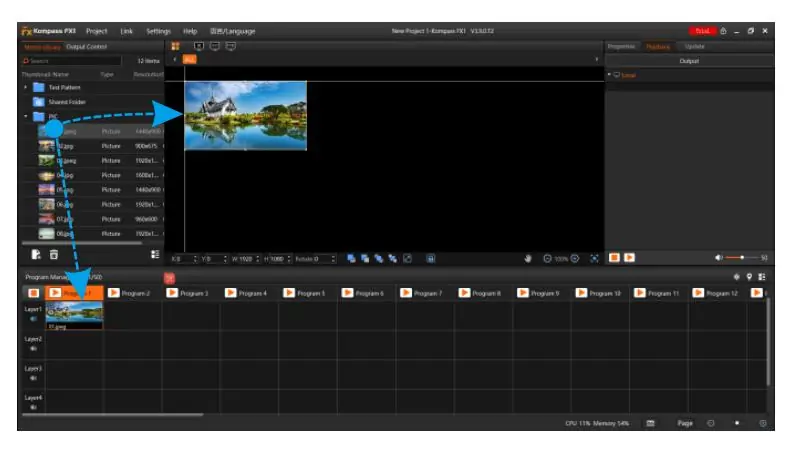
For a technician who’s used to QLab, Mitti, or even PowerPoint, Kompass FX1 has a learning curve but it’s not steep. The interface is logically laid out. The manual exists and is reasonably complete. The main friction point is that Kompass is a NovaStar-specific tool, so if your team already knows a different playback system, you’re asking them to learn a new one for this one box. That’s a reasonable ask if the integration benefits pay off. It’s less reasonable if someone in procurement just liked the price.
Remote management runs through VICP, NovaStar’s Visual Intelligent Control Platform. From a laptop or tablet on the same network, you can monitor playback status, switch programs remotely, and adjust schedules without walking to the rack. For an integrator managing displays across a campus or a chain of retail locations, VICP is one of the main reasons to choose the ET1S-G over a generic PC running a third-party media player.
5. Where Novastar ET1S-G Fits in NovaStar's Lineup
NovaStar’s product catalog can be confusing because they make processors, sending cards, receiving cards, media servers, and cloud platforms that all overlap in different ways. Novastar ET1S-G lives in the ET media server series, which is separate from the Taurus playback processors (Novastar TU15 Pro, TU20 Pro, TU4K Pro) and separate from the H-Series video wall splicers.
The difference matters. A Taurus unit like the TU4K Pro integrates a media player, video processor, and sending card into one Android-based box. The ET1S-G is just the media player. It outputs a standard video signal over HDMI or DisplayPort, and you connect that to whatever processor or sending card your LED wall already uses. If you already have a video processor you like and you just need a reliable playback source, the ET1S-G is the right approach. If you’re building from scratch and want one box to do everything, a Taurus unit might make more sense.
Within the ET series, Novastar ET1S-G is the entry point:
| Model | Form | Max Output | Storage | Best For |
|---|---|---|---|---|
| ET1S-G | 1U | 1× 4K@60 | 256 GB | Small rooms, exhibitions |
| ET1S-500G | 1U | 1× 4K@60 | 500 GB | Same, larger media libraries |
| ET2S-G | 2U | 2× 4K@60 | 500 GB | Dual-screen installs |
| ET4S-G | 4U | 4× 5K@60 | 250 GB + 1 TB | Large venues, multi-screen |
| ET16S-G | Server | Multi-8K | Up to 2 TB+ | Stadiums, high-end productions |
For most fixed installs with a single LED wall, the ET1S-G or ET1S-500G is plenty. Step up to the ET2S-G when you need independent content on two walls from one box. The ET4S-G and ET16S-G are for the kind of installations where you have a dedicated rack room and someone whose full-time job is managing content.
6. Novastar ET1S-G vs Alternatives
6.1 Novastar ET1S-G vs a Generic Small PC
A Dell OptiPlex or Intel NUC with similar specs costs about the same or slightly less. You could install Playdeck, VLC, or a custom playback app and get something functionally similar. What you wouldn’t get is Kompass FX1 pre-configured and tested, the VICP remote management platform, NDI support out of the box, the 1,024-partition mosaic mode, or NovaStar’s warranty and support. For a one-off install where the integrator is local and can troubleshoot in person, a generic PC might be fine. For a multi-site deployment managed remotely, the ET1S-G’s integration with VICP justifies the premium.
6.2 Novastar ET1S-G vs Colorlight Media Players
Colorlight offers media players at lower price points that cover basic 4K playback and scheduling. The trade-off is the same as with Colorlight processors: the hardware does the job, but the software ecosystem is less mature. Colorlight’s remote management tools are improving, but they don’t match VICP’s polish for multi-site deployments. If you’re cost-sensitive and managing a single location, Colorlight is worth a look. If you’re building a network of displays across multiple sites, the ET1S-G’s management features earn back the price difference quickly.
6.3 Novastar ET1S-G vs Taurus TU4K Pro
Different products for different problems. The TU4K Pro integrates Android-based playback, video processing, and LED sending in one box for roughly $1,800–$2,700. The ET1S-G is a Windows-based media server for roughly $875–$1,100 that outputs a standard video signal. If your LED wall already has a processor and sending card, get the ET1S-G. If you need the all-in-one approach, get the TU4K Pro.
7. Novastar ET1S-G Media Server: Limitations & Areas for Improvement
The 256 GB SSD is tight if you’re working with high-bitrate 4K H.265 files. A single uncompressed 4K 60p workflow won’t fit, but for compressed delivery formats (which is what 99% of installations actually use), it’s fine. The 500 GB variant is only about $80 more and worth it if you’re storing more than a few hours of 4K content.
The HDMI 1.3 ports are limited to 1080p, which means the four 2K outputs max out at that resolution. If you’re driving four independent 4K displays, you need the ET4S-G or a different approach entirely. This isn’t a flaw — the spec sheet is honest about it — but it’s easy to miss if you’re scanning the port count without checking the resolution per port.
Windows 10 LTSC is stable and stripped down, but it’s still Windows. You get driver updates, occasional reboots, and the overhead of a full desktop OS. For a box that’s supposed to run 24/7 without intervention, an embedded Linux or Android approach (like the Taurus series) has less long-term maintenance surface. That said, Windows also means you can run third-party software if Kompass FX1 doesn’t cover every use case, which is flexibility the Android-based Taurus units don’t offer.
No redundant power. At 80 watts and intended for fixed installs where downtime is inconvenient but not catastrophic, this is acceptable. For a 24/7 mission-critical display, spec a backup unit or look at the higher-end ET models.
8. Who Should buy Novastar ET1S-G?
The ET1S-G makes the most sense when:
- You need a dedicated, rack-mountable media server for a fixed LED install (exhibition, showroom, conference room, lobby, museum, retail)
- Content is pre-produced and scheduled — playlists, loops, timed programs — rather than live-switched
- You already have a video processor and sending card and just need a reliable playback source
- Remote management matters — you want to monitor and update content across one or more locations without being on-site
- You value the integration between Kompass FX1 and NovaStar’s ecosystem over the flexibility of a generic PC
Skip it and look at alternatives when:
- You need live multi-source switching, PIP, or IMAG — that’s processor territory (TU4K Pro or H-Series)
- You need everything in one box including the sending card — that’s Taurus territory (TU4K Pro)
- You’re doing a one-off install managed locally and a generic PC with VLC would work fine
- The budget is extremely tight — Colorlight or Huidu media players cost less, with trade-offs in software
- You need more than one 4K output — look at the ET2S-G or ET4S-G
9. FAQs
1. Is the ET1S-G a receiving card?
No. The ET1S-G is a media server. It outputs standard video signals (HDMI, DisplayPort) to a video processor or sending card. It does not connect directly to LED cabinets. Receiving cards are a separate product category — NovaStar’s A-series and MRV-series handle that job.
2. Can I install my own software on the Novastar ET1S-G?
Yes. It runs Windows 10 Enterprise LTSC, so any Windows-compatible media playback software will run. That said, Kompass FX1 is pre-installed and licensed, and using third-party software means you lose the VICP remote management integration that is one of the main reasons to buy this box.
3. How does the Novastar ET1S-G connect to an LED wall?
The ET1S-G outputs HDMI or DisplayPort to a video processor or sending card. That device then drives the LED cabinets over Ethernet or fiber. The ET1S-G does not have Ethernet outputs for direct cabinet connection — it’s a media source, not a processor.
4. What's the difference between the ET1S-G and a Taurus unit like the TU4K Pro?
The TU4K Pro is an all-in-one: Android media player + video processor + 20-port sending card in one box. It connects directly to LED cabinets. The ET1S-G is just the media player — it outputs HDMI/DP to your existing processor setup. Choose the TU4K Pro for new all-in-one builds. Choose the ET1S-G when you already have a processor and just need a playback source.
5. Does the ET1S-G support 8K playback?
No. Novastar ET1S-G decodes and outputs a maximum of 4K@60Hz (or 4× 2K@60Hz). For 8K playback, you need a higher-end ET model like the ET16S-G or a different product category entirely.
6. Can I control the ET1S-G remotely?
Yes. VICP (Visual Intelligent Control Platform) provides remote monitoring, program switching, and scheduling over TCP/IP. You can manage multiple Novastar ET1S-G units from a single VICP dashboard.
10. Conclusion
The Novastar ET1S-G is a purpose-built media server that does one job: plays 4K content on a schedule and keeps running. Kompass FX1 and VICP remote management are the real value — the hardware is a competent small PC, but the software and ecosystem integration are what you’re paying for. If you manage displays across multiple locations, the remote management covers the price premium over a generic PC within the first year of not dispatching a tech to swap a USB stick.
At $875 to $1,100, the Novastar ET1S-G is priced fairly. Get the 500 GB variant if you work with high-bitrate 4K. Step up the ET series if you need more outputs. And if you need an all-in-one box with processing and sending built in, the TU4K Pro is the next stop.