

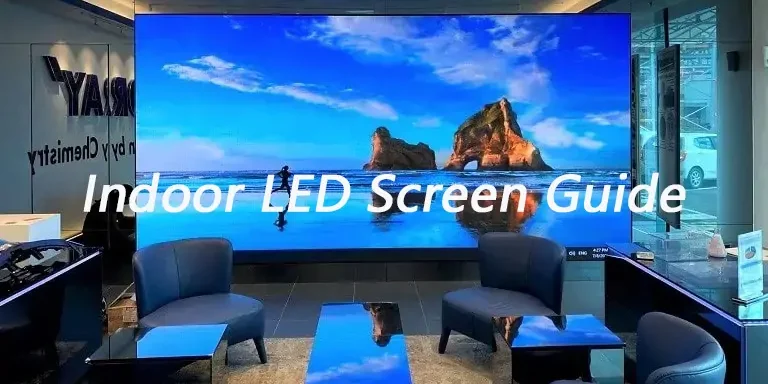
An indoor display is now a standard and commonly used form of visual communication for businesses to create engagement with their audience. They are great in retail shops, conference halls, sports stadiums, and entertainment venues, and much more. You can attract your customers with sharp and bright indoor LED screen displays.
The purpose of this article is to help you purchase according to your need and budget. This article will discuss indoor LED screens, its types, specifications and costs etc. Let’s start.
1. What is an Indoor LED screen?
An indoor LED screen delivers high-quality visual content. You should use them in suitable lighting conditions where the brightness of the display is not as bright as for an outdoor LED screen. The indoor LED screens should have a brightness level of between 800 nits and 1500 nits. This range is enough to provide a clear image.
These screens do not need weatherproofing that outdoor LED screens do. Indoor LED screens are lighter, easy to install, and suited for close view. They have smaller pixel pitch and make sharper images for viewers standing nearby.
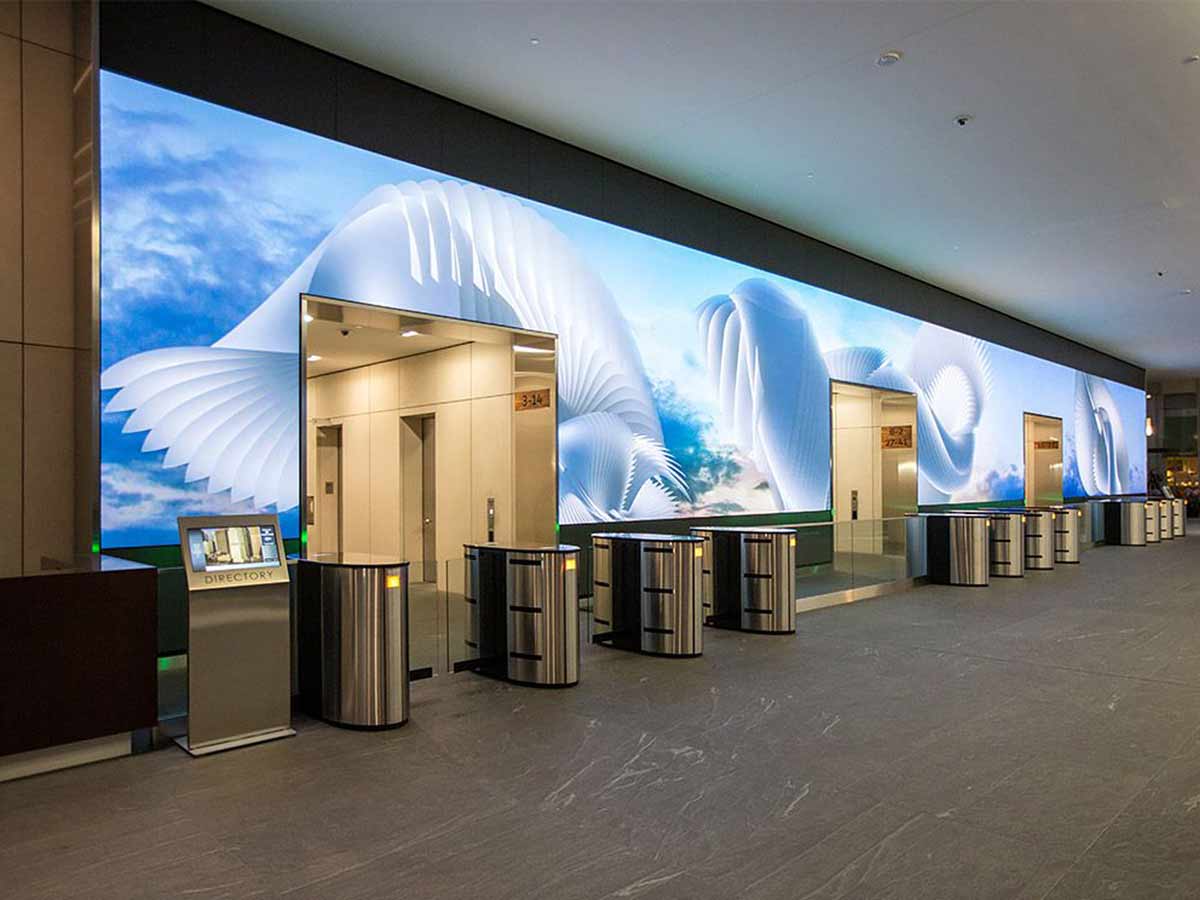
You can use them in retail advertising walls, backdrops on stage at concerts, displays at live events, corporate presentations or museum exhibits. They all share the commonality of indoor LED screens allowing you to share messages, videos, and/or real-time information in a way to keep your audiences engaged.
2. Indoor LED Screen Types
Not every indoor LED screen can accomplish the same job. Here’s what each type does well, what to expect, and when to choose it.
2.1 Fixed Indoor LED Screens
A fixed indoor LED display remains in a specific position. It is mounted on a wall or frame, aligned, and then connected to power and data. We see this type of display in malls, control rooms, hotel lobbies and meeting areas.
Because it is not moved around like a mobile display, it has a clean finish and easy front service. Further, you have more control over light, sound, and cables.
2.2 Rental Indoor LED Screens
A rental indoor LED screen consists of modular assembled panels that lock together and can be easily disassembled. This works great for concerts, trade show booths, and temporary stages. Each panel is designed for quick setup and can also be transported easily. A rental indoor LED screen also has the option to change the size and shape of the display, making it versatile enough for every venue.
2.3 Transparent Indoor LED Screens
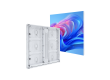
Transparent indoor LED displays allow light to pass through the viewing surface. Hence, make the store or interior visible. They are a fantastic way to advertise from the retail window, while allowing daylight to pass through the display and sight lines.
Transparent indoor LED displays deliver digital content with an open, transparent appearance. These types are popular in retail storefronts and for glass installations.
2.4 Flexible or Curved Indoor LED Screens
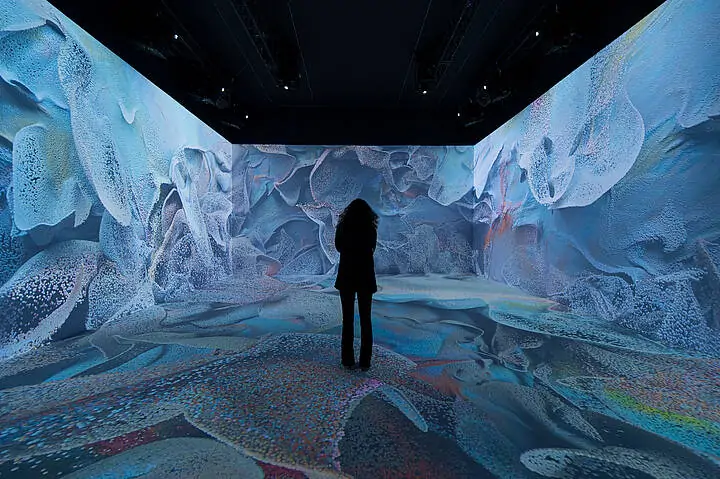
Curved indoor LED screens can be bent to fit around columns or arcs or form other creative shapes. You can adjust the screens according to the needs of the architecture of a space. Hence, you can make immersive designs without breaking up the image with seams or hard edges.
Flexible LED screens are commonly found in museums, experience centers, and high-end retailers, where the display is included in the experience.
2.5 All-in-One LED Displays
All-in-one LED displays offer a screen, controller, speakers, and sometimes a stand or wall bracket in one package. These types of indoor LED screens allow for a plug-and-play option. They are great for boardrooms, classrooms, and hotels. All-in-one displays can be mounted, plugged into the wall, and start presenting in a matter of minutes. You won’t have to purchase any extra processors or audio systems.
2.6 Ultra-Fine Pitch Screens
Ultra-fine pitch screens have very small pixel spacing or pitch and are designed to be viewed closely. It is beneficial when you need to see sharp detail. You see ultra-fine pitch screens where images require significant detail. For example, in control rooms, executive briefing centers, and broadcast studios. Smaller pixel pitch allows for clear images at close proximity, but also allows for the opportunity to use a larger pixel pitch in larger rooms to save money on the screens without compromising the viewing experience.
3. Key Features and Specifications to Consider
When you decide on an indoor LED screen, knowing the primary technical characteristics will help to narrow down the options to the most appropriate screen type and pixel pitch for your space and viewing distance.
3.1 Pixel Pitch
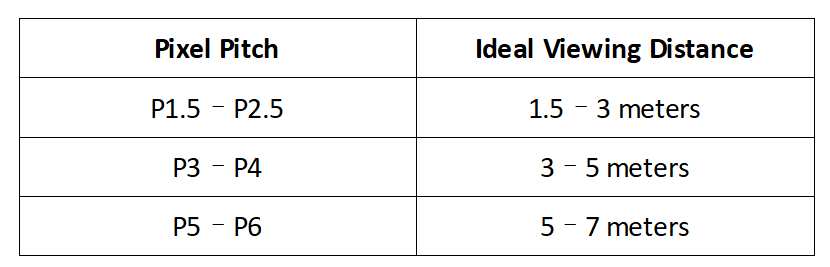
The pixel pitch is the distance in millimeters from the center of one LED pixel to the center of the next LED pixel. A smaller pixel pitch will provide a sharper image at a close viewing distance, while a larger pixel pitch will work for longer viewing distances.
For example:
3.2 Brightness Levels
Indoor LED screens will usually be between 800 and 1,500 nits of brightness. Lower brightness works well in darker meeting-room environments and higher brightness should be given consideration in retail environments that are bright or have higher levels of indoor lighting. Selecting an appropriate brightness level will ensure no glare and the appearance of natural colors, as intended.
3.3 Refresh Rate
Refresh rate means how many times the image is refreshed in any given second. If it is important that it has to appear smooth visually (for instance if the display might be filmed) a refresh rate of 3840 Hz or higher should be reviewed along with looking for a low refresh rate. Higher refresh rate = less flicker and crispness at very high magnification.
3.5 Viewing Angle
The viewing angle determines how far to the side someone can be to still see a clear image. A viewing angle range of 140° to 160° means you can still see okay when not looking directly at the screen. This is important in a broader type of space like a conference hall or retail flooring.
3.6 Contrast Ratio
Contrast ratio means the difference between the whitest white and the blackest black any screen can output. A higher contrast ratio means richer colors as well as deeper black levels which create a brighter image that is more vivid and easier to read.
3.6 Energy Efficiency
Energy consumption may rely on the quality of LED chips and powering design.Some of the more recent models feature energy-saving modes or compatibility with solar systems. Energy-efficient screens provide reduced operational costs, which can be crucial for very large installations or ones that are permanent or always-on displays.
4. Benefits of Indoor LED Screens
Indoor LED screens are a go-to option for businesses, venues and organizers who need to deliver messages with clarity and impact. EagerLED understands that the right display can do more than just show images. It can attract attention, deliver information clearly, and strengthen brand presence.
4.1 Captivating Visual Quality
An indoor LED screen delivers bright, vivid visuals that effectively stand out in busy or heavy traffic environments. High color accuracy allows video or photographic images to appear natural on LED screens, with sharp definition, making the text readable from distances.
This high-quality visual experience promotes attention to your overall message, product, information or brand experience. Often, in busy environments such as retail stores, airports or event halls, a visual experience can be the difference between catching someone’s eye or being overlooked.
4.2 Versatility for Multiple Content Types
LED displays can display nearly any type of digital content. Videos, animations, static images, real-time data feeds and social media feeds can all be displayed.
For instance, a retail shop can rotate product promotions while a corporate event can use the displays for schedule information, speaker bios or live polling.
Most importantly, the flexibility allows the content to change on-the-fly, giving the ability when appropriate to respond to an event, season or promotion without the delays and expense of printing new marketing materials.
4.3 Real-Time Updates for Maximum Relevance
One of the advantages of an indoor LED display is the ability to change what is displayed quickly when needed. There are many ways to schedule messages for specific times of day and depending on the software program, changing or updating content can be done instantly for new opportunities. Flexibility is incredibly valuable for venues that hold multiple events or for businesses that run time sensitive promotions.
4.4 Long Lifespan and Consistent Performance
High quality indoor LED screen is built for longevity, often with a rating of 50,000-100,000 hours before consistently noticeable degradation in brightness or color occurs. Consequently, if your investment is beneficial, it will last for many years without replacement. The durability of LEDs also provides consistent performance across the display.
4.5 Cost Effective Repairs
Indoor LED screen is constructed with a modular structure, which means each panel can be repaired or replaced independently. If that small section fails, one can simply swap out that section rather than replacing the entire display. This can result in minimizing downtime, reducing cost of repairs, and allowing the screen to be repaired smoothly across your operation with the least amount of interruptions.
4.6 A Strategic Asset for Engagement and Branding
When you combine high visual impact, flexibility of content display options and long-term reliability, an indoor LED screen is more than just display technology. They are a strategic engagement asset for communication strategy and branding. It aids in connecting with audiences to reinforce messaging and create a lasting impression in any indoor environment.
5. Installation and Maintenance Suggestions
To achieve optimal performance and longevity from your indoor LED screen, it’s important to install and maintain it according to established best practices.
5.1 Location and Placemen
Choose the orientation, placement, and mounting height of the screen to maximize visibility without blocking movement or causing glare. Determine height based on whether the general audience will be viewing from a standing or seated position. When working in larger spaces, it is worth considering viewing angles so that all viewing locations and angles of the audience can see the content clearly.
5.2 Structure and Safety
The frame or structure that supports the screen or the mounting must support the total weight of the screen and any vibrations from playback. While indoor mounted units will not be exposed to wind or rain, it is still important to secure them to resist accidental movements. Use certified mounting structures and respect the weight limits recommended by the manufacturer.
5.3 Ventilation and Overheating
LED screens generate heat during normal operations. In order for heat to disperse or vent, ensure that there is enough space present behind /around the display. If your installation is a completely enclosed setup, consider providing fans or vents to help maintain safe operating temperatures or avoid the risk of degraded performance.
5.4 Cleaning and looking over
Like any display, you will want to keep dust off your screen. Use soft, lint-free cloths or soft brushes to remove dust. Avoid hard chemicals for cleaning and high pressure methods, as both could easily damage the LEDs. In addition to cleaning dust from the display, use this time to provide regular inspections of cabinet connections, wiring and power supply. Before loose or worn materials become bigger issues, they could be corrected or remedied much quicker with early detection.
5.5 Updating Software and Content
Keep your content management system (CMS) up to date. Updated software improves performance, security, and compatibility with new file formats. Regularly refresh your content to keep it relevant and engaging for your audience.
6. Cost Factor of Indoor LED Screens
The price of an indoor LED screen purchase depends on multiple factors. One of the most significant is size — bigger displays use more panels, thus increasing both materials costs and installation costs. Pixel Pitch also affects cost. Smaller pitches provide better quality images but use more LEDs per square meter which increases cost.
Also to be considered are brightness levels and refresh rates which can impact costs. Higher brightness is helpful in bright environments but carries a greater cost due to powerful LED chips. Similarly, a screen that has a refresh rate of 3,840 Hertz or higher may cost more than say a refresh rate of 60 Hertz but will provide better results on camera, plus smoother motion.
Technology types are also important, for instance, Fixed LED indoor displays are typically much cheaper when they are made to be permanent, while Rental units may cost more on the front side due to their stronger, modular design and include physical elements that protect the display. Transparent variants, Flexible products, and other ultra-fine pitch units are also more premium products, and therefore cost appropriate, which speak to how they use it.
Comparing prices, remember, it’s not always about achieving the lowest price but rather assessing value. The better the quality and capability of an indoor LED screen display means better image performance, longer product life cycles, and lower maintenance rates. It could be seen as a better investment.
6.1 What Does Contrast Ratio Mean?
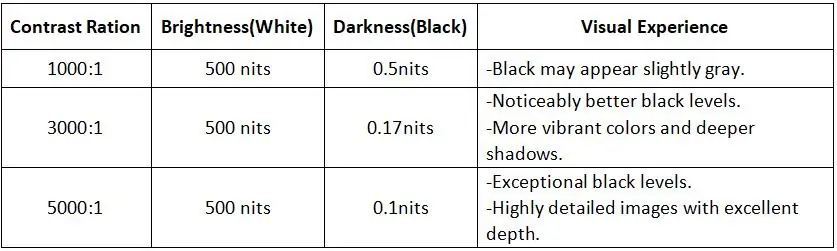
These screen contrast ratios mean the brightest white is 1000/3000/5000 times brighter than the darkest black. The higher the display contrast ratio, the greater the difference between light and dark areas, resulting in more vivid and detailed images.
6.2 Visual Experience Comparison
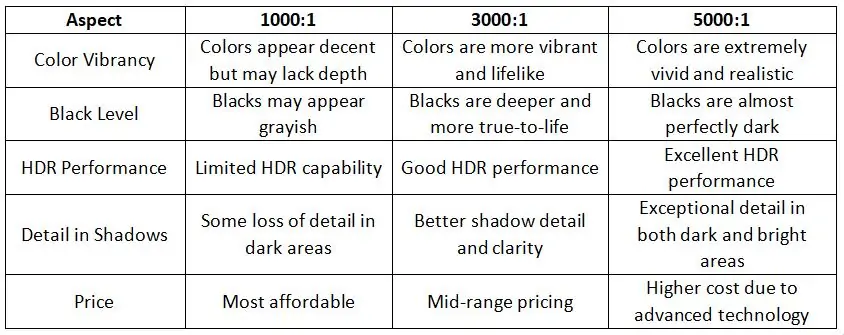
6.3 Key Difference
6.4 Real-World Application
1000:1 Contrast Ratio: Suitable for everyday tasks like browsing, streaming, and office work.
3000:1 Contrast Ratio: Great for immersive gaming, movie watching, and creative work.
5000:1 Contrast Ratio: Ideal for professional environments where color accuracy and detail are paramount, such as graphic design, video editing, and luxury home theaters.
7. What Factors Influence Screen Contrast Ratio?
Many factors affect the screen contrast ratio, including display technology, ambient light, and screen characteristics.
7.1 Display Technology
LCD screens rely on backlighting, have a low contrast ratio, and blacks do not appear deep enough. OLED screens have self-illuminated pixels that completely turn off black pixels and have extremely high contrast. The contrast ratio of LED displays depends on the quality of LED and driving technology, high-end products usually have a higher screen contrast ratio.
7.2 Display Processing
Too high a brightness setting will gray out blacks and reduce contrast; a proper brightness setting will improve contrast. Color calibration ensures display accuracy and prevents color deviations from affecting display contrast ratio. High Dynamic Range (HDR) content better demonstrates high contrast.
7.3 Screen Treatment and Features
Anti-reflective coating reduces ambient light reflection and improves contrast ratio. Matte screen scatters light and reduces reflections; Mirror screen reflects significantly in bright light and reduces contrast. High resolution and pixel density make images more detailed, indirectly improving contrast perception.
7.4 Environment and Screen Inner Structure
Strong ambient light reduces the black performance of the screen and affects display contrast ratio. In dark environments, contrast is usually higher. High-quality driver circuits and signal processing technologies provide more precise control of brightness and color and enhance contrast.
8. How to Improve LED Display Contrast Ratio?
Improving the contrast ratio of LED displays can be started with hardware optimization, software adjustment and environmental control. The following are some specific measures:
8.1 Hardware Optimization
High-Quality LED Module: Reduce reflections by choosing LED modules with higher raw contrast, such as LED beads with black masks.
Improve Packaging Technology: Adopt COB (Chip on Board), flip chip technology or other packing technology to reduce light scattering and improve contrast.
Local Dimming: Local dimming technology is introduced into the LED display to dynamically adjust the brightness of different areas, making the darker parts darker and the brighter parts brighter.
Optimized Optical Design: Use high-contrast optical lens to reduce the halo effect. Optimize LED alignment and spacing to avoid light overflow.
8.2 Software Adjustment
Color Calibration: Use professional calibration tools or software to regularly calibrate the color and brightness of the display to ensure accurate representation of black and white.
Dynamic Contrast Adjustment: Dynamically adjust the brightness and contrast of the screen through the software algorithm to adapt to the needs of different scenes.
HDR Support: Optimize picture details with HDR algorithms to make dark and bright areas more distinct.
8.3 Environment Control
Reduce Ambient Light Interference: Choose an LED display with an anti-reflection coating or matte surface treatment. In strong light environments, use a light shield or adjust the display angle to reduce ambient light reflection.
Control Ambient Brightness: Avoid installing the display near direct light or strong light sources. Using LED displays in a dark environment can significantly improve contrast perception.
8.4 Content Optimization
Using High Contrast Content: Play optimized high-contrast content to take full advantage of the display’s performance. Avoid using low-contrast or grayed-out images.
Adjusting Content Brightness: Adjust the content brightness according to the ambient light to ensure a clear picture with a moderate screen contrast ratio.
8.5 Maintenance and Optimization
Regular Cleaning: Dust and dirt will reduce the contrast of the LED display, clean the surface regularly to maintain the LED screen.
Check the Hardware Status: Regularly check the LED beads and driving circuits to ensure brightness and color consistency. Replace aged or damaged LED modules to avoid affecting the overall display contrast ratio.
9. How to Choose the Best Contrast Ratio?
Choosing the best contrast ratio for your LED display depends on several factors, including the intended use, viewing environment, and the type of content you plan to display. Here’s a guide to help you determine the best screen contrast ratio for your needs:
9.1 Consider the Display’s Intended Use
For Home Entertainment (Movies and TV Shows): OLED displays, with their infinite contrast ratios, are ideal for this purpose, but Mini-LED or QLED displays with high contrast ratios (around 10,000:1 or more) also perform well.
For Gaming: A high contrast ratio improves shadow details and the overall gaming experience. A contrast ratio of at least 5,000:1 is recommended for gaming displays.
For Professional or Business Use (Presentations, Work): In these environments, color accuracy and sharpness are more important than extreme contrast. A moderate contrast ratio of 1,000:1 to 3,000:1 should be sufficient for standard office tasks.
For Outdoor or Public Displays: Contrast ratio is important for visibility, especially in direct sunlight. An IP-rated display with a high contrast ratio (around 3,000:1) ensures better readability.
9.2 Evaluate the Viewing Environment
Bright Environments: If you’re placing your display in a bright room or near windows, prioritize a higher contrast ratio, possibly around 5,000:1 or better. This ensures the image is still visible even under challenging lighting conditions.
Dark Environments: For home theaters or other settings where the display will be used in a dark environment, look for a high contrast ratio (10,000:1 or more), preferably with OLED technology, to achieve true black levels and excellent detail in dark scenes.
9.3 Look for Technologies with True Black Capabilities
LCD/LED with Local Dimming: They allow specific areas of the screen to darken, which helps to achieve better black levels. The display contrast ratio is around 3000:1 to 10,000:1.
OLED: OLED displays provide the best contrast ratio because they can turn individual pixels off, producing true blacks and infinite contrast ratios. This is ideal for applications where color depth and image quality are paramount.
Mini-LED: If you want the best of both worlds—improved contrast and brightness—Mini-LED technology can deliver excellent contrast ratios (up to 50,000:1 or more) while still providing excellent brightness, making it suitable for bright environments.
QLED: While not as perfect as OLED for black levels, QLED offers excellent color reproduction and contrast ratios (often around 10,000:1), making it a strong choice for bright rooms or when you need vibrant, eye-catching visuals.
9.4 Budget Consideration
Displays with higher contrast ratio (e.g., OLED or Mini-LED) tend to be more expensive. Balance your budget with your needs—don’t overpay for contrast ratio if you don’t need it.
9.5 Key Recommendation
- For Most Users: A contrast ratio of 1000:1 to 3000:1 is sufficient.
- For Enthusiasts/Gamers: Look for 3000:1 or higher, or consider OLED/Mini-LED.
- For Professionals: Prioritize color accuracy and static contrast ratio over dynamic contrast.
10. FAQs
1. Is 1000000:1 a Good Display Contrast Ratio?
Yes, a 1,000,000:1 contrast ratio is excellent, but it’s likely a dynamic contrast ratio, which measures the display’s ability to adjust brightness in different scenes. For true image quality, focus on the static contrast ratio (typically 1000:1 to 3000:1 for most displays).
2. What is the Lowest Contrast Ratio?
The lowest usable contrast ratio for most displays is around 200:1 to 300:1. Below this, images may appear flat, with the poor distinction between dark and light areas, making it hard to see details.
3. Is High Contrast Good for Eyes?
High contrast is not necessarily good for the eyes. While it can make images appear sharper and more vivid, excessively high contrast, especially in poor lighting conditions. It’s important to balance contrast with ambient lighting and adjust settings to a comfortable level for prolonged use.
4. Should Contrast be Higher than Brightness?
Yes, generally, contrast should be higher than brightness for optimal viewing. Higher contrast ensures better distinction between dark and light areas, enhancing image clarity and detail. However, both settings should be balanced to avoid eye strain—excessive brightness with low contrast can wash out images, while too much contrast with low brightness can make details hard to see.
11. Summary
We hope that through the analysis in this article, you can better understand the importance of contrast ratio and make a more informed decision when choosing an LED video wall to enjoy better visual enjoyment!
In short, contrast ratio is more than just a number in a display’s technical specifications, it directly affects the vividness and detail of an image. Whether for daily office work, entertainment viewing or professional design, choosing the right contrast ratio can significantly enhance your visual experience.