Published by EagerLED · Updated
A MiP LED display is a direct-view LED screen built with very small LED chips assembled into discrete packages before those packages are mounted on the display circuit board. MiP usually means Micro LED in Package. Its appeal is a manufacturing route that combines miniature emitters with package-level testing and surface-mount assembly.
For a buyer, the useful question is whether a MiP LED display delivers the required image quality, serviceability, and operating cost in the actual room. Packaging alone does not guarantee brightness, waterproofing, energy savings, or an easier repair. This guide explains MiP LED technology, compares alternatives, and shows which specifications to request before ordering.
Quick answer: Shortlist MiP for fine-pitch video walls where close viewing and consistent color matter. Compare it with COB and SMD at the same pixel pitch, calibrated brightness, screen size, and warranty conditions. Ask for a demonstration using your content and an agreed repair procedure.
Planning a fine-pitch wall? Request a model-specific comparison and quotation with your screen dimensions, closest viewing distance and installation environment.
1. What Is MiP LED Display Technology?
In a full-color MiP LED display, red, green, and blue emitters create the picture. The packaged devices are arranged into modules; modules form cabinets; cabinets join into a video wall. Receiving cards and driver electronics control the pixels, while the processor maps incoming video to the wall’s native resolution.
01. What MiP LED technology changes
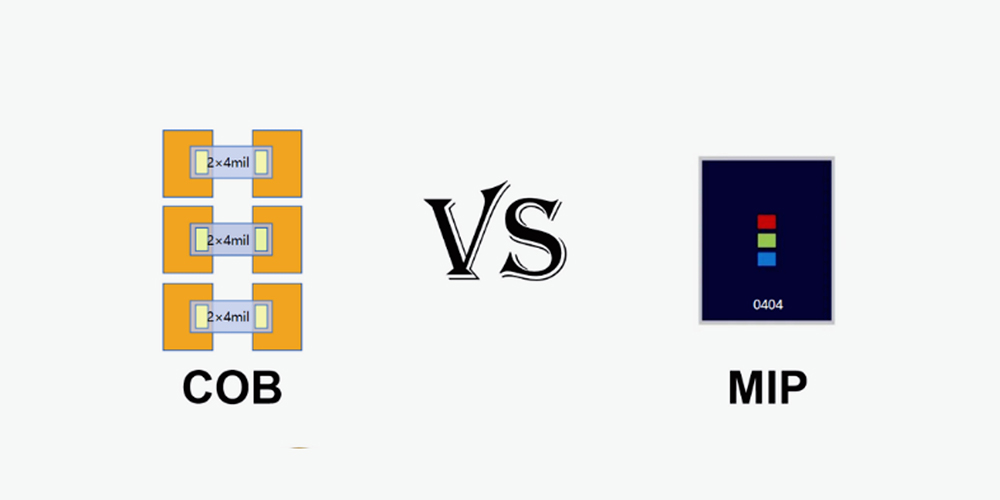
MiP describes the packaging and assembly route. A manufacturer can test and sort discrete devices before placing them on a larger board. The finished result still depends on chip quality, package optics, placement accuracy, soldering, driver configuration, and calibration. The key distinction from COB is packaging the emitters before mounting devices on the display board, rather than bonding chips directly to that board.
Do not confuse chip dimensions with pixel pitch. Chip size describes an emitter; pixel pitch measures the center-to-center distance between adjacent pixels. A smaller chip may help enable a finer pitch, but it does not tell you the finished screen’s resolution or its minimum viewing distance.
02. MiP display versus a memory-in-pixel monitor
The term “MIP display” can also refer to memory-in-pixel LCD technology, commonly discussed in low-power electronics. That is a different display architecture. Memory-in-pixel LCDs store pixel information within the LCD architecture. A MiP LED display for digital signage is an emissive video wall, not that reflective LCD technology. Specify “Micro LED in Package video wall” when requesting quotations to avoid ambiguity.
2. How MiP LED Packaging and Manufacturing Work
The manufacturing sequence varies by supplier, package architecture, and chip dimensions. The following explains the main quality-control stages of MiP LED technology without assuming every factory uses an identical process. Ask the manufacturer to identify the actual package and production route used in the quoted model.
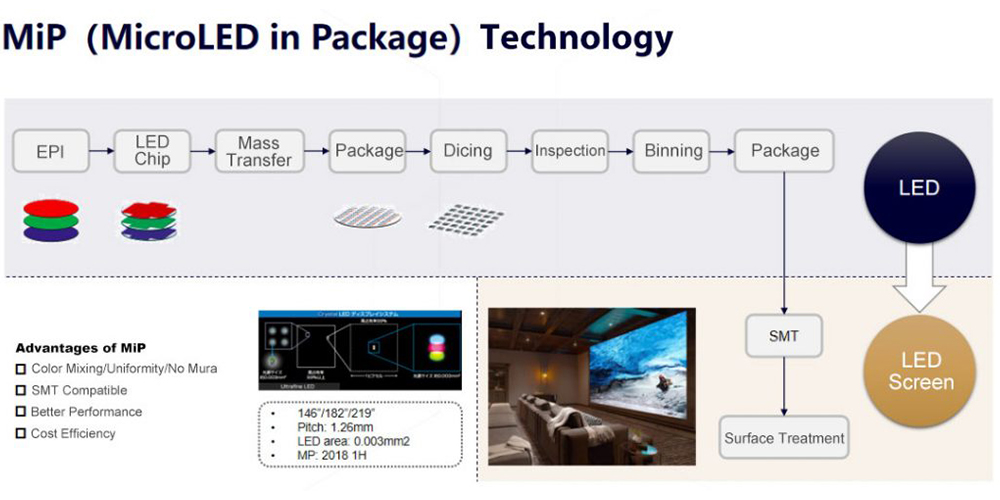
01. Chip selection and package formation
Red, green, and blue chips are selected and connected within a compact device structure. Electrical interconnections, mechanical support, and optical materials must work together. Some architectures use transfer processes and subsequent singulation to produce individual devices. A supplier’s packaging drawing is more informative than a broad claim that all MiP devices have the same construction.
02. Testing, sorting, and placement
Electrical and optical testing identifies defective devices and groups acceptable ones by relevant characteristics. Sorting can reduce the variation passed to module assembly, but it does not eliminate the need to calibrate the finished MiP LED display. Placement and soldering must also preserve alignment and reliable connections across a dense array.
03. Module finishing and system calibration
After assembly, modules undergo inspection and functional testing. Depending on the design, a protective treatment may be added. The manufacturer then checks cabinet alignment, brightness, color, and grayscale behavior. Qualification should include the operating conditions in the order, rather than only an attractive high-brightness demonstration video.
| Stage | Useful evidence | Why it matters |
|---|---|---|
| Device selection | Package identification and optical sorting method | Establishes what is actually being supplied |
| Board assembly | Inspection and electrical test records | Helps detect placement and connection faults |
| Surface finishing | Coating description and cleaning instructions | Defines handling and maintenance limits |
| Calibration | Calibration files and target brightness settings | Supports uniformity and later module replacement |
| Final acceptance | Agreed test patterns and defect criteria | Creates a repeatable delivery inspection |
3. History of MiP LED Display Packaging Technology
LED video walls have developed through several overlapping approaches rather than one technology simply replacing every previous design. DIP used separate through-hole devices; SMD brought compact surface-mounted packages into widespread display production. COB attaches chips directly to the display substrate, while IMD groups multiple pixels within a device. MiP LED technology extends the packaged-device route toward smaller emitters.
The engineering challenge becomes more demanding as pitch decreases: more pixels occupy each square meter, component handling becomes more precise, and small defects become conspicuous at close range. MiP LED display development addresses part of that challenge by moving useful testing and sorting operations to the package stage.
When assessing a new package design, separate a demonstration prototype from a deliverable product. Confirm the production model, actual pitch, package identification, lead time, and replacement-part availability in the quotation. For the broader terminology, see EagerLED’s LED packaging technology guide.
4. MiP LED Advantages and Limitations
01. Fine detail and consistent images
A fine-pitch MiP LED display can provide enough native pixels for detailed diagrams, presentation text, or high-resolution video within a limited wall area. The benefit comes from matching pitch and physical dimensions to the content. A processor accepting a 4K input does not make a lower-resolution wall a native 4K display.
Package sorting is useful for controlling optical variation. However, evaluate the whole wall with neutral gray, white, primary colors, and dark gradients. Look for visible module boundaries and changes in color from side seats. A strong center-view image alone is insufficient for a wide meeting room.
02. A potentially practical repair route
Discrete MiP devices may allow component replacement by trained technicians using the appropriate tools. That does not mean a facility manager can repair a pixel on site. Surface treatments, package dimensions, and warranty rules can change the service procedure. For urgent recovery, swapping a compatible spare module may still be the fastest option.
For any MiP LED display, ask who performs component repairs, where they happen, and whether recalibration is included. Keep matching spare modules and their configuration files available. The broader LED display module selection guide explains why module compatibility matters when planning maintenance.
03. Manufacturing flexibility with measurable limits
Surface-mount-compatible packages can fit established assembly workflows, although equipment and process requirements depend on the device. This can be commercially useful, but manufacturing compatibility is not a promise of a lower project price. Compare complete quotations and service commitments rather than assuming one packaging label is always cheaper.
Similarly, a MiP LED display is not automatically waterproof, impact-proof, or more efficient than every alternative. Request the model’s environmental ratings and measured power consumption. Any percentage saving needs a defined comparison: identical area, brightness, content, operating mode, and calibration settings.
5. MiP vs COB, SMD and IMD: What Buyers Should Compare
Use this comparison to understand construction and service questions. It deliberately avoids universal rankings for contrast, price, and lifetime because those belong to a tested product specification. A well-designed alternative can outperform a poorly implemented MiP LED display.
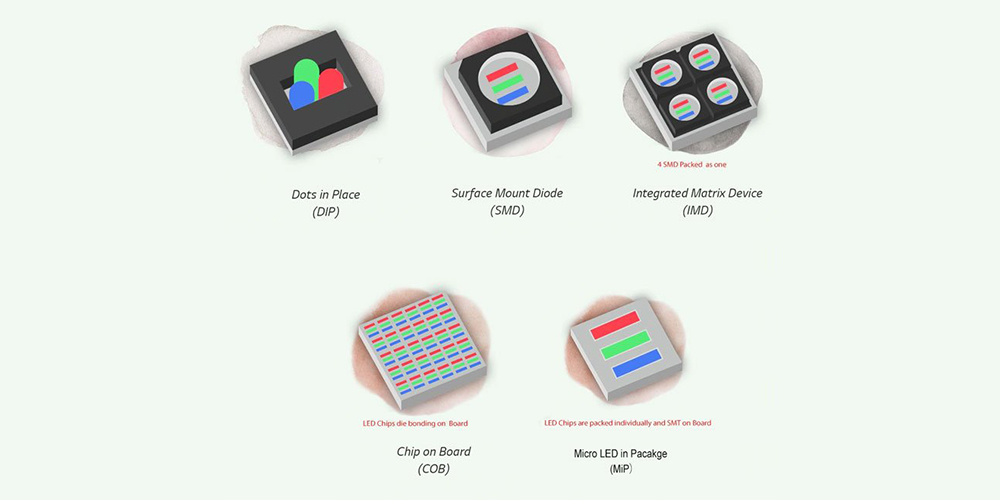
| Technology | Construction | Service consideration | What to verify |
|---|---|---|---|
| MiP | Miniature emitters in discrete packages before board assembly | Package repair may be possible; module swap can restore service faster | Package type, coating, repair tools, and spare compatibility |
| SMD | Packaged LEDs soldered onto the board | Individual package replacement is possible with suitable tools | Handling protection and actual fine-pitch performance |
| COB | Chips bonded directly to the display substrate and encapsulated | Field module exchange and specialist repair arrangements vary | Surface finish, repair policy, uniformity, and replacement matching |
| IMD | Multiple pixels integrated within one device | Repair involves the integrated device or a module, depending on procedure | Pixel grouping, package availability, and service support |
01. MiP LED versus SMD
Both approaches can use discrete surface-mounted devices, so their distinction should be explained through the actual package design. SMD remains relevant across many display applications. Do not assume SMD cannot produce fine-pitch images or that every failed SMD lamp requires a new module. Ask to compare sample cabinets using the same source image and brightness.
02. MiP LED versus COB
The main distinction is packaging before display-board assembly versus direct chip attachment. A MiP LED display may offer useful package-level sorting and repair options; a COB display may provide a continuous protective surface. Neither description establishes a universal winner. For a fuller explanation of direct-chip construction, see the EagerLED COB LED display guide. Surface reflectance, low-brightness grayscale, cabinet mechanics, and service support often determine the better project fit.
Also distinguish COB from GOB. GOB generally refers to a protective material applied over an assembled LED surface, rather than the same direct-chip architecture as COB. Read the COB vs. GOB display guide when comparing coating terminology in supplier quotations.
03. MiP LED versus IMD
IMD groups multiple pixels into a package, whereas the structure marketed as MiP depends on the manufacturer’s design. Ask how many pixels each device contains and what happens when one emitter fails. The repair unit affects labor, spare stock, and matching after service. It does not, by itself, establish brightness or color accuracy.
6. MiP LED Screen Applications, Pixel Pitch and 4K Sizing
01. Match the wall to the room
A MiP LED display is worth evaluating for boardrooms, control rooms, premium retail, museums, and other spaces with demanding close-view content. Start with the nearest and farthest viewers, available wall dimensions, ambient light, and the smallest text that must remain readable. Then evaluate pitch and resolution together.
For control rooms, test dense dashboards and alarm text across every planned input window. For meeting rooms, test spreadsheets and video calls from side seats. For retail, assess glare under the installed lighting and confirm approved cleaning methods. For camera-facing applications, test the intended camera, shutter settings, frame rates, and shooting angles; an advertised refresh-rate number alone cannot rule out scan artifacts or moiré.
02. Calculate native resolution before selecting pitch
The planning relationship is straightforward: horizontal pixels = active width in millimeters ÷ pixel pitch in millimeters. Apply the same calculation to height. For definitions and source-to-screen mapping, use our LED display resolution guide. Final dimensions must follow available module and cabinet increments, so the calculations below are illustrative rather than product configurations.
| Nominal pitch | Pixels across a 3.84 m width | Active size for 3840 × 2160 pixels |
|---|---|---|
| 0.8 mm | 4,800 | 3.072 × 1.728 m |
| 1.0 mm | 3,840 | 3.840 × 2.160 m |
| 1.2 mm | 3,200 | 4.608 × 2.592 m |
| 1.5 mm | 2,560 | 5.760 × 3.240 m |
These are exact geometric calculations for the stated nominal pitches, not a list of available EagerLED MiP models. Request actual pitch and native cabinet resolution. A slightly different pitch changes the dimensions needed for a target pixel count. Screen framing and structural clearance add to the active image size.
Viewing-distance rules are only initial estimates. Comfortable viewing depends on visual acuity, content, contrast, and how long people watch. Compare sample pitches from the real seating positions before choosing a MiP LED display. Excessively fine pitch can add cost and processing load without making the intended content more useful.
03. Specify power, access, and acceptance tests
Record both maximum electrical demand and representative operating consumption. Maximum demand helps size electrical infrastructure; average consumption estimates energy costs. A simple planning example is a 10 m² wall averaging 150 W/m² for 12 hours per day: 10 × 150 ÷ 1000 × 12 = 18 kWh per day. This is a hypothetical calculation, not a measured MiP LED display specification, and excludes cooling and ancillary equipment.
Check whether modules, power supplies, and receiving cards are accessible from the front or rear. Leave the clearances required by the manufacturer and coordinate mounting with the installation team. For an outdoor MiP LED display, demand an explicitly outdoor-rated complete system with suitable environmental and thermal specifications; the package name alone does not establish outdoor suitability.
7. MiP LED Display Cost and Buying Checklist
There is no single MiP LED display price that applies to every project. The main cost drivers are actual pixel pitch, active screen area, package design, processing capacity, installation access, spare stock, and service scope. Compare the installed system and expected operating costs, not just a cabinet price. A smaller pitch can increase pixel count and processing requirements even when the wall area stays the same.
01. Compare total project cost
A MiP LED display quotation should identify what is included: cabinets, processor, receiving cards, power distribution, mounting, delivery, installation, commissioning, spares, and training. Compare the same scope across suppliers. A price per square meter can conceal differences in resolution, redundancy, warranty, and after-sales obligations.
| Decision | Specify in writing | Acceptance check |
|---|---|---|
| Image detail | Active dimensions, actual pitch, native resolution | Display fine text and a one-pixel test pattern |
| Image quality | Calibrated brightness and viewing conditions | Inspect gray ramps, dark scenes, and side views |
| Signal chain | Processor capacity, inputs, frame rates | Test all required sources and layouts |
| Reliability | Operating environment and any redundancy | Demonstrate the agreed recovery procedure |
| Maintenance | Spare quantities, access, repair location, turnaround | Demonstrate module exchange and calibration recovery |
| Commercial scope | Warranty exclusions, freight, installation, training | Reconcile delivery against the signed scope |
02. Plan for a replacement that still matches
Keep records of module batches, calibration files, controller settings, and the delivered configuration. A replacement that fits physically may still differ electrically or optically. Agree on spare availability and matching procedures before purchase. This turns MiP LED display serviceability from a marketing promise into an actionable maintenance plan.
During acceptance, inspect the wall after it reaches stable operating conditions. Record any defective pixels, alignment problems, visible seams, and color differences with the supplier. Use the same test images and settings for later inspections. Consistent documentation makes changes easier to diagnose without confusing content or brightness adjustments with hardware faults.
8. Choosing a MiP Video Wall for Your Project
A MiP LED display offers a practical route to fine-pitch digital signage, combining miniature emitters with discrete-device assembly. Its value should be demonstrated through readable content, consistent images, appropriate environmental performance, and a service plan suited to the installation. MiP LED technology is one part of the system, alongside processing, mechanical alignment, power, and calibration.
Choose the MiP LED display that meets a written specification and passes a relevant demonstration. To discuss an EagerLED project, send your wall dimensions, viewing distances, content requirements, installation environment, and operating hours. Request a model-specific recommendation and a comparable quotation for suitable alternatives.
9. MiP LED Display Frequently Asked Questions
01. What does MiP mean in an LED display?
MiP usually means Micro LED in Package. Small LED emitters are incorporated into discrete devices before display-board assembly. Ask for the package specification because suppliers may use related terminology differently. A MiP LED display is a direct-view video wall, distinct from a memory-in-pixel LCD.
02. How does a MiP LED display work?
Red, green, and blue emitters generate each pixel’s light. Driver electronics control their output, receiving cards distribute image data, and the video processor maps source content onto the wall. MiP describes how the emitting devices are packaged; it does not replace the rest of the display system.
03. Is MiP better than COB?
Neither is universally better. Compare complete products at the same resolution, calibrated brightness, and operating conditions. A MiP LED display may provide useful discrete-package service options, while a COB design may offer a suitable protective surface. Demonstrated image quality and documented repair arrangements should decide the purchase.
04. Can individual MiP LED pixels be repaired?
Some designs support device replacement by trained technicians. Tooling, coating, package size, and warranty conditions determine whether this happens on site or at a service center. Ask for a demonstrated procedure; maintaining spare modules can reduce downtime while component repair is completed elsewhere.
05. How much does a MiP LED display cost?
There is no reliable universal price. Pitch, active area, controller capacity, calibrated performance, mechanical design, spares, and installation scope all affect cost. Request an itemized quotation and compare ownership costs over your intended service period. Treat an unqualified price per square meter as incomplete.
06. Is a MiP LED display suitable outdoors?
Only when the complete product is specified for that environment. Verify brightness under expected ambient light, front and rear protection, operating temperature, humidity limits, and installation requirements. Do not use an indoor MiP LED display outdoors simply because its LEDs have protective packaging.
07. Which MiP LED display pixel pitch should I choose?
Begin with screen dimensions, native resolution, viewing positions, and the smallest important text. Compare sample pitches with real content. The finest pitch is not automatically the most economical choice; confirm that the additional pixels improve the intended viewing experience and that the processor supports the resulting load.