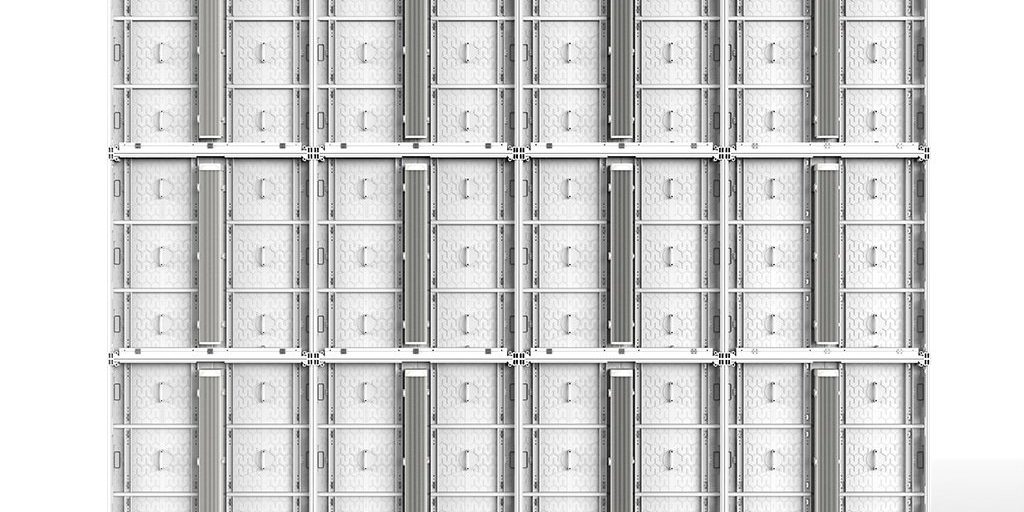
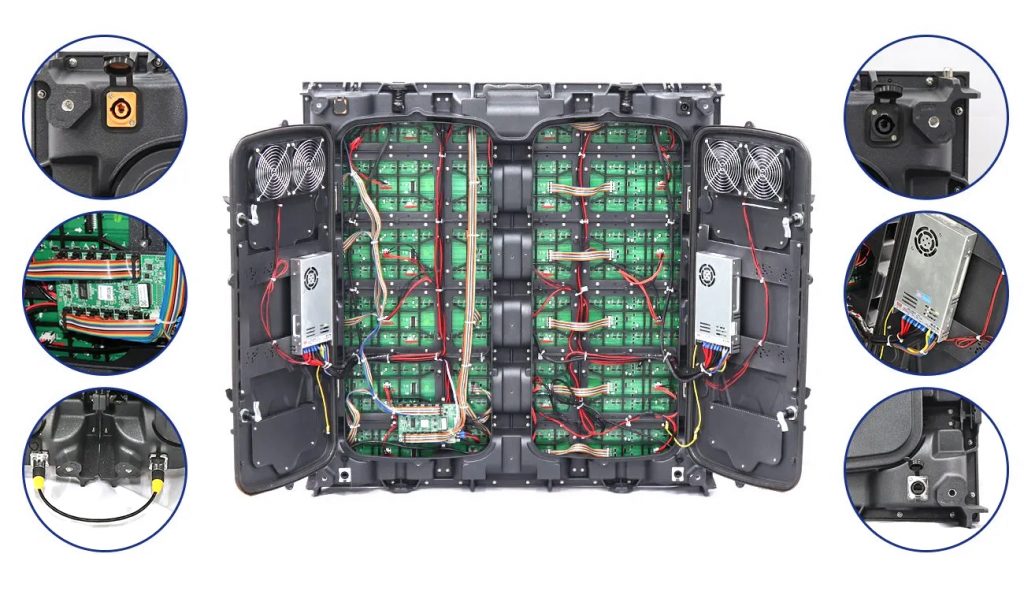
A front maintenance LED screen, also called a front service LED display, lets a technician remove LED modules and reach service components from the viewing side. A full-front-service cabinet can provide access to LED modules, power supplies, receiving cards, HUB boards, and internal cables without requiring a rear service aisle. Some products are front-service only at the module level, so buyers should confirm exactly which components can be reached from the front.
This service direction does not determine image quality by itself. Its main value is installation and maintenance access: it can support wall-mounted, recessed, retail, control-room, transport-hub, and other projects where space behind the screen is limited.
Quick answer
- Front maintenance means service is performed from the display face.
- Full front maintenance should include the module and the main cabinet electronics, not only the LED module.
- Best fit: projects with little or no safe rear access.
- Main checks: access scope, removal mechanism, cabinet depth, heat management, environmental protection, and compatible service tools.
Looking for fault diagnosis instead? If an LED wall is completely or partly dark, use EagerLED’s LED black screen troubleshooting guide. This page explains service access and system selection.
What Is a Front Maintenance LED Screen?
A front maintenance LED screen is an LED display designed so that routine service can be completed from the front. Depending on the cabinet, a technician may pull out a magnetic LED module, release a front lock, or open a hinged front section. This exposes the components that must be inspected, disconnected, replaced, and aligned.
The important distinction is between module-only front service and full front service. A module-only design lets the technician remove the LED module from the front but may still require rear access for the power supply or receiving card. A full-front-service design places all major service items where they can be reached from the viewing side. Confirm this point before approving a wall or structural design.

How Does Front Maintenance Work?
The exact procedure depends on the cabinet and module fixing system, but a controlled service sequence normally follows these steps:
- Identify and isolate the affected area. Confirm whether the fault is at the module, cabinet, power, data, or control level. Disconnect power before removing a module or touching internal wiring.
- Release the front component. Use the manufacturer-specified vacuum tool, magnetic tool, key, or front lock. Do not pry against LED pixels or use a tool that is not approved for that module surface.
- Support and disconnect the module. Hold the module securely, then disconnect its power and data connectors without pulling on the cables.
- Access the cabinet electronics. On a full-front-service cabinet, the power supply, receiving card, HUB or adapter board, and related cables can be inspected from the same side.
- Reconnect, align, and test. Refit every connector, align the module with adjacent modules, restore power, and run a display test before returning the screen to service.
EagerLED’s EA320F outdoor front service installation guide shows a six-stage workflow from cabinet connection and power/data wiring to module installation and lighting tests. For magnetic-module handling, review the H-01 LED display front maintenance tool before selecting a service method.
Three Common Front-Service Mechanisms
1. Magnetic module extraction
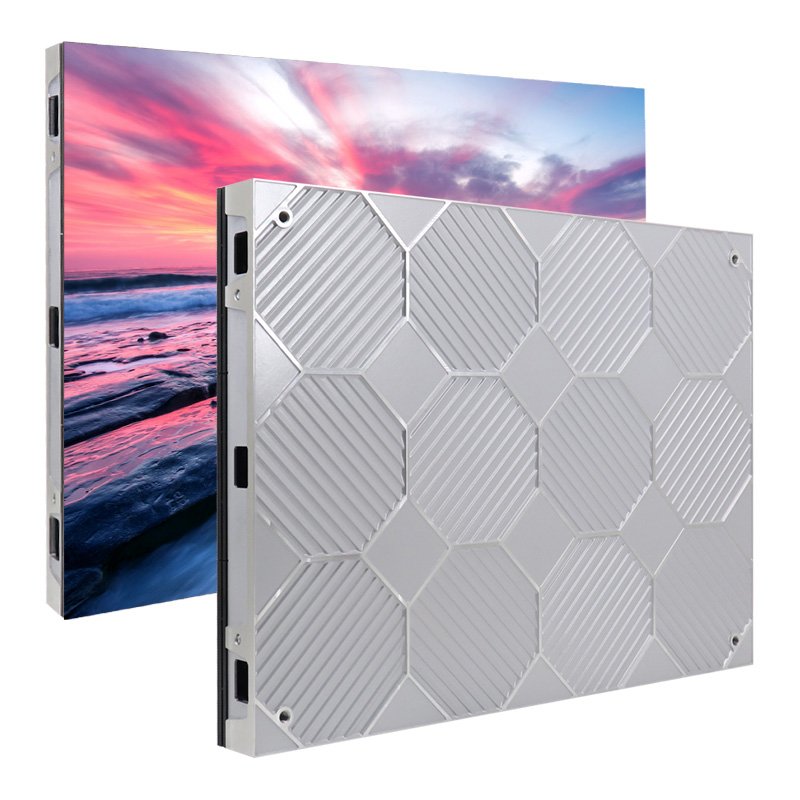
Magnets hold the LED module to the cabinet or frame. A compatible suction or vacuum tool lifts the module from the front. This approach is common on indoor fixed displays and fine-pitch systems, but the module surface and fixing strength must match the tool.
2. Front-release locks or fasteners
A key or service tool releases mechanical fasteners from the display face. The connection is positive and repeatable, but technicians must know the correct release points and tightening sequence to protect cabinet flatness.
3. Hinged or flip-open front access
A cabinet or module section opens from the front while remaining supported by the structure. This can provide broader component access on outdoor and architectural displays. The hinge, seals, drainage, and cable movement must all be checked for the actual installation environment.
No mechanism is automatically suitable for every LED package. SMD, COB, GOB, and other module surfaces can require different handling. Match the service tool and extraction force to the exact product documentation.
Front Maintenance vs. Rear Maintenance LED Displays
Front and rear maintenance describe where a technician works; they do not describe pixel pitch, brightness, refresh rate, or picture quality. The better layout is the one that gives the project safe, repeatable access throughout the screen’s service life.
| Decision factor | Front maintenance | Rear maintenance |
|---|---|---|
| Service side | Viewing side | Back of cabinet |
| Rear working space | Not required for components designed for front access | A planned rear aisle, door, or open framework is required |
| Typical structure | Magnetic modules, front locks, or flip-open sections | Rear doors, panels, screws, or clamps |
| Strong project fit | Wall-mounted, recessed, narrow, or architecturally integrated screens | Open-frame, large-format, or sites with a permanent rear service zone |
| Key planning risk | Assuming all electronics are front-accessible when only modules are | Failing to reserve safe and continuous rear access |
| Maintenance setup | Work takes place in front of the display, so the public area may need to be controlled | Work is separated from the viewing side when a rear service area exists |
Benefits, Tradeoffs, and Best Applications
Where front maintenance adds value
- Space-efficient installation: the display can be planned without a walk-in service corridor behind components that are fully front-accessible.
- Wall and recess integration: a slimmer service layout can support retail walls, meeting rooms, command centers, broadcast backgrounds, and architectural features.
- Direct component replacement: a technician can reach the affected module from the viewing side instead of removing the complete display.
- Cleaner architectural finish: front access can reduce the need for visible rear doors or deep enclosures in indoor spaces.
Tradeoffs to plan for
- Front work zone: service may interrupt a public or operational area, so access control and maintenance timing still matter.
- Tool compatibility: the wrong extraction tool can damage LEDs, masks, or protective surfaces.
- Alignment discipline: a reinstalled module must sit flush with adjacent modules to avoid visible seams or height differences.
- Heat and weather engineering: a thin cabinet still needs an appropriate thermal path; outdoor equipment also needs project-specific sealing, drainage, corrosion, and environmental protection.
- Access scope: a front-removable module does not prove that the power supply and receiving card are front-serviceable.
Front service is usually a strong candidate for indoor fixed LED walls, retail displays, control rooms, meeting spaces, transport terminals, and screens installed against solid surfaces. Outdoor front service can also work well on building facades and advertising structures when the cabinet, seals, heat management, and mounting system are engineered for that environment. See EagerLED’s overview of outdoor front service LED display considerations.
EagerLED Front-Service Product Examples
The following figures are taken from current EagerLED product documentation. Confirm the final project datasheet because available pixel pitches, electrical configurations, and options can change.
| Series | Verified service and dimensional details | Useful project context |
|---|---|---|
| EA640F2 | Full front access to modules, power supply, and receiving card; 640 x 480 mm cabinet; 320 x 160 mm module; 60 mm cabinet thickness; 7.5 kg cabinet weight; up to 140° horizontal and vertical viewing angle. | Indoor fixed installation with a 4:3 cabinet format and limited rear access. |
| EA169F2 | 640 x 360 mm die-cast aluminum cabinet with a 16:9 format and magnetic front-service modules. | Indoor high-definition walls designed around common 16:9 content formats. |
| EA169F3 | 600 x 337.5 mm cabinet with front service and plug-and-play module power and data connections. | Indoor fixed projects that prioritize simplified module installation and servicing. |
How to Choose a Front Maintenance LED Screen
- Define the required service scope. List every component that must be reachable from the front: module, power supply, receiving card, HUB or adapter board, and cabling.
- Measure the installed condition. Record the screen size, wall or recess depth, front working clearance, structural fixing points, and available power and data routes.
- Confirm the removal mechanism. Ask whether modules use magnets, front locks, or a hinged structure and identify the exact tool required.
- Match the cabinet to the environment. Indoor and outdoor displays have different requirements for heat, moisture, dust, drainage, corrosion, and access control.
- Verify module and cabinet formats. Cabinet ratio, module dimensions, pixel pitch, and spare-part compatibility affect both screen layout and future repairs.
- Plan safe isolation and testing. The installation should let trained technicians disconnect power, support removed modules, reconnect cables, align the surface, and test the display in a controlled sequence.
- Keep compatible spares and tools. Document the module batch, receiving card configuration, power supply, firmware or configuration files, and approved extraction tools for the delivered screen.

For an indoor wall project, EagerLED also provides a step-by-step EA640F2 wall installation guide. Use it as a planning reference, then follow the documentation supplied with the exact project configuration.
Frequently Asked Questions
What is a front maintenance LED screen?
A front maintenance LED screen is designed so technicians can remove and service specified components from the viewing side. A full-front-service cabinet provides front access to the LED modules and main electronics, while a module-only design may still require rear access for other parts.
What is the difference between front and rear maintenance LED displays?
Front maintenance is performed from the display face and can remove the need for a rear service aisle. Rear maintenance is performed through doors or panels behind the cabinet and requires continuous access to the back of the screen.
Which components can be serviced from the front?
The accessible parts depend on the cabinet. They may include LED modules, power supplies, receiving cards, HUB or adapter boards, and internal power and data cables. Confirm the service scope on the product drawing instead of assuming that front-removable modules mean full front service.
Can a front maintenance LED screen be used outdoors?
Yes, when the cabinet and installation are designed for the outdoor environment. The project must account for front-side sealing, drainage, heat management, corrosion protection, structural mounting, and a safe service procedure.
What tool is used to remove a front-service LED module?
Magnetic modules commonly use a manufacturer-approved suction, vacuum, or magnetic service tool. Other cabinets use a front-release key or hinged mechanism. The tool must match the module surface and fixing system to avoid pixel or mask damage.
Plan the Service Route Before Ordering
Send the installation dimensions, viewing distance, indoor or outdoor location, available rear space, required front-access components, and preferred cabinet format with your inquiry. EagerLED can then match the service layout to the actual site instead of treating front maintenance as a one-size-fits-all feature.