


Transparent LED pixel mapping must account for both the physical screen shape and its horizontal and vertical pixel counts. Some strip-based transparent displays use different spacing in the two directions. Matching an artwork file to the native pixel count can still produce the wrong physical proportions if the playback workflow assumes square pixels.
For retail design teams specifying indoor screens behind shopping-mall glass in the United States or Canada, the purchasing decision is to approve a complete content-to-screen map before ordering. The worked example below uses published EA1000TiF2 module specifications. It is a planning calculation, not an installed mall case or a tested controller configuration.
In this guide
Why transparent LED pixel mapping needs two aspect ratios
The physical aspect ratio describes the width and height people see. The native raster describes the number of independently addressed pixel columns and rows. These ratios match when the effective horizontal and vertical pixel spacing is the same. They can differ on a transparent screen built from widely spaced horizontal strips.
The EA1000TiF2 product table, checked on October 21, 2026, lists 500 × 125 mm modules. Its P2.6-5.2 column specifies a 192 × 24 pixel module. That module is physically 4:1, while its pixel-count ratio is 8:1. The P3.91-7.82 columns similarly list 128 × 16 pixels in the same physical module format.
This is why a short pitch label is insufficient for artwork production. Keep the exact model column, module dimensions, native resolution and orientation together. Ask the supplier to confirm which direction each pitch value describes rather than treating the first number as a square-pixel pitch in both directions.
Calculate the cabinet raster from verified module data
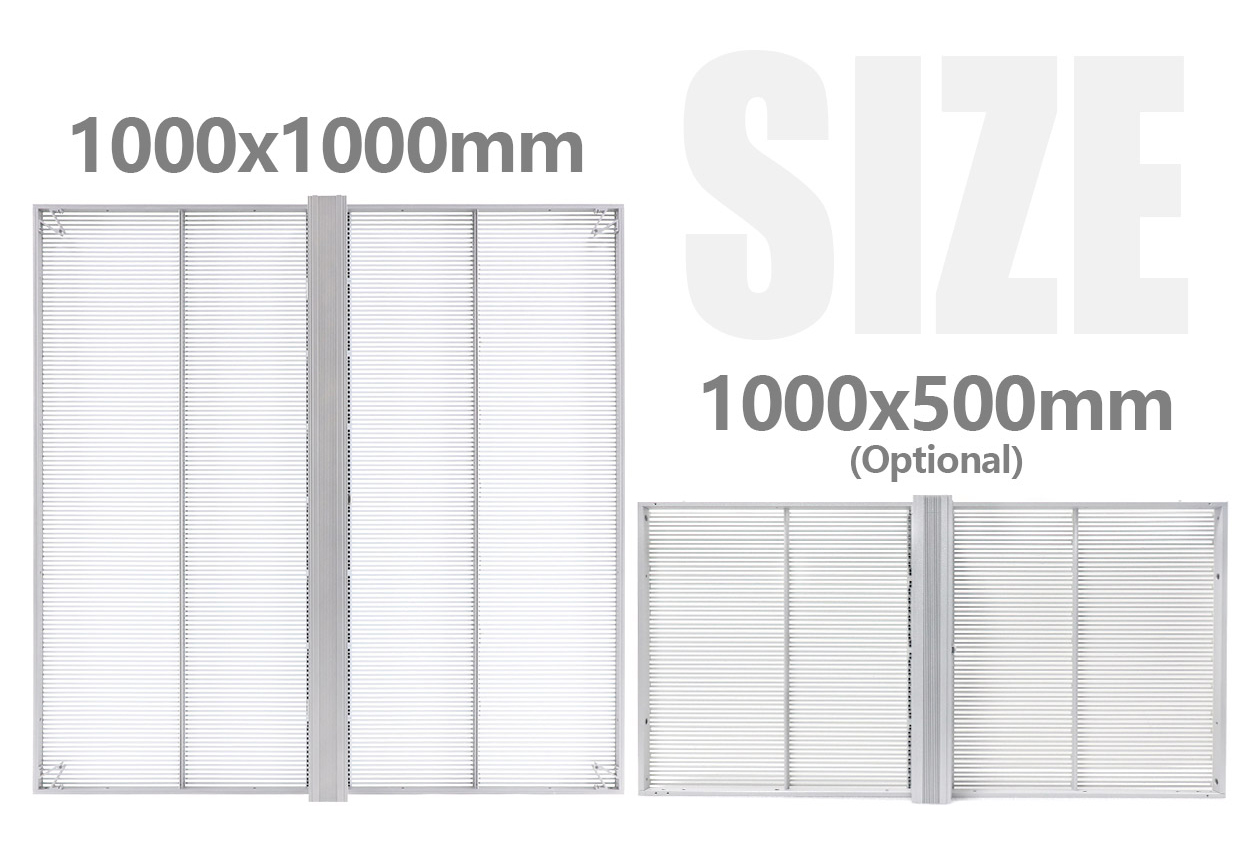
Use the actual module matrix as the starting point. Dividing by a rounded pitch name can introduce avoidable errors. For the published 1000 × 1000 mm cabinet and 500 × 125 mm module format, the nominal layout is two modules across and eight down. Confirm that arrangement and the receiving-card map for the ordered revision.
| Calculation | P2.6-5.2 column | P3.91-7.82 columns |
|---|---|---|
| Published module matrix | 192 × 24 pixels | 128 × 16 pixels |
| Nominal modules per cabinet | 2 across × 8 down | 2 across × 8 down |
| Derived cabinet matrix | 384 × 192 pixels | 256 × 128 pixels |
| Pixels per 1 m² cabinet | 73,728 | 32,768 |
| Physical / raster aspect ratio | 1:1 / 2:1 | 1:1 / 2:1 |
The calculated pixel totals agree with the product table’s listed densities. That provides a useful arithmetic cross-check, but it does not replace an approved cabinet drawing or controller file. The two P3.91 columns also have different scan and brightness entries; the shared raster does not make their electronics or operating specifications interchangeable.
For transparent LED pixel mapping, keep a named map for each hardware revision. Include cabinet orientation and the order in which physical cabinets connect. Do not approve a controller on total pixel capacity alone: the supplier must confirm the required input format, output arrangement, port loading and supported processing functions.
Work through a four-meter-wide mall display
Assume an uninterrupted active rectangle 4.0 m wide × 2.0 m high, made from four columns and two rows of the stated one-meter cabinets. This planning example contains eight cabinets and excludes gaps, trim and structural allowances. A real glass elevation still needs a dimensional and mounting review.
With the P2.6-5.2 module column, the derived wall raster is 4 × 384 by 2 × 192, or 1536 × 384 pixels. With either listed P3.91-7.82 column, it is 1024 × 256 pixels. Both raster shapes are 4:1, although the physical display is 2:1. A 4K input label does not change either native matrix.
Retain an artwork master representing the intended physical 2:1 composition. Have the content producer and integrator agree how it becomes the output raster, including any required pixel-aspect compensation. The method may depend on the selected player and processor. Do not prescribe a software setting before those devices and their supported workflow are confirmed.
A circle in an ordinary square-pixel file is a useful warning example. If identical row and column counts are sent directly to a display whose vertical spacing is larger, the physical shape can become taller. Correct transparent LED pixel mapping should preserve the approved physical shape, not merely make the file dimensions match a spreadsheet.
Approve a compact content test pack
A transparent LED pixel mapping test should use a dated set of original files that reveals errors quickly. The test should identify whether the problem belongs to the cabinet map, aspect conversion, source scaling or the artwork. Changing several settings together can hide the cause and make the result difficult to reproduce.
| Test asset | What to inspect physically | Record for handover |
|---|---|---|
| Circle and a known-proportion rectangle | Expected width-to-height relationships | Master dimensions, output raster and compensation location |
| Numbered cabinet blocks and corner labels | Correct positions, orientation and uninterrupted edges | Cabinet elevation, numbering and connection map |
| Smallest required offer text and price | Readable characters from the agreed pedestrian positions | Font, output size, viewing position and source scaling |
| Grid crossing cabinet boundaries | Missing rows, repeated sections and offsets | Approved controller configuration and remaining exceptions |
| Complete campaign loop | Correct proportions through every transition | Final files, playback mode and approved settings |
Inspect shapes with a suitable physical reference where practical. A phone photograph can change apparent proportions when taken obliquely, so record the viewing position and do not use a tilted photograph as the sole dimensional check. For legibility, the decisive test remains the actual essential message at the intended approach positions.
Repeat the approved content under representative mall lighting and daylight through the proposed glass. Brightness and transparency are separate acceptance questions from geometry. A correctly proportioned logo can still be hard to read against reflections, while an attractive bright demonstration can conceal incorrect text sizing.

Keep artwork geometry separate from the glass-bay plan
A building mullion or an opening door is not an active pixel region in transparent LED pixel mapping. Decide whether each glass bay plays an independent composition or whether one master image spans separate display rectangles. In the latter case, the content team must decide how physical gaps are represented; treating every bay as adjacent can make a moving object appear to jump.
Deliver the approved elevation, cabinet matrices, connection numbering, input format, output raster, processing settings and original test pack as one revision-controlled record. Save the approved configuration through the manufacturer’s supported procedure. A replacement player or restored factory setting can change scaling even when the LED cabinets have not changed.
For transparent LED pixel mapping, the acceptance record should identify who approves geometry and who approves the final campaign. The transparent-window supplier checklist addresses the separate questions of merchandise visibility, exact configuration and rear access.
The official @EagerLED EA1000TiF2 production clip shows a working transparent assembly labeled P5.6 for Mexico. Observe the strip construction and moving image. That label differs from the current table columns used in this article, so the clip does not verify their raster calculations or a mall installation.
Frequently asked questions
Can a designer simply export at the native pixel dimensions?
Only after the physical aspect ratio and playback compensation are agreed. A native raster can have a different numerical aspect ratio from the physical screen, so confirm the end-to-end result with known shapes before producing the full campaign.
Does the P2.6 label mean 2.6 mm in both directions?
Not for the P2.6-5.2 column discussed here. Read both pitch values and the published module matrix. Confirm their orientation and the exact ordered revision instead of shortening the specification to one number.
Can the one-meter cabinet calculation be reused for a half-height cabinet?
Do not assume it without confirmation. Obtain the optional cabinet’s module arrangement, pixel matrix and orientation, then calculate its contribution to the complete wall map.
Will a finer pitch fix stretched campaign graphics?
A finer pitch changes available detail, but it does not correct an incorrect aspect-conversion workflow. Diagnose the source, scaling and cabinet mapping first, using the same known-proportion test asset.
Should separate glass bays use one player?
That depends on the required synchronization, independent schedules, total raster and supported outputs. Ask the integrator to document the proposed architecture; a common product family does not establish that one player can serve every layout.
Request a cabinet map before commissioning artwork
Send the mall elevation, active display rectangles, glass-bay gaps, viewing positions, destination country and sample campaign files. Ask for transparent LED pixel mapping to be included with the exact model proposal and playback specification. Discuss the glass facade and request a confirmed pixel map