A true 4K LED screen has a native pixel canvas of 3840 × 2160 pixels (4K UHD). For a direct-view LED wall, that resolution is determined by the wall’s physical size, pixel pitch and cabinet layout. A processor that accepts a 4K signal cannot turn a lower-resolution wall into a native 4K display. Start with the closest viewing distance and the available wall dimensions, then confirm the final pixel map with the supplier.
This guide shows how to calculate a 4K LED wall, choose a practical pitch, compare installation options and ask for a quote that covers the complete system.
Contents
- What does 4K mean for a direct-view LED wall?
- Calculate 4K size from pixel pitch
- How to choose the right 4K LED screen
- 4K LED wall versus LCD and projection
- What determines the project cost?
- EagerLED configurations to evaluate
- Frequently asked questions
What does 4K mean for a direct-view LED wall?
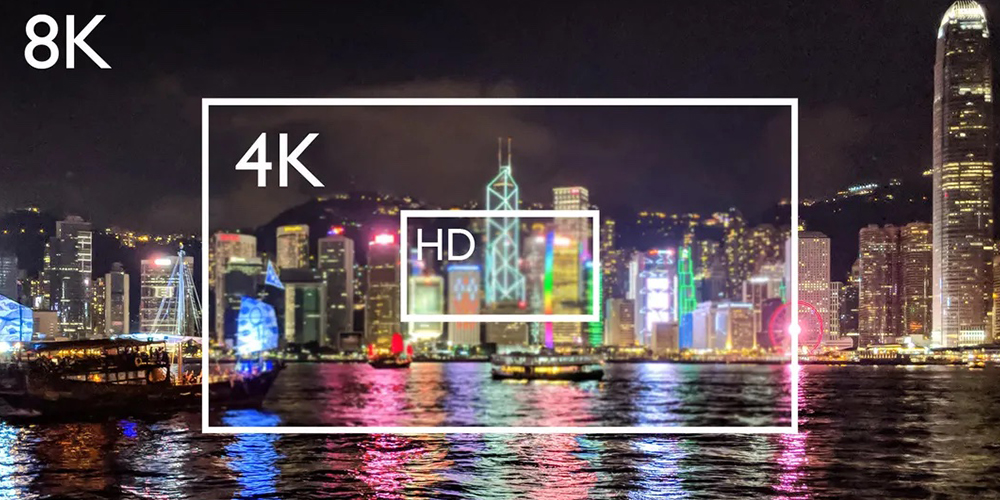
In this guide, 4K means UHD resolution: 3840 pixels across by 2160 pixels high, with a 16:9 aspect ratio. That is four times the pixel count of 1920 × 1080 Full HD. Cinema 4K can refer to 4096 × 2160, so ask which definition a quotation uses.
A direct-view LED wall is assembled from modules and cabinets. Each physical LED pixel contributes to the final canvas. Three specifications are easy to confuse:
- Native resolution: the wall’s actual horizontal and vertical pixel counts.
- Input resolution: the signal the processor can receive, such as 3840 × 2160.
- Refresh rate: how often the LEDs are driven, commonly stated in hertz. A 3840 Hz refresh rate is not 3840 horizontal pixels and does not establish 4K resolution.
A wall with 1920 × 1080 physical pixels may accept a 4K input and scale it down, but it will still display 1920 × 1080 pixels. Ask for both the native wall pixel map and the processor’s input/output capability on the same proposal. For a broader explanation, see EagerLED’s LED display resolution guide.
Calculate 4K size from pixel pitch
Pixel pitch is the center-to-center spacing between adjacent pixels, measured in millimeters. For an exact 3840 × 2160 canvas, the theoretical dimensions are:
Width (m) = 3840 × pixel pitch (mm) ÷ 1000
Height (m) = 2160 × pixel pitch (mm) ÷ 1000
| Pixel pitch | Theoretical native 4K size | Approx. diagonal | Typical planning context |
|---|---|---|---|
| P1.25 | 4.80 × 2.70 m | 217 in | Closer-view indoor meeting or control room |
| P1.5 | 5.76 × 3.24 m | 260 in | Indoor presentation wall |
| P1.875 | 7.20 × 4.05 m | 325 in | Large indoor venue |
| P2.5 | 9.60 × 5.40 m | 434 in | Longer-view large wall |
These are mathematical examples, not available product sizes or viewing-distance guarantees. Cabinets and modules come in fixed pixel increments. The installer may propose a nearby size and a slightly different final pixel map. Have the supplier show the number of cabinets across and high, pixels per cabinet, overall dimensions and resulting total resolution before you order.
For example, if your available wall is only 4.8 m wide, P2.5 provides about 1920 pixels across, not 3840. You would need a finer pitch or more width for native 4K. Conversely, specifying 4K without considering the closest viewer can overspend on pixels that are not useful in that setting. See the pixel pitch guide for more selection context.
How to choose the right 4K LED screen
1. Start with the room and the closest viewer
Measure the maximum display width and height, the closest and typical viewing positions, ambient light and whether people will read small text. Fine-pitch LED is especially valuable when viewers sit near a large wall or need detailed dashboards. For a distant stage backdrop, native 4K may be less useful than a suitable pitch, brightness and a reliable signal path.
2. Confirm native pixels and cabinet geometry
Request a layout drawing with cabinet dimensions, cabinet count, pixel pitch, pixels per cabinet and the total native pixel map. Check whether a nominal 16:9 configuration reaches 3840 × 2160 exactly, exceeds it, or requires scaling. The physical pixel map is more useful than the phrase “4K compatible.”
3. Specify the environment and service access
Indoor and outdoor systems have different brightness, weather protection, thermal and structural requirements. Ask for brightness measured in nits, the appropriate IP rating for exposed surfaces, front or rear service clearance, total installed depth, mounting structure, power requirements and ventilation. An outdoor installation also needs a site-specific structural and electrical plan.
4. Check the full video chain
Confirm the source format, connector, frame rate, processor input capacity, sending/output capacity, scaling behavior and backup plan. If the screen will be filmed, request a camera test at the planned shutter settings as well as the specified refresh rate. HDR, color calibration and grayscale performance should be demonstrated on the proposed hardware rather than assumed from the word “4K.”
5. Agree on acceptance criteria
Before production, agree on the final pixel map, brightness target, uniformity and calibration method, spare modules, maintenance access, warranty scope and who will commission the processor. Ask for a test image showing a one-pixel grid and fine text at native resolution. This makes the delivered result easier to verify.
4K LED wall versus LCD and projection
| Option | Best fit | Trade-off to check |
|---|---|---|
| Direct-view LED wall | Large, seamless, custom-size display | Native 4K size depends on pitch; allow for mounting, power and service |
| 4K LCD display or tiled LCD wall | Smaller screens and close-view text | Tiled walls have visible bezels; individual 4K panels have fixed sizes |
| 4K projection | Very large image where lighting can be controlled | Ambient light, throw distance and surface affect the result |
The label “LED TV” can describe an LCD television with an LED backlight. This article concerns direct-view LED, where the LED pixels themselves form the image. Choose by the viewing task and room conditions, then compare complete installed systems at the same required image size.
What determines the cost of a 4K LED screen?
There is no reliable single price for every 4K LED wall. At the same native resolution, a finer pitch creates a smaller wall and can change the cabinet count and hardware cost. An honest quotation should separate:
- LED cabinets/modules, pixel pitch and spare parts;
- processor, sending hardware, cabling and any redundancy;
- mounting structure, electrical work, ventilation and installation;
- calibration, commissioning, freight, taxes and after-sales support.
Compare quotes using the same native pixel map, brightness, cabinet configuration and service scope. A low panel-only price is not the installed project price. Send the room dimensions, viewing distance, indoor/outdoor setting, content sources and installation location to EagerLED for a project-specific quotation.
EagerLED configurations to evaluate
EagerLED offers several indoor cabinet families that may be configured into high-resolution walls. The product family name alone does not guarantee a 4K installation; the selected pitch and cabinet count determine the final resolution.
- EA640F2 indoor LED display: a 640 × 480 mm cabinet format with front service. Request a cabinet-by-cabinet pixel map for your chosen pitch.
- EA640H1 indoor LED wall: evaluate its front access and installation depth where rear maintenance space is limited.
- EA600COB1 indoor COB display: a 16:9 cabinet format to consider for close-view applications. Confirm the exact native resolution of the proposed assembly.
Ask the EagerLED team to compare these options against your wall dimensions, minimum viewing distance and content requirements. A layout drawing and sample image will tell you more than a generic “4K ready” label.
Frequently asked questions about 4K LED screens
Does a 4K input make an LED wall native 4K?
No. The processor can scale a 3840 × 2160 signal to a wall with fewer physical pixels. Native 4K requires a wall pixel map of 3840 × 2160 for UHD content.
What pixel pitch is needed for a 4K LED wall?
There is no single required pitch. For an exact UHD canvas, P1.25 needs a theoretical 4.80 × 2.70 m area, while P2.5 needs 9.60 × 5.40 m. The available space and viewing distance determine which pitch is sensible.
Is a 3840 Hz LED screen the same as a 4K screen?
No. 3840 Hz normally describes refresh rate. 4K describes the physical pixel count. Ask for both specifications separately.
Can an outdoor LED screen be native 4K?
Yes, if its assembled pixel map reaches 3840 × 2160. With a wider outdoor pitch, that can require a very large wall. Brightness, weather protection, structure and viewing distance must also be specified.
What should I send a supplier for an accurate quote?
Send the maximum wall dimensions, indoor/outdoor location, closest viewing distance, installation photos or drawings, planned content sources, operating hours, service access and target delivery location. Ask the supplier to return the native pixel map and complete installed scope.
Next step: Share your project details with EagerLED to receive a proposed pixel pitch, cabinet layout and complete quotation.