

Most people talking about NovaStar’s H-Series jump straight to the H9 or H15. The big iron. The stuff you find in broadcast trucks and arena control rooms. But a lot of LED walls out there aren’t driving millions of pixels across a stadium scoreboard. They’re in boardrooms, retail windows, small stages, and corporate lobbies where the rack is tight, the budget has actual limits, and nobody’s getting fired if the screen blinks.
That’s where the Novastar H2 fits. It’s the smallest and cheapest entry in the H-Series, but it inherits the same modular FPGA architecture as its bigger siblings. If you’ve been pricing out processors for a modest fine-pitch display install and wondering whether the H2 is enough processor or a compromise you’ll regret, this piece is for you.
1. What is Novastar H2?
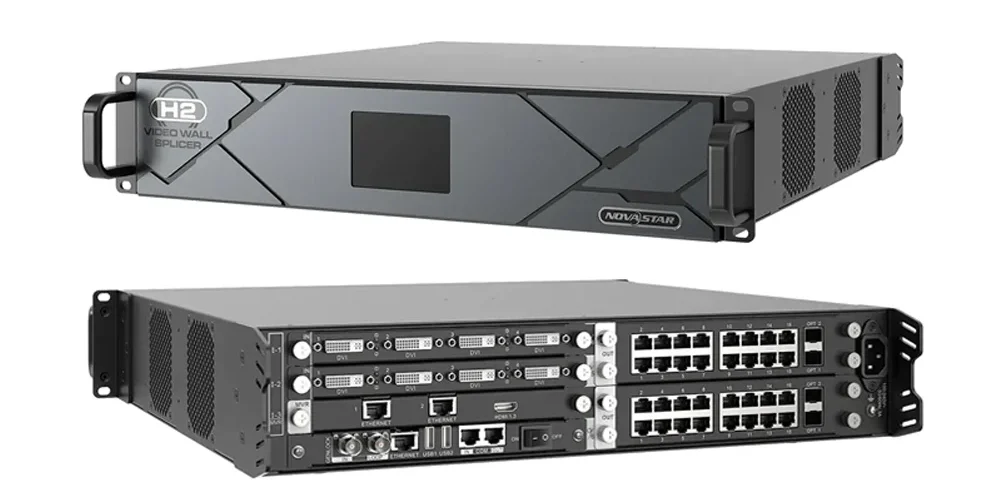
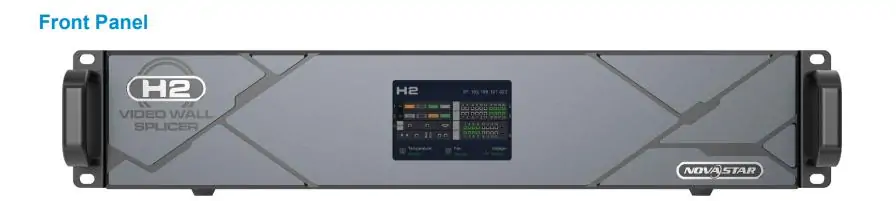
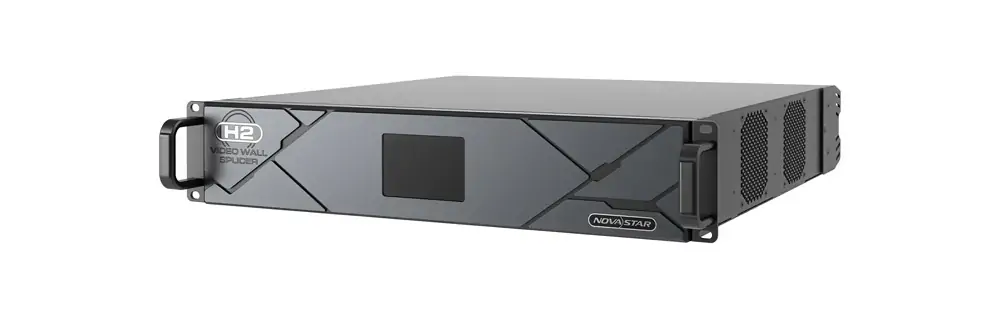
The H2 is a 2U rack mount video wall splicer and LED controller in a single chassis. Like the rest of the H-Series, it combines the job of a video processor and an LED sending unit into one box. You slot in the input and output cards you need, rack it, and it drives the wall directly over Ethernet or fiber.
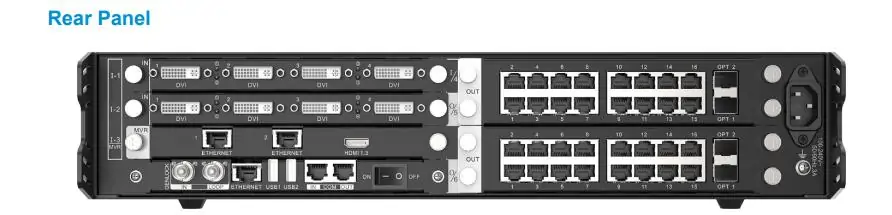
It’s the entry point to NovaStar’s modular ecosystem. Compared to the H5 (5U, ~$1,265), H9 (9U, ~$1,830), and H15 (15U, ~$5,050), the H2 is genuinely compact. The chassis runs about $480 to $670 bare. That gets you 4 input card slots and 2 output card slots, with a max pixel load of roughly 52 million pixels when fully kitted with fiber enhanced cards.
NovaStar didn’t strip out the core processing to hit the price point. You still get 4K@60Hz with 4:4:4 chroma, 10-bit and 12-bit color, HDR10 and HLG support, and the same web based control interface the bigger units use. What you give up is I/O density, total pixel headroom, redundant power, and 3D support. Whether any of that matters depends on your install.
2. Technical Specs of Novastar H2 that Matter for Actual Installs
AV pros spec’ing a processor want to know if it’ll drive the wall on the drawing and fit in the rack they’ve already half-filled. Here are the Novastar H2’s numbers.
2.1 Chassis and physical footprint
At 482.6 × 88.1 × 455 mm and roughly 11 kg bare (closer to 15.6 kg with cards), the H2 is a one-person lift and fits in shallow racks that would laugh at an H15. Power draw sits around 210 W. That’s less than a quarter of what the Novastar H15 pulls. No redundant PSU option — you get one supply, and if it goes, the wall goes dark.
2.2 Input card options
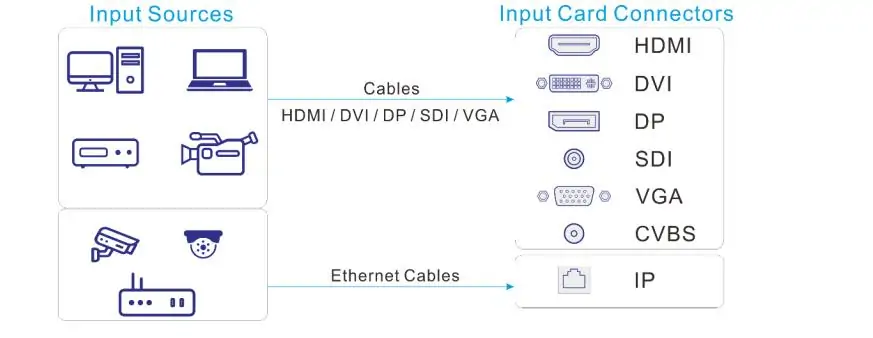
The H2 takes up to 4 input cards from the same H-Series card catalog the bigger units use. That means you can spec HDMI 2.1 + DP 1.4 for 8K input, 12G-SDI for broadcast, quad 3G-SDI, HDMI 2.0, DisplayPort, NDI, SMPTE ST 2110, HDBaseT, IP decoder cards, even legacy analog if you still need VGA or CVBS. The cards are hot swappable.
Four slots sounds limiting, but each card handles multiple channels. A single H_4x3G-SDI card gives you four SDI inputs. A H_2xHDMI2.0 card is two independent 4K channels. For most small to medium installs, four cards is enough signal diet. If you need more, you need an H5 or H9.
2.3 Output cards and pixel loading
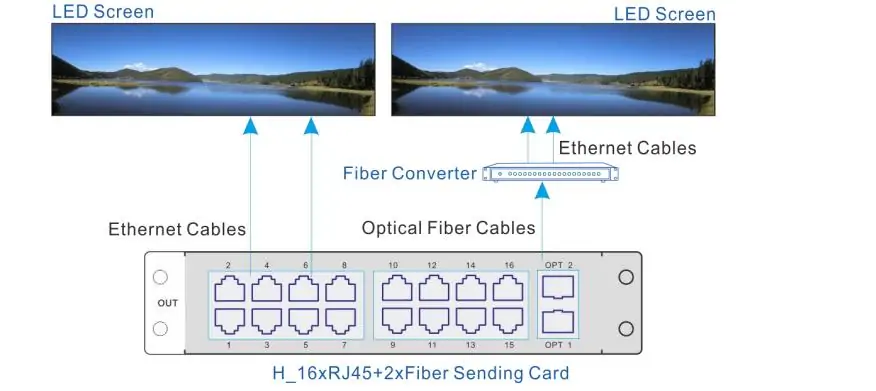
Two output card slots. That’s the real ceiling on the Novastar H2. Your options:
- H_20×RJ45: 20 Ethernet ports, roughly 13 million pixels per card
- H_16×RJ45+2×Fiber: 16 Ethernet + 2 optical, roughly 10.4 million pixels per card
- H_4×Fiber: 4 optical ports, roughly 20.8 million pixels per card
- H_4×Fiber Enhanced: 8 optical ports (4 active + 4 backup), roughly 26 million pixels per card
With two fiber enhanced cards, you top out around 52 million pixels. That’s a solid 4K wall with room to spare, or a modest 8K setup if you’re not trying to drive a building facade. For a single 1080p or 4K LED wall in a corporate setting, you’ll never touch the ceiling.
2.4 Spec table
| Parameter | Novastar H2 |
|---|---|
| Rack units | 2U |
| Max input cards | 4 |
| Max output cards | 2 |
| Max layers (total) | 32 |
| Max pixel load (fiber enhanced) | ~52M pixels |
| Max input resolution | 8192 × 4320 @ 30Hz (8K) |
| Color depth | 10-bit / 12-bit |
| HDR | HDR10, HLG |
| Power consumption | ~210 W |
| Redundant PSU | No |
| 3D support | No |
| Chassis weight (net) | ~11 kg |
| Control | Web based (browser), TCP/IP, RS-232 |
3. Novastar H2 Core Features
3.1 Hot swap cards
Same as the rest of the H-Series: input and output cards pull out and slot in without powering down. For a retail display or a 24/7 corporate lobby where a dead input card at 11 a.m. means someone’s boss notices, that matters. No reboot, no screen blackout, just swap and go.
3.2 4K HDR processing on FPGA
The Novastar H2 uses the same FPGA hardware architecture as the H15. Sub-one-frame latency. 4K×2K at 60 Hz with 4:4:4 chroma sampling. HDR10 and HLG processed in hardware. For fine-pitch LED where you can actually see the difference between 8-bit and 10-bit gradients, this isn’t just spec-sheet filler.
3.3 32-layer compositing
You get 16 layers per output card, 32 total across the chassis. That’s fewer than the 160 layers on an H15, but let’s be honest about what most small to medium installs actually do: a main feed, a PIP window, maybe a lower third, and a logo bug. 32 layers is plenty. If you’re compositing dozens of live feeds, you’re probably not doing it on an H2.
3.4 Web based control
No software license. No Windows-only installer. Point a browser at the H2’s IP and the full control interface loads. Works on anything. In practice, use a laptop — a phone screen gets annoying fast when you’re mapping cabinets. But for recalling presets or checking system health from the floor, pulling it up on a tablet is genuinely useful.
4. What the Novastar H2 Actually Costs
The chassis alone runs $480 to $670 USD depending on your distributor. That’s the cheap part. Cards are where the budget expands.
Input cards range from a few hundred dollars for a quad HDMI 1.3 card to over $2,000 for an HDMI 2.1 + DP 1.4 or ST 2110 card. Output cards sit in the $900 to $4,000 range depending on type. A sensible config — say, two HDMI 2.0 input cards and a pair of H_20×RJ45 output cards — lands around $2,500 to $3,500. Load it with fiber and SDI and you can push past $6,000.
Is that a good deal? Compared to buying a separate video scaler and LED sending unit, you’re saving on rack space, cabling, and integration time. Compared to a non-modular all-in-one like a Novastar VX1000, you’re paying a premium for the hot swap capability and the card ecosystem. Whether that premium is worth it comes down to uptime requirements.
Compared to the next step up: the H5 chassis is about $1,265 and gives you 10 input slots and 3 output slots. If you can see yourself needing more than 4 input sources or 2 output cards within the lifespan of the install, skip the H2 and start at the H5. Buying too small and upgrading later costs more than buying right the first time.
5. How Novastar H2 Stacks Up Against Alternatives
5.1 Novastar H2 vs H5 vs H9 vs H15
| Model | Rack | Input Slots | Output Slots | Max Pixels | Price (Chassis) | Redundant PSU |
|---|---|---|---|---|---|---|
| H2 | 2U | 4 | 2 | ~52M | ~$630 | No |
| H5 | 5U | 10 | 3 | ~62M | ~$1,265 | Optional |
| H9 | 9U | 15 | 5 (10 Enhanced) | ~208M | ~$1,830 | Optional |
| H15 | 15U | 30 | 10 (16 Enhanced) | ~416M | ~$5,050 | Standard |
The H2 isn’t just a smaller H15. It’s missing redundant power, 3D processing, and the pixel headroom the bigger units take for granted. But for a single 4K wall in a boardroom, retail space, or small stage, it hits the sweet spot. The H5 gives you more I/O headroom for not much more money. The H9 is where you go for serious multi-screen installations. The H15 is for when downtime isn’t an option and the pixel count is genuinely large.
5.2 H2 vs standalone processors (VX series, Colorlight, Linsn)
NovaStar’s own VX series (VX1000, VX2000) are non-modular all-in-ones. They’re cheaper and simpler, but you can’t hot swap cards and you’re locked into the I/O they ship with. For a permanent install where the signal sources aren’t changing, a VX unit is often the smarter spend.
Colorlight and Linsn offer budget alternatives that can match the H2’s resolution on paper at a lower price. The trade off is software polish, documentation, and long term support. Colorlight’s Z6 and X4e processors are capable hardware, but the configuration experience is rougher. If you’re the integrator who’ll get called when something doesn’t work, the H2’s ecosystem is worth the premium. If you’re price sensitive and have someone on staff who knows Colorlight or Linsn inside out, those alternatives are viable.
6. How to Setup Novastar H2
6.1 First power-up
Rack the H2, connect power, and plug a laptop into the management Ethernet port. The default IP is 192.168.0.10. Make sure your laptop is on the same subnet, open a browser, and navigate to that address. The web UI loads. No installer, no license key, no driver conflicts.
6.2 Screen configuration
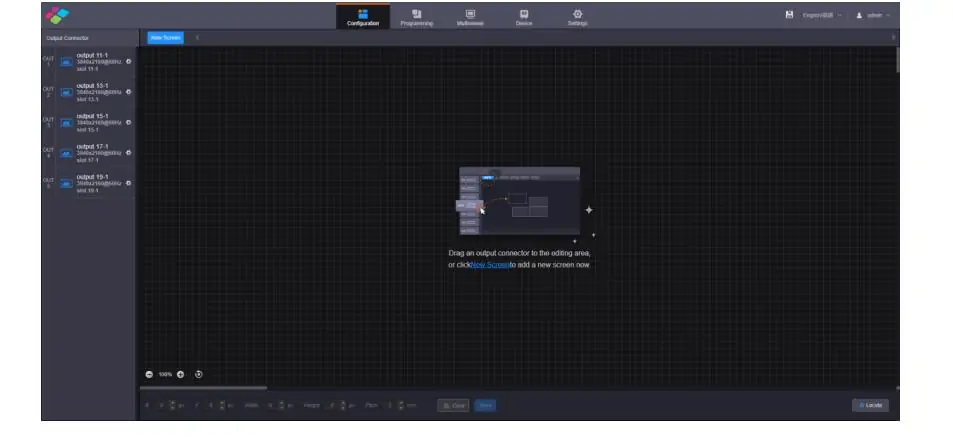
Go to Configuration → Screen Configuration → New Screen. Name it something useful. Set the rows and columns to match your physical cabinet layout. Drag your output card type onto the canvas and assign ports to sections of the wall. The visual mapping tool is fairly intuitive if you’ve done this kind of thing before.
6.3 RCFGX files: the step everyone screws up
You need the correct `.rcfgx` file from your LED cabinet manufacturer. This file defines the scan mode, driver IC, pixel order, and data grouping for your specific panels. Load it to each receiving card before you do anything else. If the config thinks your cabinets are 128×128 and they’re actually 192×192, nothing you do after that point will fix the scrambled image. Get the RCFGX right first.
6.4 Power-up checklist
- Load the correct RCFGX file and verify cabinet resolution matches physical panels
- Check Ethernet port loading: keep under ~650,000 pixels per port
- Match bit depth to your source (8-bit source + 10-bit processor = unnecessary banding)
- Set output resolution to the wall’s actual pixel dimensions
- Test at 60 Hz before pushing higher refresh rates
- Leave advanced processing features (gray compensation, temperature compensation) disabled until everything else is stable
7. Common Issues and Troubleshooting
7.1 Ghosting and flickering
Ghosting on a Novastar H2 is almost always a processing setting, not bad hardware. Gray compensation — NovaStar calls it “Magic Gray” — helps low-gray uniformity on some panels and creates weird trailing on others. Turn it off as your first debugging step. If ghosting vanishes, dial it back to 30% instead of disabling it entirely.
Temperature compensation is another frequent offender. Bad sensor data or an aggressive algorithm causes brightness drift and flicker that looks like a failing power supply. Disable it during setup and only re-enable once you’ve confirmed everything else is stable.
7.2 Port overloading
The math is simple: Cabinets × Width × Height = Pixels per port. Stay under about 650,000 pixels per Ethernet port. Push past that and you’ll see flickering, dropped frames, or signal loss that looks exactly like a bad cable. It’s usually not the cable.
7.3 The gamma display quirk
Some firmware versions have a bug where the front panel shows one gamma value but the processor is using a different one. If colors look off after calibration, try changing the gamma setting to something else, then back. Annoying, but the fix takes five seconds.
8. FAQs
1. Does the H2 come with input and output cards?
No. The chassis ships bare. You buy cards separately based on your signal requirements. At minimum you need one input card and one output card to make the unit functional.
2. Can I use the same cards from an H5 or H9 in the H2?
Yes. All H-Series units share the same card ecosystem. If you upgrade from an H2 to an H9 later, your cards move over.
3. Does the H2 support 8K?
It supports 8K input via the HDMI 2.1 + DP 1.4 input card at up to 8192×4320@30Hz. Whether your output cards and LED wall can actually display 8K depends on your pixel count and configuration. Most H2 installs top out at 4K on the output side.
4. How many layers can the H2 actually handle?
32 layers total, 16 per output card. In practice, layer count depends on resolution — you’ll get fewer layers at 4K than at 1080p. For most corporate and retail applications, 32 layers is more than enough.
5. Is the H2 fan noise an issue in quiet environments?
The H2 is rated under 45 dB(A) at 25°C ambient. That’s noticeable in a silent boardroom but quieter than most rack gear. If the rack has ventilation and other equipment running, you probably won’t hear the H2 specifically.
6. Can I control the Novastar H2 from a Mac or iPad?
Yes. The web based control interface works from any modern browser on any platform. For actual configuration you’ll want a laptop with a real screen. For preset recalls and status checks, a tablet is fine.
7. What's the warranty situation?
NovaStar typically provides a 2-year warranty on H-Series chassis and cards. Check with your distributor for regional specifics, but the standard coverage is reasonable for pro AV gear in this class.
9. Conclusion
The H2 doesn’t try to be a Novastar H15. It does the core stuff right — 4K HDR, hot swap cards, web control — in a 2U chassis that fits anywhere and doesn’t torch your power budget. For a boardroom wall or a retail display, you won’t miss the redundant PSU or the 3D support.
If your signal diet stays under 4 inputs and the pixel count is reasonable, buy the H2, spec the cards you actually need, and get the RCFGX files right. It’ll run for years without drama. If you can already see yourself outgrowing those 4 slots, skip straight to the H5 and save the upgrade cost.