

NovaStar VX4S is a highly capable 4K LED display controller designed for seamless performance and versatility. In this article, we’ll explore its key features, how to set it up, and the advantages it offers for various applications. Whether you’re working with digital signage or broadcast, discover why the VX4S is a solid choice for your LED display needs.
catalogue
1. What is Novastar VX4S?
NovaStar VX4s is a All in One Controller designed specifically for professional LED display management. Unlike basic controllers that merely send signals to your display, this novastar led controller integrates advanced video processing capabilities that eliminate the need for external scalars—a game-changer for installation simplicity.
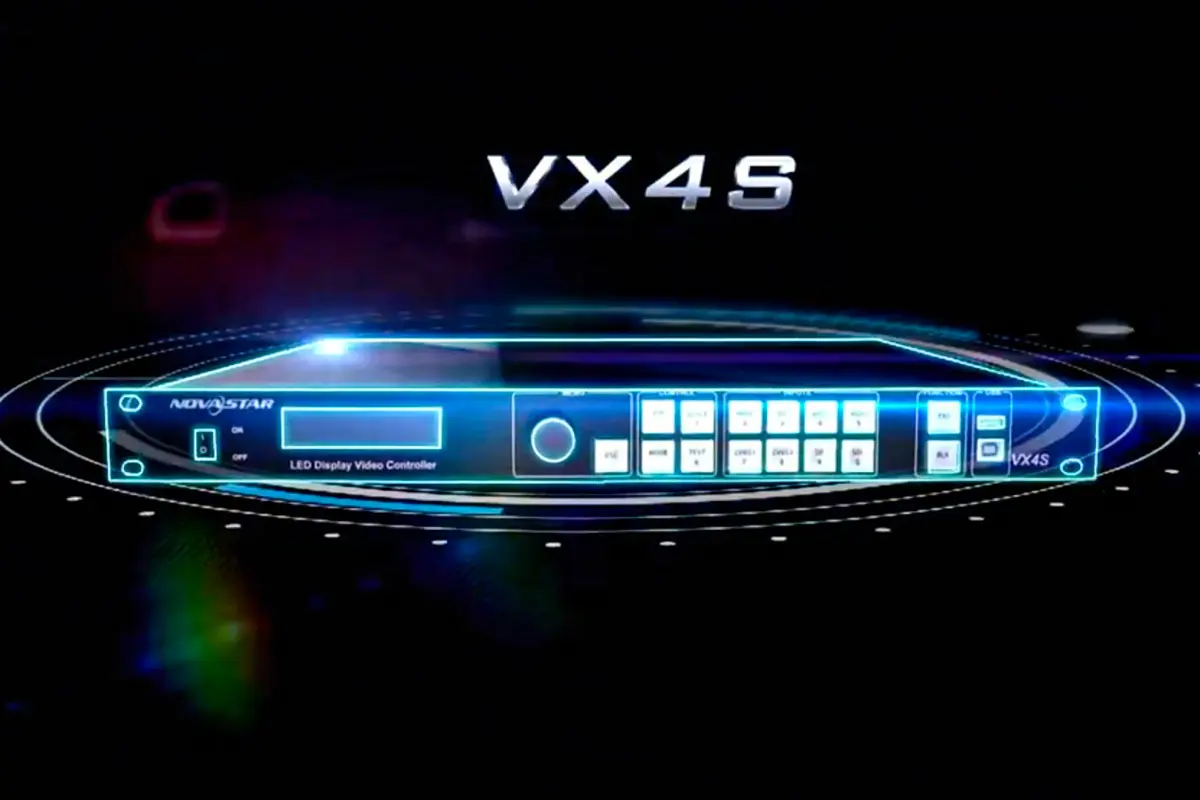
As a true novastar video processor, the VX4s handles everything from signal conversion to pixel mapping in a single, compact unit. It’s engineered for broadcast-quality applications where reliability and image fidelity are non-negotiable. Whether you’re managing a stadium display, a broadcast studio backdrop, or a high-end corporate installation, the VX4s positions itself as a comprehensive solution that brings professional-grade control within reach.
What sets it apart immediately is its “all-in-one” philosophy—combining input processing, scaling, color correction, and display control in a single device that fits in the palm of your hand. No more daisy-chaining multiple devices; the VX4s aims to be your one-stop solution for LED display management.
2. Important Features of Novastar VX4S You Should Know
The NovaStar VX4s isn’t just another controller—it’s packed with features that make it stand out in the crowded LED controller market. Here’s what you need to know:
Multi-Format Input Flexibility
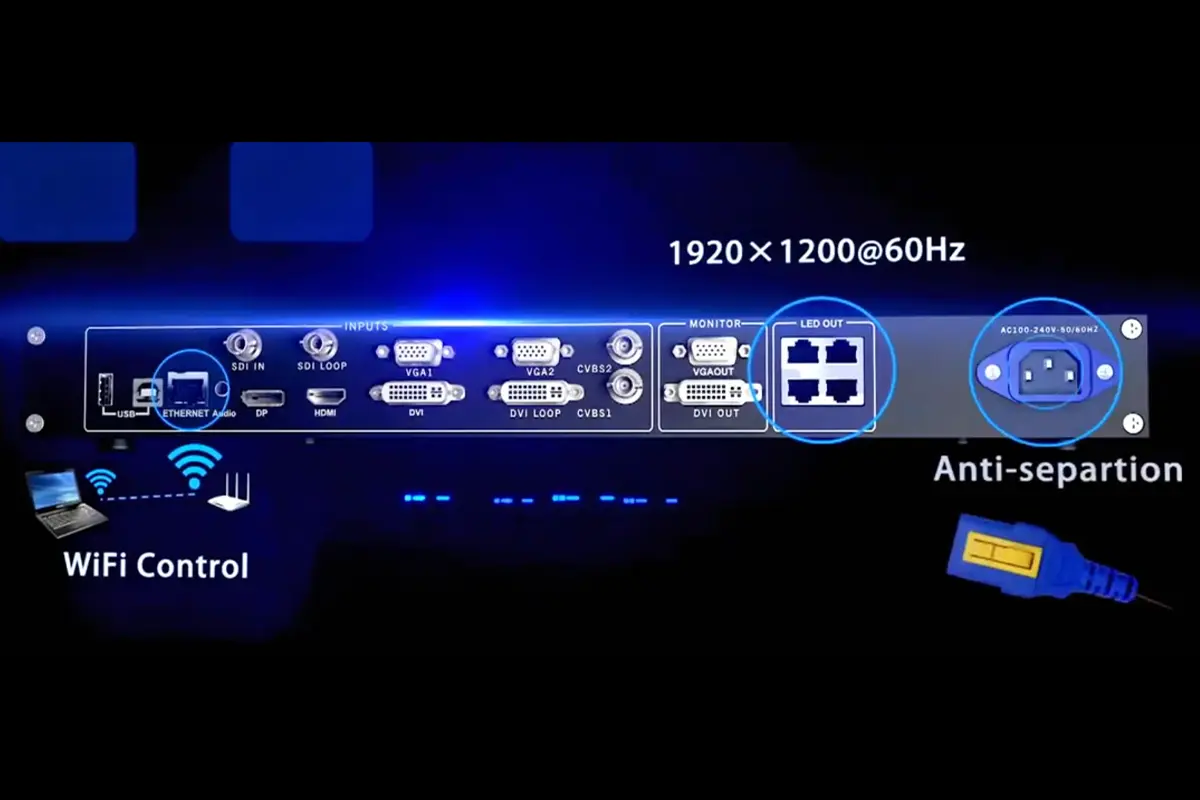
Unlike many controllers that force you to choose between signal types, the VX4s embraces versatility with:
- HDMI, DP, and DVI digital inputs
- Traditional VGA and CVBS connections
- Professional SDI input (a rarity in all-in-one controllers)
- Support for resolutions up to 1920×1200@60Hz
This means you can connect virtually any source—from broadcast cameras to legacy presentation equipment—without additional converters.
Professional Image Processing
The VX4s shines with its Nova G4 engine that delivers:
- Flicker-free, scanning-line-free display
- Point-to-point zoom with perfect clarity
- Advanced white balance calibration
- Color gamut mapping for accurate reproduction
PIP (Picture-in-Picture) Mastery
The VX4s offers one of the most flexible PIP implementations available:
- Adjustable size and position
- Multiple layout options (Custom, Left Top, Left Bottom, etc.)
- Transparency control
- Window swapping capability
3. Understanding the Novastar VX4S Important Parameters
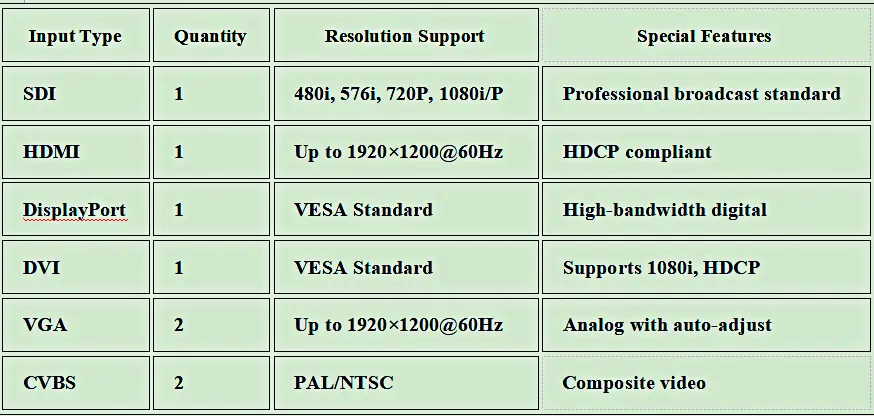
To truly appreciate what the VX4s brings to the table, you need to understand its technical capabilities. Here’s a breakdown of the key parameters that define this novastar video processor:
Input Capabilities
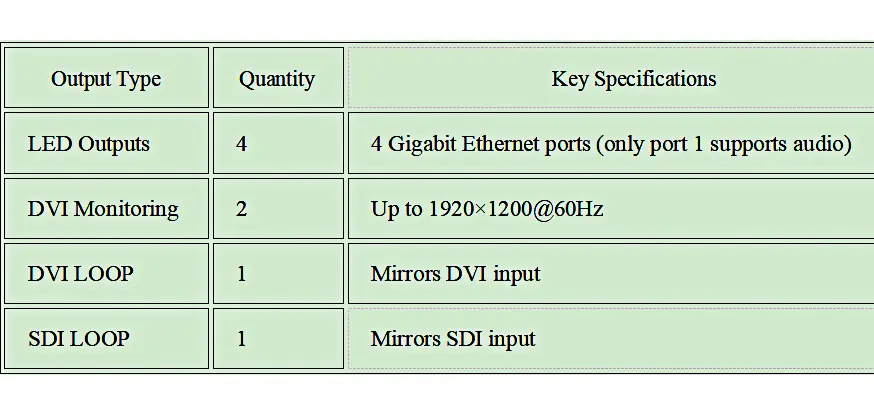
Output Capabilities
System Specifications
- Maximum Loading Capacity: 2.3 million pixels (3840×1920 max resolution)
- Physical Dimensions: 483.6×275.1×51.5 mm
- Weight: 2.55 kg
- Power Requirements: AC 100-240V, 50/60Hz
- Operating Temperature: -20°C to 70°C
- User Interface: OLED display with intuitive knob navigation
4. Step-by-Step Guide to Connecting Novastar VX4S
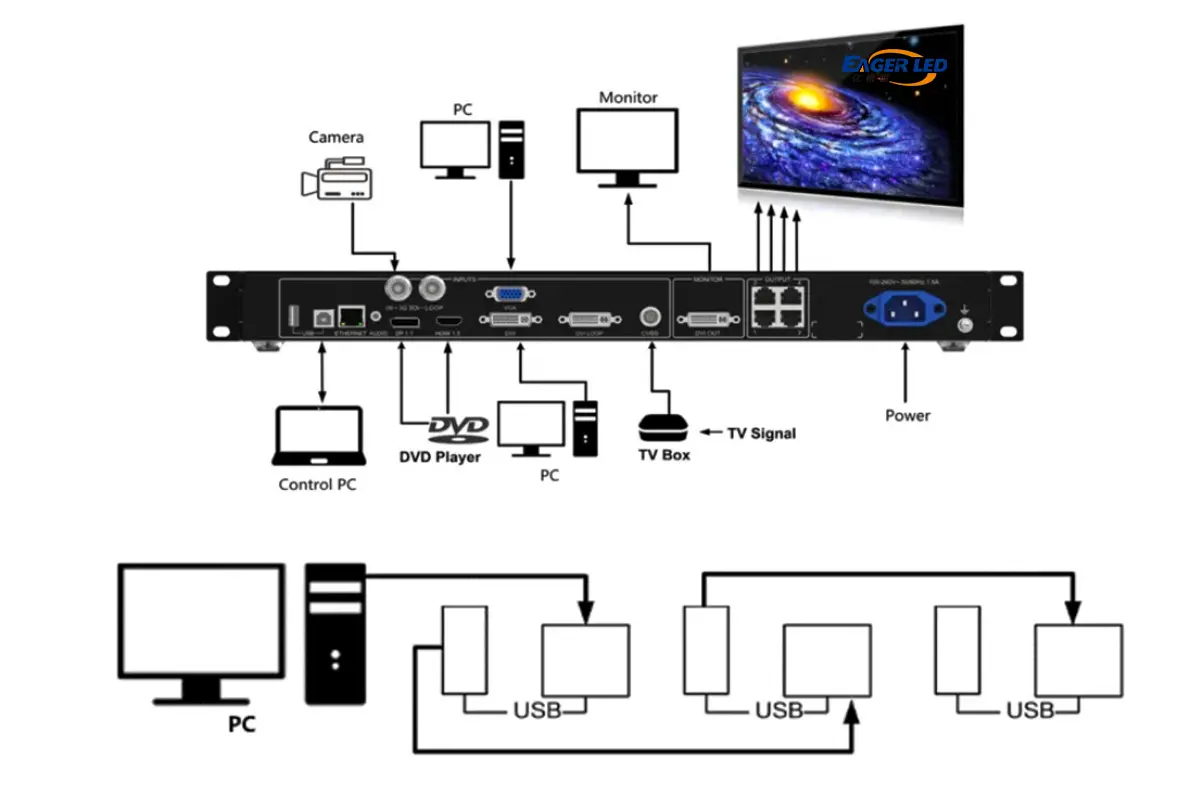
Setting up your NovaStar VX4s as an All in One Controller is straightforward when you follow these essential connection steps:
Essential Connections
Power Connection
Plug in the power cord to the rear panel and connect to a grounded outlet (100-240V compatible)
Source Connections (Choose what you need):
- For HDMI sources: Connect HDMI cable to the dedicated HDMI input.
- For SDI broadcast sources: Use the SDI input port (a standout feature for professional setups).
- For computer sources: Connect via DP, DVI, or VGA depending on your output.
Display Connections:
- Connect your LED display’s receiving cards to the four LED output ports (Ethernet style)
- For monitoring: Connect DVI cables from the monitoring outputs to your reference displays
5. How to Set Up and Calibrate Novastar VX4S
Getting your novastar led controller up and running takes just minutes with the VX4s intuitive interface. Here’s how to get professional results quickly:
Input Settings:
Press the knob to enter the menu
Navigate to “Input Settings” and select your source
Choose preset resolution or customize as needed (1920×1080 is common for HD content)
Screen Configuration:
Go to “Screen Settings” and input your cabinet dimensions
Set row and column quantities based on your physical setup
Configure data flow direction (critical for proper display)
Brightness Adjustment:
- From the main menu, select “Brightness”
- Rotate the knob to set your desired level (25-50% is typical for indoor use)
Output Configuration:
- Choose between Point-to-Point, Auto Fit, or Custom Scaling
- For most applications, “Auto Fit” provides the best results
Calibration Shortcuts
The VX4s shines with its calibration efficiency:
- VGA Auto ADJ: Press the Fn button when using VGA sources for automatic phase adjustment
- ADC Calibration: Run this when colors look off with analog inputs
- Test Patterns: Press the TEST button to access 8 different test patterns for color and geometry verification
For broadcast professionals, the real time feedback on the OLED display showing your current signal format (e.g., “1024×768@60Hz”) eliminates guesswork—no more wondering if your source is being properly recognized.
6. The Advantages of Using Novastar VX4S for Your LED Displays
While many controllers promise professional results, the NovaStar VX4s delivers tangible advantages that translate to real-world benefits:
Time and Cost Savings
- Eliminates External Processors: The integrated video processing means no additional scalars or converters
- Rapid Setup: Complete screen configuration in under 30 seconds versus hours with traditional systems
- Reduced Rack Space: One compact unit replaces multiple devices, saving valuable space
Broadcast-Quality Performance
- Eliminates External Processors: The integrated video processing means no additional scalars or converters
- Rapid Setup: Complete screen configuration in under 30 seconds versus hours with traditional systems
- Reduced Rack Space: One compact unit replaces multiple devices, saving valuable space
The VX4s isn’t just for static displays—it’s engineered for live environments where:
- Seamless switching prevents awkward transitions during live broadcasts
- Professional-grade color accuracy ensures brand consistency
- SDI support integrates directly with broadcast workflows
Future-Proof Flexibility
Unlike single-purpose controllers, the VX4s grows with your needs:
- Handles both traditional and emerging signal formats
- Supports image mosaic for displays that exceed single-controller capacity
- Firmware updates extend functionality over time
7.FAQs
Can the VX4S handle true 4K content?
While the VX4S supports up to 3840 horizontal pixels (matching 4K width), its maximum vertical resolution is 1920 pixels. This makes it ideal for ultra-wide displays but not for full 4K (3840×2160) displays. For most professional applications, however, its 2.3 million pixel capacity covers nearly all common display configurations.
What makes the VX4S different from the standard VX4 model?
The VX4S includes an SDI input port—a critical feature for broadcast environments—which the standard VX4 lacks. It also has slightly different input configurations (1 DVI vs 2 on VX4, 2 CVBS vs 3, etc.). For broadcast professionals, the SDI input makes the VX4S the clear choice.
How many VX4S units can I cascade for massive displays?
The VX4S supports image mosaic with multiple units. While the documentation doesn’t specify an absolute maximum, practical installations typically use 2-4 units for displays exceeding 4.6 million pixels. The equal division and unequal division mosaic options provide flexibility for complex display arrangements.
Is the VX4S suitable for outdoor LED displays?
Absolutely. The VX4S operates in temperatures from -20°C to 70°C, making it suitable for most outdoor environments when housed in appropriate enclosures. Its robust signal processing handles the brightness requirements of outdoor displays effectively.
Can I control the VX4S remotely?
Yes! The VX4S supports both USB and network (Ethernet) control. For permanent installations, network control allows integration into larger facility management systems, while USB provides direct control for setup and troubleshooting.
8.conclusion
For broadcast studios, event producers, and AV integrators who need reliability, flexibility, and professional results without complexity, the VX4s represents an exceptional value proposition. It’s not merely a novastar led controller—it’s a complete video processing solution that puts professional results within reach of teams of any size.
If you’re tired of juggling multiple devices to achieve what should be simple display control, it might be time to experience what this compact powerhouse can do for your next project.